


Here are today’s @MacStoriesDeals on hardware, iOS, and Mac apps that are on sale for a limited time, so get them before they end!
Read more
#MacStoriesDeals - Monday
Visualize OmniFocus As iThoughts Map, OPML, Or Plain Text

A few weeks ago, Michael Schechter found a way to export an OmniFocus for Mac database to OPML to visualize it in mind-mapping apps like iThoughts and MindNode. In the post, he wrote that, however, he was reaching to the Mac community to see if anyone would be able to build a more powerful and reliable solution with filters, color options, and more control on the exported data. RobTrew picked up the task and, on the OmniGroup Forums, released an initial script to export from OmniFocus to OPML.
Then, yesterday, Rob released a new version of the script which adds native iThoughts support and plain text exporting options, as well as settings for colors, templates, and filters.
I tested Rob’s script with my OmniFocus database, and after several improvements he made to the script, I feel comfortable enough with linking to it here. Unlike other solutions, Rob’s script looks directly into the SQL OmniFocus database cache to get its data – quite a feat on its own. But there’s so much more the script can do if you start customizing it. Read more
60 Mountain Lion Tips
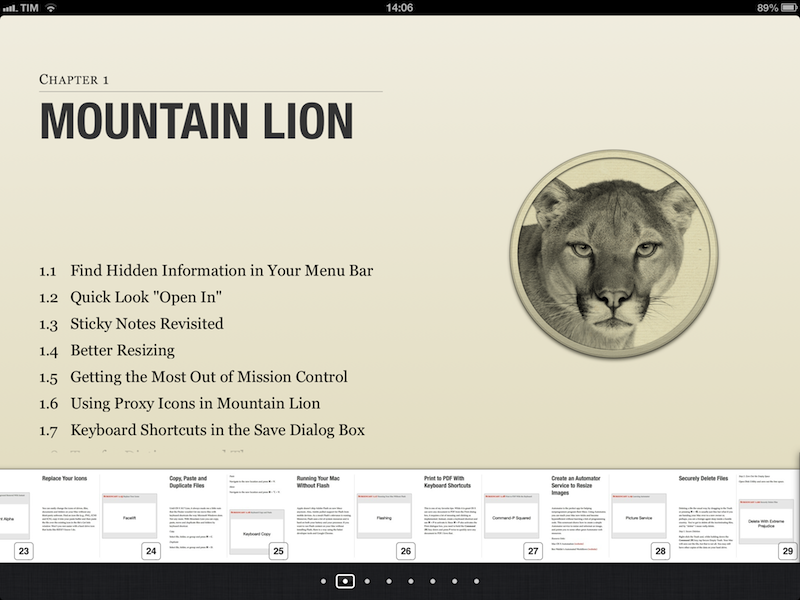
Published today, 60 Mountain Lion Tips is the latest entry in the MacSparky Field Guides series. Co-authored by Brett Terpstra and David Sparks, the book stands out for its clever use of iBooks 2.0 features (though a PDF version is also available) and embedded screencasts. There are 53 screencasts with 1.5 hours of video for a total of 60 tips organized in sections like Mountain Lion, Keyboard, Mail, and more.
I was able to read the iBooks version on my iPad, and, as usual, everything’s just great. I’m a big fan of David’s screencasts (see here and here for examples), and the format of this new book makes for a quick consumption that, however, doesn’t lack in depth. The tips are laid out clearly on the left side as text (assuming you’re reading in landscape mode, which lets you see more of a page), and screencasts are available as video thumbnails on the right. Both text and video are clear, concise, and to-the-point. David and Brett do the voiceover, and the quality of the videos doesn’t disappoint – they are compressed, but not too much, so they’re still pleasant to watch on the Retina display. The videos contain both voiceover and system audio, as well as on-screen tips for keyboard shortcuts and menus.
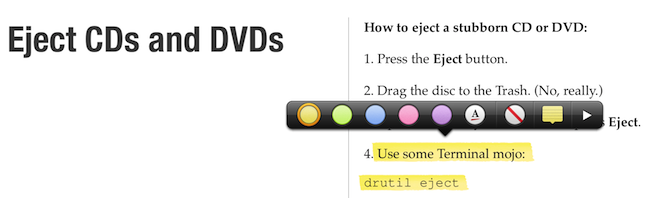
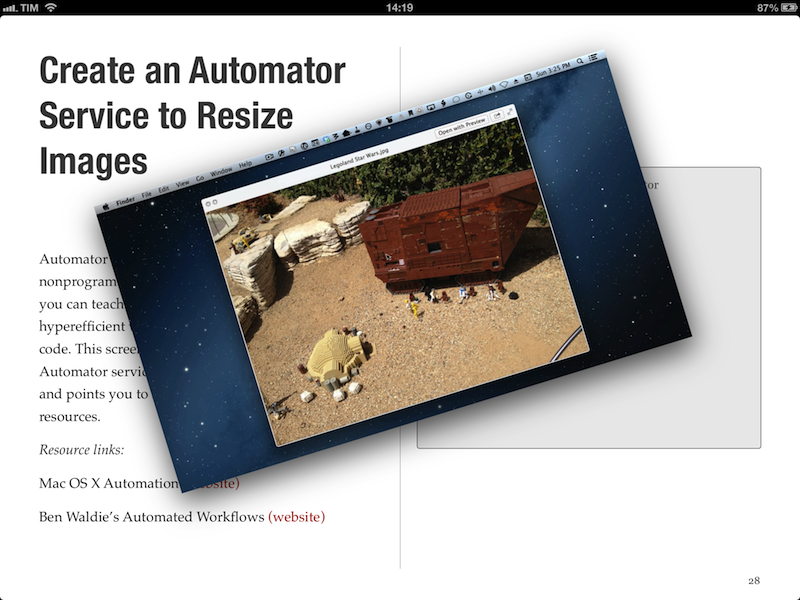
The layout of the book is clean, and, like David’s previous Field Guide, compliant with the design standards of iBooks Author. For instance, you can navigate from a page to a chapter by pinching out, you can access a dedicated page for notes and highlights, and you can watch videos inline. Similar to Push Pop Press’ old physics engine, you can also “move” videos on the screen as they play. It’s not that useful, but it’s very cool.
More importantly, 60 Mountain Lion Tips is easy to read and, in just a few hours, I actually got a lot out of it. We had our own Mountain Lion tips in our first eBook, and yet this book taught me a few OS X tricks I didn’t know about. I especially appreciated the section on third-party app tips, which many roundups usually don’t cover (we didn’t).
60 Mountain Lion Tips is only $6.99. Check out the website here for more information and a link to the separate PDF purchase.
iPhone 5 Display Vs. Spectroradiometer→
iPhone 5 Display Vs. Spectroradiometer
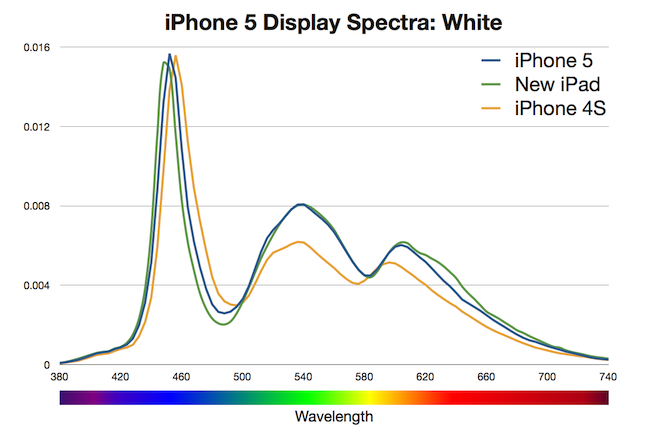
According to Apple, the iPhone 5 offers 44% more color saturation than the iPhone 4S. Jeff Yurek of dot color decided to put the claim under direct scientific inspection, and found out (through a spectroradiometer) that, indeed, the display is remarkably improved.
The 44% more color claim for the iPhone 5 is the same claim Apple made for the new iPad. As with the iPad, increasing the color performance of the iPhone 4S by 44% of NTSC 1953 gamut, measured using the CIE 1931 color space, would result in color saturation matching the sRGB color standard. Using these standards as the goal posts, we measured the iPhone 5 at 70% of NTSC 1953 in CIE 1931, a 39% increase from the iPhone 4S, which measured at 50%. That’s 5% less of an improvement than Apple’s 44% claim and just 99% of sRGB (measured against the sRGB primaries). While 5% less might seem like a big deal, getting to 99% of sRGB is a major feat and will result in tremendously noticeable color improvement in the phone. Additionally, color filters are notoriously difficult to manufacture.
I am no display expert, but from personal experience I can say I see a definite improvement of blues and greens on the iPhone 5. Just by looking at the App Store, Phone, and Messages icons on an iPhone 5 and iPhone 4S, you can see that the colors are more vivid and “real” on the new device. Yurek’s scientific measurements put this into better context with factual evidence.
Also worth linking is the photo set of retinal neuroscientist and photographer Bryan Jones. He took macro shots of the iPhone 5 and iPhone 4 to compare color quality, then put them both under a microscope to take a look at the pixels. Check out his results here.
Tim Cook Writes Open Letter To Customers, Apologizes For Maps ‘Frustration’
Apple has just posted on its website a letter from Tim Cook to Apple’s customers, apologizing for not delivering the best experience with its new iOS 6 Maps. In the letter, prominently link to from the front page of Apple.com, Cook describes how Apple “strives” to make products the “deliver the best experience possible”, but that the new Maps app has fallen short of this standard, frustrating millions of customers.
He re-emphasises the previous Apple statement on Maps, by saying that as time goes on and more people use Maps (there have already been nearly half a billion location searches), that the Maps app will get better. But in the mean time, Cook suggests that users try alternative map apps, and actually names some third-party apps available in the App Store such as “Bing, MapQuest and Waze” or alternatively to use “use Google or Nokia maps by going to their websites and creating an icon on your home screen to their web app”. Whilst that is certainly far from ideal, it’s quite extraordinary to see Cook actively name and recommend third party mapping solutions.
Cook explains that since they first shipped the original iPhone, they’ve been wanting to add new features such as “turn-by-turn directions, voice integration, Flyover and vector-based maps”. Cook claims that they had to create a new version “from the ground-up” to achieve these - there is no mention of Google’s role in the letter.
Tim Cook’s full letter to customers:
To our customers,
At Apple, we strive to make world-class products that deliver the best experience possible to our customers. With the launch of our new Maps last week, we fell short on this commitment. We are extremely sorry for the frustration this has caused our customers and we are doing everything we can to make Maps better.
We launched Maps initially with the first version of iOS. As time progressed, we wanted to provide our customers with even better Maps including features such as turn-by-turn directions, voice integration, Flyover and vector-based maps. In order to do this, we had to create a new version of Maps from the ground up.
There are already more than 100 million iOS devices using the new Apple Maps, with more and more joining us every day. In just over a week, iOS users with the new Maps have already searched for nearly half a billion locations. The more our customers use our Maps the better it will get and we greatly appreciate all of the feedback we have received from you.
While we’re improving Maps, you can try alternatives by downloading map apps from the App Store like Bing, MapQuest and Waze, or use Google or Nokia maps by going to their websites and creating an icon on your home screen to their web app.
Everything we do at Apple is aimed at making our products the best in the world. We know that you expect that from us, and we will keep working non-stop until Maps lives up to the same incredibly high standard.
Tim Cook
Apple’s CEO
Drip Makes Sharing Large Files Simpler
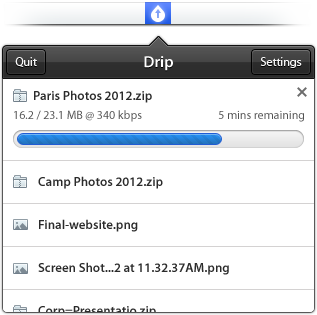
I recently discovered Drip, a new small menubar filesharing app developed by Scott Savarie (@ScottSavarie) and Florian Denis (@Olotiar), released last month. After I got to take a look at it, I think I maybe know where the drop-down menu redesign in the latest Dropbox beta introduced yesterday got partly inspired by. Drip is a small, really useful tool for sharing large files quick and completely without hassle.
Drip uses the servers of hosting service sendspace to store files. Sendspace offers a completely free data plan (called sendspace Lite) with which users can upload files sized up to 300 MB which are available for download for 30 days starting from the time of the newest download; after this period of time they get deleted. The free plan is ad-powered, so you need to click through some ads if you download a file from the sendspace website. But this is the only disadvantage: as far as I know from the sendspace FAQs, there ist no upload limit in total for free users. Perfect for quick, temporary file sharing of smaller, but also suited for quite large files. If you want to upload even larger files and store them for a longer time on sendspace, you can sign up for a Pro or Premium account which support larger file sizes and higher download bandwidth (see detailed plan information here).
Drip is your desktop companion for Mac if you use sendspace. Download it for free from the app website, install and launch, and you can immediately start uploading files. There is no signup needed, new users automatically are connected to a free sendspace account without having to login. If you want to be more flexible with using the free account (maybe you want to use the web upload interface) or if you are a Pro/Premium user, you can enter your login data for sendspace in app’s preferences (I’ll come to them in detail in a bit).
Uploading files works just like you would expect it: drag the file you want to upload for sharing onto the menubar icon, drop it, and it gets uploaded. If the upload is finished, the related sendspace.com download link is automatically copied to you clipboard for sharing.
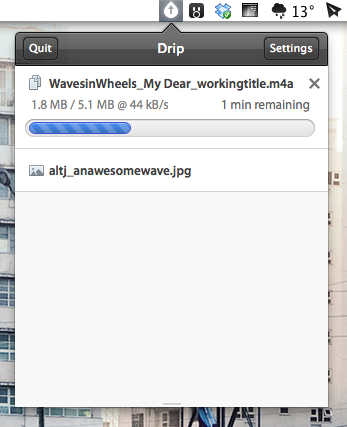
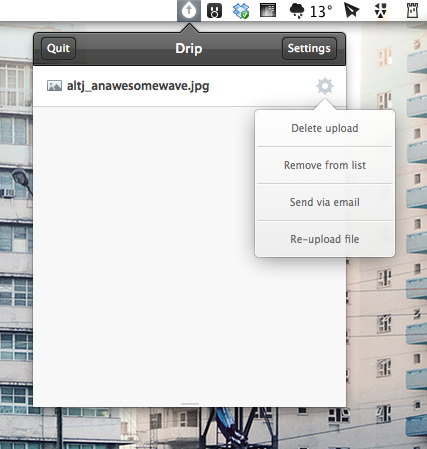
If you drop a file onto Drip’s menubar icon or if you click on it, a really great-looking drop-down menu appears listing the last uploaded files. You can change its height to view more elements without scrolling using a small draggable element at the very bottom of the list — I state this feature, since the dragging indicator is designed a bit too small in my opinion and is hard to aim at. You can click on any file in the list to copy its download URL again. Using the preference icon which always appear when you hover over a file list element you can do even more actions. The drop-down menu which appears when you click on it (my personal UI highlight of Drip) offers you to delete the upload, remove the file from the list to keep Drip uncluttered, automatically share the file download link with your default email client, or re-upload the file if you need a new link for any reason.
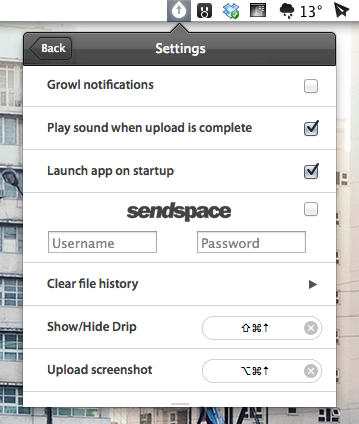
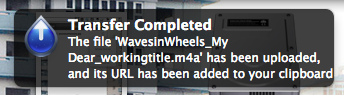
As you can see, Drip is very versatile, but still drop-dead simple to use. It also features extensive settings to make it work just like you want it to. You can bring them up by clicking the settings button in the top right corner of the main drop-down menu. Apart from the aforementioned sendspace account login panel, you can also activate Growl notifications (see example below), set up upload completion sound, clear the whole file list, or let the operating system start Drip at launch. However, the best option available in the settings are the shortcuts. Besides the standard one to bring up the app window, you can also set a custom shortcut for uploading the last screenshot you took, a truly great feature for quick thought sharing or reporting bug fixes.
After I researched a bit about the current free data plans of sendspace, I decided to make Drip my default app for quick, temporary file sharing. I had accounts for Droplr and Cloudapp in the past, as well as a free Dropbox account. But non of those services supports large file uploads (or they didn’t work like with Cloudapp), or in case of Dropbox I had to intricately delete unused files to free space for new ones. With Drip, all this hassle is gone (at least for now). It’s not just a new app supporting another web hosting service in the game, version 1 is already a serious competitor for apps like Droplr and iCloud. I can’t wait to see if they manage to develop a fitting iOS client of it as well to have all the uploaded files and links available on the road. Currently, Drip is Mac-only. But if the app gets as popular as I think it will, this will surely change soon.
Bad Piggies Is Now Available For Download On iPhone, iPad and Mac

Bad Piggies, the latest game from Rovio, is now available for download on iPhone, iPad, Android and Mac. This latest Rovio game is a twist on the infamous Angry Birds series in which you now control the pigs and must pilot them safely to the bird eggs. Unlike the simple mechanic featured in Angry Birds in which you simply slingshot the birds into the pigs and their structures, Bad Piggies requires you to make “the ultimate flying machine” and steer them through the levels.
With more than 60 levels, and free updates coming up, you have hours and hours of pig-crashing, exploding, and flying fun! Get three stars on every level to unlock 30 more puzzles! HINT: Sometimes you need to play the level several times to achieve all the objectives – try building a new device or steering in a different way to earn all the stars!
The game currently features 60 levels, with another 30 unlockable by getting three-stars on levels and will, like Angry Birds, receive free updates that add levels. There’s also 4 sandbox levels in which you can really have fun with making some awesome flying contraptions with various fans, wings, motors, balloons and other objects. If you’re interested in reading a review, check out this one by Polygon’s Chris Plante:
Bad Piggies’ levels aren’t nearly as fast as Angry Birds. They require attention and patience as the pig slowly travels from one end to the other. Unlike Angry Birds, it’s not as easy to play on a subway or during a coffee break. The main game is a fine distraction, something to do with your hands while watching sitcoms or talking on the phone.
Download links:
- Bad Piggies for iPhone ($0.99)
- Bad Piggies for iPad ($2.99)
- Bad Piggies for Mac ($4.99)
Jump the break to watch the Bad Piggies trailer.
OmniOutliner, Plain Text, and Nebulous Notes→
OmniOutliner, Plain Text, and Nebulous Notes
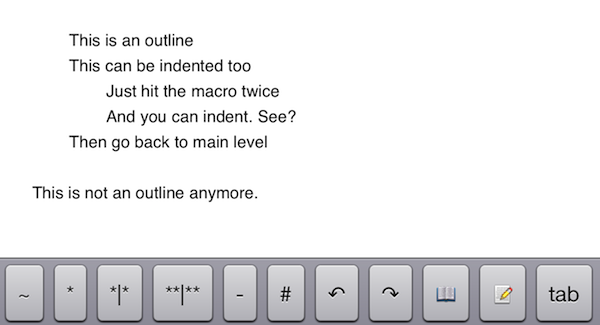
A few months ago, I asked if there was a way to produce plain text-based outlines and import them into OmniOutliner for iPad while preserving indentation. Today, Jeff Hunsberger has posted a nice overview of his setup, which doesn’t include OmniOutliner but relies upon the same “trick” I use – speeding up plain text outlining using Nebulous Notes’ macro functionality.
Just by setting up those few macros, I have create a fully-realized meeting outline tool in markdown using Nebulous Notes. The outline in the same format I’ve been using for years and is searchable, extensible and ubiquitous thanks to Dropbox. The beauty of this is, after the meeting is over, the notes I’ve just taken are ready back at my desk – they can be inserted into an email to the team with a simple copy/paste.
My workflow is only slightly different. Firstly, I usually outline in CarbonFin Outliner on the iPad (Tree on the Mac), but sometimes good ideas strike when I’m already in my text editor, thus requiring me to write them down as quickly as possible. What I end up with is a rough structure of my thoughts that I want to further refine in OmniOutliner. From there, I’ll then export as OPML to CarbonFin Outliner. It sounds convoluted – maybe it is – but this setup works for me. This is how I built the outlines for my Mountain Lion and iOS 6 reviews, and I’m always looking for improvements.
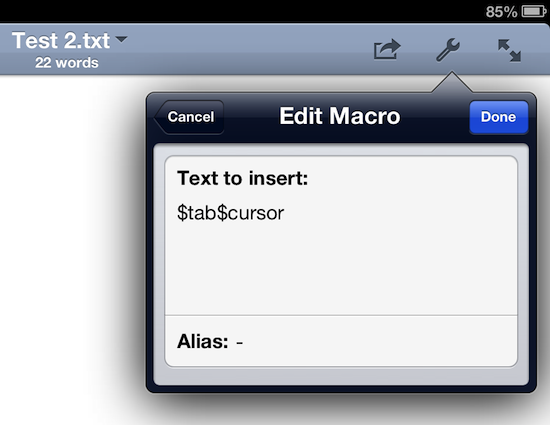
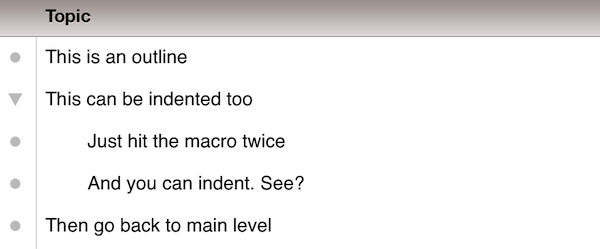
As I discovered, OmniOutliner for iPad wants to receive tab-delimited plain text. So, unlike Jeff’s, my macro doesn’t have hyphens, just a tab that I can hit as many times as I need to indent text into lines and children. Unfortunately, it doesn’t seem like tab-delimited plain text can handle notes, but that’s something I do in OmniOutliner or CarbonFin Outliner anyway.
I would love to see proper documentation for plain text import in OmniOutliner; for instance, while OmniOutliner can export to plain text, if you try to re-import what you exported (I know, I like to reverse-engineer plain text), OmniOutliner will lose indentation. Similarly, I’d like to see import/export options in CarbonFin Outliner, which is still lacking from this standpoint. As for Nebulous Notes, the latest 6.0 version lets you chain macros, which makes the app even better.
Check out Jeff’s plain text workflow for outlines here.
Better Dropbox Camera Uploads with CameraSync
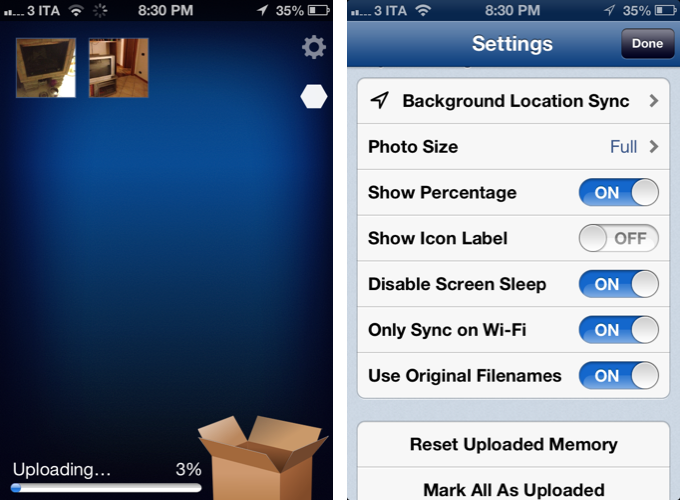
Two weeks ago I wrote about my new Dropbox-based workflow for photos. Towards the end of the article, I mentioned how I was handling uploads from my iPhone:
The official Dropbox app recently gained the capability of automatically uploading photos to the Camera Uploads folder: this means every time I go out and take some photos, I can come back home, open the Dropbox app, let it do its magic, then delete the photos from my iPhone. The photos will be uploaded to the Camera Uploads folder, and sorted using the same Hazel workflow described above.
Thanks to a third-party app, I’ve managed to (partially) automate the process of uploading photos from my iPhone (and iPad) as soon as I get home. I’m now using CameraSync to upload photos to Dropbox automatically. Read more