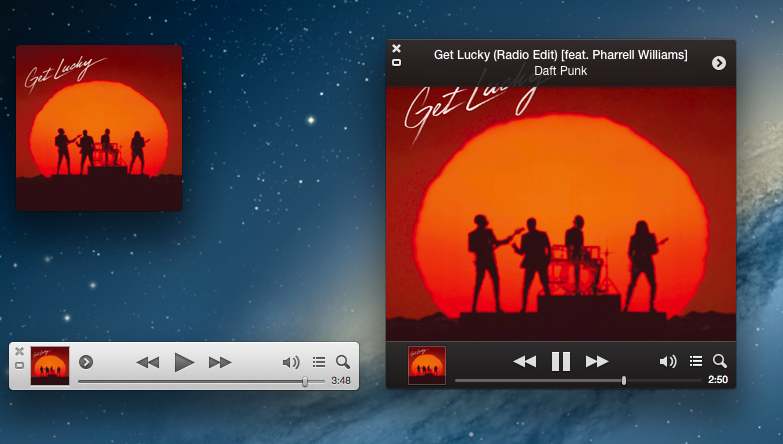
Released in late November 2012, Apple today updated iTunes to version 11.0.3. The new version, available through the Mac App Store’s Software Update panel, brings a redesigned MiniPlayer, an improved songs view, support for multi-disc albums, and performance improvements.
The biggest change of iTunes 11.0.3 is the new MiniPlayer. Sporting a progress bar, the MiniPlayer now also comes with a larger artwork view that can be activated by clicking on the artwork thumbnail in the bottom left corner. The new artwork view will turn the MiniPlayer into a widget reminiscent of desktop music controllers like Bowtie and CoverSutra, with the usual controls to adjust volume, hide/view Up Next, and access an additional contextual menu. In the image above, you can see a composited screenshot of the new MiniPlayer views.
iTunes 11.0.3 is available now on Software Update and through Apple’s website.
For both Android and iOS, Pebble developers can now add two-way communication to their applications for their watchapps through Pebble’s SDK, PebbleKit. The AppMessage API enables Pebble watches to send and receive data from smartphone apps for remotely controlling internet connected devices, receiving scores from your favorite sports teams, and checking in with apps like Foursquare or Facebook. iOS developers utilizing two-way communication, however, will need to have their apps whitelisted through Pebble as a part of the Made For iPhone program. In the future, Pebble plans on making that part of the process easier for iOS devs.
You can find all the details about Pebble’s developer updates, latest firmware, and new watch colors on Kickstarter.
Pixelmator 2.2 downloads have surpassed the previous record downloads and topped half a million making it the most successful release in our history,” said Saulius Dailide of the Pixelmator Team. “Also, the customer response to Pixelmator 2.2 is absolutely incredible. We’ve been overwhelmed by the 5-star reviews on the Mac App Store and the fantastic support we receive from our customers.
Pixelmator isn’t new to Mac App Store records. In January 2011, three weeks after the Mac App Store launched, the Pixelmator team announced their app had grossed $1 million in 20 days.
With a press release published this morning, Apple formally announced the 50 billion app download milestone they hit yesterday, alongside the name of the $10,000 App Store gift card winner and 50 billionth app download. The 50 billionth app was Say the Same Thing by Space Inch, downloaded by Brandon Ashmore from Mentor, Ohio.
Apple would like to thank our incredible customers and developers for topping 50 billion apps downloaded,” said Eddy Cue, Apple’s senior vice president of Internet Software and Services. “The App Store completely transformed how people use their mobile devices and created a thriving app ecosystem that has paid out over nine billion dollars to developers. We’re absolutely floored to cross this milestone in less than five years.
In the press release, Apple quotes various developers, such as Shazam’s CEO, on the importance of the App Store and its evolution in the past five years.
The iOS App Store opened on July 10, 2008. After 1770 days, 50 billion app downloads make an average of over 28 million apps downloaded each day (28.2 million). Today, the App Store offers more than 850,000 apps (350,000 made for the iPad) in 155 countries, organized in 23 categories that span Productivity, Games, Newspapers, and more.
For the 50 billion app download contest, Apple has also offered a $500 gift card to each of the 50 people who downloaded an app after the 50 billion milestone.
Google demonstrated a new version of Google Maps during the Google I/O 2013 keynote today, showcasing a full screen maps application for the web that reacts to every click. Redesigned in an effort to put an emphasis on directions and places, Maps’ new interface is focused on discovery. As you click, Maps will surface contextual information about what you can find at a desired location through a carousel and contextual cards, highlighting popular tourist attractions, directions to that place, and street views so you know exactly what to expect when you get there. Based on photos taken in the area, Google will even create tours so you can easily plan your next trip.
It’s contextually aware too: taking into account location information from your Google account, such as where you live and where you work, Google Maps will make recommendations on places to visit, utilizing reviews from Zagat and recent places your friends on Google+ have visited to highlight what’s popular in the area. It’ll also highlight new places you might be interested in based on your previous search history.
Maps will be much faster than before, as vector maps are replacing tile-based maps on the web, bringing it up to date with Android and iOS. For WebGL-enabled browsers, Google Earth is now a part of the web app and can be activated through a simple toggle for viewing 3D imagery. Just the like the desktop app, you can zoom out and fly around the entire planet or just around your favorite locale.
You can request an invite to preview the update for Google Maps before it hits the web at http://maps.google.com/preview.
Google also talked about updates to their mobile applications, announcing than an iPad app will be arriving in the summer. Building upon the interface introduced with Google Maps on iOS, Google will be bringing in global traffic data and alerts for live reports on incidents and accidents, no matter where you’ll be going. Google Offers will also be integrated, giving you a heads up on nearby deals from restaurants and department stores so that you can take advantage of discounts and special offers.
A few days ago, I remembered a story by TouchArcade from last year that explained how adding iCloud support to games was no easy task for most independent developers:
It’s also obvious to us that iCloud and the implementation of it needs to be easier, and the service itself needs to be more reliable. Almost every studio we talked to had some trepidations or a horror story to share. Browse our message board, and you’ll find even more from users receiving the bad end of an iCloud problem.
Today, Google announced Google Play Game Services, a set of APIs to enable cross-platform gaming features like saved game states, leaderboards with Google+ support, achievements, and automatic player matches with real-time multiplayer. There is a native SDK for iOS and Android, REST APIs and various libraries for the web.
WWDC ‘13 is less than a month away, and it’s safe to assume Apple will show new developer tools for iCloud and Game Center. It’ll be interesting to see if “Sign In with Google+” buttons will start showing up in iOS games in the next few months.
As expected, Apple has hit the 50 billion app downloads milestone today. The countdown that the company launched two weeks ago was updated with a new “Thanks” image on Apple’s servers earlier today, which is now publicly available across Apple.com and the iTunes Store. On Apple’s website, there’s a new photo of an iPad running Paper by FiftyThree and displaying “Thanks” as a handwritten note; on the promotion’s webpage, Apple writes “50 billion app downloads. One really big thank you”.
Apple will award an App Store gift card of $10,000 to the lucky customer who downloaded the 50 billionth app, plus a $500 App Store gift card to each of the next 50 people to download an app.
In the past five years, Apple shared various App Store download milestones: three billion apps had been downloaded by January 2010; 10 billion by January 2011; 15 billion in July 2011; for the 25 billionth app download in March 2012, Apple awarded Chunli Fu of Qingdao, China — who downloaded Where’s My Water? Free — with a $10,000 gift card. Apple announced 40 billion App Store downloads in January 2013, with 20 billion of them in 2012 alone.
The iOS App Store opened on July 10, 2008. After 1770 days (4 years, 10 months, 5 days), 50 billion app downloads make an average of over 28 million apps downloaded each day (28.2 million). In January 2013, Apple announced 500 million iOS devices had been sold; assuming the number jumped to 560 million after Apple’s Q2 2013 results, that would make an average of 89.3 apps downloaded for each iOS device sold.
According to Apple, “the grand prize winner will be announced soon”.
Ellis Hamburger and Dieter Bohn have published an in-depth feature story on the newly launched Hangouts over at The Verge. Make sure to watch the video.
A detail that struck as a great feature was, surprisingly, related to Google+ and photos:
The service’s Google+ integration is one of the best features in the entire product: every photo that you or a friend posts is automatically saved in a private, shared album on Google+. For example, after a year of using Hangouts, it will be easy not just to trace the text conversations your budding relationship has produced, but to track the photos you’ve shared over time.
I have been using iMessage with the MacStories team since the service first launched; it used to be the only communication tool we relied upon to stay in touch. We have shared thousands of screenshots and photos in a group thread, but Messages makes it nearly impossible to browse old attachments. You can retrieve attachments through the OS X Finder, but the process is cumbersome at best. Having Google automatically archive Hangouts photos and organize them in a private album shared with my coworkers sounds obvious and, for someone who relies on a group chat on a daily basis, incredibly useful. This would be a great addition to iCloud and Photo Stream with iOS 7.
After logging into your Google account, you can upload your own personal collection of EPUBs and PDFs under My Books in the Google Play Store, or choose files to include in your uploads from Google Drive. Through the newly updated Google Play Books app on iOS, you can then download the added files to your mobile device.