


We have many great deals for #MacStoriesDeals today. You can find us as @MacStoriesDeals on Twitter.
#MacStoriesDeals - Tuesday
Pocket Update Adds Quotebook Sharing→
Alongside bug fixes and improvements for a minor 4.5.1 update, Pocket for iOS has added sharing to WordPress, Quotebook, and Twitterrific.
Quotebook is, as MacStories readers know, my favorite app for storing and retrieving quotes. I already use it with RSS, and it’s good to see Pocket supporting it with the share menu that was revamped in version 4.5.
Pocket 4.5.1 is available now on the App Store.
Tweetbot 2.8 Adds Media Timeline
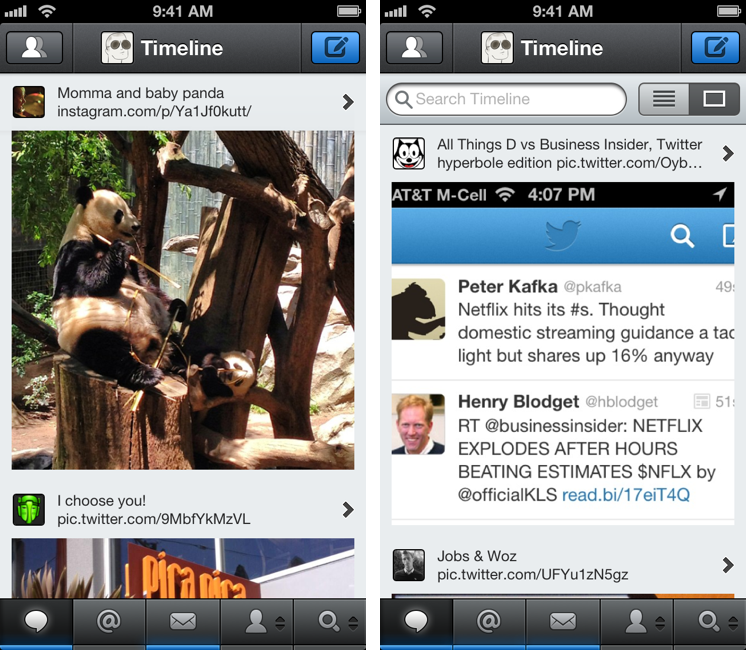
Ever since its original release two years ago, I’ve always wished Tweetbot could provide filters to separate the standard timeline from a “media” one containing pictures and videos. After the launch of Twitter’s own photo service and rise in popularity of services like Instagram, usage of pictures – either photos or screenshots – among the people I follow has skyrocketed. Apps like TweetGlass (nèe Quip) succesfully explored the concept of letting users browse “media updates” in a dedicated feed, so why not Tweetbot?
The latest version of Tapbots’ client, available today, does just that: it adds a media timeline to show only supported images and video tweets (the ones that you’d normally see displayed inline as thumbnails). Read more
Apple Restricting Special Characters In App Descriptions→
Mikey Campbell:
As seen in the image above, Apple is no longer allowing developers to submit app description edits with the unique character sets, which in this case includes a checkmark, explosion, “no symbol” and a speech bubble. It is thought that others are included in the new restrictions, but that has yet to be verified.
It appears that Apple has also started restricting usage of glyphs that aren’t necessarily emoji.
I would welcome a change to text-only release notes. While emoji and other characters can add a bit of fun and personality to otherwise boring release notes, some developers were overusing them.
Twitterrific 5.2.1: Notification Badges, Favstar, Trends, and More→
Big update for Twitterrific today, including automatic theme changing based on local sunrise and sunset times, automatic timeline refreshing after posting a tweet or DM, and improved VoiceOver support. The list of updates is long, but the rest is comprised of bug fixes and various improvements.
By the way, if you’re looking for those Trends, they’re buried in Search under the Tweets tab. For Favstar, you’ll also have to turn on those links in the Settings under Other Services.
For more information on Twitterrific, be sure to read our earlier reviews.
Dark Sky Launches Forecast Lines→
Another neat web app following the release of Forecast.io last month:
Forecast Lines shows you the forecast spread for each field (temperature, precipitation intensity, pressure, etc.), overlaid with our best guess of what will actually occur. It’s a simple idea, but a powerful one: at a glance, you can see what will happen over the course of the next week, and where we are most–and least–confident in our predictions.
Essentially, Lines looks like a consumer version of Forecast.io’s API raw data sources, which is also available here.
I’m a big fan of the Dark Sky team’s work with web apps and developer APIs for weather data. I can’t use the main Dark Sky app in Italy, but I am testing various third-party apps that are implementing Forecast.io and I’m impressed with their accuracy so far.
I like the idea of Lines’ statistically-aggregated graphs, and, unsurprisingly, the iOS web app is solid.
iTunes Store Adds “Buy Now, Download Later”→
Good find by Macworld’s Jonathan Seff. I’d love to see more download options for the App Store as well – such as something similar to CameraSync’s location monitoring, but for app downloads.
#MacStoriesDeals - Monday
We have many great deals for #MacStoriesDeals today. You can find us as @MacStoriesDeals on Twitter.
Sponsor: DraftCode
My thanks to Freeridecoding for sponsoring MacStories this week with DraftCode.
DraftCode is a new PHP development tool for iPad. With built-in offline PHP code execution (using standard PHP 5.4.10), DraftCode lets you build and run PHP projects right on your iPad. In addition to offline PHP execution, DraftCode also includes CGI handling and fully supports working with POST and GET forms, includes, and linking to other PHP files in your workspace. Via its built-in webkit based preview, DraftCode lets you work on javascript/AJAX, HTML and CSS in conjunction with PHP, making it a full featured workspace to develop your PHP website.
Other features of DraftCode include the possibility of sending files to other iPad apps, an extended keyboard, and an easy to use workspace for all your files.
DraftCode is available on the App Store for $8.99, and you can find more information here.