Tweetbot for Mac 1.3 Adds Media Timeline, More Tweaks

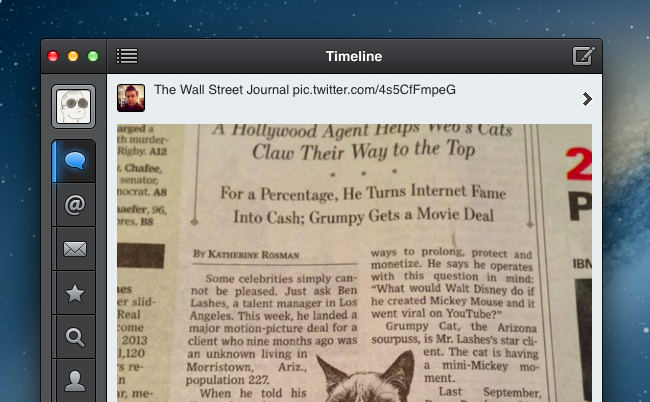
Following the 2.8 update released on iOS in April, Tapbots today updated Tweetbot for Mac to version 1.3, which adds various tweaks to the interface as well as the media timeline that debuted on the iPhone and iPad.

To access the new media timeline, which provides an inline media view of all timelines in Tweetbot, you can hit ⌘F and click on the icon next to the search bar, or, alternatively, choose View > Media Timeline (⌥⌘M with the keyboard). The media timeline retains the same functionality and design that Tapbots first brought to the iPhone; to switch back to the default timeline, you can click another icon next to the search bar or go to View > Default Timeline (⌥⌘T).

Complying with Twitter’s new display guidelines, the tweet detail view now comes with retweet and favorite counters – again, implemented just like in Tweetbot for iOS. And alongside a series of bug fixes and improvements, Tweetbot 1.3 brings a welcome enhancement to profile views: besides Cover Image support, you can now double-click the titlebar on a profile to scroll back to the top. Double-clicking again will scroll a profile’s timeline to the top as well.

Tweetbot for Mac 1.3 is available now on the Mac App Store.

Apple Announces iTunes Festival 2013 in London

Apple PR:

Apple today announced that global superstars including Justin Timberlake, Thirty Seconds to Mars, Jack Johnson and Jessie J are among the headliners at this year’s iTunes Festival in London. Running every night in September at the Roundhouse, the iTunes Festival features over 60 acts performing at the legendary venue.

The festival schedule for this year’s iTunes Festival hasn’t been posted yet, and Apple says that more details on the 30 nights of free live shows will be made available as they get closer to September. As with last year’s iTunes Festival, viewers from around the world will be able to watch live shows using iTunes, an Apple TV, or a dedicated app for iOS.

iTunes Festival used to take place in the month of July, but Apple moved it to September in 2012. Tickets will be available with a lottery system run by Apple and its media partners.

Permalink

Star Wars: Knights of the Old Republic Coming To iPad

BioWare’s classic, released 10 years ago, is coming to the iPad. IGN’s Steve Watts has a review:

Knights of the Old Republic is a classic-style BioWare RPG, and still stands up remarkably well. Though its action mechanics aren’t quite as polished as those of Mass Effect and Dragon Age, the characters, setting, and infamous plot twist are as well-delivered today as ever. The iPad’s touch interface is largely an improvement over the original, save for a few reservations.

Knights of the Old Republic is widely regarded as one of the best Star Wars games ever made. IGN’s review doesn’t mention a release date, but it’s safe to assume the game should be released very soon. As Pocket-lint notes, the game is being ported to the iPad by developer Aspyr, who accidentally leaked information about it in a newsletter last week.

Permalink

Apple Introduces New Low-End 16 GB iPod Touch

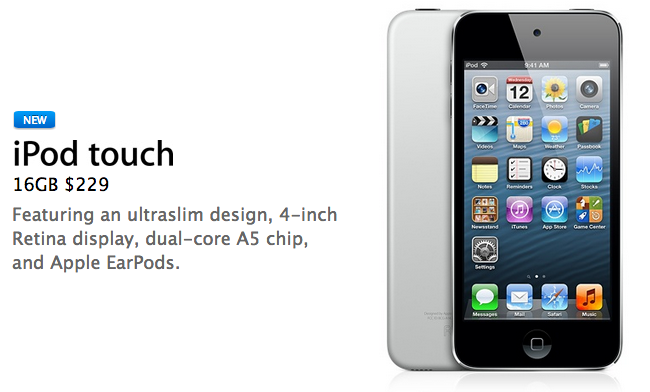
Apple today quietly updated its online Store to launch a new low-end iPod touch that replaces the fourth-generation model. Eric Slivka reports at MacRumors:

Apple today made a quiet update to its iPod touch lineup, launching a new 16 GB fifth-generation model without a rear camera for $229. The new iPod touch, which is only available with a black front and silver back, replaces the fourth-generation iPod touch that Apple had continued to offer since the introduction of new models late last year. The new model is available now in Apple’s online store and should be available in the company’s retail stores starting tomorrow.

New design aside, there are a series of notable additions for the new low-end iPod touch. Removing the rear-facing camera and 16 GB of storage from the higher-end iPod models, Apple could reach the $229 price point, which is $70 cheaper than the fifth-generation iPod family. Keeping the front-facing camera (bumped to a 1.2 MP “HD” status) allows Apple to keep FaceTime and ensure basic compatibility with third-party iOS camera apps.

Apple is, essentially, future-proofing the iPod touch family: adding Lightning, a taller Retina screen, a dual-core A5 chip, faster WiFi on the 5GHz band, and, presumably, more RAM than the 256 MB found in the fourth-gen iPod, the new 16 GB iPod touch will certainly be capable of running iOS 7 and future updates. It’ll be interesting to see if iOS 7 will run on the just-discontinued iPod touch 4th gen, which had less RAM than the iPhone 4 (512 MB), also released in 2010.

On the new iPod touch webpage, Apple features the higher-end iPod models as the ones with iSight and loop – the latter absent from today’s new low-end model.


ReadKit 2.0 Adds Smart Folders, Built-in RSS, Fever, and More

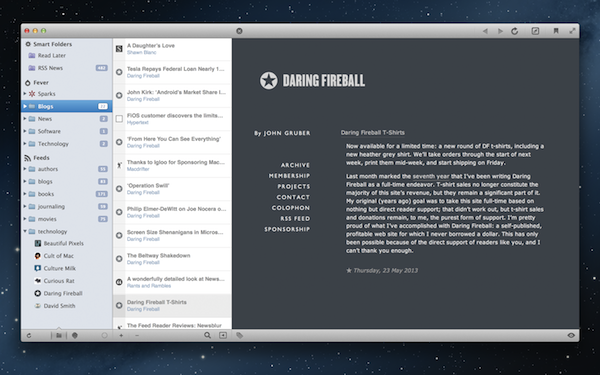
ReadKit initially answered the requests for a proper Instapaper and Readability desktop app, including Pocket and later adding support for popular bookmarking sites like Delicious and Pinboard. Bringing together the multiple places where people are likely to save stuff on the web, ReadKit 2.0 adds offline support for RSS to the mix, and also includes support for Fever and NewsBlur. But by far, my favorite feature is smart folders.

I have a big backlog of articles I have to read through in Pocket, but I’m only interested in a few topics at the moment. Smart folders act as ReadKit’s playlists, bringing forward articles based a set of rules. For example, I can make sure I’ve caught up on all the games I like by looking for keywords in the title.

ReadKit 2.0 also adds a few new options for readers in the preferences, such the option to save and restore reading positions and to cache images locally. Under the hood you’ll find improve sync performance and various other bug fixes.

ReadKit 2.0 is a free update for previous Mac App Store customers, and is currently available for $4.99. With the exception of newly added services, our initial review of the app still holds true.


Second Gear Pit Pass

This is a neat idea by Second Gear: instead of the regular newsletter, they’ll be using Passbook to gradually release information about their new app.

In Italy, I’ve seen a couple of services that are starting to use Passbook. Pit Pass is the first item that I’ve added to my Passbook since its launch last year, and I’m intrigued by the prospect of more developers using it to tease upcoming apps.

Lex Friedman has a nice overview of Pit Pass at Macworld. As an aside, I’ve also found out today that Passbook files can be viewed in Mountain Lion’s Mail through a popover.

Permalink


Twitter For iOS Update Brings Wider Timelines, New Tweet Composer

A few minutes ago, Twitter updated its official iOS app to include a number of improvements for the app’s visual appearance.

On the iPhone, Twitter got rid of the margins at the sides of timelines: the app now uses a wider timeline design that feels more natural and less constrained. Comparing the screenshot above with an older version of the app, you can see how today’s new design makes more sense and is in line with timelines we’re used to seeing in other iOS apps.

The tweet composer for iPhone has also received attention, getting an updated look that lets you see how a tweet containing images will look like when it’s posted. The tweet composer, besides revealing photos in your Library in the same area occupied by the keyboard, embeds a preview of a photo you’re attaching below the status update, with an “x” button to immediately remove it and revert to a text-only tweet.

Twitter 5.7 is available on the App Store.


Gmail Introduces Categories With a Tabbed Interface, Gradually Rolling Out Over the Coming Weeks

Today, Google announced new features for Gmail that sorts your inbox into various categories for social network notifications, receipts and shipping updates, and promotions from your favorite shopping sites. While Priority Inbox made an attempt to surface only the stuff that really mattered, categories breaks the inbox down to a series of tabs that should help cut down on some of the clutter. Categories and tabs are basically pre-defined filters and labels with training wheels.

On the desktop, the new inbox groups your mail into categories which appear as different tabs. You simply choose which categories you want and voilà! Your inbox is organized in a way that lets you see what’s new at a glance and decide which emails you want to read when.

Categories for Android, iOS, and the desktop will be gradually rolling out to Gmail users and their respective app stores over the coming weeks. In the meantime, be sure to check out The Verge, who have an initials hands-on with the latest features.

Permalink