

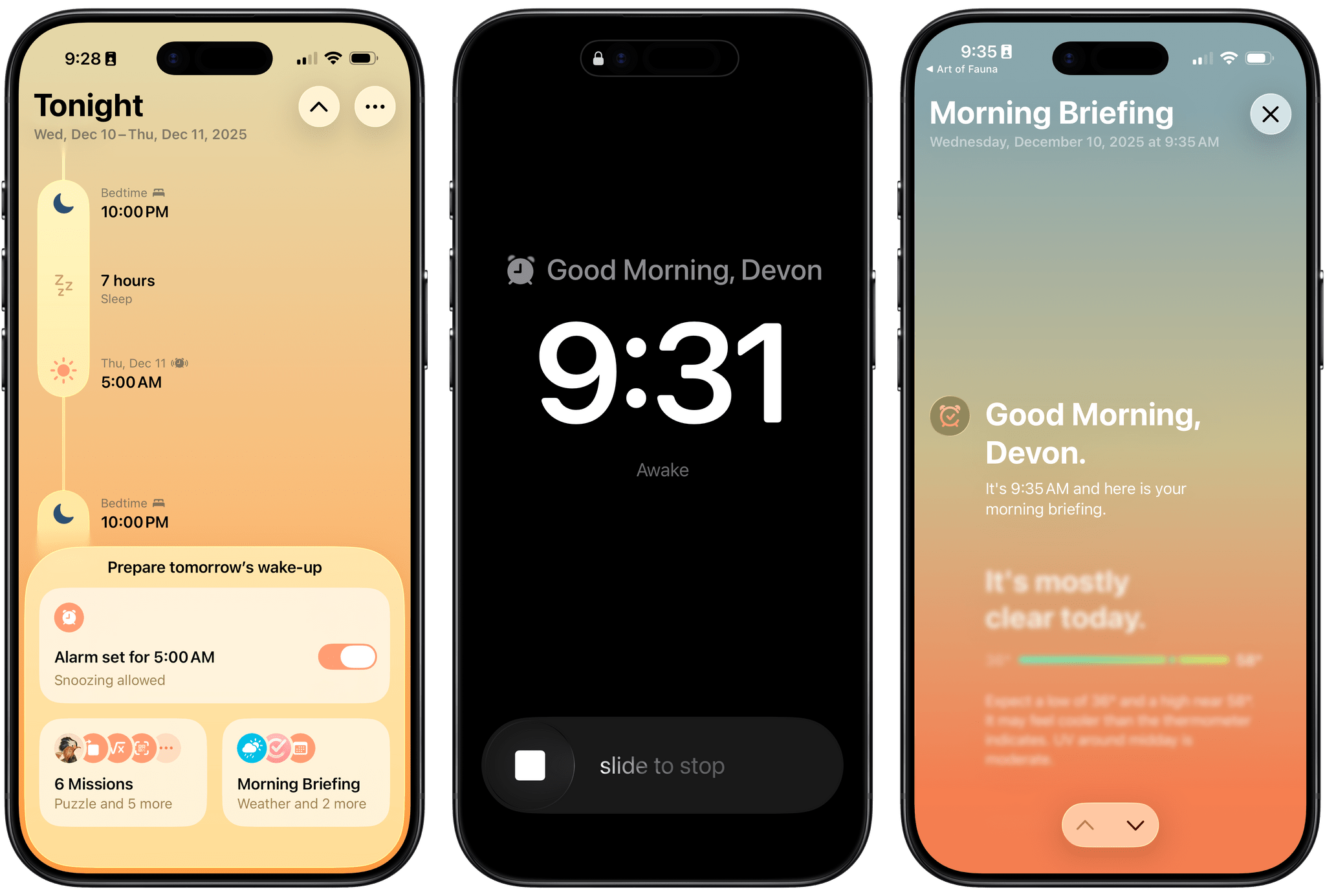
Waking up on time is a quintessential human problem. Over the years, we’ve come up with all kinds of solutions, from ringing analog clocks to flashing lights to motorized digital clocks that roll away from our bedsides as they chime, forcing us to get up and find them to turn them off. But what if there was a way to use a device you already have – your phone – to help you break the habit of snoozing and actually get out of bed when you’re supposed to?
That’s what unorderly, the team behind the day planner app and App Store Awards 2025 finalist Structured, have set out to do with their new alarm app Awake. Built on the newly introduced AlarmKit API, which gives third-party alarm apps the same level of system access as Apple’s Clock app, Awake takes a comprehensive approach to setting alarms that’s meant not only to wake you up but to help you feel more alert and prepared for the day when you do.
If you’ve ever used Structured before, you’re aware of how deeply the unorderly team considers every element of their work, from the color scheme to the fine details of editing events, to make tools that are both elegant and powerful. I’m happy to report that the same level of care is reflected in Awake, both in its design and in the balance of simplicity and customization it offers.
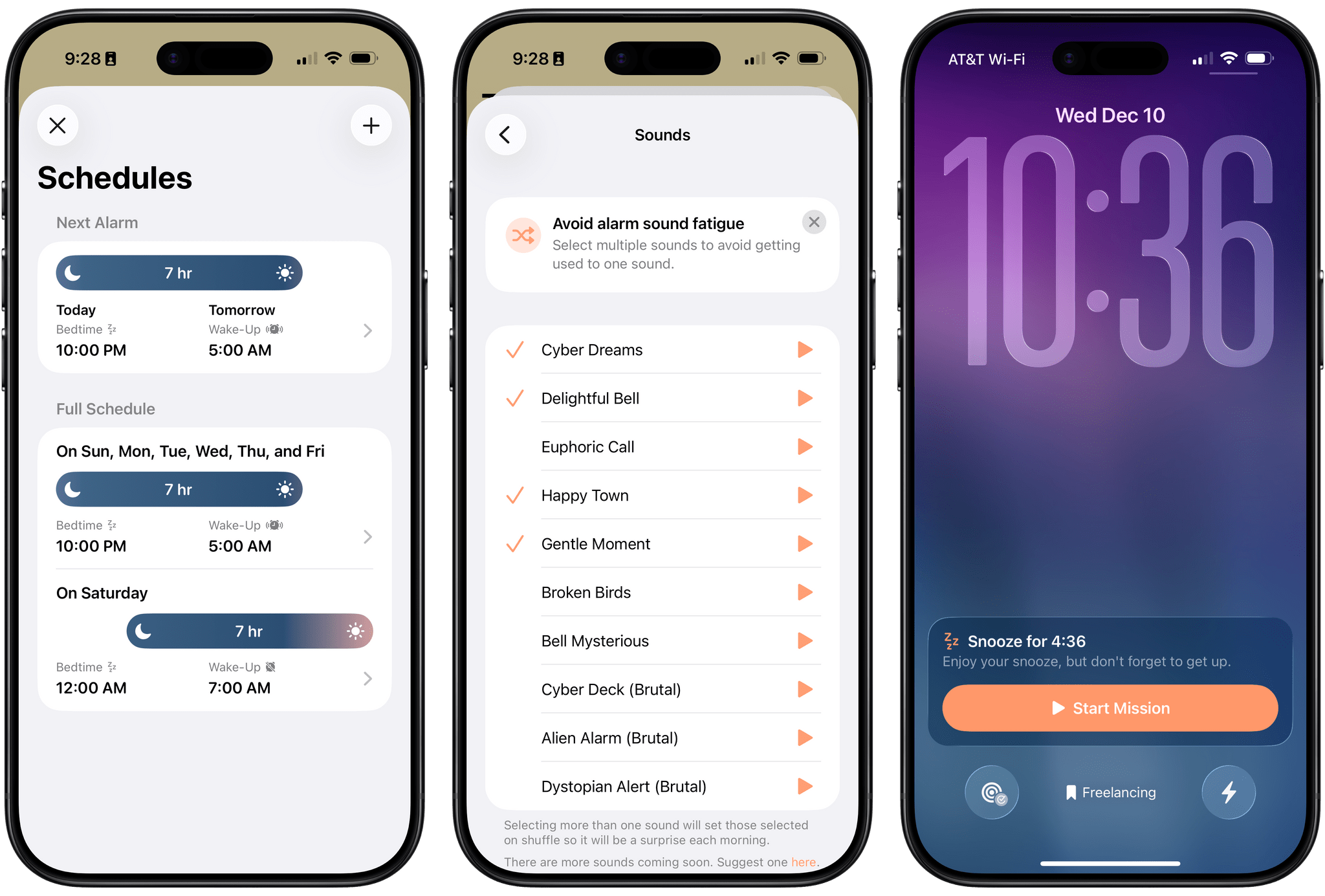
It all starts with setting your alarm schedule. The app asks you what time you need to wake up and how long you plan to sleep, and it then calculates your bedtime based on those figures. You can set the same sleep schedule every night or assign different schedules to different days of the week, such as setting your alarm to go off later on weekends.
Once your schedule is set, you can enable and customize your alarm. This is the first thing I noticed about Awake that sets it apart from other alarm solutions I’ve used before. When choosing an alarm sound, you’re not limited to a single selection; in fact, the app encourages you to enable multiple sounds for it to randomly select from on different days so that you don’t become immune to one particular sound. Changing up your alarm sound automatically is just one of the ways that Awake attempts to make waking up easier, and it’s the kind of feature that makes perfect sense for an alarm app.
The app currently offers ten alarm sounds. There’s a good range of options, from gentler ones that nudge you awake to a few that are labeled “brutal” for stirring heavier sleepers. If you’re like me and prefer to wake up to your Apple Watch vibrating instead of a sound, you can select the ‘None’ option.
Awake also offers customization options for snoozing your alarm. You can turn the option off completely if you like, but if you enable it, you can set both the snooze time and the maximum number of snoozes allowed.
When it comes time for your alarm to go off, the app is persistent, exactly the way you want an alarm to be. Thanks to the power of AlarmKit, Awake’s sounds and vibrations break through any Focus modes you have set, and the alarm appears as a full-screen alert, wishing you a good morning and offering you options to disable the alarm or snooze it. Snoozing the alarm kicks off a Live Activity that counts down to the next alert.
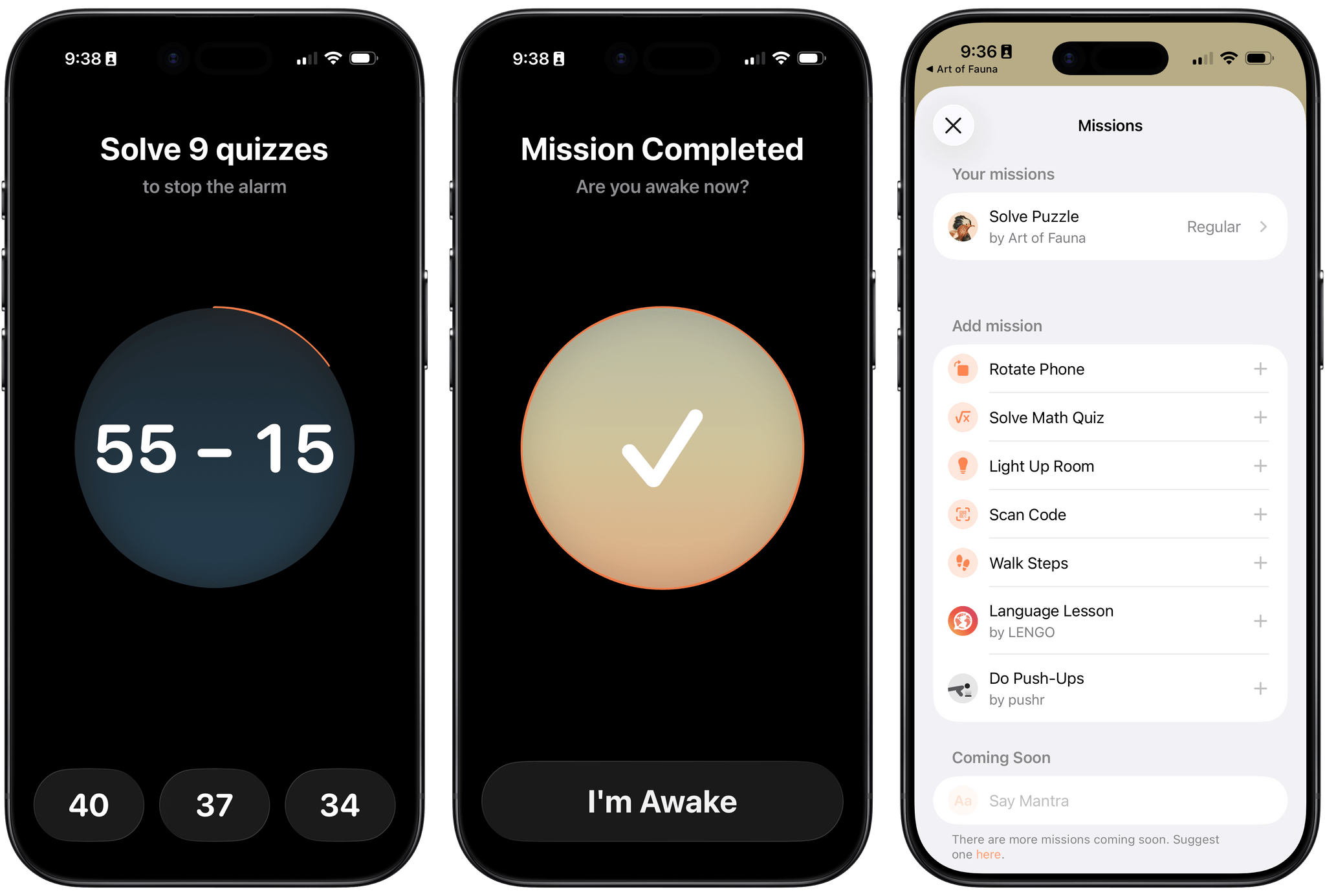
Turning off the alarm can be as simple as swiping it away, but Awake is built upon the recognition that waking up can be harder for some people than others. That’s where missions come in. For those of us who might need a little more motivation to get out of bed, the app offers a range of tasks that can be required in order to turn the alarm off. These include:
- rotating your phone,
- solving math problems,
- turning on a light,
- scanning a QR or bar code, and
- walking a certain number of steps.
As with alarm sounds, you can enable multiple missions in Awake to change up your routine each morning and make sure you’re truly waking up. You can also preview each mission to get an idea of what it will be like before enabling it for your morning routine. My favorite mission built into the app is the code scanner. I set it up to look for the QR code on my toothpaste, which means I have to walk to the bathroom and open up a drawer to turn off the alarm. By the time I’ve done all of that, I’m definitely awake enough to start the day.
Beyond the built-in missions, Awake also integrates with a few indie apps to offer unique tasks to start your day. You can solve a puzzle in the App Store Award-winning Art of Fauna, do some pushups and track them with pushr, or take a quick language lesson with LENGO. Each mission requires the corresponding app to be installed, so in addition to injecting some variety into your morning, these missions also support indie developers.
Whether your ideal way of waking up is with a brain challenge, physical exertion, or just a well-lit room, Awake’s missions encourage you to do what it takes to truly get up and get the day going. And as I said before, the app is stubborn: if you try to circumvent your challenge by closing the app, Awake will start a very short Live Activity timer before the alarm goes off once again.
This combination of flexibility, variability, and persistence makes Awake an extremely powerful tool for helping people wake up in a healthy way. If traditional alarm clocks or the stock options built into the Clock app aren’t effective at waking you up, Awake probably has a combination of alerts and missions that can help you form a better waking habit. The approach is incredibly well thought out and adaptable to different users’ needs.
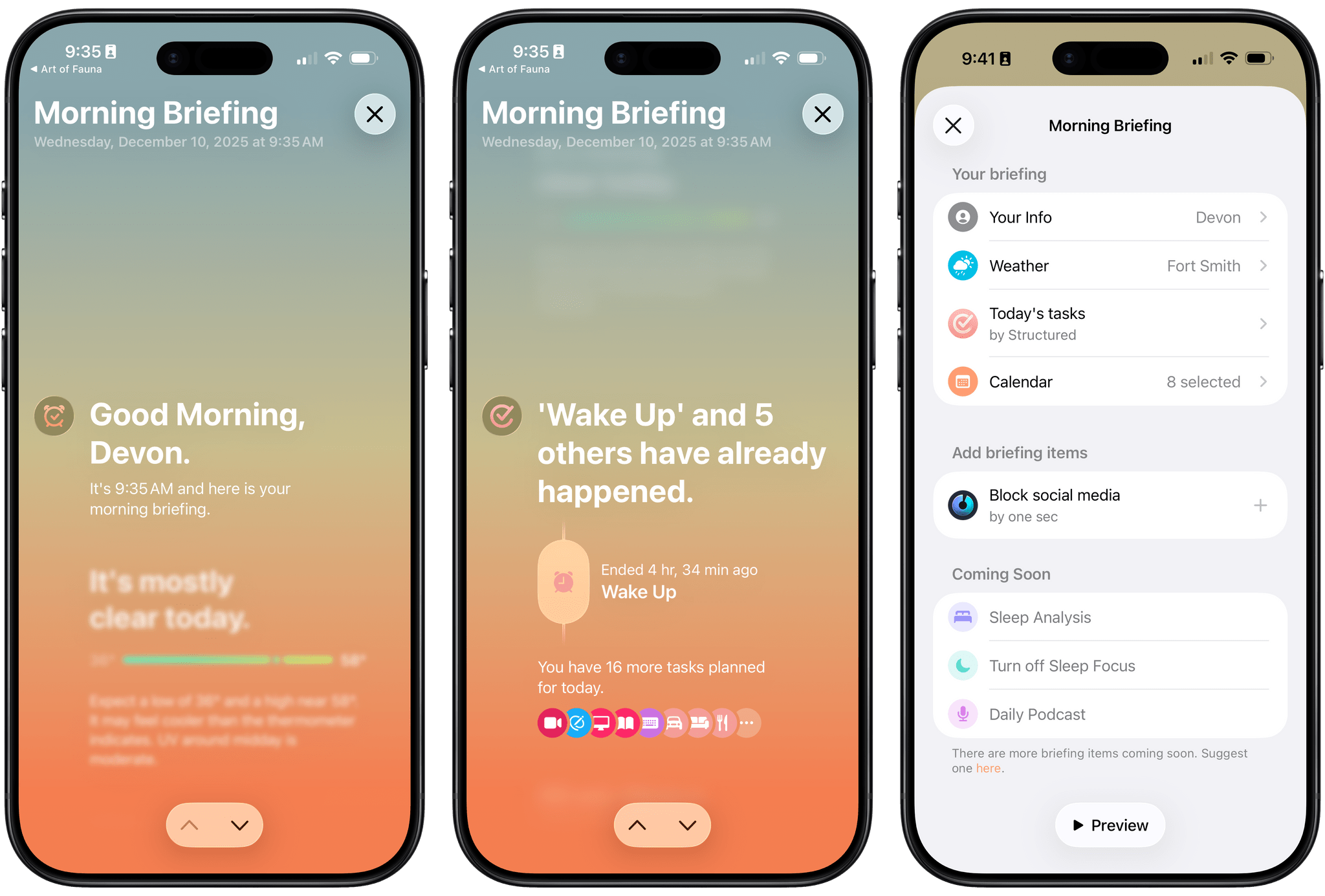
My favorite feature of the app, though, is Morning Briefing. Once you’ve successfully disabled your alarm, Awake greets you with a kind and informative introduction to your day. You can configure the morning briefing to include the weather forecast at your location and your upcoming calendar events, and the app can even integrate with Structured to give you an overview of your day plan as you’re getting started. I do wish the day plan could be expanded to show more detail in the morning briefing, but instead, a tap of the day plan opens up your timeline in the Structured app, which is a helpful alternative. The feature can also integrate with screen time app one sec to block certain apps from being used in the morning, and the unorderly team says that more morning briefing elements are on the way.
While Awake does offer a ton of customizability between schedules, sounds, missions, and morning briefing, all of the options are presented in a UI that’s elegant and easy to use. The app’s main view is a timeline of your sleep schedule that focuses on today but can be scrolled backwards and forwards in time. (In a really nice touch, each previous day’s schedule includes a tiny icon representing the mission you completed when waking up.) Below the timeline is a sheet with options to adjust your alarm for tomorrow, mission settings, and the morning briefing. The ‘…’ button in the top-right corner opens a menu with options to change your schedule and open the app’s settings. The entire view is displayed over a beautiful gradient that changes with the time of day and peeks through the Liquid Glass UI elements.
The app launched this fall alongside iOS 26 and offers an excellent set of features, but there are a couple of areas where I’d like to see it grow. Currently, Awake does not integrate with the Health app or Apple’s built-in sleep features in any way. I’d love to see integration with the Sleep Focus mode, sleep duration, and sleep score built in. Home Screen and Lock Screen widgets for viewing your next alarm would be handy, too. I also think the morning brief has a ton of potential for future integrations. The unorderly team has said more of those integrations are on the way, along with more alarm sounds and mission types. With this foundation, I think the app has a bright future ahead of it that I’m excited to see.
Awake brings a wide range of elements – AlarmKit’s capabilities, Structured’s design aesthetic, the iPhone’s array of sensors, Liquid Glass, indie app integrations, and more – together with the unorderly team’s unmatched eye for detail and empathy for the spectrum of users’ needs to form what in my mind is the ultimate alarm app. Whether you’re looking for an alarm you can tweak just a little more than the built-in option or you’re a heavy sleeper and serial snoozer in need of a robust tool to help you break the bad habit of sleeping in, Awake has you covered and will help you find the perfect way to wake up.
Awake is available for free on the App Store for the iPhone and iPad. Certain features, like the full range of missions and alarm sounds as well as the ability to randomize them, require an Awake Pro subscription, which costs $6.49/month, $19.99/year, or $64.99 as a one-time purchase. The one-time purchase is currently discounted to an introductory price of $45.49.
