This Week's Sponsor:

Copilot Money

Copilot Money, The Best Money Tracker, Launches on the Web – Limited-Time: Get 26% Off + 2 Months Free


Posts in reviews

Save Your Notes in the Menubar with QuickNote

Whether you want to jot down a quick note for yourself or save some information from the web, Mac OS X doesn’t offer a default solution for this. Well, you could leave TextEdit running all the time and create a new document everytime but that’s a low process that is likely to end up with dozens of files on your hard drive. Or, you could use Yojimbo to capture anything you want and that sounds reasonably good. But you agree with me that there must be a better way to store quick notes.

QuickNote is a new app from Snarbsoft, designed by Laurent Baumann, which runs in the menubar and allows you to easily capture text notes.

Read more


CoGe, Quartz Composer Powered VJ Application

Link

“CoGe is a free, open-source, semi-modular Quartz Composer powered VJ Application for Mac OSX with a solid, minimalistic look and feel. It’s an unconventional application, because has not built-in media handle feauters or effects. With the excellent Quartz Composer support, you can build your own media handlers, effects, mixer and automatization modules.”


Harmony, HTML5 Procedural Drawing Tool

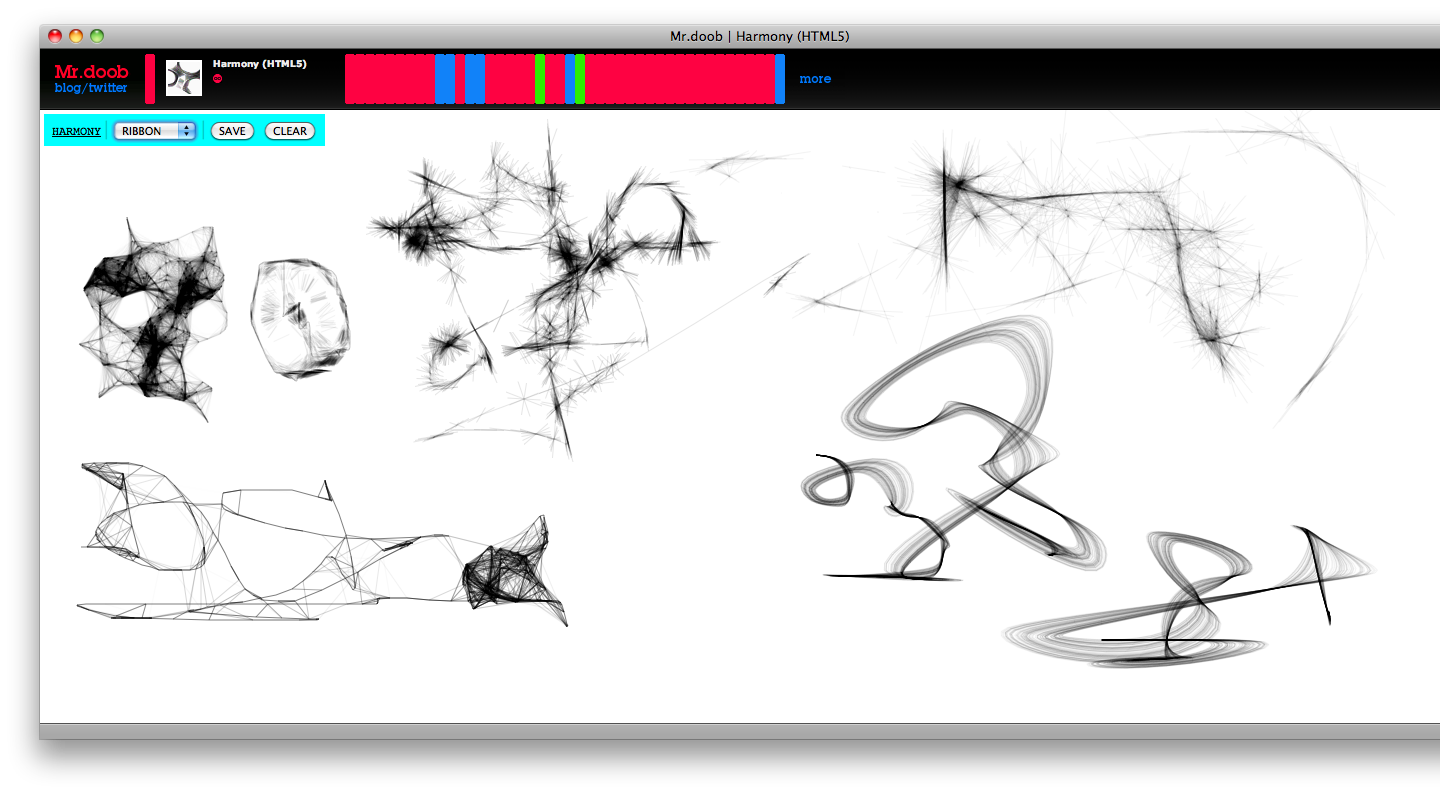
Harmony is an HTML5-based online tool that lets you draw on a white canvas using different brushes. It’s nothing more than an experiment but it’s great nevertheless. It supports a very basic multiply blending effect (as seen in Photoshop) and the developer says it’s very first attempt to reproduce the functionalities of a drawing application after playing with the <canvas> element for some weeks.

Harmony

Harmony

Also, it works best on Webkit as Firefox and Opera don’t support context.globalCompositeOperation = ‘darker’. You can save images to .png format.

An experiment, but after seeing Sketchpad weeks ago, we can’t deny that the future of webapps is very bright and promising.


MacHeist nanoBundle 2: A Complete Overview

Between all the popular outlets and what seems to be constant talk on Twitter, Mac users might have found it hard not to notice the MacHeist nanoBundle 2, a set of excellent applications worth $322 that can be purchased for $19.95, with 25% of the proceeds going towards a reputable charity of your choice. While we’re already 4 days in to this helluva deal, is it worth your hard earned cash? I’d instantly tell you yes, but then you’re going to ask me what makes these apps better than some free alternatives (as possibly mentioned on Lifehacker). Well my friends, here’s the definitive overview of the 2nd nanoBundle.

Read more


Locations, From Network Aware to Settings Applied

Being a student, I often travel with my laptop between home and campus. At school, there’s a lot of things I need to do, but I often forget to do. For example, I need to mute my machine (it would be embarassing if suddenly a notification from Twitterrific suddenly sounded in the middle of class), disable bluetooth, and close Mail. Locations, a basic application from Codehackers, solves this problem by doing all of this for you. If you’ve ever used MarcoPolo (which isn’t fully Snow Leopard compatible), you’ll be right at home with this app.

Read more


Kohive: Online Collaboration Tool, File Storage App, Virtual Desktop.

We’ve been reviewing a lot of web applications on MacStories during these last weeks, and not because we haven’t been able to find new “native” apps both for Mac and iPhone - because we believe today’s webapps have a lot to teach to desktop applications. Also, many of us use websites as desktop applications running inside an instance of Fluid.app: I have 3 Fluid apps sitting in my dock at the time of writing this post.

We usually focus on applications that could empower our productivity workflows with new tools, new ways of doing the old stuff, possibly standard compliant. Just take a look at Zootool, HipChat, Nirvana: they’re all great pieces of software that, no matter they’re written in Cocoa or not can run on our Macs just fine - and they’re useful.

The webapp Cody and I are going to talk about today is something you haven’t seen before anywhere else. It’s a sort of online storage / virtual desktop /collaboration app that presents a nice interface and runs very smoothly. An online place for you, your family and your co-workers that could seriously become one of your 2010 new favorite apps.

Enter Kohive.

Read more


No More Accidental Caps Lock with CapSee

If you do a lot of writing with your Mac, you might be interested in CapSee. CapSee is a lightweight utility that presents a bezel on screen everytime you activate the caps lock. Just like Mac OS X does with volume or brightness.

It’s free, it works great.

CapSee

CapSee


Gmail-like Attachment Scanner Plugin for Mail.app

Attachments, I hate them. Still, most of the times I have to deal with them as it’s only way (for many people) to quickly receive files.And most of times, I forget to include attachments.

Thanks to Sebastian de With (@Cocoia) I’ve just found out this neat plugin for Apple’s Mail that warns you everytime you mention an attachment in the body of a message but you didn’t attach it. From the website:

“When you send a message, it checks if there’s an attachment. If there isn’t, and it looks like you’ve referred to an attachment in the body of your mail (by using a word like attach, attaching, attachment, etc), it gives you a warning. Most of the time, you should never notice that this plugin is running.”

And it works great. Invisible, useful, free. Must have.

Download