This Week's Sponsor:

Copilot Money

Copilot Money, The Best Money Tracker, Launches on the Web – Limited-Time: Get 26% Off + 2 Months Free


Posts in reviews

Dribbblr: Elegant Dribbble Client for iPad

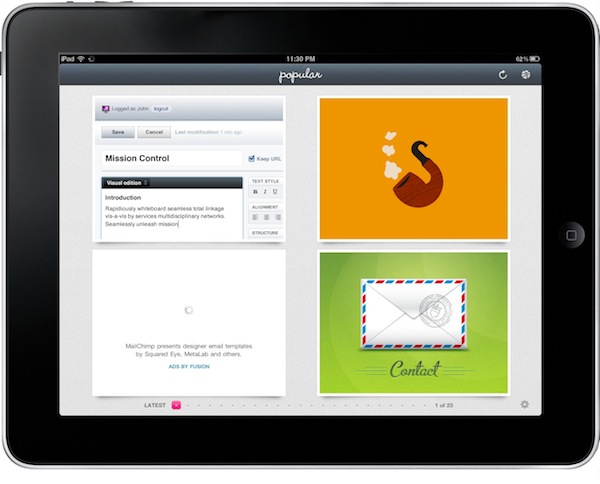
I wanted to write about this app before, but I couldn’t manage to get it working properly on my iPad running iOS 4.2 beta. Luckily enough, the Tapmates developers worked hard on releasing a compatibility update, and here I am testing Dribbblr on my iPad running iOS 4.2 GM. Dribbblr is a free client for Dribbble.com, a gallery of great works submitted by popular and new designers who managed to get an invite to the website. It’s a great place to discover new talents and, why not, new apps coming out on iOS and OS X.

You can browse Dribbble from your iPad without an account, but thanks to the recently opened API Dribbblr adds native features like a completely redesigned interface and navigation that wraps Dribbble’s screenshots around a polished and minimal iPad interface. The app is free, but you can upgrade to a Pro version via in-app purchase ($2.99) that removes all the ads, although they’ve been cleverly integrated in the “timeline” and they’re good-looking enough to not get in the way all the time. Read more


miCal, Powerful Calendar App for iPhone

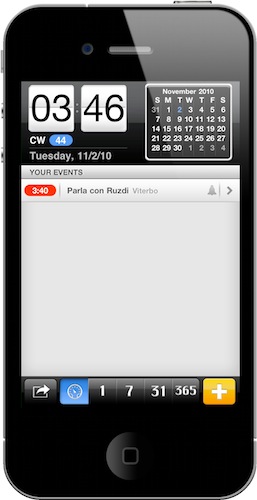
If you follow me on Twitter, you might have noticed I’ve been tweeting about Google Calendar integration on iOS since last week. Indeed, I’m looking at all the possible ways to integrate Google’s calendar utility on iOS, especially on the iPhone which is the device I always have with me. It turns out there are many ways to get your Google Cal up and running on the iPhone, the default one requiring you to create an Exchange or CalDAV account in Mail, Contacts and Calendars. In that way, you’ll be able to use Google Calendar in Apple’s default Calendar app and enjoy the additional sync services offered by Google (very similar to MobileMe).

Or, you can just go looking for a 3rd party calendar application in the App Store and play with features Apple didn’t implement in its default app. So I did, and here’s the first app I downloaded, miCal.

Read more


AppSwitch: Cool Process Management App for iPhone

My  good friend @kenyarmosh tweeted about this app a few hours ago and it immediately caught my attention: a process management app for iOS, like the ones seen on Android and, yes, the dekstop? How’s that even possible without breaking Apple’s ban of usage of private APIs?

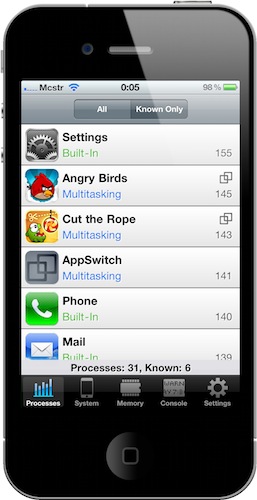
AppSwitch, available at an introductory price of $0.99 in the App Store, monitors and provides detailed information about the apps running in the background on your iPhone. As a matter of fact, AppSwitch can monitor both running apps and background system processes, something that I haven’t seen in any other App Store app before - mainly because Apple doesn’t want users to know which system processes are running. With AppSwitch you can keep an eye on your iPhone memory usage (with an interface similar to the Mac’s Activity Monitor) and see which apps are actually multitasking and which are not, with the possibility to quickly jump to another app or to an app’s specific feature. Read more


PDF Expert: PDF Reader and Annotation Tool That Fits In My Workflow

As you may know, I try a lot of apps every week. Perhaps that is wrong, as one may be tempted to constantly jump between different softwares just for the sake of having something new to play with (like kids are always attracted by new toys), but I’m firmly convinced I’m doing this because there are hundreds of indie developers that don’t have the resources or the knowledge to virally promote their apps, yet they deserve attention.

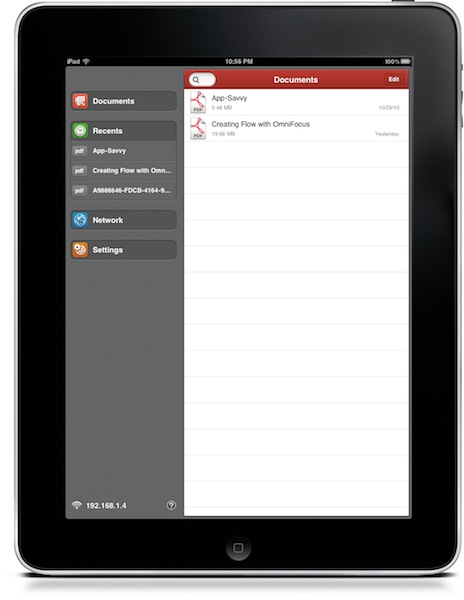
That’s why I’m doing this. And thanks to this “method” (or habit), every once in a while I discover gems that redefine and refine my workflow. New apps that set new standards and raise an already high bar. It’s not easy. But it’s possible. Read more


MacStories Weekly Game: Samurai II

For this week’s “MacStories Weekly Game”, I needed a good ol’ action game to talk about. You know those hack & slash type of games, where you usually wander around levels focusing on killing enemies and making combos? I grew up with them. Then God of War came around and the new kids got a new concept of hack & slash. But Samurai II is different: while clearly inspired by the post-God of War generation (the level schemes, the rich graphics, the bosses, the upgrades, the roll), it retains a somewhat old-style feeling that I was missing on the iPhone.

Samurai II: Vengeance is the sequel to last year’s Samurai: War of the Warrior, featured by Apple in the Best Games of 2009. It was indeed a great game, packed with stylish manga-like graphics, swipe-based controls and good action. Quite possibly, the original Samurai for iPhone is still one of the best action games out there. With Samurai II, though, the developers enhanced the whole system, create even better graphics and took away a few things. Read more


Phone Disk: Mount & Browse Your iPhone In The Finder, No Jailbreak Required

They say one of the biggest advantages of jailbreaking your iPhone ( or iPad) is that you gain root access to the device. By root access they usually mean that the filesystem becomes visible to the end user, thus allowing people to play around with the device’s system files and modify stuff. From graphical modifications to file browsers available in Cydia to extra functionalities granted by access to hidden folders, root access is one of the most important aspects of jailbreak.

But it turns out, jailbreak isn’t required to access the iPhone’s internal files in the way most people would need: Phone Disk, a Mac (and Windows) app gone free until December 1st, lets you mount and browse your iDevice directly in the Finder without the need to jailbreak anything. Read more


WorldView+: Webcams Worldwide, With An Elegant Interface

The iPhone 4 has got a great camera, but this app is about checking on images captured by other cameras around the globe. If you’ve ever wished to have access to more than 14,000 webcams from your pocket, WorldView+ might be just the app for you. With a nice icon and a redesigned UI by Marcelo Marfil, this app combines the functionality of checking on live webcams with additional data pulled from Wikipedia, weather stations and Google Maps.

Read more


Meet My New Gmail App for iPad

Every day I check on 7 different Gmail accounts. Both personal and work-related, I have to keep an eye on them. On the desktop I use Mailplane, which is a must-have application that wraps Google’s Gmail web UI around a Cocoa native interface for the Mac, and adds a lot of features to it. If you haven’t tried it yet, go get Mailplane right now.

On iOS we don’t have anything like Mailplane. There’s Mailroom, but it’s not as rich or powerful as Mailplane and it’s only for iPhone. I use Mailroom, but I’d like to be able to do more stuff with it and have a full-featured iPad version as well.

So I’m forced to either keep on switching between accounts on Google.com (not a chance in hell), or use different apps on the iPhone and iPad to enjoy this useful “easy multi-account” feature. Like I said, I use Mailroom on the iPhone; on the iPad I’ve been using MailWrangler and Mailboxes for months, but I think I’ve found something that’s faster, equally powerful and free.

MultiG is a simple app for iPad that lets you switch between regular Gmail accounts and Google Apps ones, it’s got a lightweight and fast integrated browser and it even comes with Instapaper support. Read more