Posts in news

AppStories, Episode 273 – Our iOS 16 Wishes

This week on AppStories, we kick off our annual ‘OS wishes’ series with a look at our wishes for iOS 16, including everything from system-level features to the iPhone’s built-in apps.

Sponsored by:

  • Sourcegraph: Universal Code Search. Move fast, even in big codebases. Try it now.
  • Instabug: Empower mobile teams to monitor, prioritize, and debug performance and stability issues and ship better mobile apps.

On AppStories+, Federico explains why he’d like to see Quick Note come to the iPhone.

We deliver AppStories+ to subscribers with bonus content, ad-free, and at a high bitrate early every week.

To learn more about the benefits included with an AppStories+ subscription, visit our Plans page, or read the AppStories+ FAQ.

Access Extra Content and Perks

Founded in 2015, Club MacStories has delivered exclusive content every week for nearly a decade.

What started with weekly and monthly email newsletters has blossomed into a family of memberships designed for every MacStories fan.

Learn more here and from our Club FAQs.

Club MacStories: Weekly and monthly newsletters via email and the web that are brimming with apps, tips, automation workflows, longform writing, early access to the MacStories Unwind podcast, periodic giveaways, and more;

Club MacStories+: Everything that Club MacStories offers, plus an active Discord community, advanced search and custom RSS features for exploring the Club’s entire back catalog, bonus columns, and dozens of app discounts;

Club Premier: All of the above and AppStories+, an extended version of our flagship podcast that’s delivered early, ad-free, and in high-bitrate audio.

Learn more here and from our Club FAQs.


Adobe Announces Major Updates to Fresco and Photoshop for iPad

Source: Adobe.

Source: Adobe.

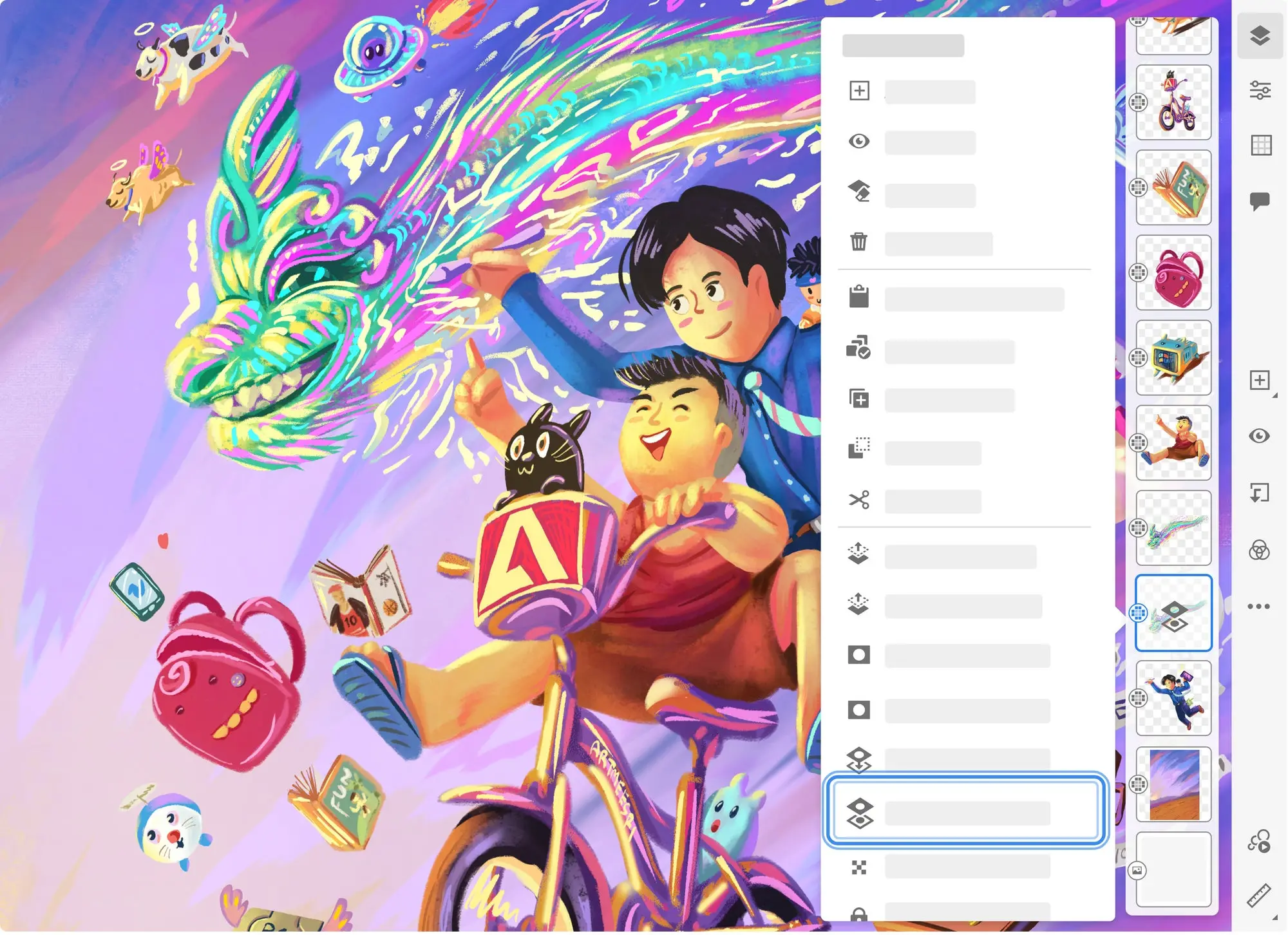
Today, Adobe announced substantial updates to Fresco, its drawing and painting app for the iPhone and iPad, and its image editor, Photoshop for iPad. I haven’t had a chance to spend much time with these updates yet, but based on Adobe’s announcement, the changes promise to be among the most significant releases yet.

Source: Adobe.

Source: Adobe.

Fresco is adding a magic wand selection tool that allows selections to be made based on color. A slider adjusts the color that defines the selection, which gives artists fine-grained control over what is selected. As with magic wand tools in other Adobe products, the purpose of the new tool is to eliminate tedious manual selection methods where possible.

Source: Adobe.

Source: Adobe.

The app has also added a liquify tool that blends colors on Fresco’s canvas as though they were paint. Liquify, which is part of the Transform set of tools, allows users to push, pull, and mix adjacent colors in a way that looks quite natural in Adobe’s demonstrations.

Fresco first added tools that brought compositions to life with motion last year. Today’s update adds the ability to adjust the opacity of motion frames from the Frames action menu and move, resize, and rotate motion paths. Fresco’s update includes several other new features, including a recent brushes list, new vector manga brushes, and the ability to define reference layers, a handy way to separate line work from color fill work, and capture a perspective grid from an imported image.

Source: Adobe.

Source: Adobe.

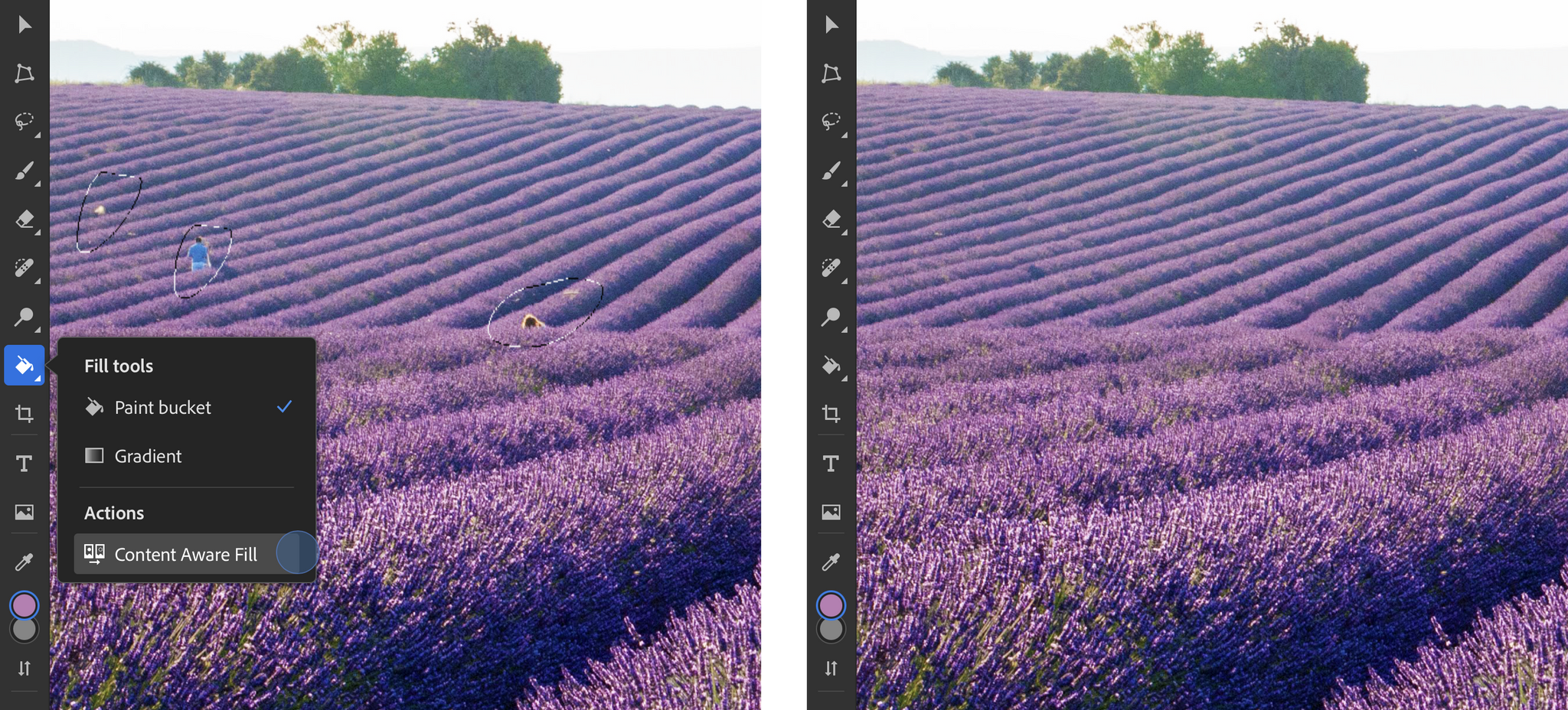
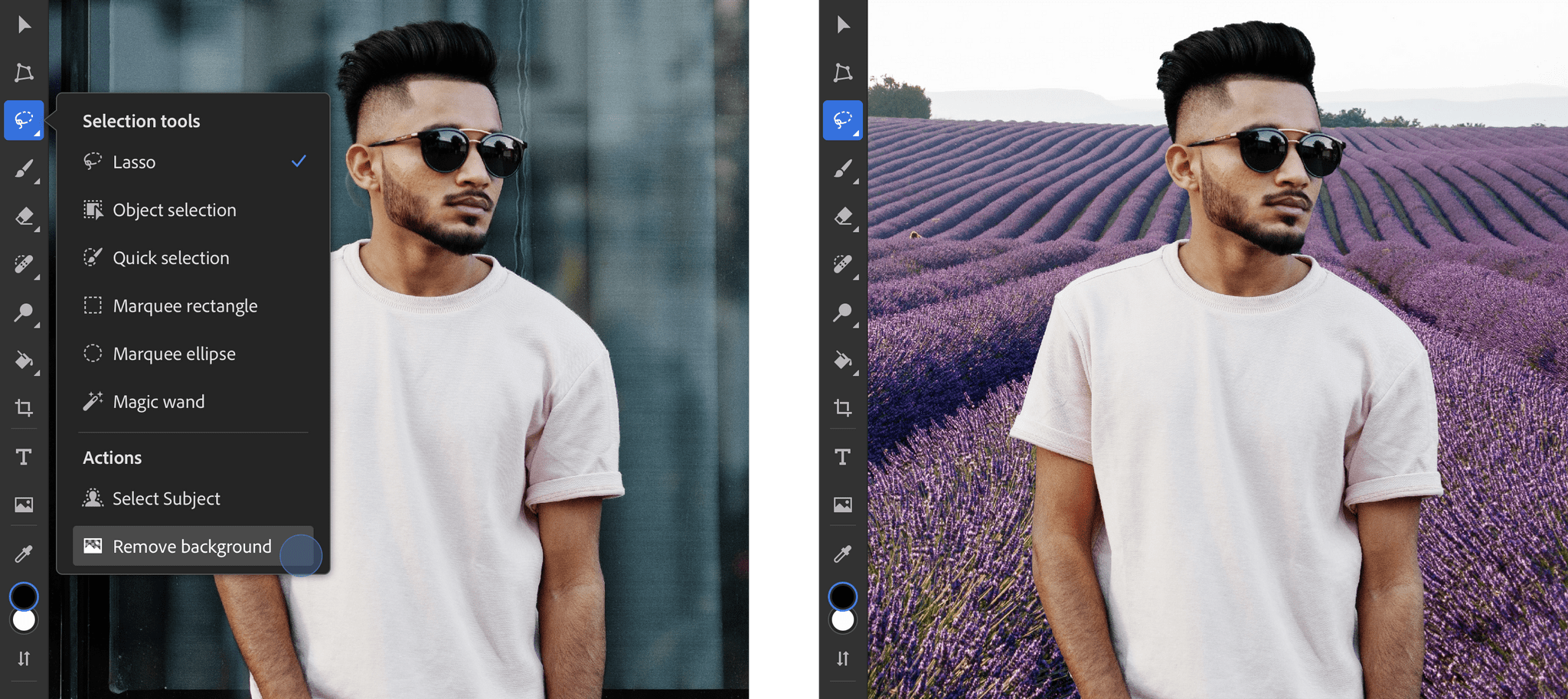
The Photoshop update has added a new AI-based Content-Aware Fill tool that can use surrounding parts of an image to remove and fill unwanted sections of an image with a single tap. Content-Aware Fill is one of the marquee Photoshop features on the Mac, so it’s nice to see it added to the iPad now too. The app has also added a single-tap background removal and replacement tool, which relies on Adobe’s Select Subject technology.

Source: Adobe.

Source: Adobe.

To make quick adjustments to an image, Adobe has introduced auto-tone, color, and contrast tools to Photoshop too. Adobe says these are three of the most frequent actions taken by users on the desktop, so bringing them to the iPad should make it a much more attractive platform for editing images. Adobe’s font browser with over 20,000 fonts is available on Photoshop for iPad too.

I continue to be impressed with the pace at which Adobe apps, but especially Fresco and Photoshop, are advancing on the iPad. Both have grown into some of the most sophisticated iPad apps available and feel natural and native to the platform in the way they implement the equivalent of desktop features on the iPad.

Fresco and Photoshop are available as free downloads on the App Store and offer In-App Purchases to unlock certain features.

Access Extra Content and Perks

Founded in 2015, Club MacStories has delivered exclusive content every week for nearly a decade.

What started with weekly and monthly email newsletters has blossomed into a family of memberships designed for every MacStories fan.

Learn more here and from our Club FAQs.

Club MacStories: Weekly and monthly newsletters via email and the web that are brimming with apps, tips, automation workflows, longform writing, early access to the MacStories Unwind podcast, periodic giveaways, and more;

Club MacStories+: Everything that Club MacStories offers, plus an active Discord community, advanced search and custom RSS features for exploring the Club’s entire back catalog, bonus columns, and dozens of app discounts;

Club Premier: All of the above and AppStories+, an extended version of our flagship podcast that’s delivered early, ad-free, and in high-bitrate audio.

Learn more here and from our Club FAQs.


Last Week, on Club MacStories: Federico’s New Reminders Setup and Imagining Deeper Integration of Videogames with Apple TV

Because Club MacStories now encompasses more than just newsletters, we’ve created a guide to the past week’s happenings along with a look at what’s coming up next:

MacStories Weekly: Issue 319

Access Extra Content and Perks

Founded in 2015, Club MacStories has delivered exclusive content every week for nearly a decade.

What started with weekly and monthly email newsletters has blossomed into a family of memberships designed for every MacStories fan.

Learn more here and from our Club FAQs.

Club MacStories: Weekly and monthly newsletters via email and the web that are brimming with apps, tips, automation workflows, longform writing, early access to the MacStories Unwind podcast, periodic giveaways, and more;

Club MacStories+: Everything that Club MacStories offers, plus an active Discord community, advanced search and custom RSS features for exploring the Club’s entire back catalog, bonus columns, and dozens of app discounts;

Club Premier: All of the above and AppStories+, an extended version of our flagship podcast that’s delivered early, ad-free, and in high-bitrate audio.

Learn more here and from our Club FAQs.


MacStories Unwind: Alpha Games and OlliOlli World

AppStories+ Deeper into the world of apps
0:00
19:21

AppStories+ Deeper into the world of apps


This week on MacStories Unwind, Federico recommends Alpha Games by Bloc Party and John suggests the skateboarding videogame OlliOlli World.

Federico’s Pick:

Alpha Games by Bloc Party

John’s Pick:

Access Extra Content and Perks

Founded in 2015, Club MacStories has delivered exclusive content every week for nearly a decade.

What started with weekly and monthly email newsletters has blossomed into a family of memberships designed for every MacStories fan.

Learn more here and from our Club FAQs.

Club MacStories: Weekly and monthly newsletters via email and the web that are brimming with apps, tips, automation workflows, longform writing, early access to the MacStories Unwind podcast, periodic giveaways, and more;

Club MacStories+: Everything that Club MacStories offers, plus an active Discord community, advanced search and custom RSS features for exploring the Club’s entire back catalog, bonus columns, and dozens of app discounts;

Club Premier: All of the above and AppStories+, an extended version of our flagship podcast that’s delivered early, ad-free, and in high-bitrate audio.

Learn more here and from our Club FAQs.


Apple, Google, and Microsoft Announce Their Commitment to Expand Standard-Based Passwordless Sign-Ins

Today, Apple, Google, and Microsoft committed to expand the use of passwordless sign-in technology developed by the FIDO Alliance and the World Wide Web Consortium. The companies say that the standard will ‘offer consistent, secure, and easy passwordless sign-ins to consumers across devices and platforms.’

If this rings a bell, it’s because the passwordless technology announced today was first covered by Apple at WWDC 2021 when the company released a technology preview to developers to start implementing the tech into their apps and websites. The goal of passwordless sign-ins is to make sign-ins more convenient and secure by eliminating password management. Instead of passwords, sign-ins for apps and websites will happen through face, fingerprint, or device PIN authentication and eliminate the need for the use of one-time passcodes over SMS.

Apple, Google, and Microsoft already have FIDO Alliance standards built into their devices, but with the expansion announced today, the system will make authentication easier for users. According to the companies’ joint press release:

  1. Allow users to automatically access their FIDO sign-in credentials (referred to by some as a “passkey”) on many of their devices, even new ones, without having to reenroll every account. 
  2. Enable users to use FIDO authentication on their mobile device to sign in to an app or website on a nearby device, regardless of the OS platform or browser they are running.

Kurt Knight, Apple’s Senior Director of Platform Product Marketing, said of the joint effort:

Just as we design our products to be intuitive and capable, we also design them to be private and secure. Working with the industry to establish new, more secure sign-in methods that offer better protection and eliminate the vulnerabilities of passwords is central to our commitment to building products that offer maximum security and a transparent user experience — all with the goal of keeping users’ personal information safe.

With the number of devices in our lives today and the use of multiple platforms by many people, those two changes should go a long way to making passwordless sign-ins easier to use. As good as password management apps and OS-level tools have become, juggling passwords for hundreds of websites and apps is a burden on consumers, which often leads to password reuse and other insecure practices. The FIDO Alliance’s standard promises to change that, and with Apple, Google, and Microsoft on board, the likelihood that we will see a more secure, passwordless future is better than ever.

Access Extra Content and Perks

Founded in 2015, Club MacStories has delivered exclusive content every week for nearly a decade.

What started with weekly and monthly email newsletters has blossomed into a family of memberships designed for every MacStories fan.

Learn more here and from our Club FAQs.

Club MacStories: Weekly and monthly newsletters via email and the web that are brimming with apps, tips, automation workflows, longform writing, early access to the MacStories Unwind podcast, periodic giveaways, and more;

Club MacStories+: Everything that Club MacStories offers, plus an active Discord community, advanced search and custom RSS features for exploring the Club’s entire back catalog, bonus columns, and dozens of app discounts;

Club Premier: All of the above and AppStories+, an extended version of our flagship podcast that’s delivered early, ad-free, and in high-bitrate audio.

Learn more here and from our Club FAQs.


Apple Releases Behind the Mac: Skywalker Sound

To mark Star Wars Day, Apple released a special Behind the Mac video featuring the sound designers of Skywalker Sound, who rely heavily on Apple devices. The film, which runs just under 17 minutes, is a fascinating look at how the Skywalker Sound team captures and mixes real-world sounds that they transform into otherworldly sound effects for the Star Wars movies and other films.

The Behind the Mac video, which is currently featured on Apple’s homepage, focuses on Skywalker Sound’s production process from start to finish. Behind the scenes, the group’s mixing and editing are backed by a lot of Apple hardware. Sound editor Ryan Frias is featured in the video touring Skywalker Sound’s central machine room, which is filled with racks of Mac Pros. According to Apple’s press release:

With the power of approximately 130 Mac Pro racks, as well as 50 iMac, 50 MacBook Pro, and 50 Mac mini computers running Pro Tools as their main audio application, along with a fleet of iPad, iPhone, and Apple TV devices, Skywalker is advancing sound artistry and reshaping the industry.

That’s a lot of gear, but the video’s primary focus is on the creative process of the professionals at Skywalker Sound, who have been pushing the boundaries of sound design for many years. If you enjoy getting a behind-the-scenes look at creative people doing cutting-edge work, I recommend checking out Behind the Mac: Skywalker Sound.

Access Extra Content and Perks

Founded in 2015, Club MacStories has delivered exclusive content every week for nearly a decade.

What started with weekly and monthly email newsletters has blossomed into a family of memberships designed for every MacStories fan.

Learn more here and from our Club FAQs.

Club MacStories: Weekly and monthly newsletters via email and the web that are brimming with apps, tips, automation workflows, longform writing, early access to the MacStories Unwind podcast, periodic giveaways, and more;

Club MacStories+: Everything that Club MacStories offers, plus an active Discord community, advanced search and custom RSS features for exploring the Club’s entire back catalog, bonus columns, and dozens of app discounts;

Club Premier: All of the above and AppStories+, an extended version of our flagship podcast that’s delivered early, ad-free, and in high-bitrate audio.

Learn more here and from our Club FAQs.


AppStories, Episode 272 – Gaming on Apple Platforms

This week on AppStories, we revisit the state of gaming on Apple’s platforms, considering hardware, OS support, services, and the games themselves.

Sponsored by:

  • Pillow – Sleeping better, made simple.
  • Sourcegraph – Universal Code Search. Move fast, even in big codebases. Try it now.
  • Instabug – Empower mobile teams to monitor, prioritize, and debug performance and stability issues and ship better mobile apps.

On AppStories+, we highlight some of the late-beta-cycle Shortcuts bugs we’ve encountered and consider the tenuousness of Twitter’s existence.

We deliver AppStories+ to subscribers with bonus content, ad-free, and at a high bitrate early every week.

To learn more about the benefits included with an AppStories+ subscription, visit our Plans page, or read the AppStories+ FAQ.

Permalink

Last Week, on Club MacStories: Accessories, a Text to Files Shortcut, MacStories Unplugged, and Interviews with Shortcuts Contest Judges

Because Club MacStories now encompasses more than just newsletters, we’ve created a guide to the past week’s happenings along with a look at what’s coming up next:

MacStories Weekly: Issue 318

Monthly Log: April 2022

This month, we interviewed three of our Automation April Shortcuts Contest judges:

Each judge shared lessons they’ve learned from the hundreds of submissions we’ve received, and shared a recent automation that made a difference to their dailly lives.

Access Extra Content and Perks

Founded in 2015, Club MacStories has delivered exclusive content every week for nearly a decade.

What started with weekly and monthly email newsletters has blossomed into a family of memberships designed for every MacStories fan.

Learn more here and from our Club FAQs.

Club MacStories: Weekly and monthly newsletters via email and the web that are brimming with apps, tips, automation workflows, longform writing, early access to the MacStories Unwind podcast, periodic giveaways, and more;

Club MacStories+: Everything that Club MacStories offers, plus an active Discord community, advanced search and custom RSS features for exploring the Club’s entire back catalog, bonus columns, and dozens of app discounts;

Club Premier: All of the above and AppStories+, an extended version of our flagship podcast that’s delivered early, ad-free, and in high-bitrate audio.

Learn more here and from our Club FAQs.


MacStories Unwind: VGC Guide and The Batman

AppStories+ Deeper into the world of apps
0:00
20:14

AppStories+ Deeper into the world of apps


This week on MacStories Unwind, Federico recommends VGC Guide for anyone interested in learning about competitive Pokémon, and John shares The Batman, the latest reboot of the caped crusader series.

Kolide – Endpoint security for teams that Slack. Try Kolide for 14 days free; no credit card required.

Federico’s Pick:

John’s Pick:

Access Extra Content and Perks

Founded in 2015, Club MacStories has delivered exclusive content every week for nearly a decade.

What started with weekly and monthly email newsletters has blossomed into a family of memberships designed for every MacStories fan.

Learn more here and from our Club FAQs.

Club MacStories: Weekly and monthly newsletters via email and the web that are brimming with apps, tips, automation workflows, longform writing, early access to the MacStories Unwind podcast, periodic giveaways, and more;

Club MacStories+: Everything that Club MacStories offers, plus an active Discord community, advanced search and custom RSS features for exploring the Club’s entire back catalog, bonus columns, and dozens of app discounts;

Club Premier: All of the above and AppStories+, an extended version of our flagship podcast that’s delivered early, ad-free, and in high-bitrate audio.

Learn more here and from our Club FAQs.