Posts in news

Raycast Introduces a Pro Subscription with New AI, Sync, Theming, and Clipboard Functionality

Raycast, the keyboard-driven launcher for the Mac, introduced a new subscription service today called Raycast Pro that adds AI, syncing, templating, and extended clipboard functionality to the app.

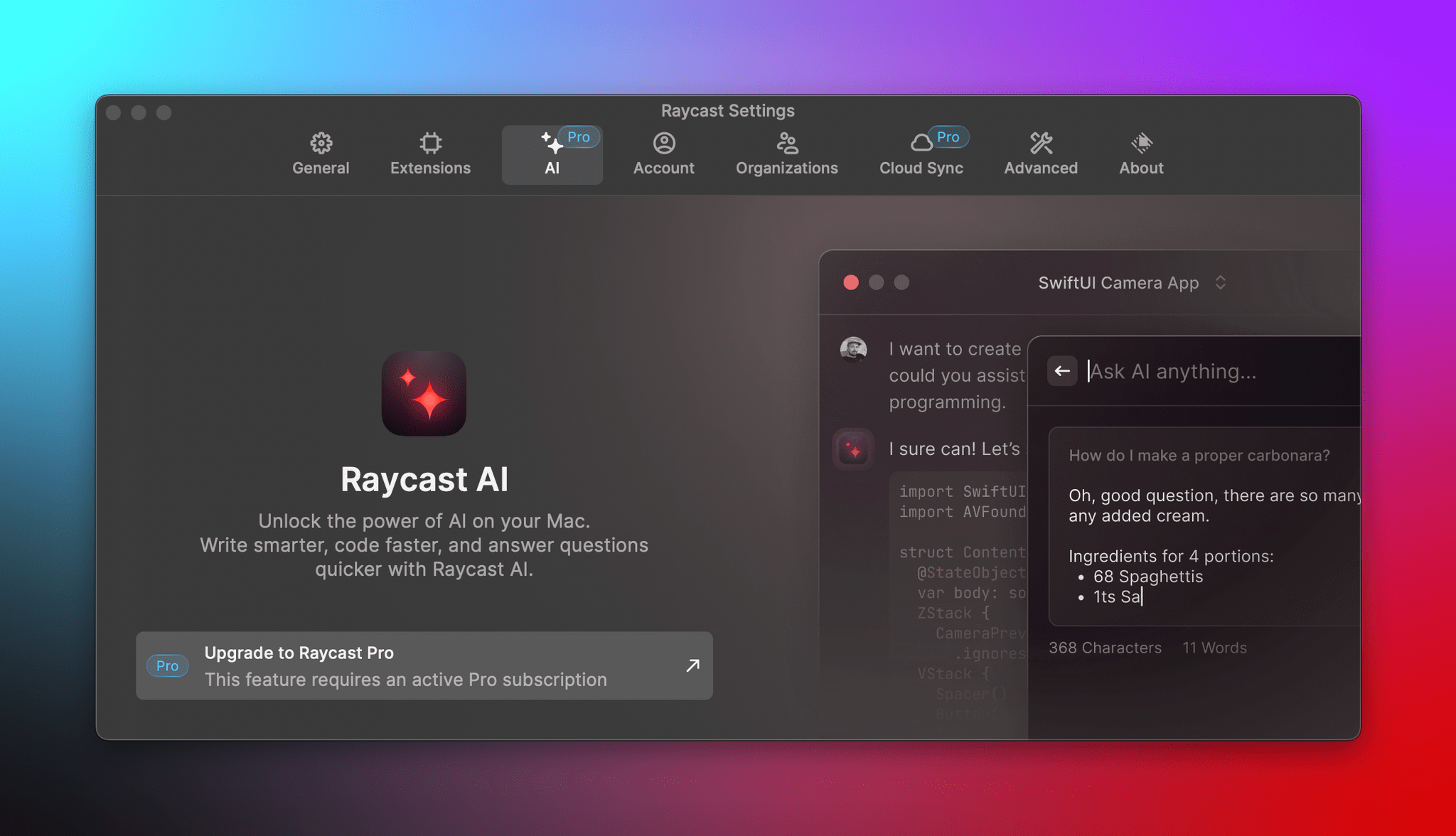
Raycast Pro, which is $8 per month when billed annually and is also included in Team plans, includes three artificial intelligence features:

  • Quick AI, which is meant to provide one-off answers that can be copied and pasted into whatever you’re working on
  • AI Chat, a chatbot window that floats onscreen, allowing for back-and-forth interaction
  • AI Commands, which include built-in commands for things like spelling and grammar checking, along with customizable commands

According to Raycast’s FAQs, the app uses OpenAI’s GPT 3 and GPT 3.5-Turbo large language models “as well as some other models” for their AI features and does not offer an option to use your own OpenAI API key.

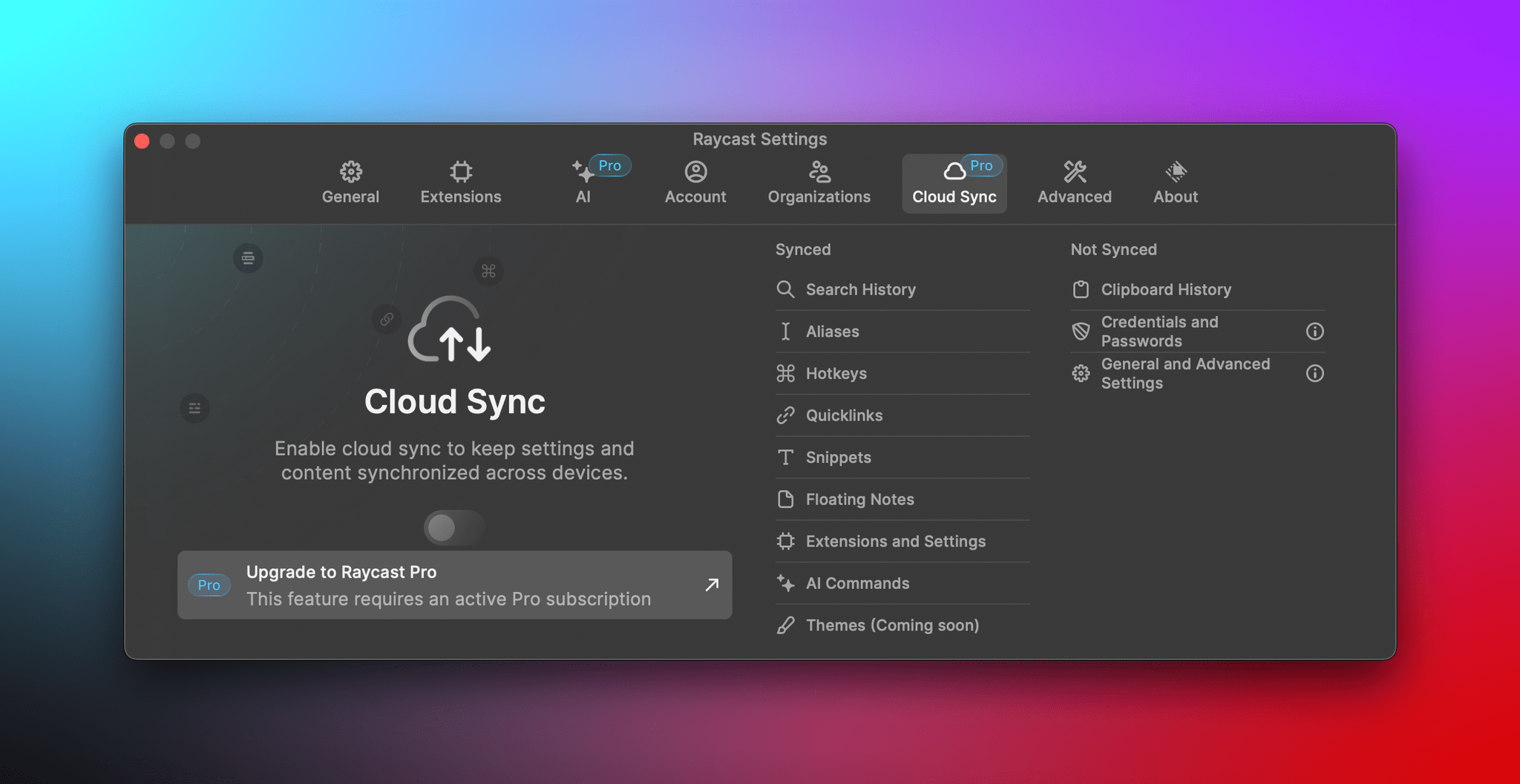
If you use Raycast on multiple Macs, a Pro subscription will allow you to flip a toggle to sync items like Extensions, Quicklinks, Snippets, and Hotkeys. Subscribers can customize Raycast with themes and build their own sharable themes in the app’s Theme Studio too. Finally, a subscription adds an unlimited clipboard history that is stored locally on your Mac and not synced as part of the app’s new sync features for security reasons. Free users are limited to a maximum of three months of clipboard history.

For anyone who relies heavily on AI for their work or has complex Raycast setups that they find hard to maintain across multiple Macs, a Raycast Pro subscription should be attractive. For everyone else, you can still take advantage of the free features, which haven’t changed. I’ve relied on Raycast for more than a year now and don’t need the Pro features myself, but I’m glad to see Raycast expanding its offerings and ways users can support the app’s continued development.

Access Extra Content and Perks

Founded in 2015, Club MacStories has delivered exclusive content every week for nearly a decade.

What started with weekly and monthly email newsletters has blossomed into a family of memberships designed for every MacStories fan.

Learn more here and from our Club FAQs.

Club MacStories: Weekly and monthly newsletters via email and the web that are brimming with apps, tips, automation workflows, longform writing, early access to the MacStories Unwind podcast, periodic giveaways, and more;

Club MacStories+: Everything that Club MacStories offers, plus an active Discord community, advanced search and custom RSS features for exploring the Club’s entire back catalog, bonus columns, and dozens of app discounts;

Club Premier: All of the above and AppStories+, an extended version of our flagship podcast that’s delivered early, ad-free, and in high-bitrate audio.

Learn more here and from our Club FAQs.


Last Week, on Club MacStories: Using Dropover with Shortcuts, Mona Tips, an Apple Podcasts Experiment, and Giveaway

Because Club MacStories now encompasses more than just newsletters, we’ve created a guide to the past week’s happenings:

MacStories Weekly: Issue 367

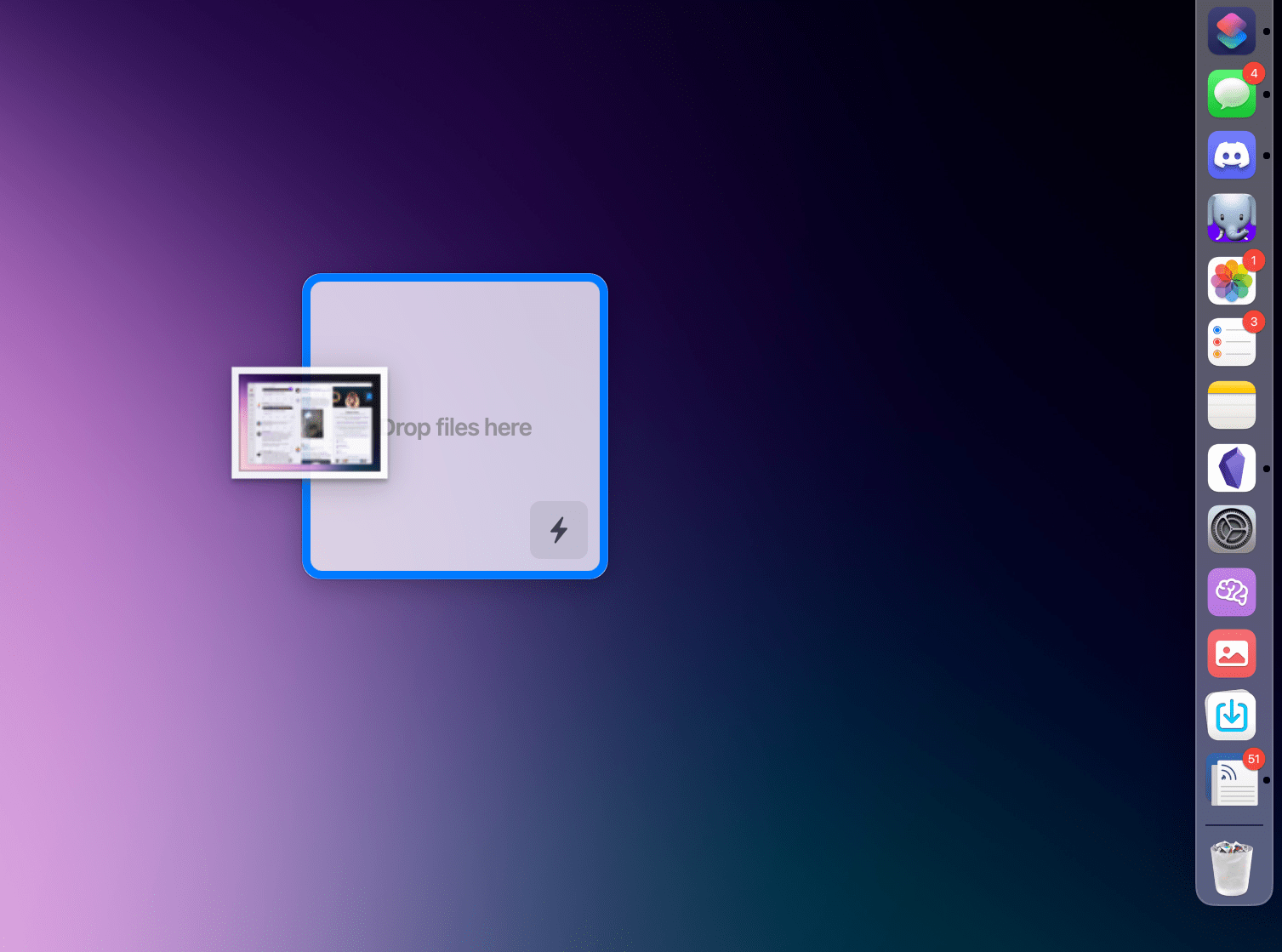
Sending images to Shortcuts using Dropover.

Sending images to Shortcuts using Dropover.

Access Extra Content and Perks

Founded in 2015, Club MacStories has delivered exclusive content every week for nearly a decade.

What started with weekly and monthly email newsletters has blossomed into a family of memberships designed for every MacStories fan.

Learn more here and from our Club FAQs.

Club MacStories: Weekly and monthly newsletters via email and the web that are brimming with apps, tips, automation workflows, longform writing, early access to the MacStories Unwind podcast, periodic giveaways, and more;

Club MacStories+: Everything that Club MacStories offers, plus an active Discord community, advanced search and custom RSS features for exploring the Club’s entire back catalog, bonus columns, and dozens of app discounts;

Club Premier: All of the above and AppStories+, an extended version of our flagship podcast that’s delivered early, ad-free, and in high-bitrate audio.

Learn more here and from our Club FAQs.


Apple Announces Pride Edition Sports Band, Watch Face, and iPhone Wallpaper

Source: Apple.

Source: Apple.

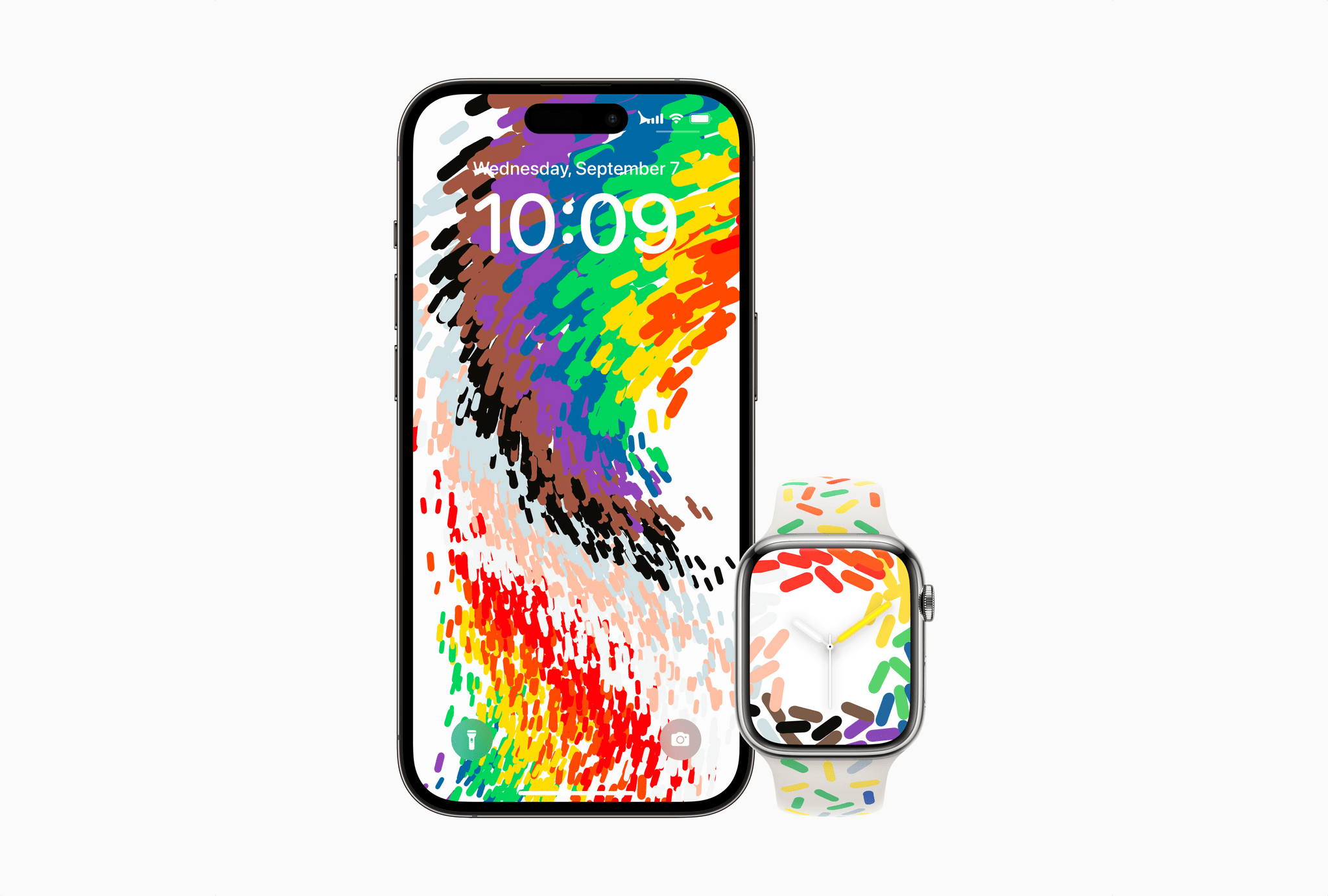
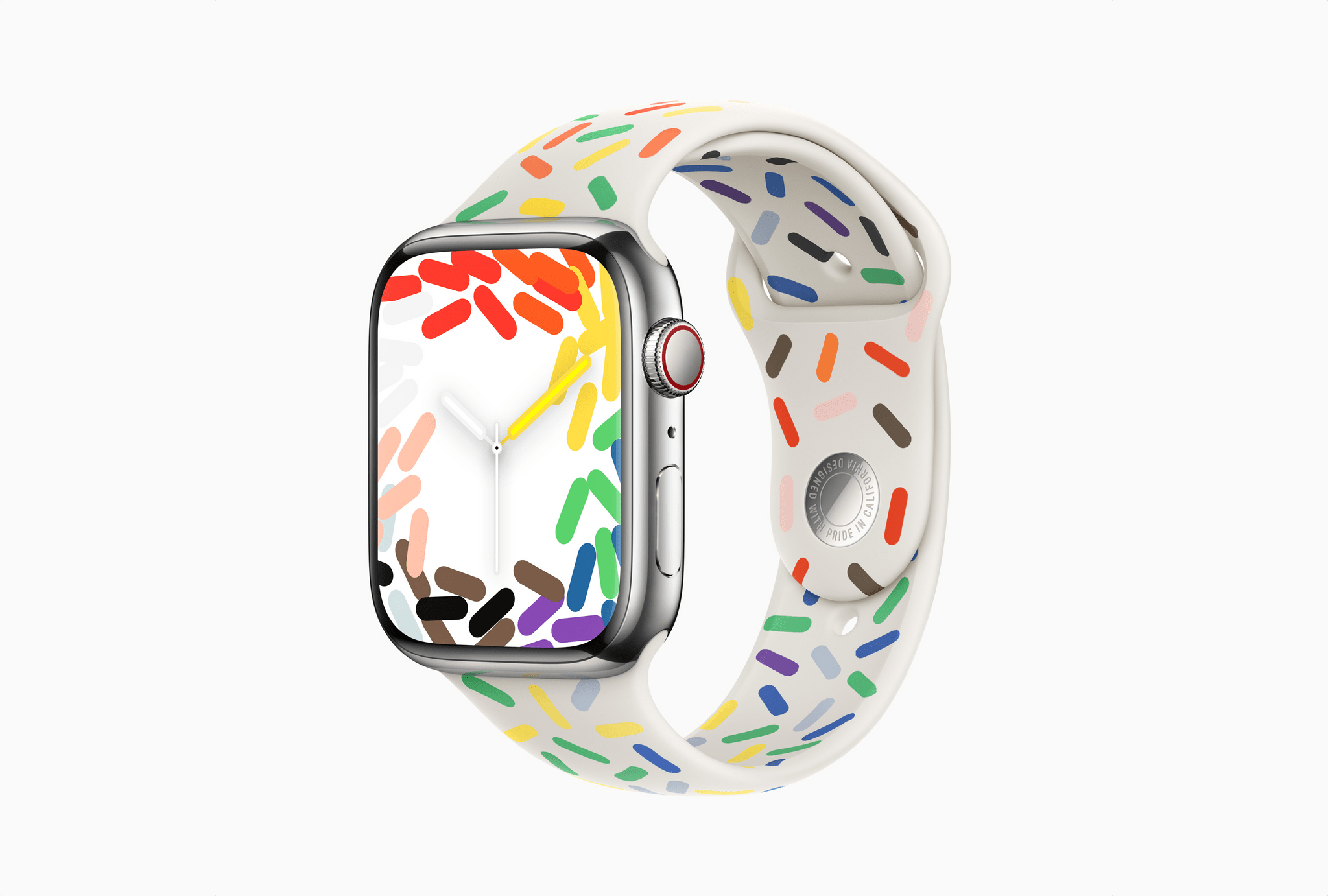
Today, Apple also announced its annual Pride Edition Apple Watch band, along with a similarly-designed watch face and iPhone wallpaper.

The band is a Sports Band model that Apple says is:

Inspired by the strength and beauty of the LGBTQ+ community, the new Sport Band design showcases the original pride flag rainbow colors and five others — black and brown symbolize Black and Latin communities, in addition to those who have passed away from or are living with HIV/AIDS, while light blue, pink, and white represent transgender and nonbinary individuals.

Source: Apple.

Source: Apple.

The watch face compliments the band using the same graphical elements around the edges of an analog clock. The iPhone wallpaper takes a slightly different approach blending the colorful elements of the watch band into a river-like stream of color.

The Pride Edition Sports Band will be available at Apple Stores and online beginning May 23rd for $49 for 41mm and 45mm Apple Watches. The watch face and iPhone wallpaper will be released next week, presumably with an update to watchOS and iOS.

Access Extra Content and Perks

Founded in 2015, Club MacStories has delivered exclusive content every week for nearly a decade.

What started with weekly and monthly email newsletters has blossomed into a family of memberships designed for every MacStories fan.

Learn more here and from our Club FAQs.

Club MacStories: Weekly and monthly newsletters via email and the web that are brimming with apps, tips, automation workflows, longform writing, early access to the MacStories Unwind podcast, periodic giveaways, and more;

Club MacStories+: Everything that Club MacStories offers, plus an active Discord community, advanced search and custom RSS features for exploring the Club’s entire back catalog, bonus columns, and dozens of app discounts;

Club Premier: All of the above and AppStories+, an extended version of our flagship podcast that’s delivered early, ad-free, and in high-bitrate audio.

Learn more here and from our Club FAQs.


Final Cut Pro and Logic Pro Are Coming to the iPad on May 23rd

Source: Apple.

Source: Apple.

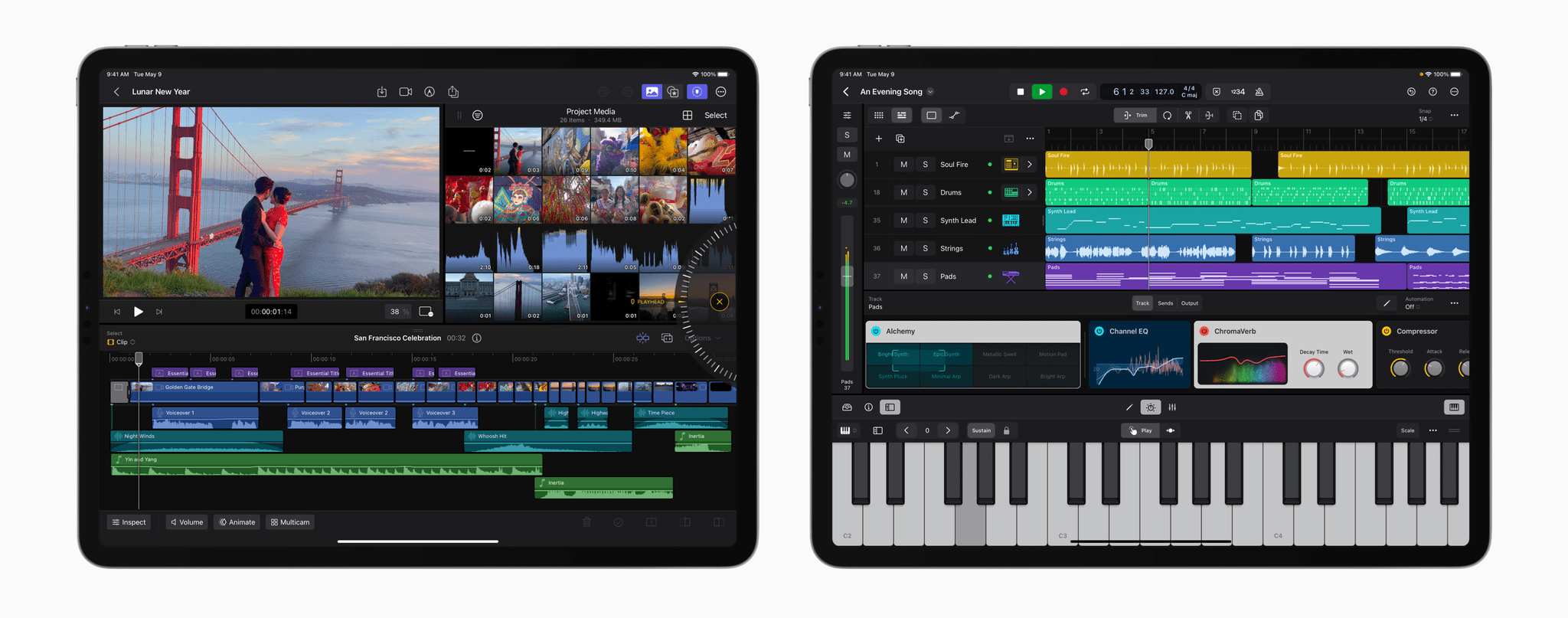
At long last, Apple has announced Final Cut Pro and Logic Pro for the iPad. Ever since the introduction of the iPad Pro, iPad power users have wondered where the ‘pro’ apps were. Third parties released pro-level creative tools, but Apple’s lineup of apps was conspicuously absent. That looks like it’s changing with today’s announcement that Final Cut Pro and Logic Pro are coming as subscription-based apps on Tuesday, May 23rd.

According to Apple’s press release:

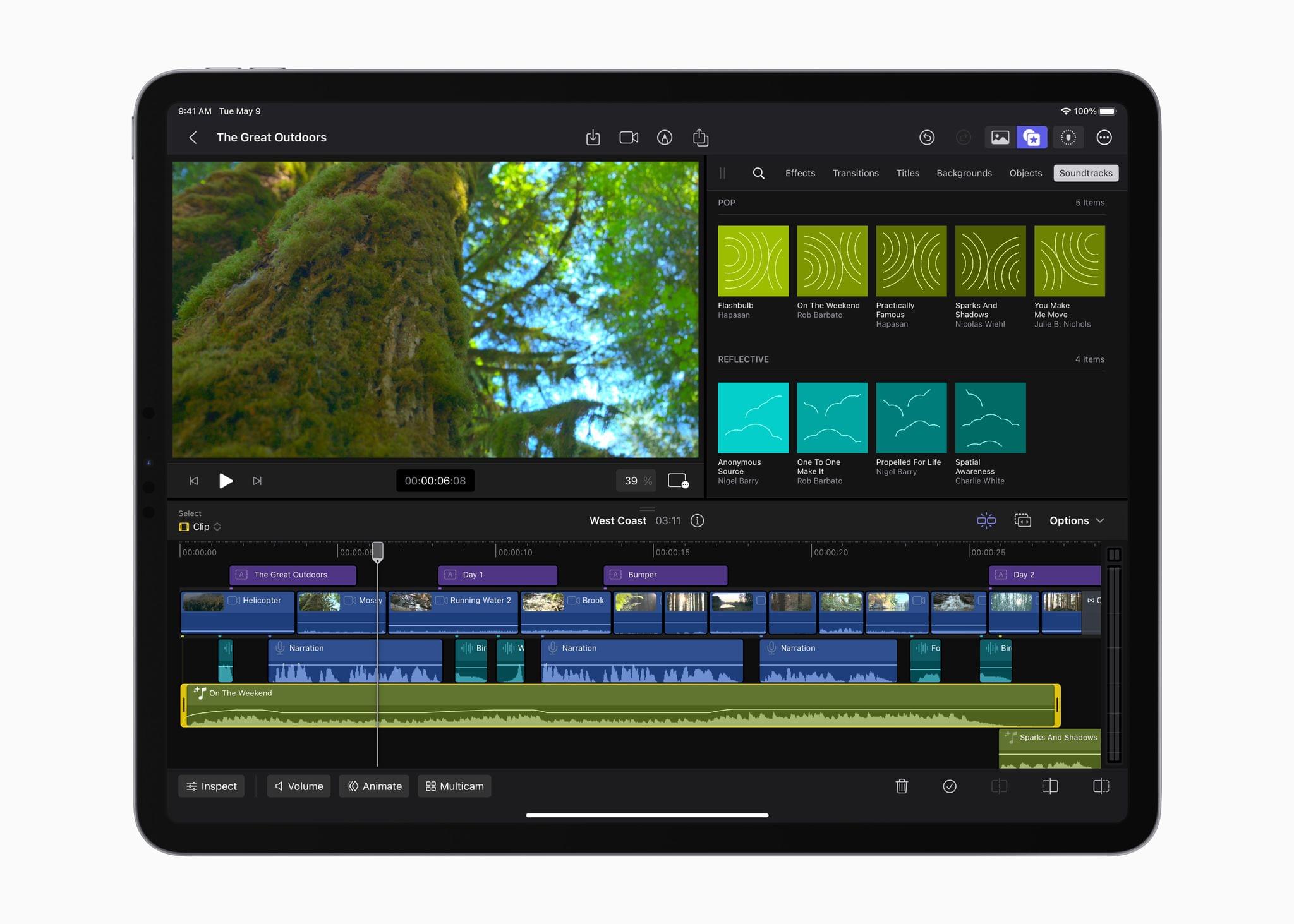
Final Cut Pro for iPad introduces an all-new touch interface and intuitive tools — unlocking new workflows for video creators. A new jog wheel makes the editing process easier than ever and enables users to interact with content in completely new ways. They can navigate the Magnetic Timeline, move clips, and make fast frame-accurate edits with just the tap of a finger, and with the immediacy and intuitiveness of Multi-Touch gestures, push their creativity to new heights.

Source: Apple.

Source: Apple.

Apple says users with an M2 iPad Pro will be able to skim and preview footage using the Apple Pencil’s hover functionality. The app will also support keyboard shortcuts when connected to a Magic Keyboard.

According to Apple’s press release, Final Cut Pro will support single-device field recording, with the M2 iPad Pro supporting ProRes video. The app will also support multicam editing, which can be automatically synced together.

Auto-cropping of the subject of a video will be possible thanks to machine learning. The app will also use machine learning to assist users with cropping to common video sizes and isolating recorded voices.

Source: Apple.

Source: Apple.

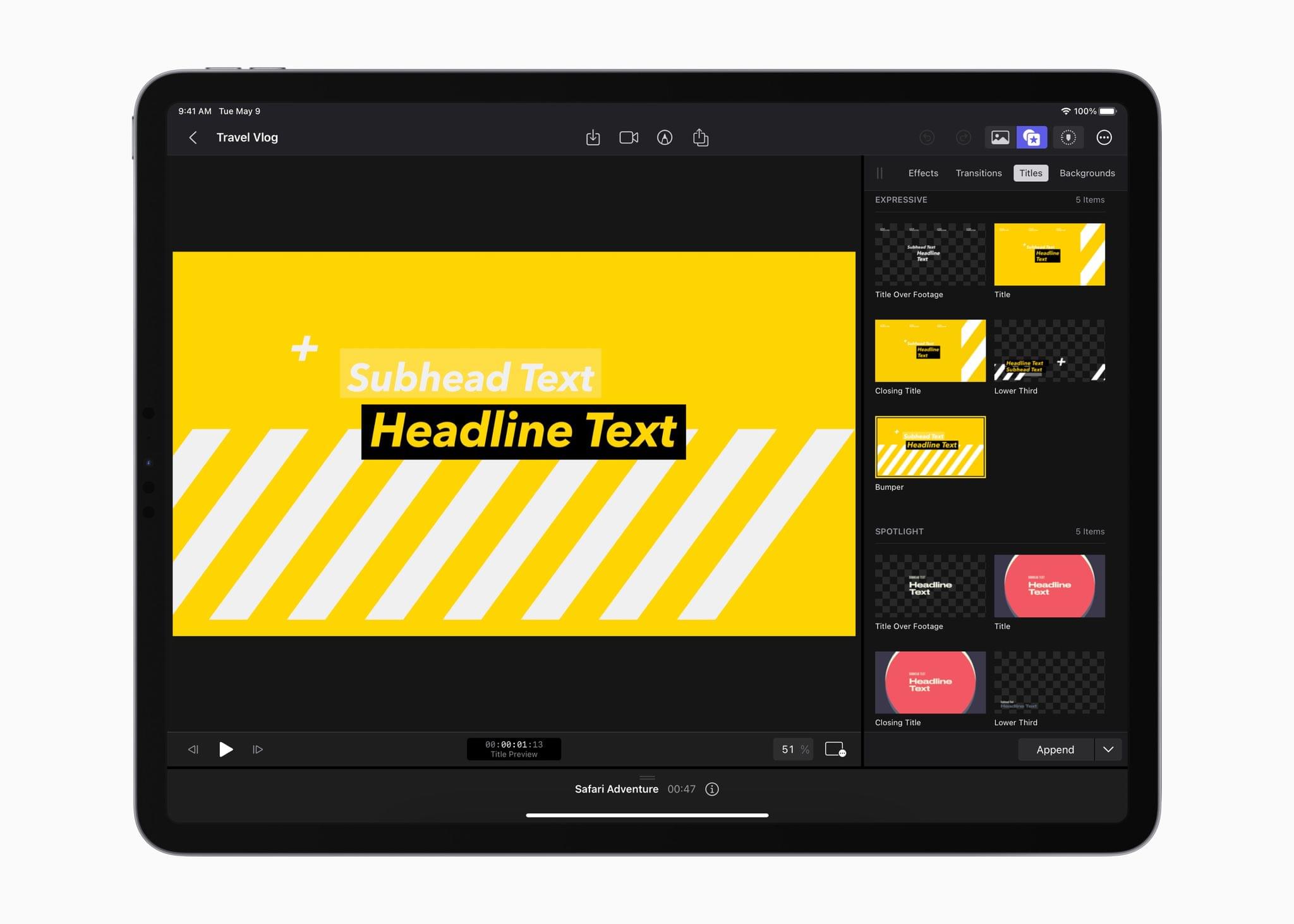
Apple also says the app will come with a “vast library” of professional graphics, effects, audio, and animation that can be automatically adjusted to the length of a video. Finally, Final Cut Pro will be able to import from the Files and Photos app and supports iMovie projects. Plus, it will be able to export to Final Cut Projects that are compatible with the Mac version of the app.

Source: Apple.

Source: Apple.

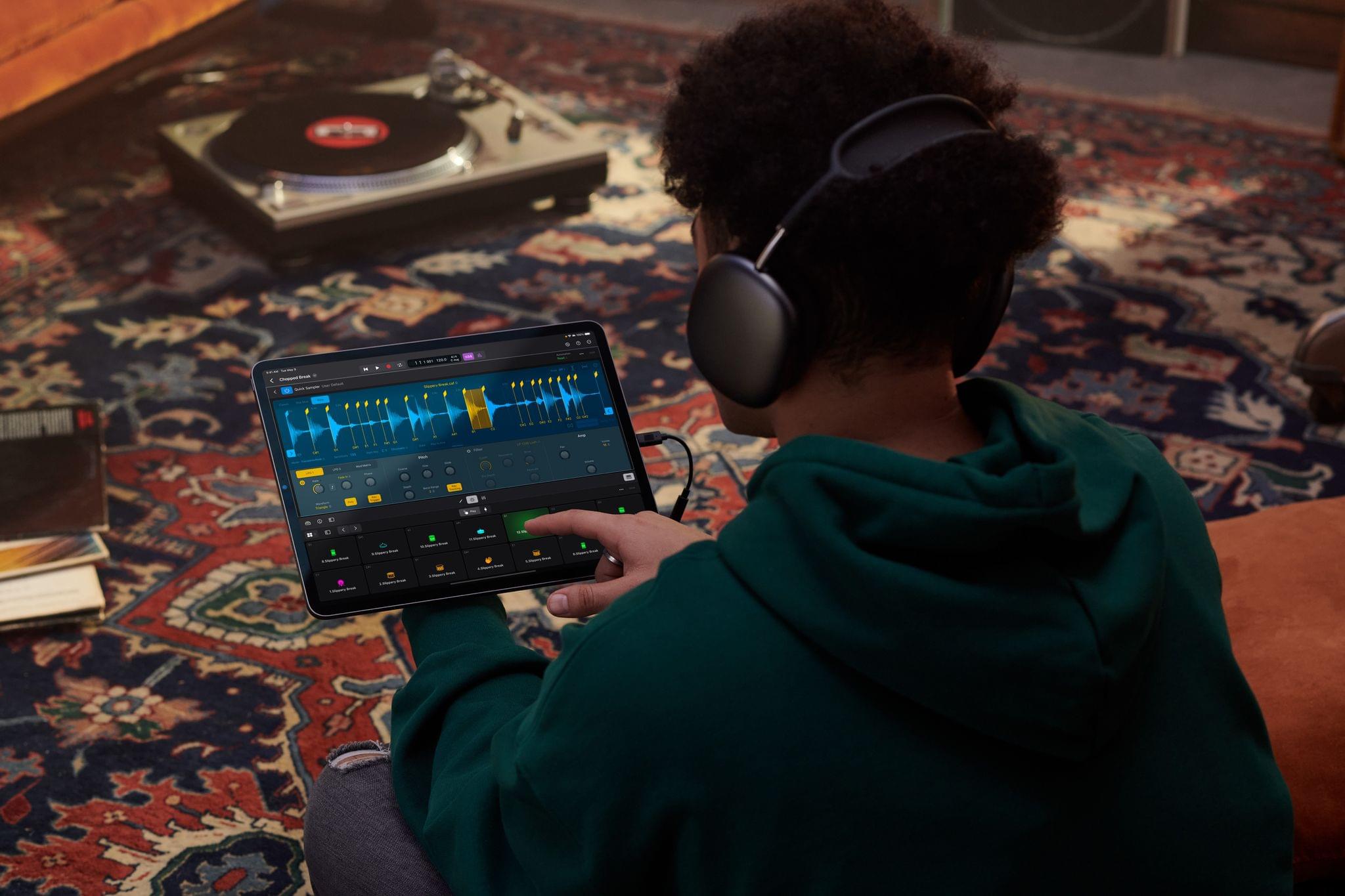
Apple says that Logic Pro will take advantage of Multi-Touch gestures for manipulating a project as well as Plug-in Tiles that will provide convenient access to certain controls. The iPad’s microphones will also be available as an audio source.

Source: Apple.

Source: Apple.

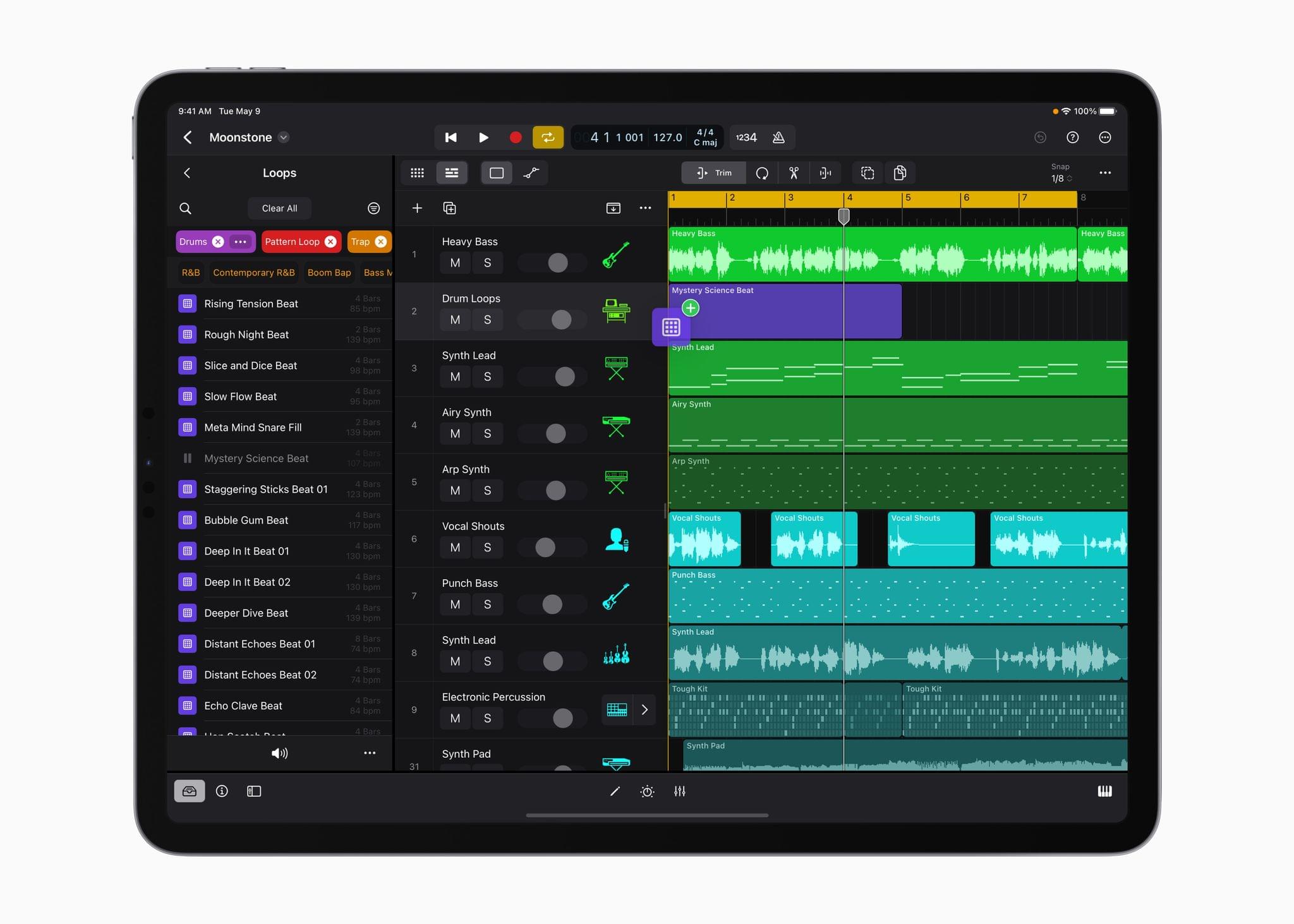
The app will also debut a sound browser:

The sound browser displays all available instrument patches, audio patches, plug‑in presets, samples, and loops in a single location, and users can tap to audition any sound before loading it into a project to save time and stay in their creative flow.

Also included in the app are over 100 instruments and effects, synths, including one called Sample Alchemy for manipulating audio samples, and an extensive set of tools for creating beats. Logic Pro for iPad will work with compatible third-party hardware like microphones, instruments, and MIDI controllers too.

Source: Apple.

Source: Apple.

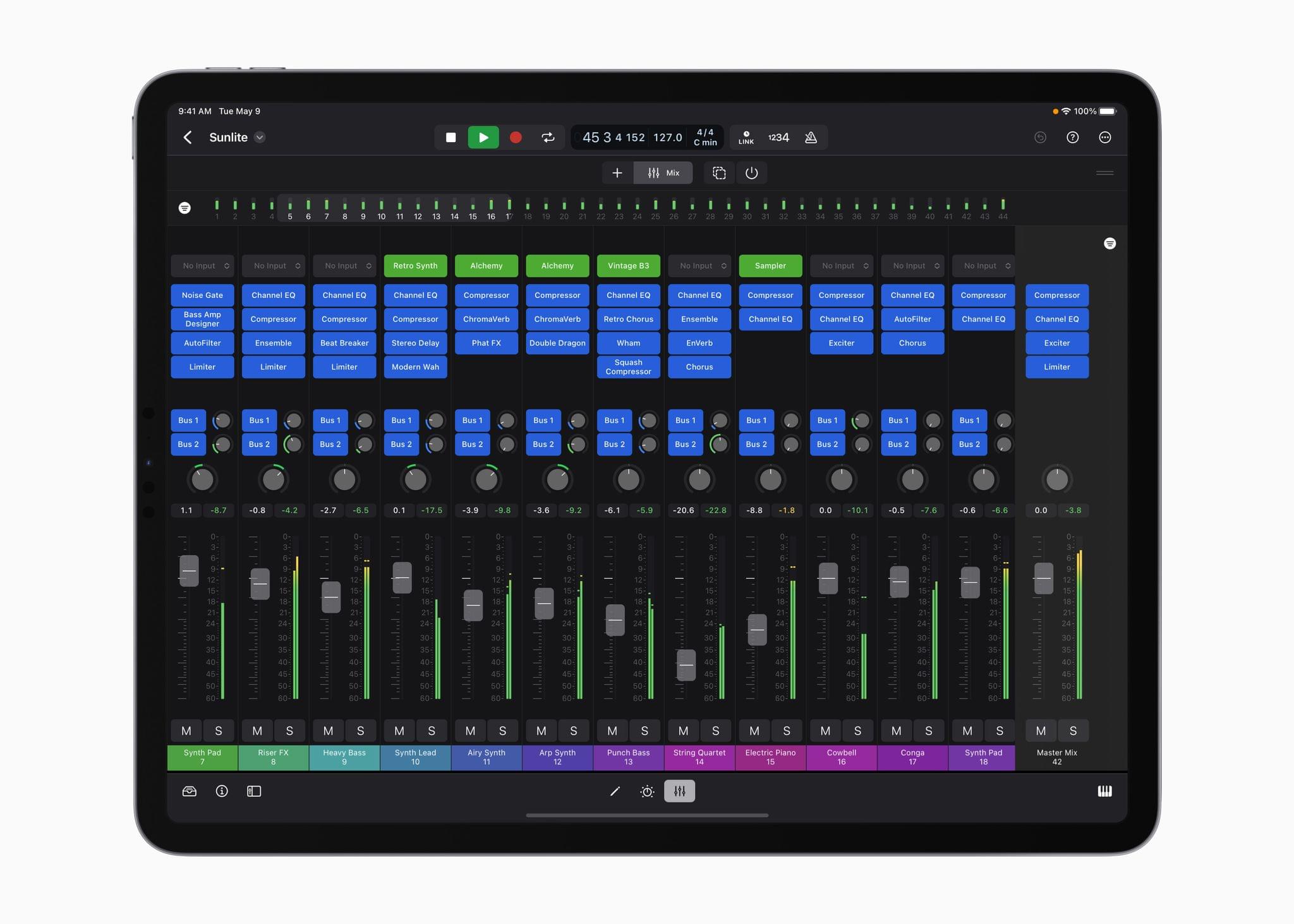
When it’s time to mix your creation, Apple says:

Multi-Touch enables creators to mix intuitively and move multiple faders at once, and the mixer meter bridge lets them quickly navigate an overview of track levels, all from iPad.

Finally, Logic Pro will support round-tripping to the Mac version of the app, GarageBand for iOS projects, and exporting in a variety of compressed and lossless formats or as individual track stems.

According to Apple:

Final Cut Pro is compatible with M1 chip iPad models or later, and Logic Pro will be available on A12 Bionic chip iPad models or later. Final Cut Pro for iPad and Logic Pro for iPad require iPadOS 16.4.

I’m glad to see Final Cut Pro and Logic Pro finally coming to the iPad. It remains to be seen how each stands up in comparison to their Mac siblings, but from Apple’s press release alone, these will clearly be more powerful and capable apps than either iMovie or GarageBand.

Final Cut Pro and Logic Pro for iPad will be available on the App Store beginning on Tuesday, May 23rd as subscriptions for $4.99/month or $49/year after a one-month free trial.

Access Extra Content and Perks

Founded in 2015, Club MacStories has delivered exclusive content every week for nearly a decade.

What started with weekly and monthly email newsletters has blossomed into a family of memberships designed for every MacStories fan.

Learn more here and from our Club FAQs.

Club MacStories: Weekly and monthly newsletters via email and the web that are brimming with apps, tips, automation workflows, longform writing, early access to the MacStories Unwind podcast, periodic giveaways, and more;

Club MacStories+: Everything that Club MacStories offers, plus an active Discord community, advanced search and custom RSS features for exploring the Club’s entire back catalog, bonus columns, and dozens of app discounts;

Club Premier: All of the above and AppStories+, an extended version of our flagship podcast that’s delivered early, ad-free, and in high-bitrate audio.

Learn more here and from our Club FAQs.


MacStories Unwind: A Goat Walks into a Dive Bar

AppStories+ Deeper into the world of apps
0:00
26:58

AppStories+ Deeper into the world of apps


This week on MacStories Unwind, we have important follow-up about potato chip flavors, an exploration of American dive bars, the art of winning an argument by shouting ‘Goat!’, and the record by boygenius.

Unite 4 – Turn Websites into Apps on Your Mac.

Show Notes

Chip Follow-Up

Dive Bars

Vittorio Sgarbi

Joint Pick

Access Extra Content and Perks

Founded in 2015, Club MacStories has delivered exclusive content every week for nearly a decade.

What started with weekly and monthly email newsletters has blossomed into a family of memberships designed for every MacStories fan.

Learn more here and from our Club FAQs.

Club MacStories: Weekly and monthly newsletters via email and the web that are brimming with apps, tips, automation workflows, longform writing, early access to the MacStories Unwind podcast, periodic giveaways, and more;

Club MacStories+: Everything that Club MacStories offers, plus an active Discord community, advanced search and custom RSS features for exploring the Club’s entire back catalog, bonus columns, and dozens of app discounts;

Club Premier: All of the above and AppStories+, an extended version of our flagship podcast that’s delivered early, ad-free, and in high-bitrate audio.

Learn more here and from our Club FAQs.


Apple Reports Q2 2023 Earnings

It’s been a rough year for the tech industry as a whole. In the wake of a COVID-induced spending spree on computers and other gadgets, and faced with rising prices, consumer demand for tech products has taken a nose dive.

The lack of new hardware announcements has undoubtedly been another drag on Apple’s earnings. For several years, Apple held a spring press event to debut device updates but not in 2023.

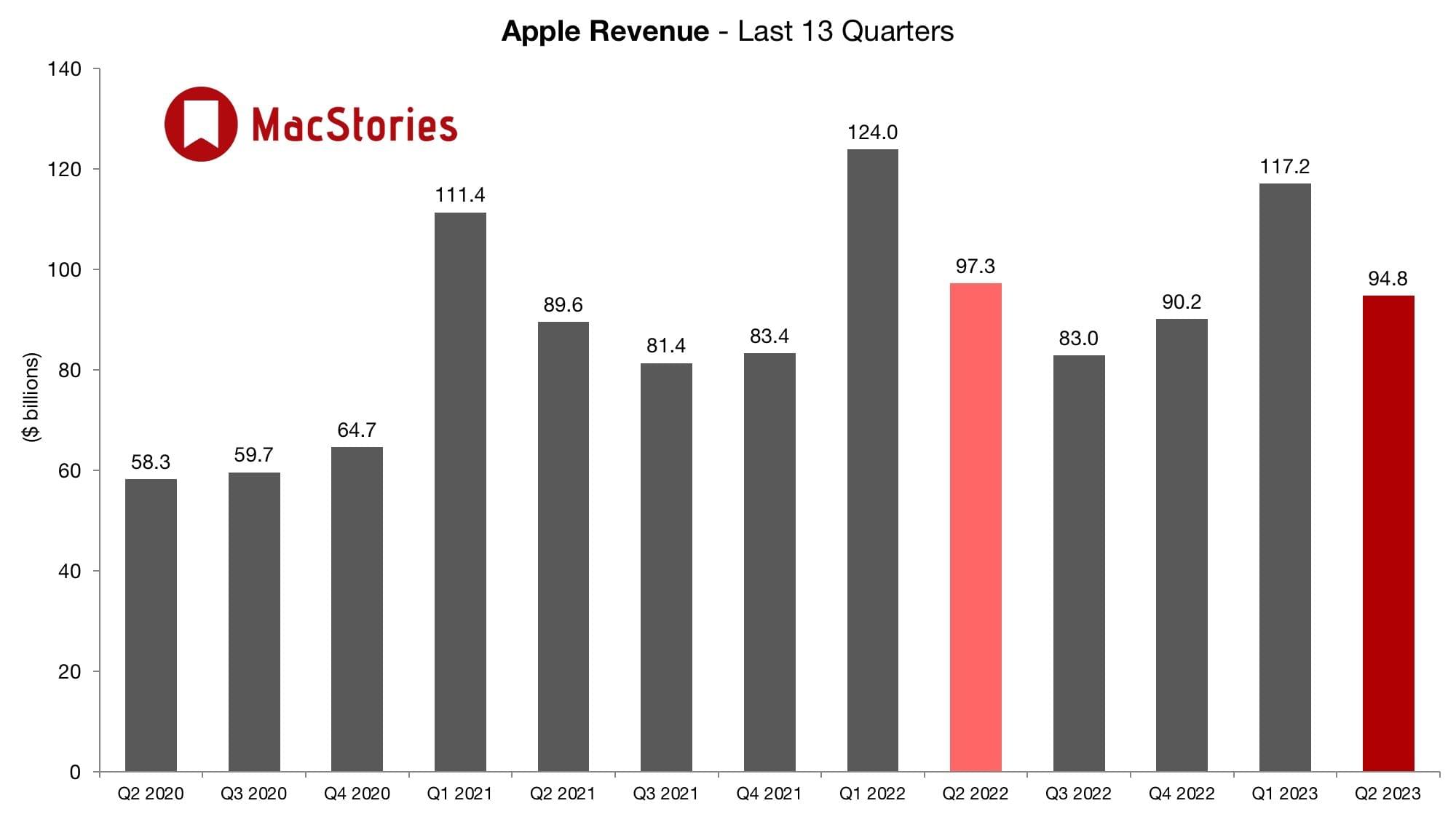
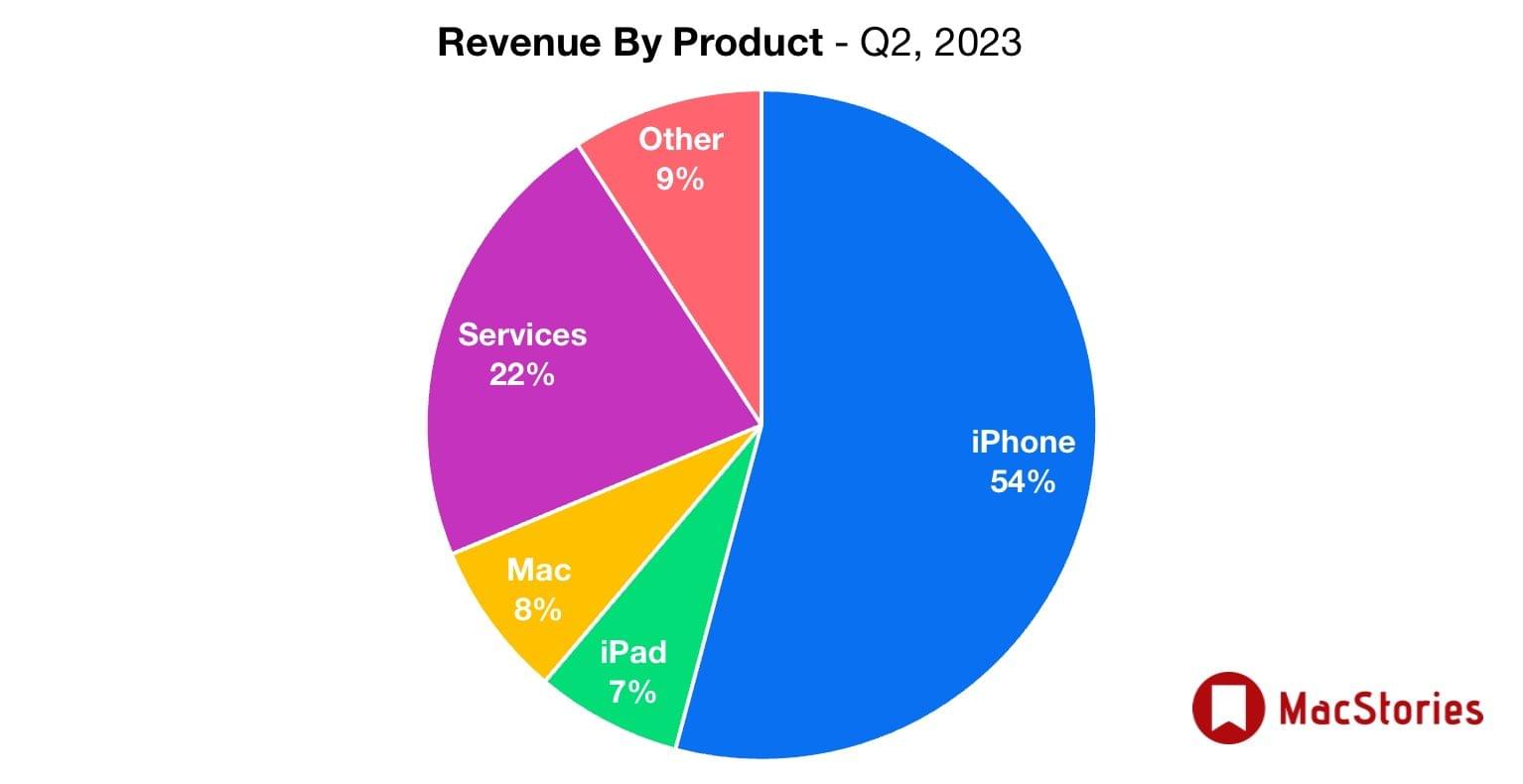
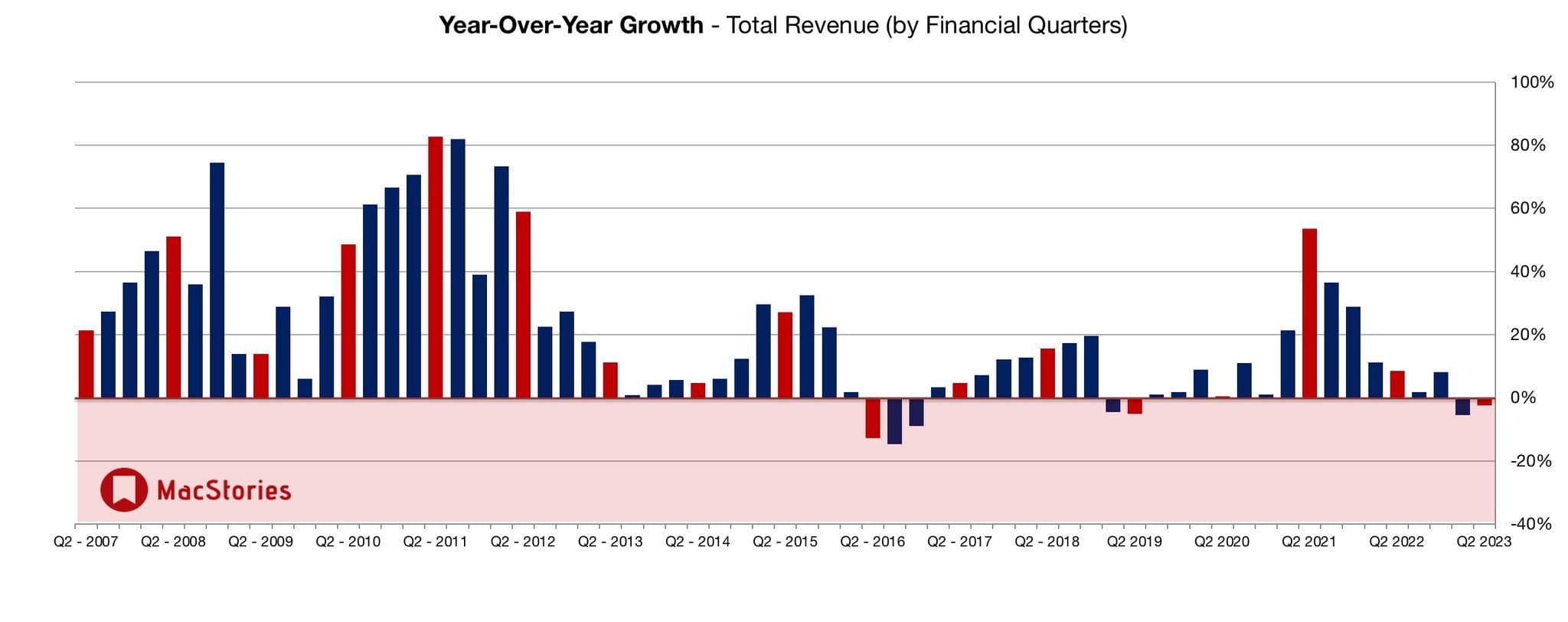
Although the company has managed to avoid the massive layoffs that have occurred at many tech companies, today’s earning show that it’s not immune from falling consumer demand. For its second fiscal quarter of 2023, Apple reported total revenue of 94.8 billion, which is a 3% year-over-year drop that includes a reduction in Mac sales and a significant drop in iPad sales, dips that were slightly less severe than analyst expectations but still dips. The company also announced stock buybacks of $90 billion and a $0.24/share dividend, which is expected to calm market reactions to its lower sales.

Tim Cook, Apple’s CEO, had this to say about the company’s earnings:

We are pleased to report an all-time record in Services and a March quarter record for iPhone despite the challenging macroeconomic environment, and to have our installed base of active devices reach an all-time high. We continue to invest for the long term and lead with our values, including making major progress toward building carbon neutral products and supply chains by 2030.

If there’s a silver lining in today’s earnings, it’s that services and iPhones served to mitigate weak sales in other areas of Apple’s product lineup. In any event, Q2 historically hasn’t been a very interesting quarter for Apple. With rumored AV/VR headset on the way at WWDC, it will be far more interesting to see how financial markets react later this year and next.

Access Extra Content and Perks

Founded in 2015, Club MacStories has delivered exclusive content every week for nearly a decade.

What started with weekly and monthly email newsletters has blossomed into a family of memberships designed for every MacStories fan.

Learn more here and from our Club FAQs.

Club MacStories: Weekly and monthly newsletters via email and the web that are brimming with apps, tips, automation workflows, longform writing, early access to the MacStories Unwind podcast, periodic giveaways, and more;

Club MacStories+: Everything that Club MacStories offers, plus an active Discord community, advanced search and custom RSS features for exploring the Club’s entire back catalog, bonus columns, and dozens of app discounts;

Club Premier: All of the above and AppStories+, an extended version of our flagship podcast that’s delivered early, ad-free, and in high-bitrate audio.

Learn more here and from our Club FAQs.


Last Week, on Club MacStories: Raindrop, Obsidian Automation on the Apple Watch, iPad Apps on the Mac, and Too Many Genius Bar Visits

Because Club MacStories now encompasses more than just newsletters, we’ve created a guide to the past week’s happenings:

MacStories Weekly: Issue 366

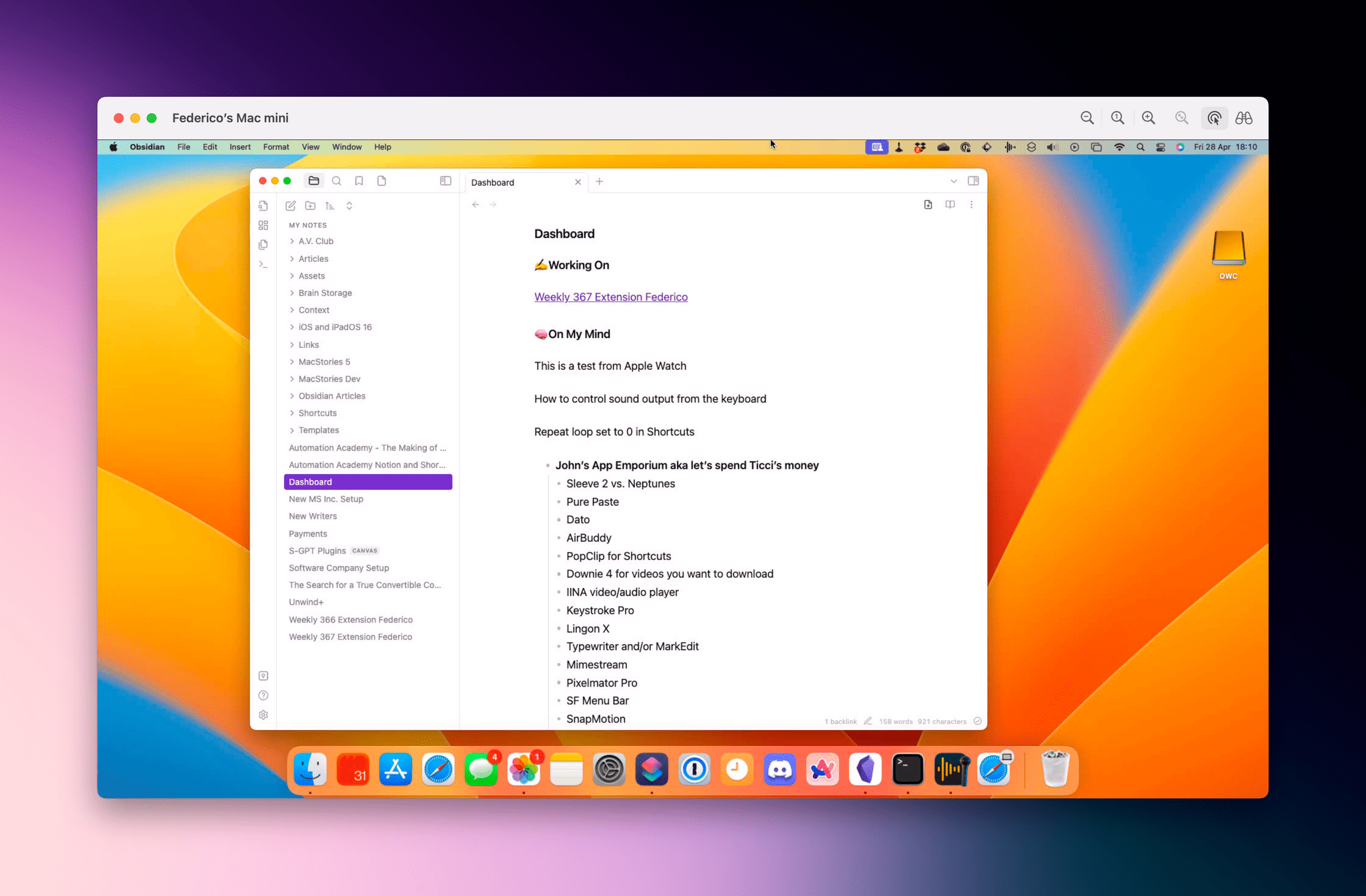
Federico's Mac mini server.

Federico’s Mac mini server.

Monthly Log for April 2023

Making iPad apps readable on the Mac.

Making iPad apps readable on the Mac.

Access Extra Content and Perks

Founded in 2015, Club MacStories has delivered exclusive content every week for nearly a decade.

What started with weekly and monthly email newsletters has blossomed into a family of memberships designed for every MacStories fan.

Learn more here and from our Club FAQs.

Club MacStories: Weekly and monthly newsletters via email and the web that are brimming with apps, tips, automation workflows, longform writing, early access to the MacStories Unwind podcast, periodic giveaways, and more;

Club MacStories+: Everything that Club MacStories offers, plus an active Discord community, advanced search and custom RSS features for exploring the Club’s entire back catalog, bonus columns, and dozens of app discounts;

Club Premier: All of the above and AppStories+, an extended version of our flagship podcast that’s delivered early, ad-free, and in high-bitrate audio.

Learn more here and from our Club FAQs.


Apple and Google Submit Spec to Industry Group Addressing Unwanted Use of Item Trackers

As useful as they are for finding misplaced belongings, AirTags and other item location trackers are also misused to track people. Today, Apple and Google announced a joint effort aimed at creating an industry standard to combat unwanted tracking. According to a press release from Apple:

Today Apple and Google jointly submitted a proposed industry specification to help combat the misuse of Bluetooth location-tracking devices for unwanted tracking. The first-of-its-kind specification will allow Bluetooth location-tracking devices to be compatible with unauthorized tracking detection and alerts across iOS and Android platforms. Samsung, Tile, Chipolo, eufy Security, and Pebblebee have expressed support for the draft specification, which offers best practices and instructions for manufacturers, should they choose to build these capabilities into their products.

Apple says that the spec, which has been submitted to the Internet Engineering Task Force (IETF), incorporates input from device manufacturers as well as safety and advocacy groups.

Erica Olsen, the National Network to End Domestic Violence’s senior director of its Safety Net Project, said of the companies’ efforts:

This collaboration and the resulting standards are a significant step forward. NNEDV is encouraged by this progress. These new standards will minimize opportunities for abuse of this technology and decrease the burden on survivors in detecting unwanted trackers. We are grateful for these efforts and look forward to continuing to work together to address unwanted tracking and misuse.

The full specification is available on the IETF’s Datatracker website.

Access Extra Content and Perks

Founded in 2015, Club MacStories has delivered exclusive content every week for nearly a decade.

What started with weekly and monthly email newsletters has blossomed into a family of memberships designed for every MacStories fan.

Learn more here and from our Club FAQs.

Club MacStories: Weekly and monthly newsletters via email and the web that are brimming with apps, tips, automation workflows, longform writing, early access to the MacStories Unwind podcast, periodic giveaways, and more;

Club MacStories+: Everything that Club MacStories offers, plus an active Discord community, advanced search and custom RSS features for exploring the Club’s entire back catalog, bonus columns, and dozens of app discounts;

Club Premier: All of the above and AppStories+, an extended version of our flagship podcast that’s delivered early, ad-free, and in high-bitrate audio.

Learn more here and from our Club FAQs.


MacStories Unwind: Introducing the New Unwind and Unwind+

AppStories+ Deeper into the world of apps
0:00
36:43

AppStories+ Deeper into the world of apps


Welcome to the all-new MacStories Unwind+, a weekly extension of MacStories Unwind just for Club MacStories members that is ad-free, and delivered early each week in high-bitrate audio.

This week, Federico explains Unwind’s new format, and John introduces him to ‘The Crab Chip’ before moving on to this week’s picks, which include an update from Federico on How I Met Your Father and Pokémon Scarlet and from John, an un-pick, an electric grill, and The Last Thing He Told Me.

Introducing the New Unwind and Unwind+

The Crab Chip

Source: Utz.

Source: Utz.

Source: Eater.

Source: Eater.

The Picks

Access Extra Content and Perks

Founded in 2015, Club MacStories has delivered exclusive content every week for nearly a decade.

What started with weekly and monthly email newsletters has blossomed into a family of memberships designed for every MacStories fan.

Learn more here and from our Club FAQs.

Club MacStories: Weekly and monthly newsletters via email and the web that are brimming with apps, tips, automation workflows, longform writing, early access to the MacStories Unwind podcast, periodic giveaways, and more;

Club MacStories+: Everything that Club MacStories offers, plus an active Discord community, advanced search and custom RSS features for exploring the Club’s entire back catalog, bonus columns, and dozens of app discounts;

Club Premier: All of the above and AppStories+, an extended version of our flagship podcast that’s delivered early, ad-free, and in high-bitrate audio.

Learn more here and from our Club FAQs.