Posts in news

2023 ADA Finalists Announced

As has been the case the past couple of years, Apple has announced the finalists in the running for its annual Apple Design Awards. The awards ceremony revealing the winners will be held during WWDC at 6:30 pm Pacific on June 6th.

The finalists have been divided into six categories that include six finalists each:

Inclusivity

Delight and Fun

Interaction

Social Impact

Visuals and Graphics

Innovation

The selections include a broad selection of games and apps, including some apps from smaller developers like Knotwords, Afterplace, and Gentler Streak, as well as titles from bigger publishers.

This is the third year in a row that Apple has announced the finalists in advance, which I like a lot. Winning an ADA is a big achievement for any developer, but it’s also nice to know who the finalists are because it’s quite an honor among the many apps that could have been chosen too.

Access Extra Content and Perks

Founded in 2015, Club MacStories has delivered exclusive content every week for nearly a decade.

What started with weekly and monthly email newsletters has blossomed into a family of memberships designed for every MacStories fan.

Learn more here and from our Club FAQs.

Club MacStories: Weekly and monthly newsletters via email and the web that are brimming with apps, tips, automation workflows, longform writing, early access to the MacStories Unwind podcast, periodic giveaways, and more;

Club MacStories+: Everything that Club MacStories offers, plus an active Discord community, advanced search and custom RSS features for exploring the Club’s entire back catalog, bonus columns, and dozens of app discounts;

Club Premier: All of the above and AppStories+, an extended version of our flagship podcast that’s delivered early, ad-free, and in high-bitrate audio.

Learn more here and from our Club FAQs.


MacStories Unwind: Coming to America and Roasting Koroks

AppStories+ Deeper into the world of apps
0:00
24:25

AppStories+ Deeper into the world of apps


This week on MacStories Unwind, I put Federico’s knowledge of American geography to the test, and we follow up on what sets The Legend of Zelda: Tears of the Kingdom apart from Breath of the Wild.

Unplugged

Coming to America

  • Coming to America is a recurring MacStories Unwind quiz where John tests Federico’s knowledge of American geography, history, culture, and more.
  • Geography
    • What States would you pass through driving from Chicago, Illinois to Charlotte, North Carolina?
    • Name three states that start with ‘W’
      • If you were in West Virginia, how would you get to East Virginia?

Weekly Picks

The Legend of Zelda: Tears of the Kingdom

MacStories Unwind+

We deliver MacStories Unwind+ to Club MacStories subscribers ad-free and early with high bitrate audio every week.

To learn more about the benefits of a Club MacStories subscription, visit our Plans page.

Access Extra Content and Perks

Founded in 2015, Club MacStories has delivered exclusive content every week for nearly a decade.

What started with weekly and monthly email newsletters has blossomed into a family of memberships designed for every MacStories fan.

Learn more here and from our Club FAQs.

Club MacStories: Weekly and monthly newsletters via email and the web that are brimming with apps, tips, automation workflows, longform writing, early access to the MacStories Unwind podcast, periodic giveaways, and more;

Club MacStories+: Everything that Club MacStories offers, plus an active Discord community, advanced search and custom RSS features for exploring the Club’s entire back catalog, bonus columns, and dozens of app discounts;

Club Premier: All of the above and AppStories+, an extended version of our flagship podcast that’s delivered early, ad-free, and in high-bitrate audio.

Learn more here and from our Club FAQs.


AppStories, Episode 329 – Our watchOS 10 and tvOS 17 Wishes

This week on AppStories, we explain the changes to watchOS and tvOS that we’d like to see made in 2023.


On AppStories+, troubleshooting hardware and software issues.

We deliver AppStories+ to subscribers with bonus content, ad-free, and at a high bitrate early every week.

To learn more about the benefits included with an AppStories+ subscription, visit our Plans page, or read the AppStories+ FAQ.

Permalink

Apple Adds Live Music Features to Maps and Music

Source: Apple.

Source: Apple.

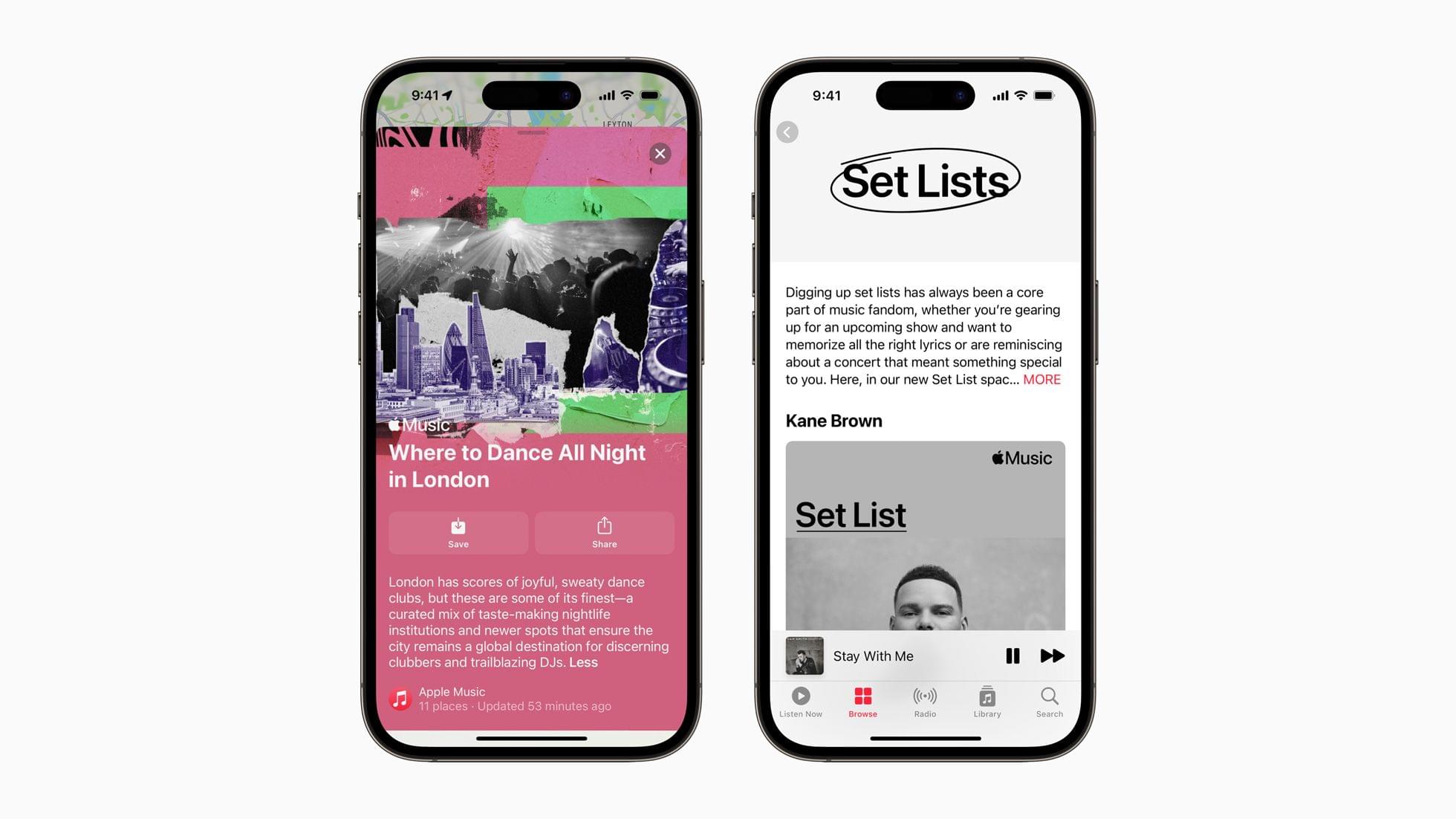
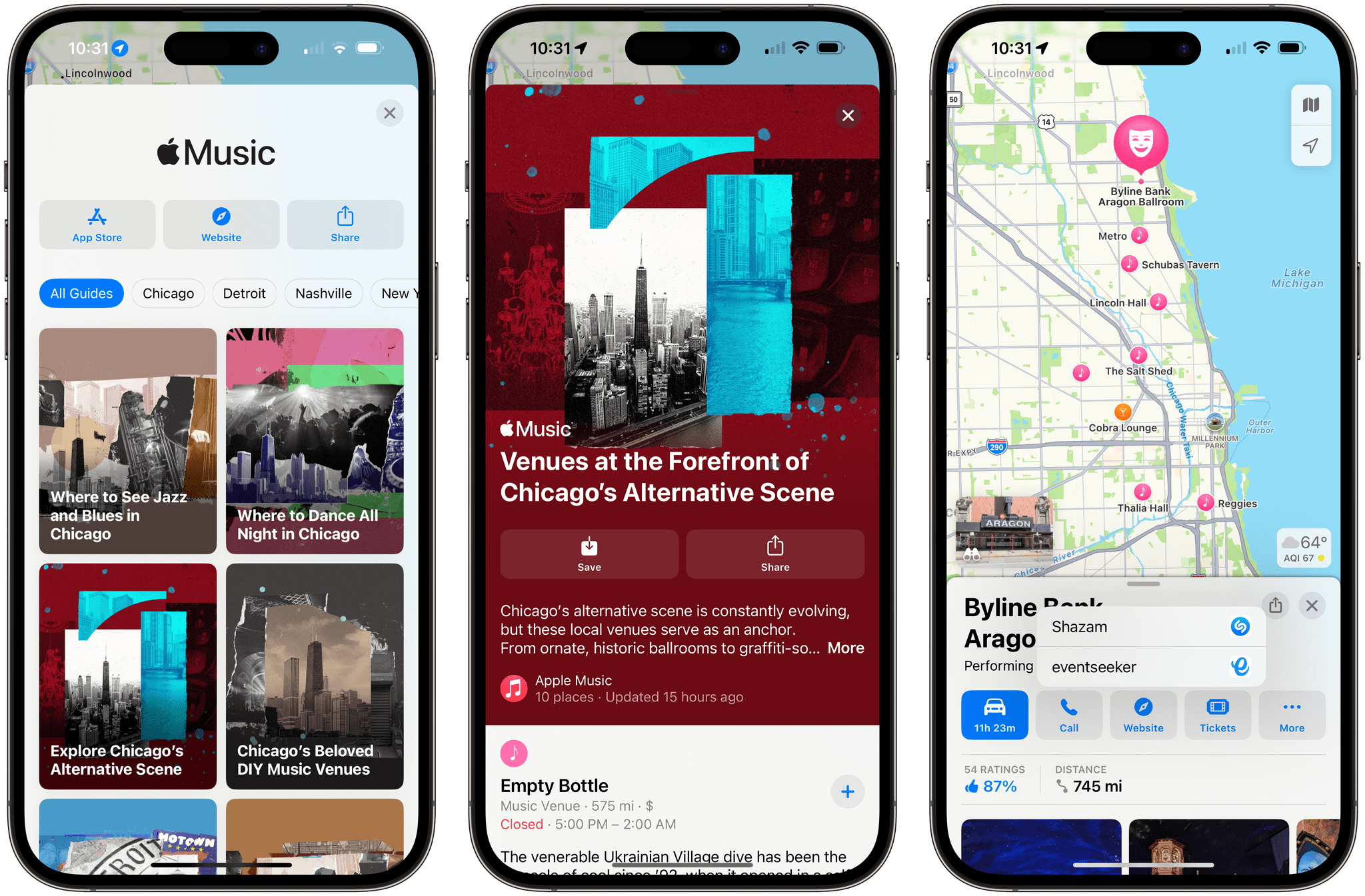
Today, Apple has launched new Apple Maps and Music features for live music fans. Apple Maps has added more than 40 Guides highlighting over 10 venues worldwide. In addition to editorial content about the music scenes in the featured cities, users can learn more about each venue and its upcoming shows using features that the Shazam app incorporated last spring, using information from Bandsintown.

Apple Music Guides.

Apple Music Guides.

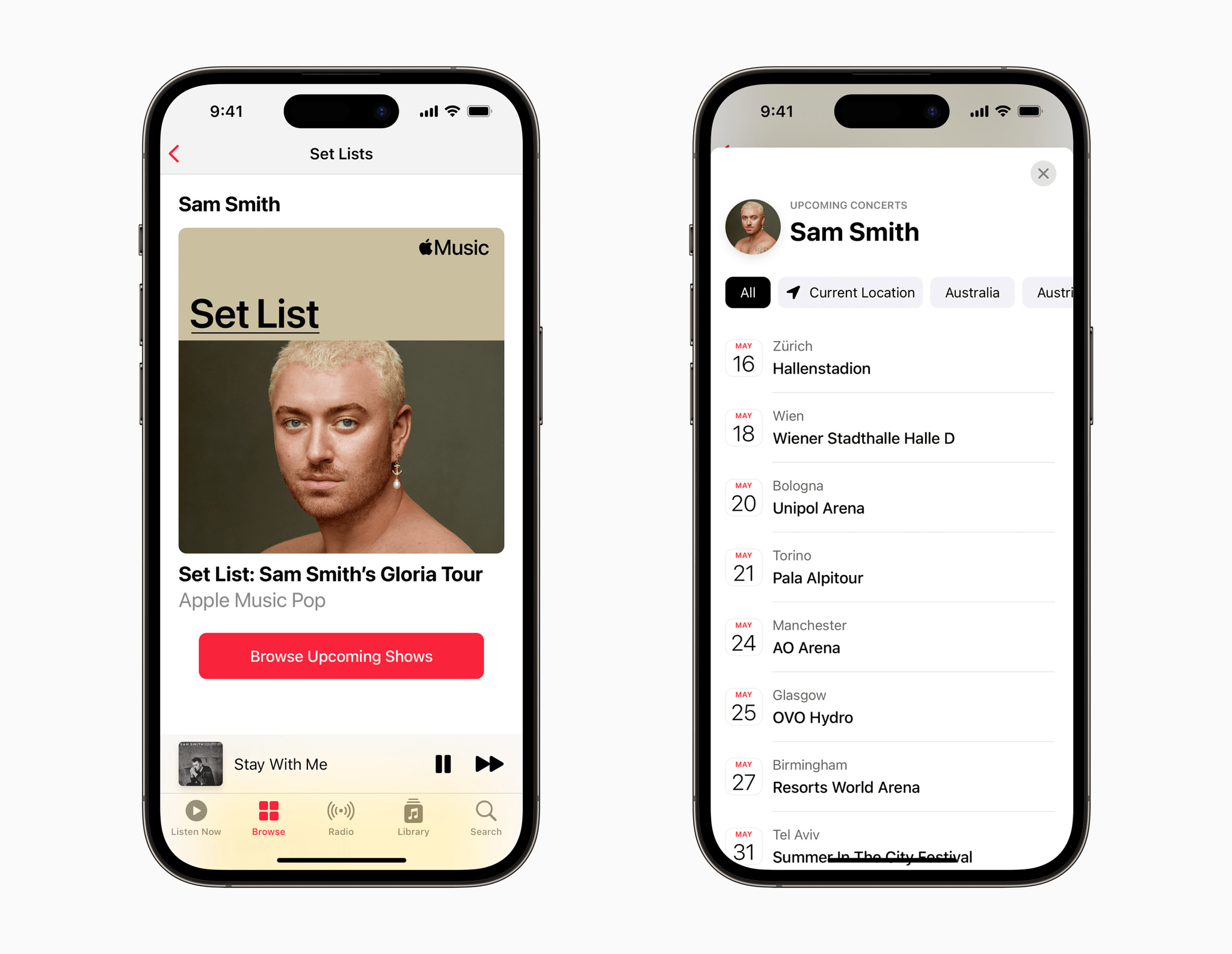
In the Music app, Apple has created a new category called Set Lists that offers information about major artists’ concerts, along with a playlist of songs they’re playing on tour. Apple’s press release says users can browse upcoming shows of the artists spotlighted in Set Lists using the same Shazam tools that power the similar Apple Maps feature too.

Set Lists. Source: Apple.

Set Lists. Source: Apple.

The new Apple Music Guides announced today include Chicago, Detroit, Los Angeles, Nashville, New York City, San Francisco, Berlin, London, Paris, Vienna, Tokyo, Melbourne, Sydney, and Mexico City. To view the guides, you can visit apple.co/MusicVenues. Set Lists are beginning to appear in Apple Music, too, although as of publication, I’ve only been able to locate them via search. Later, you should be able to browse all Set Lists at apple.co/setlists too.

It’s fantastic to see Apple Music and Maps expanding into live music. These sorts of features are something that Federico and I have been hoping Apple would implement for years, and I hope with time, we’ll see more guides for more cities around the world as well as a growing collection of Set Lists.

Access Extra Content and Perks

Founded in 2015, Club MacStories has delivered exclusive content every week for nearly a decade.

What started with weekly and monthly email newsletters has blossomed into a family of memberships designed for every MacStories fan.

Learn more here and from our Club FAQs.

Club MacStories: Weekly and monthly newsletters via email and the web that are brimming with apps, tips, automation workflows, longform writing, early access to the MacStories Unwind podcast, periodic giveaways, and more;

Club MacStories+: Everything that Club MacStories offers, plus an active Discord community, advanced search and custom RSS features for exploring the Club’s entire back catalog, bonus columns, and dozens of app discounts;

Club Premier: All of the above and AppStories+, an extended version of our flagship podcast that’s delivered early, ad-free, and in high-bitrate audio.

Learn more here and from our Club FAQs.


Apple Marks Global Accessibility Awareness Day with Features Coming to iOS, iPadOS, and macOS Later This Year

Thursday is Global Accessibility Awareness Day, and as in years past, Apple has previewed several new accessibility features coming later this year. This year, Apple is focusing on a wide range of accessibility features covering cognitive, vision, hearing, mobility, and speech, which were designed with feedback from disability communities. The company hasn’t said when these features will debut in its operating systems, but if past years are any indication, most should be released in the fall as part of the annual OS release cycle.

Assistive Access

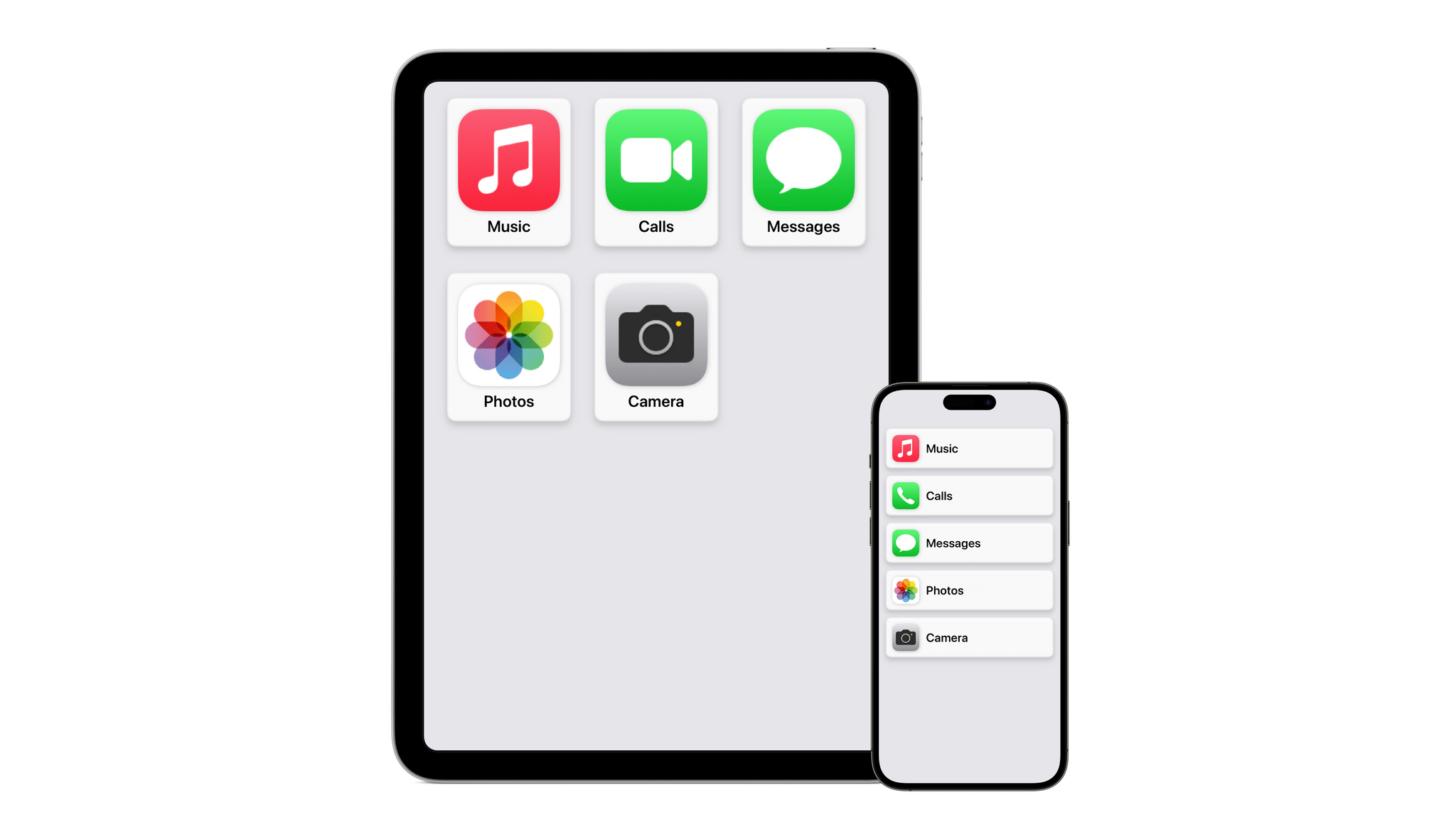
Assistive Access. Source: Apple.

Assistive Access. Source: Apple.

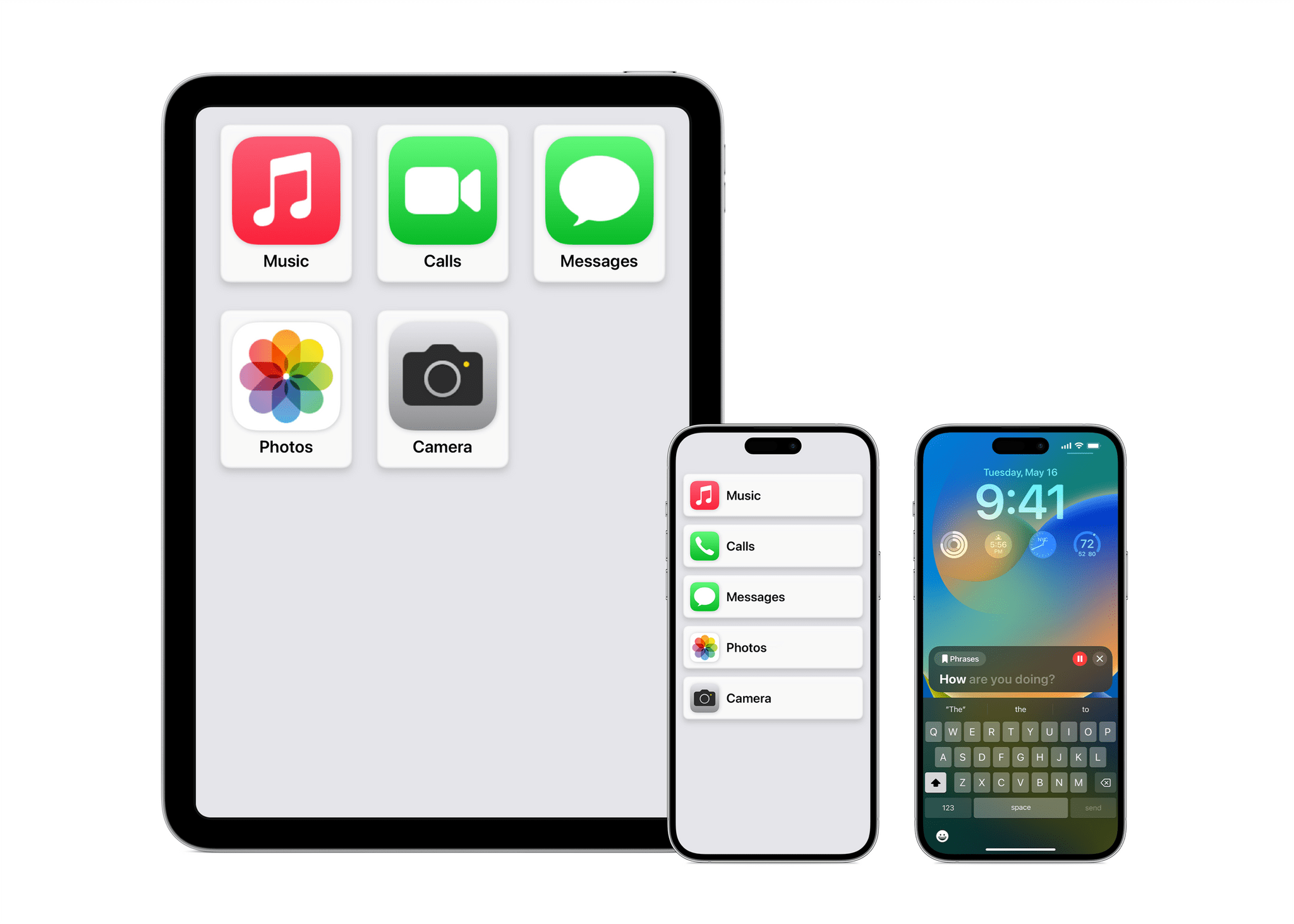
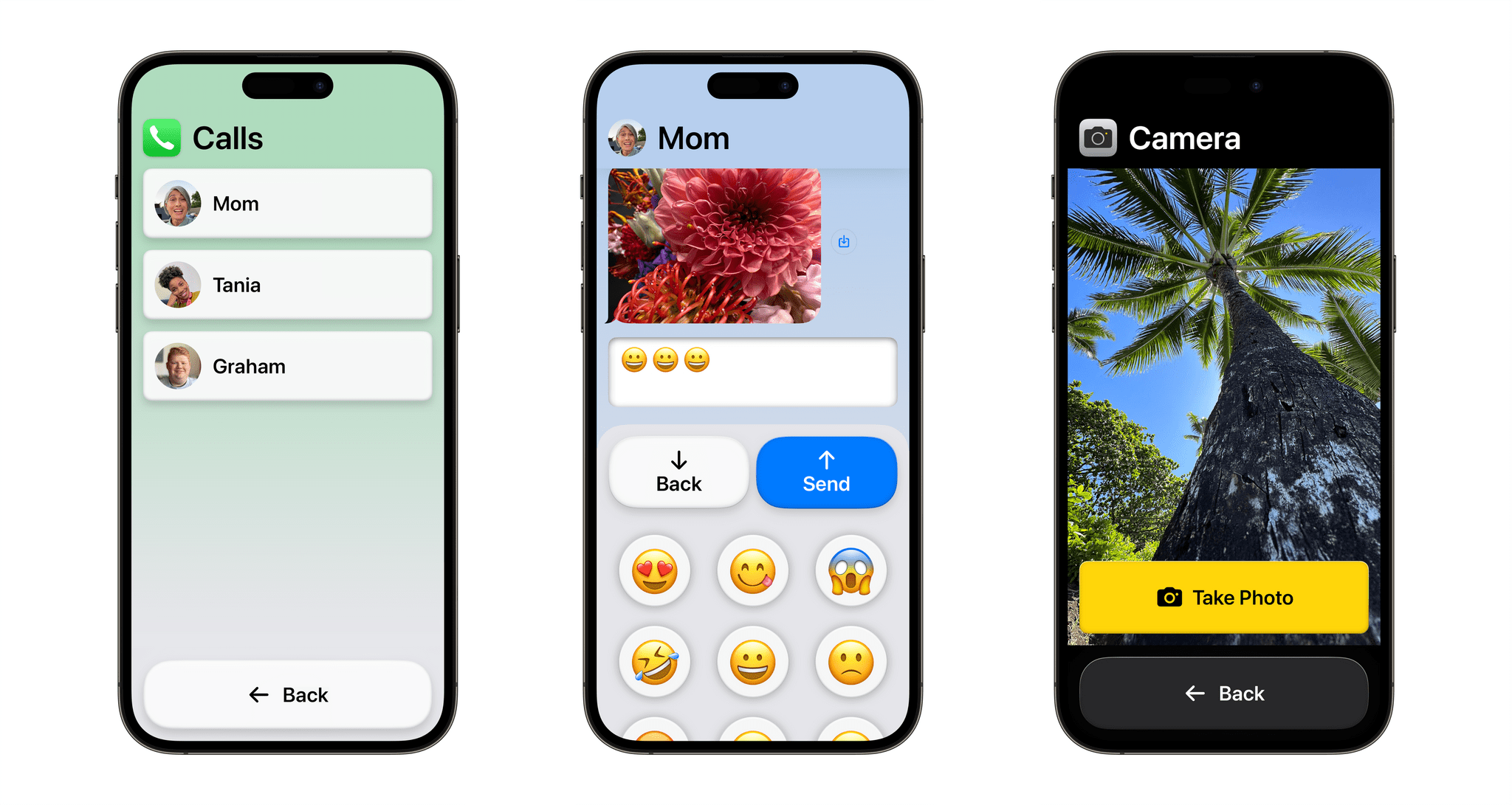
Assistive Access is a new customizable iPhone and iPad mode created for users with cognitive disabilities to lighten the cognitive load of using their favorite apps. Apple worked with users as well as their trusted supports to focus on the activities they use most, like communicating with friends and family, taking and viewing photos, and listening to music. The result is a distillation of the experiences of the related apps. For instance, Phone and FaceTime have been combined into a single Calls app that handles both audio and video calls.

Calls, Messages, Camera in Assistive Access mode. Source: Apple.

Calls, Messages, Camera in Assistive Access mode. Source: Apple.

The UI for Assistive Access is highly customizable, allowing users and their trusted supporters to adapt it to their individual needs. For example, an iPhone’s Home Screen can be streamlined to show just a handful of apps with large, high-contrast buttons with big text labels. Alternatively, Assistive Access can be set up with a row-based UI for people who prefer text.

Read more

Access Extra Content and Perks

Founded in 2015, Club MacStories has delivered exclusive content every week for nearly a decade.

What started with weekly and monthly email newsletters has blossomed into a family of memberships designed for every MacStories fan.

Learn more here and from our Club FAQs.

Club MacStories: Weekly and monthly newsletters via email and the web that are brimming with apps, tips, automation workflows, longform writing, early access to the MacStories Unwind podcast, periodic giveaways, and more;

Club MacStories+: Everything that Club MacStories offers, plus an active Discord community, advanced search and custom RSS features for exploring the Club’s entire back catalog, bonus columns, and dozens of app discounts;

Club Premier: All of the above and AppStories+, an extended version of our flagship podcast that’s delivered early, ad-free, and in high-bitrate audio.

Learn more here and from our Club FAQs.


FitnessView Teams: A Team-Based Fitness Tracker for Coaches and Trainers

Today, Funn Media released FitnessView Teams, a fitness-tracking app that allows coaches or personal trainers to track multiple team members or clients at once. I’m not a coach or a trainer, but I’ve been trying the app with demo data and like what I’ve seen a lot.

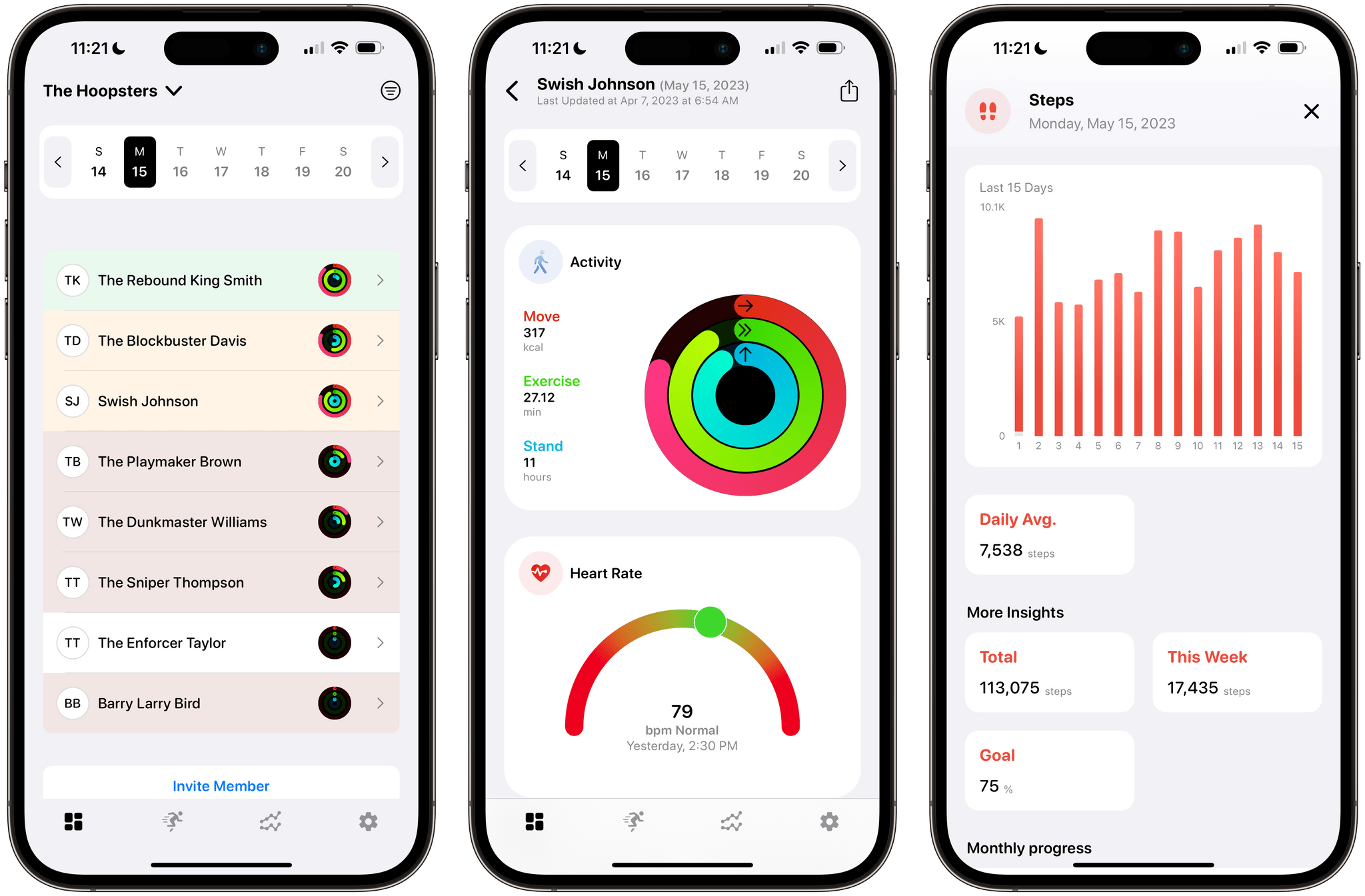
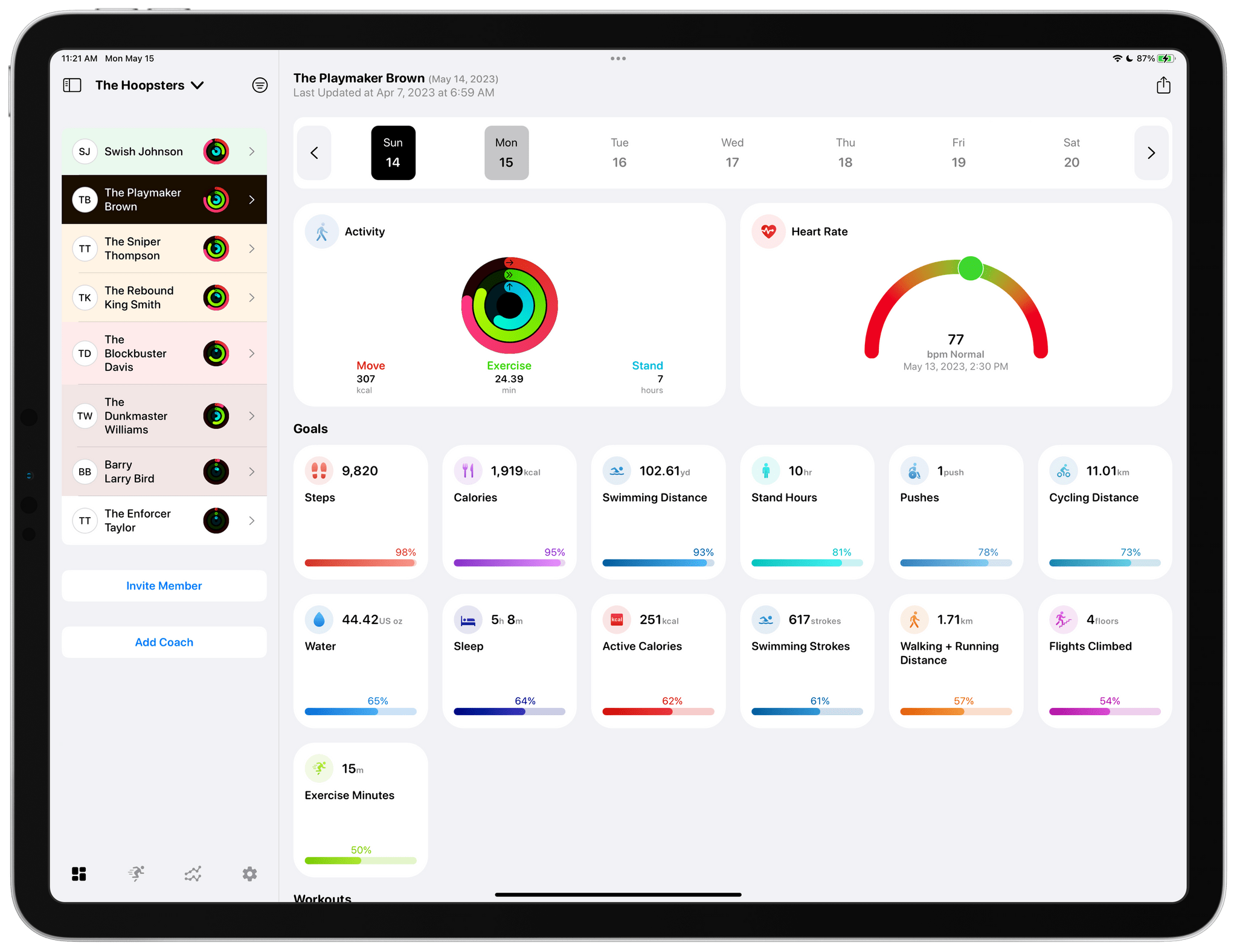
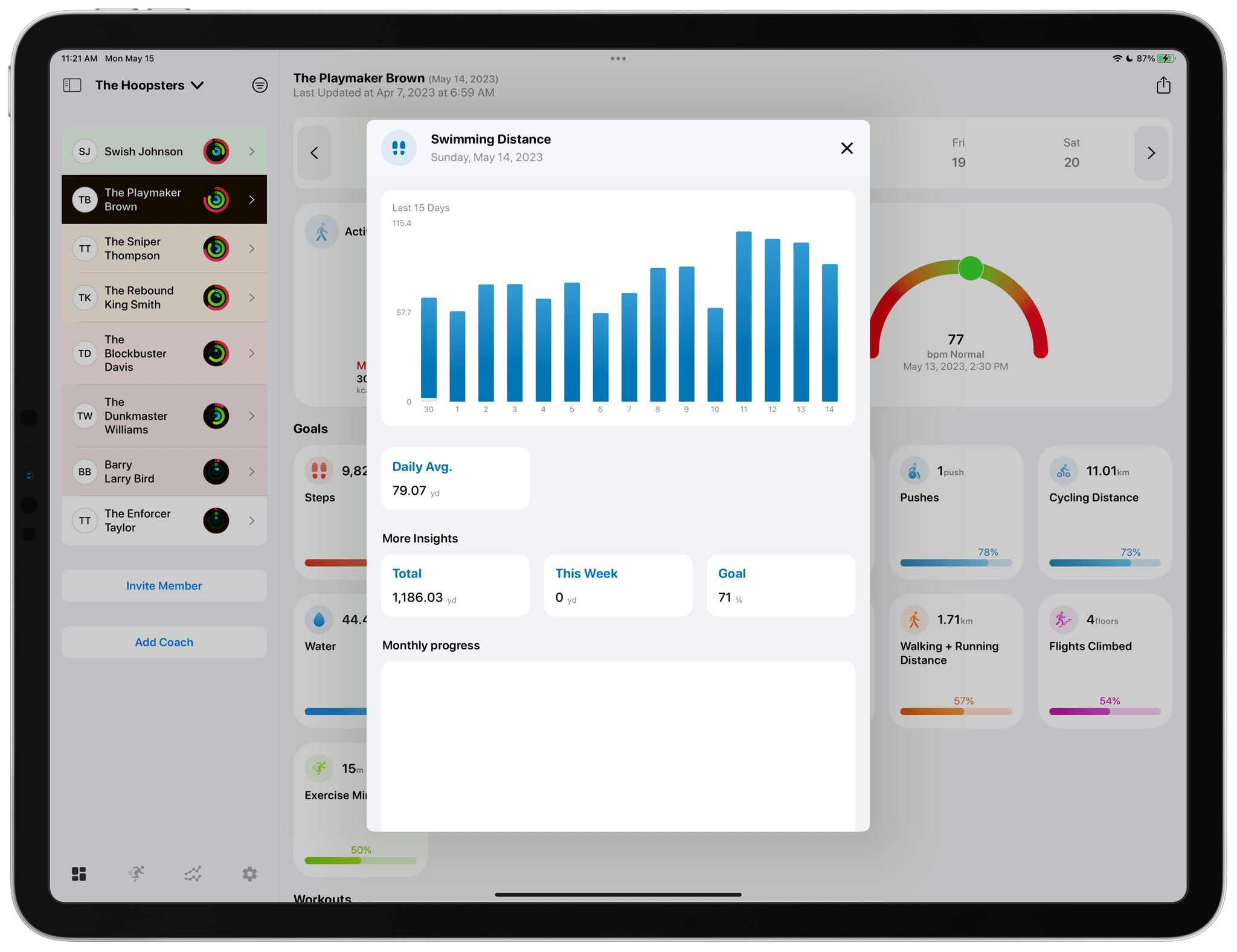
FitnessView Teams provides a home base for tracking the performance of multiple athletes.

FitnessView Teams provides a home base for tracking the performance of multiple athletes.

FitnessView Teams, which builds on Funn Media’s FitnessView app for individuals, works on the iPhone and iPad, but it’s best on the iPad where you can see more data at once. From the main view, you can switch among multiple teams, browse data by team member, invite new team members, and invite other coaches to your team. Coaches and team members can both be added via a QR code or an invitation link that allows FitnessView Teams to access the data collected by a team member’s Apple Watch. You can also browse team member data by date using a calendar strip along the top of the iPad’s screen.

Tapping any of the home view's tiles drills deeper into the details of each.

Tapping any of the home view’s tiles drills deeper into the details of each.

Most of the app’s main view is dedicated to health metric tiles that are fully customizable in the app’s settings. Tapping on any health metric brings up additional details, including a graph for that data over time, as well as daily averages and monthly progress. Reports for each athlete can be exported as a customizable PDF-formatted report too.

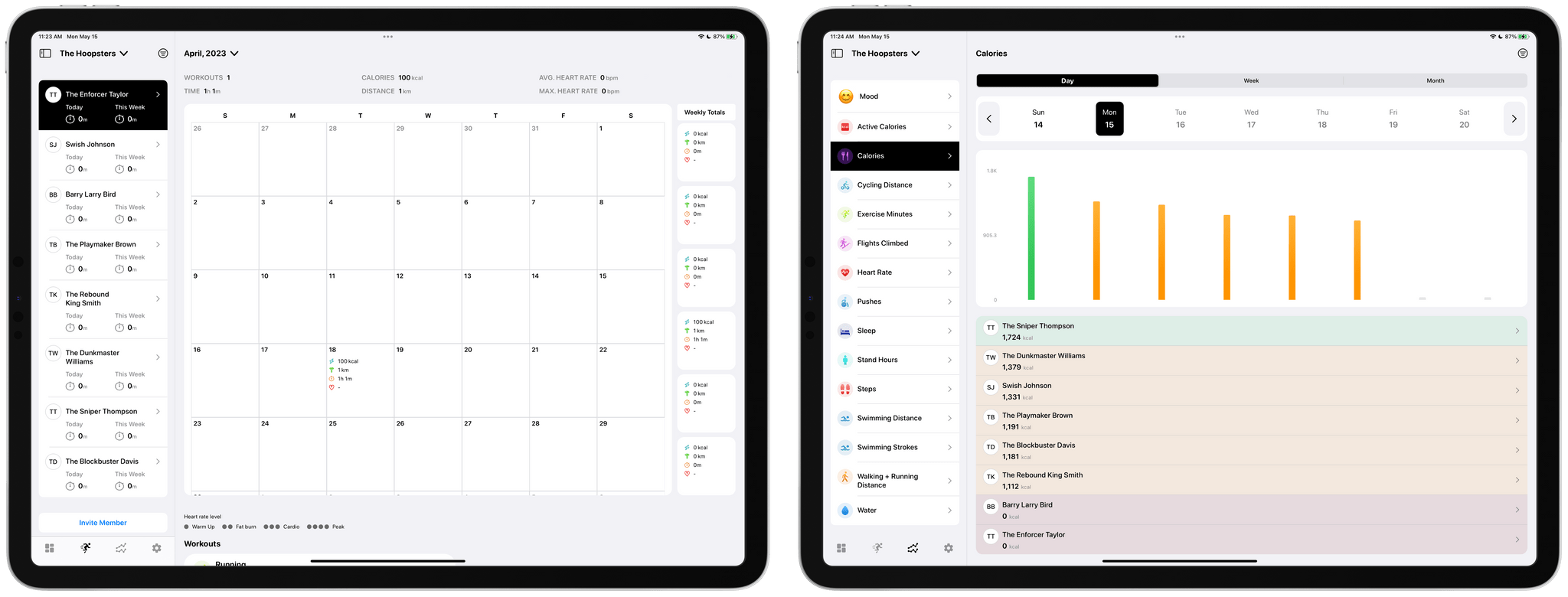
The app includes calendar and metric-based views of team data too.

The app includes calendar and metric-based views of team data too.

Other data visualizations include a tab dedicated to a full month overview per athlete. There’s also a tab that breaks down a team’s progress by fitness metric, which allows coaches to easily compare the stats of one athlete compared to another on a daily, weekly, or monthly basis. All of the same data is available on the iPhone, too, but the limited screen space requires more navigating between views and scrolling of data.

I’ve always been a fan of FitnessView for individuals. The app’s simple, clean design provides an excellent overview of core health metrics, with the ability to dive into each for more detail. FitnessView Teams takes the same approach and succeeds in organizing an even bigger set of health data for multiple people at once, which is an impressive accomplishment. If you’re a coach or trainer, FitnessView Teams is worth checking out.

FitnessView Teams is available to download for free. However, a subscription is required to add multiple team members or clients to the app, which starts at $59.99/month to track ten users.

Access Extra Content and Perks

Founded in 2015, Club MacStories has delivered exclusive content every week for nearly a decade.

What started with weekly and monthly email newsletters has blossomed into a family of memberships designed for every MacStories fan.

Learn more here and from our Club FAQs.

Club MacStories: Weekly and monthly newsletters via email and the web that are brimming with apps, tips, automation workflows, longform writing, early access to the MacStories Unwind podcast, periodic giveaways, and more;

Club MacStories+: Everything that Club MacStories offers, plus an active Discord community, advanced search and custom RSS features for exploring the Club’s entire back catalog, bonus columns, and dozens of app discounts;

Club Premier: All of the above and AppStories+, an extended version of our flagship podcast that’s delivered early, ad-free, and in high-bitrate audio.

Learn more here and from our Club FAQs.


Last Week, on Club MacStories: Things Shortcuts Tips, App Pricing Complexity, and New and Updated Apps

Because Club MacStories now encompasses more than just newsletters, we’ve created a guide to the past week’s happenings:

MacStories Weekly: Issue 368

Access Extra Content and Perks

Founded in 2015, Club MacStories has delivered exclusive content every week for nearly a decade.

What started with weekly and monthly email newsletters has blossomed into a family of memberships designed for every MacStories fan.

Learn more here and from our Club FAQs.

Club MacStories: Weekly and monthly newsletters via email and the web that are brimming with apps, tips, automation workflows, longform writing, early access to the MacStories Unwind podcast, periodic giveaways, and more;

Club MacStories+: Everything that Club MacStories offers, plus an active Discord community, advanced search and custom RSS features for exploring the Club’s entire back catalog, bonus columns, and dozens of app discounts;

Club Premier: All of the above and AppStories+, an extended version of our flagship podcast that’s delivered early, ad-free, and in high-bitrate audio.

Learn more here and from our Club FAQs.


MacStories Unwind: First Impressions: The Legend of Zelda: Tears of the Kingdom

AppStories+ Deeper into the world of apps
0:00
27:37

AppStories+ Deeper into the world of apps


In this special episode of Unwind, Federico, who received The Legend of Zelda: Tears of the Kingdom one day earlier than most people, shares his first impressions of the game, which has received rave reviews from critics.

First Impressions: The Legend of Zelda: Tears of the Kingdom

MacStories Unwind+

We deliver MacStories Unwind+ to Club MacStories subscribers ad-free and early with high bitrate audio every week.

To learn more about the benefits of a Club MacStories subscription, visit our Plans page.

Access Extra Content and Perks

Founded in 2015, Club MacStories has delivered exclusive content every week for nearly a decade.

What started with weekly and monthly email newsletters has blossomed into a family of memberships designed for every MacStories fan.

Learn more here and from our Club FAQs.

Club MacStories: Weekly and monthly newsletters via email and the web that are brimming with apps, tips, automation workflows, longform writing, early access to the MacStories Unwind podcast, periodic giveaways, and more;

Club MacStories+: Everything that Club MacStories offers, plus an active Discord community, advanced search and custom RSS features for exploring the Club’s entire back catalog, bonus columns, and dozens of app discounts;

Club Premier: All of the above and AppStories+, an extended version of our flagship podcast that’s delivered early, ad-free, and in high-bitrate audio.

Learn more here and from our Club FAQs.


AppStories, Episode 328 – Our iPadOS 17 Wishes

This week on AppStories, we continue our wish list series with our wishes for iPadOS 17.

Sponsored by:

  • Zocdoc – Find the right doctor, right now with Zocdoc. Sign up for free.

On AppStories+, stand-up lawn mowers and my struggles with social media.

We deliver AppStories+ to subscribers with bonus content, ad-free, and at a high bitrate early every week.

To learn more about the benefits included with an AppStories+ subscription, visit our Plans page, or read the AppStories+ FAQ.

Access Extra Content and Perks

Founded in 2015, Club MacStories has delivered exclusive content every week for nearly a decade.

What started with weekly and monthly email newsletters has blossomed into a family of memberships designed for every MacStories fan.

Learn more here and from our Club FAQs.

Club MacStories: Weekly and monthly newsletters via email and the web that are brimming with apps, tips, automation workflows, longform writing, early access to the MacStories Unwind podcast, periodic giveaways, and more;

Club MacStories+: Everything that Club MacStories offers, plus an active Discord community, advanced search and custom RSS features for exploring the Club’s entire back catalog, bonus columns, and dozens of app discounts;

Club Premier: All of the above and AppStories+, an extended version of our flagship podcast that’s delivered early, ad-free, and in high-bitrate audio.

Learn more here and from our Club FAQs.