Posts in news

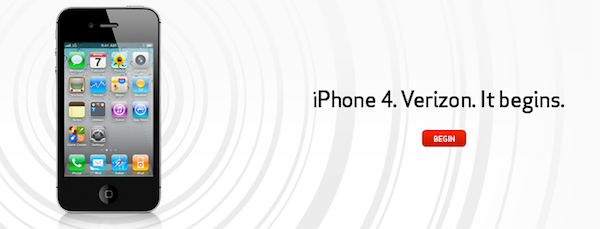
It’s Official: The iPhone 4 Comes to Verizon

After years of speculation, it’s now official. At the special media event in New York, Verizon has just announced that Apple’s iPhone is coming to their network. “If the press writes something long enough, eventually it comes true”, said Verizon’s Lowell MacAdam before the announcement. “Today we’re partnering with a giant of the industry, and that’s Apple.”

The iPhone 4 is coming to Verizon next month, as the rumors suggested. Apple and Verizon began testing CDMA iPhone in 2008, and Apple then released the iPad on Verizon in 2010. The iPhone is coming in February, it will be CDMA (no LTE) and it’s already listed on Verizon’s website. It’s the same iPhone 4 you know and love, only on Verizon and it connects to CDMA and EvDO networks. Read more


Solar Walk for Mac Now Available

Winner of an Apple Design Award in the iPad category in June 2010, Vito Technologies today released a Mac version of Solar Walk, available now in the Mac App Store at $2.99. Pretty much like Star Walk for the iPhone and iPad (which Cody originally reviewed here), Solar Walk for Mac is a full-featured 3D solar system model that allows you to move between stars and planets with your mouse, zoom in to check on the planets’ details and read accurate descriptions about them. You can zoom out to view the entire galaxy (well, at least through what’s known of this galaxy), see a planet’s inner structure and learn about its history of exploration. The 3D graphics aren’t breathtaking but they get the job done, the popover menus with descriptions seem to be taken out of the iPad app.

The app also allows you to move in time to see the position of planets and satellites in a certain day, month and year. There’s even a 3D mode that will require you to wear cyan-red glasses – too bad I don’t have them here right now. Neat stuff anyway.

Solar Walk is available in the Mac App Store at $2.99. A demo video of the iPad version, very similar to the Mac counterpart, is embedded below. Read more


Zune HD Can Sync To Mac While Windows Phone 7 Controls iTunes

While Microsoft isn’t officially advocating the Zune HD march onto OS X, a simple tweak to your Windows Phone 7 Connector software for OS X can add syncing capability in no time. With a little tweak of the .plist file, nate8nate over at Zuneboards discovered this terminal trick:

defaults write com.microsoft.Windows-Phone-7-Connector ZuneEnabled -bool YES

Nate was able to sync pictures and movies to his Zune HD – you might want to give it a try if you’re tired of syncing to that unused Windows box.

If you’ve upgraded to a Windows Phone 7 device, you might be happy knowing your iTunes playlists are now controllable over wifi. This isn’t an official Microsoft implementation, bur rather something you can add for $1.99 on the Marketplace. The WP7 Remote app not only has a pretty nice icon, but also turns your iTunes library into something terrible unique (or dare I say, Zune like?).

[via Engadget 1, 2]


Who Wouldn’t Want To Perch This Wireless Speaker?

Interested in a two-piece wireless speaker and charger that looks like half a zen-birdhouse? Check out the Perch Mobile Wireless Speaker from Quirky. A two piece design elegantly flips around so you can stand it up, lay ‘er down, and stream your music through bluetooth through the little guy. It includes an AC Charger and allows you to dock, erm, Perch your iPhone for a makeshift bed stand, perfect for something like Rise if you’re not into the default alarm clock. It’s also compatible with Androids, Windows phones, and Blackberries, but face it – it doesn’t look as cool without an iPhone nested in its maw. It’s kind of pricey at $179.99 during pre-order (it’ll be $199.99 once it launches), and we think for the commitments needed it’d have been better left to Kickstarter.


Apple Seeds Xcode 4 Preview 6 to Developers

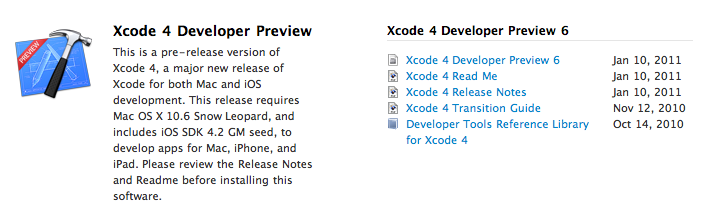
A few minutes ago Apple seeded a new Xcode 4 preview build to developers, which is available in the Mac  and iOS Dev Centers. The new version , labelled Developer Preview 6, adds a number of features and enhancements over the previous preview build, which was released in November. Xcode 4 is a major new version of Apple’s development suite which sports lots of new features and a new single-windowed UI. The first version of Xcode 4 preview was released during the WWDC in June, the second build was seeded in late July, Preview 3 was made available on September 2, Preview 4 was released in October.

Check out the release notes below. Read more


Steve Jobs and Rupert Murdoch To Unveil “The Daily” Next Week?

According to Yahoo’s The Cutline, Steve Jobs will join Rupert Murdoch to unveil the highly anticipated iPad-only digital newspaper, The Daily, at a media event in San Francisco later this month:

Rupert Murdoch will unveil News Corp.’s much-anticipated iPad newspaper onstage this month with Apple chief executive Steve Jobs, The Cutline has learned.

The two media moguls will appear together at the San Francisco Museum of Modern Art, according to a source familiar with preparations for the event. The launch date is expected to be Jan. 19, but that may change.

In December, rumors surfaced that The Daily was set to debut, or at least announced, in the “week of January 17”. The same report by All Things D suggested that Apple may release a new build of iOS to include the rumored app subscription service, the same feature we heard was once set to be made available in December.

Details on News Corp.’s “The Daily” leaked in the past months pointed to the iPad-exclusive nature of the publication, and the fact that Murdoch had assembled a “super-team” of 100 journalists to work on the newspaper. The Daily, according to the rumors, should come with a new iOS functionality that will allow iPad users to get new content every day automatically, in the background, directly from The Daily’s servers.


Google Goggles for iPhone Gains Ad Recognition and…Sudoku

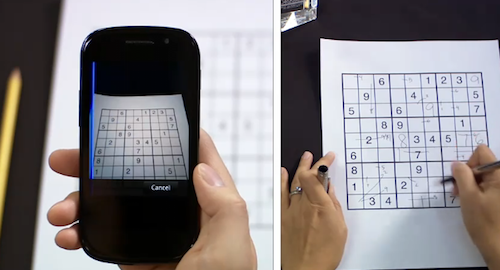
Earlier today, the Google mobile team announced an update to their official Goggles application for Android and the Goggles component in the Google Mobile App for iPhone. While Android users get advanced barcode scanning in version 1.3 of the app, printed ad recognition and Sudoku puzzle solving have been enabled both on iOS and Android. Yes, that’s right: as part of the Google Goggles labs experiments, the app can now solve Sudokuy puzzles. Just take a clear picture and let Goggles provide some help.

As for ad scanning, Goggles for iPhone can now take a look at any printed ad and return web search results for that brand or product.

Goggles will recognize print ad and return web search results about the product or brand. This new feature of Goggles is enabled for print ads appearing in major U.S. magazines and newspapers from August 2010 onwards. This feature is different from the marketing experiment that we announced in November. We’re now recognizing a much broader range of ads than we initially included in our marketing experiment.

The official Google iPhone app doesn’t seem to be updated yet, the new version should be propagating in iTunes in the next hours. In the meantime, check out the promo video for Sudoku support in Google Goggles below. Google Goggles for iPhone was launched in October as part of the Google mobile app. Read more


Enable Hidden Mac App Store Debug Menu

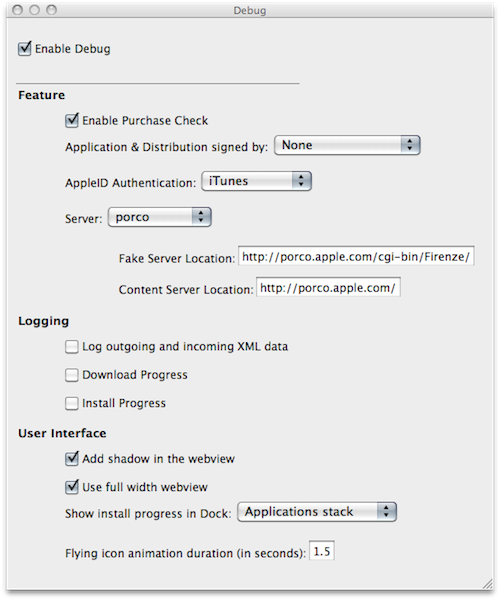
We’re not sure why the average Mac App Store user would want to do this, but we couldn’t resist to post about the Debug menu Apple left behind in the Mac App Store. Discovered by Daniel Jalkut of Red Sweater earlier today, enabling the menu is fairly easy: you just need to quit the Mac App Store, open Terminal and write:

defaults write com.apple.appstore ShowDebugMenu -bool true

Then relaunch the Mac App Store. To revert back to a Mac App Store without Debug menu, simply replace “true” in the string above with “false”. The menu, anyway, is quite interesting as it allows you to play around with a bunch of hidden settings such as shadows and width in the App Store’s webview, the animations and duration of “flying icons” (when you download an app and it goes straight to the Dock). You can also enable and disable the Purchase Check, although we wouldn’t really recommend to tweak these default settings – you don’t want to break the Mac App Store app.

We think this Debug menu will be removed in a future update, as Apple doesn’t want users to modify, or even see, this stuff. Still, you can check it out for now.


Apple Featuring “College Survival Guide” in App Store Homepage

Once again, Apple is featuring apps for college students in the iOS App Store homepage. The new section, called “College Survival Guide”, is available here and showcases more than 40 free and paid apps for iPhone and iPad.

Among the apps included in the guide, iBooks from Apple, iStudiez Pro, AP Stylebook, Momento and Instapaper. We’re not totally sure about Twitter and Facebook during classes but hey, at least they’re useful tools to stay in touch with friends. What about Netflix and Pandora Radio, though? I’m personally not sure about them either. Still, it’s good to see gems like Evernote and Put Things Off in the list.

Apple’s College Survival Guide can be accessed from the App Store’s homepage here.