Posts in news

The Most Ridiculous iPhone Game I’ve Ever Played

In these past four years, I’ve played a lot of iPhone games. From Doodle Jump and Angry Birds to Real Racing and Chaos Rings, you can find any kind of game you want on the App Store nowadays. But a game like Pah! wins the long-awaited MacStories award of “most ridiculous iPhone game I’ve ever played”.

Available in the App Store for $0.99, in Pah! you have to control a spacecraft using your voice. Okay, many games have voice control options. Problem is, in Pah! you actually have to shout “pah” to shoot and “aaahhhh” to move up and down. That’s right: pah, pah, aaahhh, ahhh, pah, pah. Directly into the iPhone’s mic. You will look like an idiot, guaranteed. And I can tell you, playing this thing with your friends around is a rewarding experience. I haven’t laughed so much for an iPhone game since the original fart app was released. And maybe more.

The game itself isn’t a masterpiece of gameplay, sounds or level-design – but it will make you laugh. For $0.99, that’s a pretty good deal.

Could The iTunes Store and Address Book Look Like This in iOS 5?

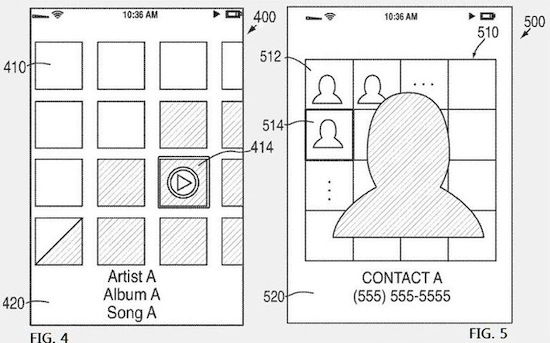
A new patent design uncovered by Patently Apple today gives us a hint at some interface elements Apple may implement in future versions of iOS, perhaps as soon as iOS 5 is released later this year. The patent doesn’t provide many details and the mockups realized by Apple are nowhere near the final style of an iOS product, but they can let us speculate on the interface changes several apps will likely go through.

In this patent, Apple has focused on browsing the iTunes Store and accessing the Address Book. The main concept seems to be that raw lists of items – songs, artists, and even contacts – should evolve into a visually richer experience based on “tiles”, rather than vertical lists. Does that ring a bell? Yes, at first I thought of the Windows Phone 7 UI – but the implementation Apple is envisioning here is quite different. From what we can see in the sketches posted online, the design looks like a mix of the Finder’s standard icon view and the iTunes album art screensaver: there’s a grid containing albums and songs in the iTunes Store and a different contact visualization in Address Book with a series of thumbnails for all your friends, and a bigger one in the foreground for the contact you’re currently talking to / editing in the app. Apple is calling these things “Segmented Graphical Representations”, and from a first look it sounds like they’re aiming for a more visual interaction with the OS based on thumbnails and graphics, rather than lists of text. Read more


Wooden iPad 2 Cover Is Cheap, Beautiful, And Smart

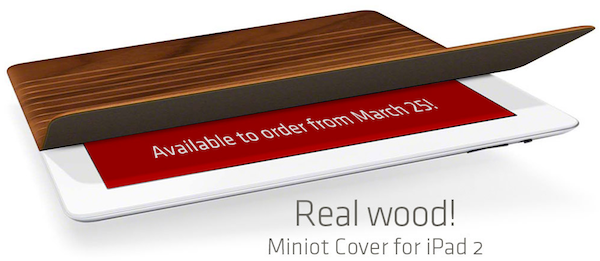
For as much as we at MacStories are in love with Apple’s Smart Cover, we’re also curious to see what kind of products third-party accessory makers will release for a device that’s got magnets and a flat surface perfect for covers and stands. Now that word about Apple’s magnet implementation is out there, it shouldn’t be long enough until we see all kinds of Smart Cover replacements come out. And while I’m sure many of them won’t offer Apple’s exceptional build quality and usability, the Miniot Cover for iPad surely is something to get excited about.

It looks like a Smart Cover, but it’s got a wooden surface that rolls into a cylinder (that’s right) to offer typing and stand modes. It easily attaches to the iPad and the wooden finish on the surface is simply beautiful. I can’t wait to try one of these things out, and I’m just going to say that Apple should allow Miniot to feature their product into the retail stores.

Shipping in a few days at €50 (it’s cheaper than Apple’s leather model sold at €69 in Europe), the Miniot Cover is set to provide a great alternative to the Smart Cover. Check out the video below. [Miniot via TUAW]
Read more


Instacast 1.1 Casts New Features, Updated Playback Controls

If you’ve been consuming podcasts with Instacast or have been waiting for some more features to trickle down the pipe, Vemedio has opened up the fire hose with their latest update. The interface plays a huge role in making Instacast incredibly user friendly, thus interface sounds have been added to provide the audible feedback element. That doesn’t seem like much, but the biggest improvements have been made to the playback controls. Shake your iPhone or iPod touch to rewind the podcast thirty seconds, and adjust the playback speed of your podcast (if you prefer 2x speed for example) with a simple tap on the artwork. Other interface tweaks include clearer button labeling and options to control how many unread feeds you want pouring in when you add new podcasts, and best of all there’s been lots of little bug fixes that make Instacast more pleasurable.

If you haven’t dove into to Instacast yet, now’s the time. It’s only $1.99 in the App Store, and you can supplement the recommendation with our original review.


iPad 2 Lines Around The World [Pics]

(iPad 2 line in Sydney via BeauGiles)

The iPad 2 is coming out tomorrow in 25 countries. As announced by Apple earlier this week, the device will be available in the following countries at 5 PM local time: Australia, Austria, Belgium, Canada, Czech Republic, Denmark, Finland, France, Germany, Greece, Hungary, Iceland, Ireland, Italy, Luxembourg, Mexico, Netherlands, New Zealand, Norway, Poland, Portugal, Spain, Sweden, Switzerland and the UK. The launch was delayed in Japan as Apple is focusing on recovering from the earthquake and tsunami that hit the country two weeks ago, and helping out employees and their families.

In the 25 countries scheduled for launch tomorrow, the iPad 2 will be available in Apple retail stores and authorized resellers. With the Apple Stores opening at 5 PM (same as the US launch on March 11), it’s no surprise that some people have decided to spend the whole day in line waiting for the doors to open – but some Apple fans have really broken any record this time. Take the Sydney Apple as an example: as reported by Fortune, Alex Lee and Marius Eilertsen started waiting in front of the store on Wednesday, 53 hours before the iPad 2 launch. Crazy. They are, of course, no. 1 and 2 in line, but they had to bring chairs and blankets (and water, I guess) for their adventure. The line has grown bigger, and it’s not extending down George Street with dozens of customers waiting. Read more


AppAppeal Collects iOS Apps That Are Donating Proceeds to Japan

Created by developers Masashi Ono and Milo Bird (Bird is the same guy behind popular RSS reader Byline), appappeal.jp is a website that collects iOS applications whose developers are currently donating 100% of the proceeds to the Japan relief effort. As developers around the world donate their proceeds to charities like the Red Cross, App Appeal wants to provide a unified way of discovering which apps you can buy to get great software, and contribute to Japan at the same time.

The list isn’t huge for now, but Bird and Ono aim at collecting more apps as developers get to know about App Appeal and through the classic word of mouth. So, if you’re a developer and you’re planning on donating your proceeds to help the people of Japan, you should get in touch with App Appeal; if you’re an iPhone or iPad user, keep an eye on the website to see which apps you can buy now and the ones that will be added in the next days.

If you don’t want to buy new apps to help Japan, Apple also lets you donate to the Red Cross in iTunes.


Microsoft Prepares Enterprise Software To Manage iOS, Android and WP7 Mobile Devices

Despite the perception of Microsoft being bitter enemies with Apple it sure seems as if this rivalry is cooling off lately with Microsoft working to provide several services and products to iOS users in particular. From their iPhone apps to additional features in Bing (that won’t even make it to Windows Phone 7 till late 2011), Microsoft is making a concerted effort to be relevant in the increasingly iOS (and Android too) mobile market.

Its latest foray is an enterprise and corporate focused piece of software that will allow IT departments to more easily manage a workplace of iOS, Android, Symbian and Windows Phone 7 mobile devices. Named, in typically superfluous Microsoft fashion, System Center Configuration Manager 2012, it will let those IT departments enforce password complexity and security, remote wipe devices amongst other key functions.

As Microsoft describes it, SCCM can “Streamline operations with a unified infrastructure that integrates client management and protection across mobile, physical, and virtual environments.” The Beta 2 of System Center Configuration Manager 2012 is available for download but it does require registration and only runs on Windows Server 2008.

[Via TUAW]


Skype 5.1 for Mac Released, Design Competition Launched

Skype, the popular VoIP and video calling service, released earlier today an update for its official Mac client, adding a number of fixes, new features and design improvements following feedback received by users in the past months since the release of Skype 5 for Mac.

The latest update, version 5.1, includes “improvements to the group video calling interface” as participants in group calls can now easily identify and focus on active speakers. Another addition to the app is the possibility to select recent numbers in the dial pad – which was redesigned in Skype 5. Among other bug fixes, one for iSight FireWire webcam detection. Skype 5.1 for Mac is available for download here.

Together with the new release, Skype is also launching a design competition with many Apple-related prizes (iPads, a MacBook Air, Apple TV) to redesign the look of chat in Skype for Mac:

When we first launched our new Mac app, we were delighted to see so many custom styles emerge from the design community, so we thought we’d make it official.

Between now and the 14th April, we’re inviting you to design your own chat style for Skype for Mac. We’ve assembled a team of experts to choose the very best, and if you’re the winner, we’ll include your design in a future version of Skype for Mac so that it can be enjoyed by millions of people around the world (as well as giving you a brand new MacBook Air, an iPad 2 and a year’s subscription to Unlimited World Extra).

When Skype 5 for Mac came out, many people were indeed disappointed by the new UI and created custom “themes” for the app. Skype noticed, and is now giving designers a chance to be included into the next major release of the app and win gadgets and development books. Not a bad deal, right? Check out the details here, and a demo video of Skype 5 for Mac below.
Read more


T-Mobile UK iPad 2 Subsidies: No 32 GB and 64 GB Models Tomorrow, 2-Year Contract

According to Geeky Gadgets, carrier T-Mobile UK will begin selling the iPad 2 tomorrow with online and phone orders, and there will be upgrade options (with different prices) for owners of the original iPad.  The website reports the following prices with a 2-year contract:

  • iPad 2 16 GB WiFi + 3G:  £199 upfront + £25 per month for existing customers
  • iPad 2 16 GB WiFi + 3G:: £229 upfront + £27 per month for new customers

The two-year contract with T-Mobile UK gives 1 GB of data per month and an additional “quiet time” 1 GB for usage between 12 AM and 10 AM. Online and phone orders with T-Mobile UK will start tomorrow at 5 PM – same applies if you want to buy an iPad 2 at the Apple Store tomorrow in the 25 countries that will get the device.