Posts in news

iWork Update: Resume, Full-Screen, Auto Save and Versions in Lion

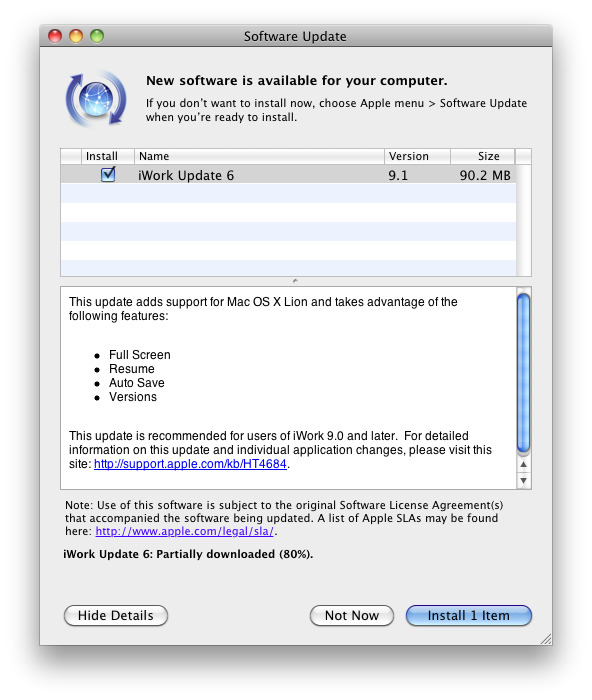
Apple just released an update to the existing iWork suite, bringing support for several new features in OS X Lion: namely, Apple enabled full-screen mode, Resume and auto save, as well as Versions for all the iWork apps when used on the new OS. Currently the update is only showing up with the Software Control panel, but we expect the Mac App Store versions to receive the update soon. Apple indeed mentions Mac App Store, Software Update and Standalone Installer in this support document.

Changelog:

All iWork 9.1 applications

Adds support for Mac OS X Lion, including:

  • Full-Screen
  • Resume
  • Auto Save
  • Versions
  • Character picker

More details available on the OS X Lion page.

  • Improves Microsoft Office Compatibility

Keynote 5.1

Adds new builds:

  • Anvil
  • Fall Apart

We’ll update this story with screenshots of the new features for iWork 9.1 as we get more information.

Update: The updated iWork apps are now available on the Mac App Store: Pages, Numbers, Keynote have all received the latest update for the standalone versions. Read more


Apple Releases Safari 5.1: Full-Screen, Gestures, Reading List, And More

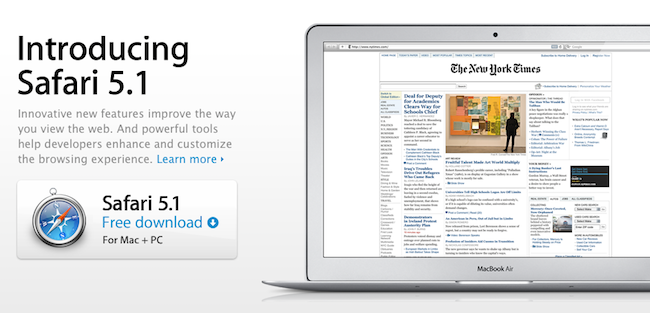
Alongside OS X Lion, new MacBook Airs, new Mac Minis and Thunderbolt Display, Apple just released a major update to Safari, reaching version 5.1. Available to developers for quite some time, the new Safari brings extensive support for gestures, the Reading List, new privacy and security features, full-screen browsing and more.

Safari isn’t just the world’s most innovative web browser. It changes the way you interact with the web. With great new features that take advantage of OS X Lion, you’ll become completely immersed in everything you see, touch, read, and watch. Oh, and browse.

The Reading List allows users to save webpages for later, and read them at any time by accessing them from a new sidebar. Reading List will gain iOS sync capabilities with iCloud this Fall, but in the meantime it works perfectly in conjunction with Safari Reader, which can strip out the clutter off webpages saved in the Reading List easily.

New multi-touch gestures and full-screen are exclusive to Lion, as they take advantage of the new APIs introduced by Apple in the new OS. You can double-tap to zoom, swipe to navigate as detailed in our Lion review, or pinch to zoom to better focus on content. Read more


Introducing the New Apple Thunderbolt Display

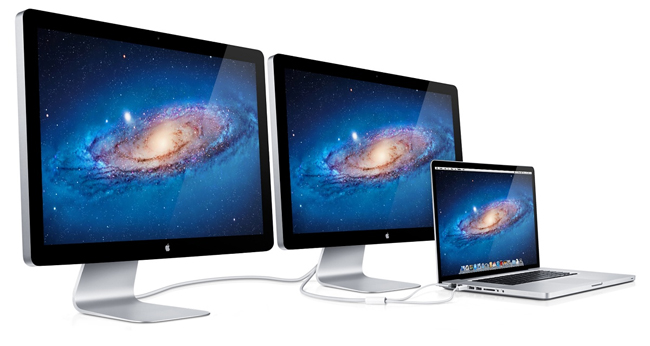
Apple’s updated their 27-inch Cinema Display this morning with a new name and a brand new Thunderbolt port and cable that’s ready for your new MacBook Air or Mac Mini, coinciding with the release of Lion.

The 27-inch Apple Thunderbolt Display gets the obvious updates this morning: you can expect a a Thunderbolt and MagSafe connections (a two pronged cable instead of three) for upstream data, and a Thunderbolt port out back for connecting a second Cinema Display for use with 15-inch or 17-inch iMacs. With three USB ports, a Firewire 800 port, and Gigabit Ethernet built in, your existing peripherals and landline connection can be connected to the Cinema Display — the Thunderbolt cable handles data transfer to your Mac up to 10 Gbps.

You can check out the full press release after the break.
Read more


The Mac Mini Receives A Refresh, Now Come With Thunderbolt and Sandy Bridge Processors

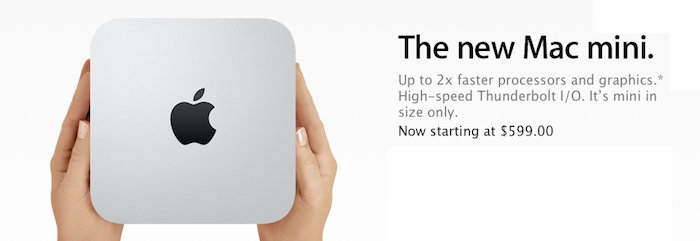
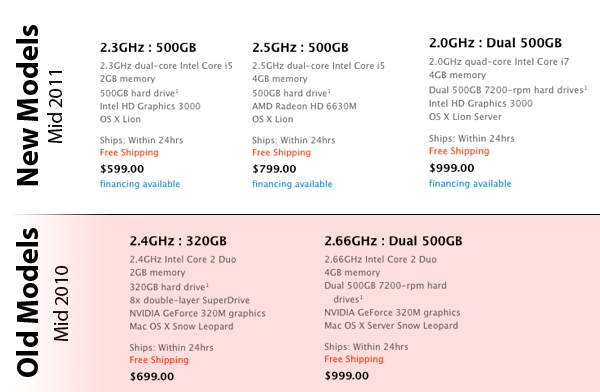
Following the refresh of the MacBook Air, Apple has today also released new Mac Mini models. As is standard for this year’s Mac refreshes, the Mac Mini now comes with the new Intel Sandy Bridge processors and Thunderbolt ports. Interestingly there is no optical drive in the Mini anymore.

Mac mini is designed without an optical disc drive. Because these days, you don’t need one. It’s easier than ever to download music and movies from the iTunes Store. And you can download apps from the Mac App Store with a click. So what did we do with all the extra space? We squeezed in more powerful processors, advanced graphics, and Thunderbolt technology.

There will be two standard models available for the average consumer as well as one server model. The base model will come with a 2.3 GHz i5 processor, 2 GB of RAM and a 500 GB hard drive for just $599. The second model increases the processor clock to 2.5 GHz and doubles the RAM to 4GB – keeping the hard drive at 500 GB and costs $799. There is also an updated server model for $999 which has a 2.0 GHz quad-core i7 with 4 GB RAM and dual 750 GB hard drives.

Jump the break for more details and Apple’s press release on the new models.

Read more


Apple Introduces New MacBook Airs With Thunderbolt And Sandy Bridge Processors

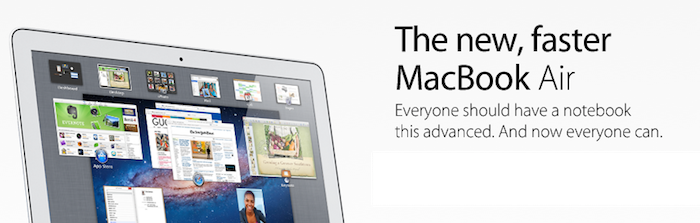
Eventually, after literally months of rumors, Apple has today unveiled a refreshed line of MacBook Airs. As expected the new models come with the new Thunderbolt I/O port that made its way onto the MacBook and iMac earlier this year. Intel’s Sandy Bridge processors also power the new MacBook Airs with a mixture of i5 and i7 processor options depending on the model you choose. Lion, which has been released just a few minutes ago also comes pre-installed on the new models. All new models also come with a built-in backlit keyboard.

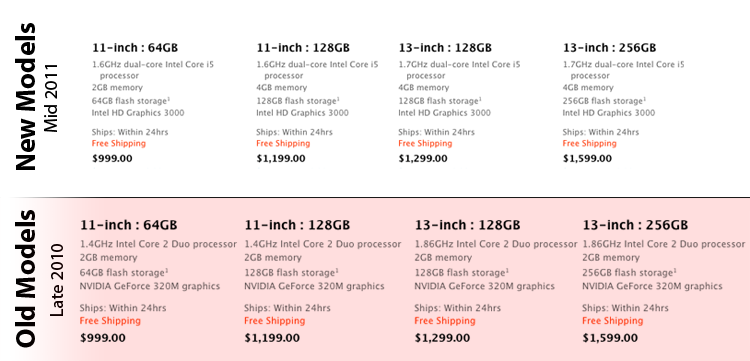
The base MacBook Air Model features the same 11.6” display and comes with a 1.6 GHz i5 processor, 2 GB of RAM and 64 GB of flash storage for the same price of $999. The more expensive 11.6” model sees an increase in RAM to 4 GB and storage to 128 GB for $1,199.

The 13.3” variety of the MacBook Air also has two standard models; the first comes with a 1.7 GHz processor, 4 GB RAM and 128 GB of storage for $1,299. The more expensive model simply bumps up the storage to 256 GB for $1,599. Built to order versions can be maxed out with a 1.8 GHz i7 processor, 4 GB RAM and 256 GB of storage. The 13” model also now includes an SD card slot.

“Portable, affordable and powerful, MacBook Air is the ultimate everyday notebook,” said Philip Schiller, Apple’s senior vice president of Worldwide Product Marketing. “MacBook Air features our most advanced technology and is an ideal match for Lion, especially with its new Multi-Touch gestures, full-screen apps, Mission Control and Mac App Store.”

Jump the break for more details and Apple’s full press release.

Read more


Apple Releases OS X Lion, USB Thumb Drive Coming at $69

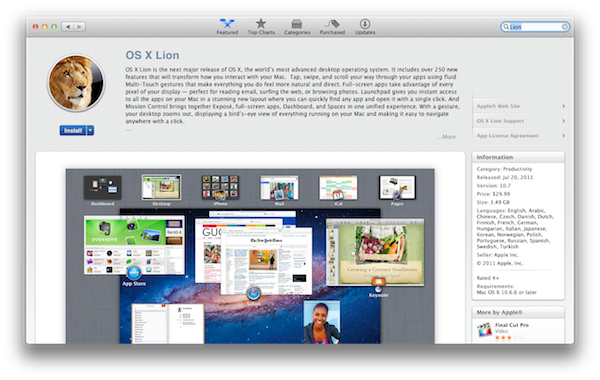
As widely expected, Apple released the next major version of OS X, Lion, on the Mac App Store today. The new OS is now available at $29.99 as digital-only download and is propagating through all the international App Stores at the moment of writing this.

You can download OS X Lion here. OS X Lion Server is available as a separate add-on here.

Lion is a major upgrade to Apple’s desktop OS that introduces over 250 new features and blends several typical desktop UI elements with design concepts and implementations first explored on the iPhone and iPad. Indeed, at the “Back to the Mac” event in October 2010, Apple described Lion as “OS X meets the iPad”. The Launchpad, for example, is a new way to install, organize and launch apps that’s heavily inspired by iOS’ Springboard, which lays out app icons in a grid against a default background with possibility of creating, moving, and deleting folders. Mission Control, a new way to manage app windows, combines the best elements of Snow Leopard’s Exposè and Spaces to create a new experience that unifies windows, desktops and full-screen apps in a single, easy to use interface. Lion brings hundreds of changes and subtle refinements, most of them delightfully added throughout the whole operating system in apps like iChat and System Preferences, others immediately visible like “All My Files” and “AirDrop”, two new Finder features to browse all documents and share files locally with others, respectively.

Lion brings new functionalities and APIs that should make users and developers alike excited to try out the new OS. For instance, developers can enable the new Automatic Termination and Resume APIs in their applications to make sure the “state” of an app is always saved upon quitting, and resumed on the next OS boot or app launch. This behavior can be reversed, but it’s enabled by default to put the emphasis on an operating system capable of saving your work and “app state” without you even thinking about it – app state means anything from open windows to position on screen and mouse cursor. Similarly, the new Auto Save when combined with Lion’s Versions will allow you to never worry about “saving” a document again, and have the OS perform continuos versioning in the background that you can access from a new Time Machine-like UI. Versions allow you to restore a document’s previous changes and edits from any point in time since you first created it.

Lion is a milestone in Apple’s desktop OS history, and we’ll have a complete review, as well as a detailed installation guide, in a few minutes on our site’s homepage.

Update: In the official press release, also embedded below, Apple confirms that Lion will be made available on a USB thumb drive at $69 for users without broadband access.

Mac OS X Lion is available as an upgrade to Mac OS X version 10.6.6 Snow Leopard® from the Mac App Store for $29.99 (US). Lion is the easiest OS X upgrade and at around 4GB, it is about the size of an HD movie from the iTunes Store®. Users who do not have broadband access at home, work or school can download Lion at Apple retail stores and later this August, Lion will be made available on a USB thumb drive through the Apple Store® (www.apple.com) for $69 (US). Mac OS X Lion Server requires Lion and is available from the Mac App Store for $49.99 (US).

Read more


Adobe Photoshop Elements 9 Editor Available On The Mac App Store

Some of us thought this day would never come - Adobe has an app in the Mac App Store. Adobe has released today Photoshop Elements 9 Editor via the Mac App Store, and it comes as a hefty 1GB download that’s aimed at the average consumers for editing photos on their Macs. The $80 Mac App Store version isn’t the same as the $100 Adobe.com version, as it’s got the Adobe Elements Organizer omitted. Perhaps they left the Organizer out to have a better price point but it’s still more expensive than other similar apps such as iPhoto, Acorn or Pixelmator. The app is only available in English, too.

Winston Hendrickson, Adobe’s VP of Digital Imaging Products, said “The powerful capabilities in Photoshop Elements 9 Editor complement iPhoto perfectly, for users who want to take their photos to the next level with advanced compositing and stunning effects.”

The Adobe Photoshop Elements 9 Editor delivers powerful yet easy-to-use photo editing tools that take your photos from flawed to phenomenal in seconds. Count on automated options that help you get great results with just a few clicks. Works great with iPhoto when you’re ready to go beyond the basics.

The Mac App Store version of Photoshop Elements 9 has many of the same photo tools that made the full version popular, like content aware-fill, Group Shot, Panorama, and Style Match Photomerge tools. Elements offers guided edit modes that walk the user though using effects and cleaning up photos.

Personally, I think there are much better options out there for the beginner / average consumer and they’re cheaper and help support small developers; maybe now Adobe is rethinking their Mac App Store strategy and we’ll see more applications later, especially ones that aren’t stripped down.

Elements 9 is available now for $79.99 in the Mac App Store. More screens after the break. [via Macworld] Read more


Apple Releases Migration Assistant Update Ahead of Lion’s Launch

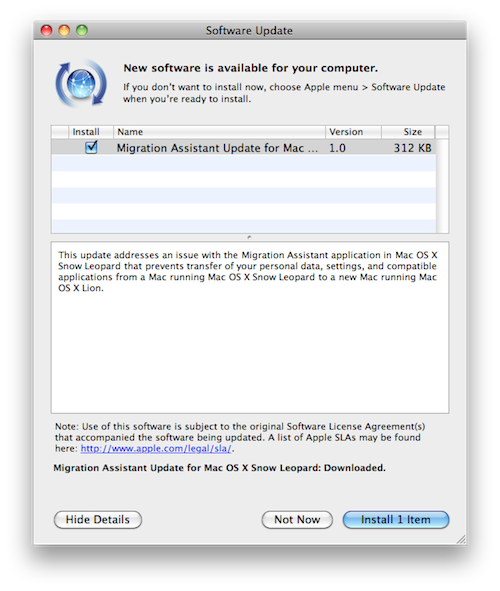
At the Q3 2011 earnings call, Apple confirmed OS X Lion is coming tomorrow on the Mac App Store. As noted by MacRumors, a few minutes before the call started Apple pushed an update for Migration Assistant to Snow Leopard users, fixing an issue that prevented the correct transfer of personal data and apps from a Snow Leopard computer to a Mac running Lion.

This update addresses an issue with the Migration Assistant application in Mac OS X Snow Leopard that prevents transfer of your personal data, settings, and compatible applications from a Mac running Mac OS X Snow Leopard to a new Mac running Mac OS X Lion.

The lightweight update can be downloaded now on Snow Leopard from Software Update, or directly from Apple’s website.


Apple Confirms: OS X Lion Coming Tomorrow

At the Q3 2011 earnings call, Apple just confirmed OS X Lion is launching tomorrow, July 20th. The OS will be available on the Mac App Store at $29.99.

OS X Lion is a major upgrade to Apple’s desktop operating system which introduces over 250 new user features and brings several interface and navigation schemes from iOS devices like the iPad, to the Mac’s multi-touch trackpad and desktop environment. Among the notable changes in Lion, also highlighted on Apple’s website, are the Launchpad and Mission Control, two new ways to launch and organize application and windows, respectively. Lion adds a new file sharing system called “AirDrop” baked into the Finder to share files and documents with nearby Macs, and the Finder itself has been finely tuned and improved to sport a more subtle window UI, new file and folder merging functionalities, and a new “All My Files” view that collects all the documents and media found on your computer in a single screen.

Lion also represents a big change for OS X developers: with new APIs and features like Sandboxing, Automatic Termination and Resume, app makers will be able to rewrite their software taking advantage of the new user experience enhancements brought by Apple to the desktop. For instance, apps can now automatically save their “state” upon quitting – meaning accidental shut downs and force-quits will no longer affect the document you were working on. Combined with Auto Save and Version, this opens to a lot more possibilities when it comes to dealing with documents stored on your computer.