Posts in news

Security Researcher Demoes Bug To Execute Unsigned Code on iOS Devices

Security researcher Charlie Miller, former NSA analyst now working for consultancy firm Accuvant, plans to publicly demonstrate a new security hole that could allow regular App Store apps to download and execute unsigned code on any iOS device. As Forbes reports, Miller, who isn’t new to the Mac and iOS hacking and security scene, plans to detail his discoveries at the SysCan conference in Taiwan next week.

Full details of the security hole aren’t available – Miller is apparently saving the presentation for next week to give Apple time to fix the issue, and the company is indeed already working on an iOS 5.0.1 update – but Miller had a “stealth app” approved by Apple in the App Store to record a video of the hidden “functionality”. The app was called Instastock, and it behaved as a regular stock monitoring app until Miller recorded a video of his iPhone being subject to malicious attacks through the app, which has since been pulled. Apparently, since Apple found out about Miller’s app and YouTube video, he’s also been removed from the iOS Developer Program.

As you can see in the video, the app gets downloaded from the App Store as any other free or paid app. The first time Miller runs it on his iPhone, nothing happens and the app performs as advertised. But as soon as Miller activates the hidden functionalities on his web server, somehow connected to the iOS app, the app “phones home” and starts downloading and executing unsigned code. As per Apple’s technical rules and guidelines, App Store apps can only execute code approved by Apple. Yet with Instastock, Miller managed to make the iPhone vibrate remotely, open a YouTube video, and even download the device’s entire Address Book remotely. The app is seen exposing parts of the iOS filesystem, listing installed apps, and presumably giving access to a user’s documents, photos and more. In the video – which we’ve embedded below – you can also watch Miller execute commands remotely (from his computer to iPhone) using a command line interface.

Apparently, the hack has been made possible by a flaw in Apple’s JavaScript engine Nitro, introduced with iOS 4.3, that makes a series of system exceptions for Mobile Safari to render web pages faster. Forbes quotes Miller as saying “Apple runs all these checks to make sure only the browser can use the exception,” he says. “But in this one weird little corner case, it’s possible. And then you don’t have to worry about code-signing any more at all.”

Instastock has already been pulled from the App Store, and it’s unlikely that anyone else will figure out the exact bug that Miller has discovered before Apple releases iOS 5.0.1, which has reached beta 2 status and has been reported to introduce security fixes for iOS devices. Apple will likely include a fix for Miller’s discovery in iOS 5.0.1, but  in the meantime you can check out the interesting demo after the break.
Read more

Apple Releases iOS 5.0.1 Beta 2

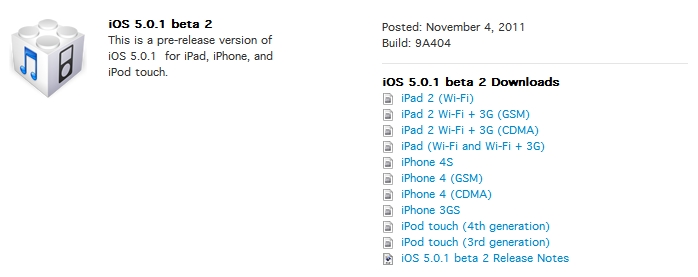
Just 2 days after seeding iOS 5.0.1 beta 1 to developers, beta 2 of 5.0.1 is now available in Apple’s Dev Center. The build number is 9A404 and is available over-the-air (800MB for iPhone 4S, 45MB for iPad 2) for users with the previous iOS 5.0.1 beta 1 installed. To download updates OTA, open the Settings.app > General > Software Update. The original beta build apparently suffered from some bugs related to failed activations. Beyond these bug fixes, it doesn’t appear that iOS 5.0.1 beta 2 contains anything more.

iOS 5.0.1 beta 2 is available now in the iOS Dev Center.

UPDATE: It looks like the iOS 5.0.1 beta 2 OTA update for the iPhone 4S is not a delta update, 800MB is too large.


Apple’s Fifth Avenue Store Re-Opens Today With Its Redesigned Glass Cube

In just a short few hours, at 10 AM local time, Apple’s flagship retail store at 5th Avenue in New York City will have a grand re-opening after its glass cube was renovated and re-created. As you can see above though, Apple has spent the night removing all the barriers and plastic wrapping and the new design is bare for all to see. The new design has just three tall glass panes on all sides of the cube, coming to a total of just 15 panes — compare that number to the old design which had 90 panes.

Jump the break to view a picture before the plastic wrapping came off, to have a look at renderings of what the store was designed to look like and what the old cube (with its 90 panes) looked like.

We will update this post as more pictures come in and the grand re-opening begins.

[Image via 9to5 Mac]

Update: MacRumors shares more pictures of the redesigned cube, showing the new “seamless” design that eliminates most of the hardware that kept the old 90 glass panels together.

Update #2: View of the redesigned cube via @andinieffendi.

Read more


Kickstarter: i+Case - Machined Aluminum Bumper Case for the iPhone 4S

Most people accessorize their iPhones with cases, bumpers, stickers, etc. to make their device unique and individual. I like a minimal case that adds some protection around the device but without distractions. The i+Case by Jason Valalik and Chungming Ying is a sleek, beautiful aluminum bumper-style case that is machined out of a single block of aluminum. Sound familiar? Apple uses the same process to make their MacBook Pros. After the case is machined, it goes through an anodization process increasing durability and resistance to corrosion. Installation is simple and requires four stainless steel screws and an included screwdriver.

The i+Case Features:

  • Slim metal profile showcases more of your iPhone 4S and 4.
  • Minimalist, form-fit feature covers corners and protects better than plastic cases.
  • Minimal assembly required, tool kit with mini-screw driver, screws and aluminum buttons (Volume, On/Off, Mute) included.
  • Access to all ports and functions.
  • Weight: 16 grams.

Video after the break. Read more

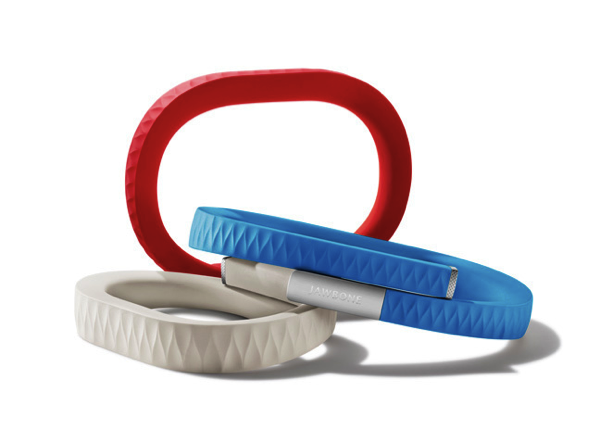
UP by Jawbone: The Health Band that’s Not Just Another Fitness Gadget

UP by Jawbone

UP by Jawbone

If you haven’t heard of it, you’ll want to familiarize yourself with the Quantified Self, a growing trend that seeks to utilize technology to give us better insight into our health, mood, and state of mind. The purpose of technologies like this isn’t to dictate how you live, but to better make you aware of your unique characteristics and nutritional needs. No two persons are built the same, and technology always finds ways to highlight facets we tend to overlook.

The UP launched late last night with much fanfare from an excited Twitter fan-base, an excellent introductory post from The Verge, and shortly after Kara Swisher, whom published an interview with its creators. Shaky cam! The UP certainly isn’t the newest contestant in the field; The Fitbit is a trick pedometer that nudges wearers to be more active, while Basis is a customizable watch module that tracks everything from body temperature to perspiration. Practical for many, Withings Wi-Fi Body Scale and Blood Pressure Monitor quantify and automate data metrics we’re already used to looking at. Websites like Fitocracy aim to gamify our health, creating social challenges that open up avenues of online collaboration and motivation with peers. Being healthy is a big avenue of interest for new startups and consumer alike.

Read more


Customize The Launchpad, Mission Control And Login Screen Backgrounds With Lion Designer

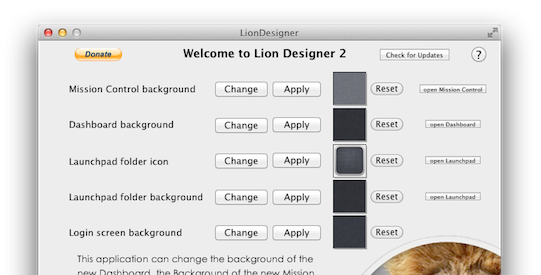
Since Lion launched we’ve covered a few hacks that describe how you can change Mission Control’s and Dashboard’s background, as well as how to change the background of folders in Launchpad - but most of them have required some level of manual file editing and replacement. Fortunately, developer Moritz Wette has made it a whole lot simpler to customize the look of Lion with his app, Lion Designer.

Lion Designer lets you customize the Mission Control, Dashboard, Launchpad folder and the login screen background as well as the Launchpad folder icon. The developer suggests using PNG images that are at the resolution of your screen or are images that can tile - otherwise you’ll end up with something that looks messy. Though if you don’t like how something looks after you’ve changed it, or something has gone wrong, you can easily click the reset button and Lion Designer will return it to the stock look. I gave the app a quick spin and found it worked fine, with my Dashboard now displaying the familiar and soothing linen pattern. Lion Designer is available for free, but be sure to send over a small donation to Wette if you find the app useful to you.

If you’re looking for some other apps to tweak and customise OS X Lion, have a look at these apps that we have covered in the past:

  • Lion Tweaks - Lets you turn various features in Lion on or off, examples include removing the system Window animation, disable spelling correction, enable permanent scrollbars and many more.
  • Launchpad-Control - Hide any app you want from being displayed in Launchpad
  • LaunchpadCleaner 2 - Also allows you to hide apps from Launchpad as well as some more in-depth features.

[Via TUAW]


Apple Pushes Back Mac App Store Sandboxing Requirement To March 2012

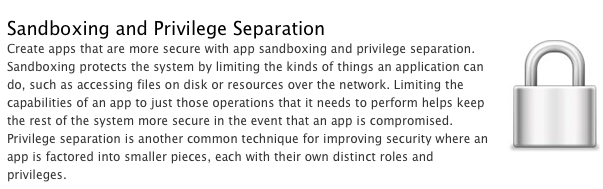
In an email to developers today obtained by iClarified, Apple has informed them that all apps submitted to the Mac App Store must implement sandboxing by March 1st, 2012. Originally Apple had told developers that the sandboxing requirement would take place this month. It isn’t entirely clear why Apple has delayed the introduction of this requirement but it does give developers a few more precious months to implement the restriction and resolve all issues that it might cause for their app.

In the email Apple notes; “Sandboxing your app is a great way to protect systems and users by limiting the resources apps can access and making it more difficult for malicious software to compromise users’ systems”. For those who aren’t familiar with the technical ‘feature’, John Siracusa has a great (and in-depth) discussion of the feature in his Mac OS X 10.7 Lion review on Ars Technica. In short, sandboxing restricts the number of actions that an app can do so that if the software is compromised, the amount of damage it can do is greatly minimised.

In Lion, the sandbox security model has been greatly enhanced, and Apple is finally promoting it for use by third-party applications. A sandboxed application must now include a list of “entitlements” describing exactly what resources it needs in order to do its job. Lion supports about 30 different entitlements which range from basic things like the ability to create a network connection or to listen for incoming network connections (two separate entitlements) to sophisticated tasks like capturing video or still images from a built-in camera.

In its email to developers, Apple also notes that if an app requires access to “sandboxed system resources”, the developer must also include justification for why it needs those entitlements when submitting the app to the Mac App Store. Finally, Apple notes that it is willing to offer developers additional, temporary, entitlements if the app is being re-engineered for sandboxing - but only on a short-term basis.

[Via iClarified, Image via Apple]


Apple Seeds New iTunes 10.5.1 Beta with iTunes Match To Developers

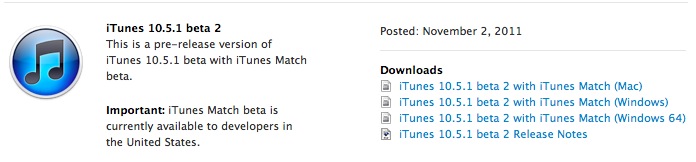
iTunes Match, Apple’s upcoming cloud music service based on “scan and match” technology, was scheduled to launch by the end October. As October went by and Apple missed its pre-announced release date – which Apple’s Eddy Cue announced at the “Let’s talk iPhone” media event on October 4th – it appears the company is now requiring additional testing for iTunes Match, which is available in a new version of iTunes not released to the public yet, iTunes 10.5.1.

A new beta of iTunes 10.5.1 has been seeded to developers a few minutes ago, including the iTunes Match functionality that Apple has been testing since August. From the release notes of this beta, it appears iTunes Match is now also available on Apple TV for testing. iTunes 10.5.1 beta 2 comes with a number of bug fixes and improvements, and Apple notes iCloud music libraries will be deleted at the end of this beta.

iTunes Match is currently in beta for developers and US-only. Rumors in the past weeks suggested another reason for the delay of iTunes Match could be Apple trying to get international rights to launch iTunes Match in additional countries besides the US – a rumor seemingly confirmed by Apple’s Eddy Cue himself, who stated iTunes Match would become available in Canada shortly after the US launch. Of course Apple may have added more countries to the launch list since September, although the company’s website still reports iTunes Match as a US-only service.

iTunes Match will work on iTunes for Macs and PCs, iPhone, iPad, iPod touch and Apple TV.


Powered by Amazon, Flow Scans Products You Can Buy Online

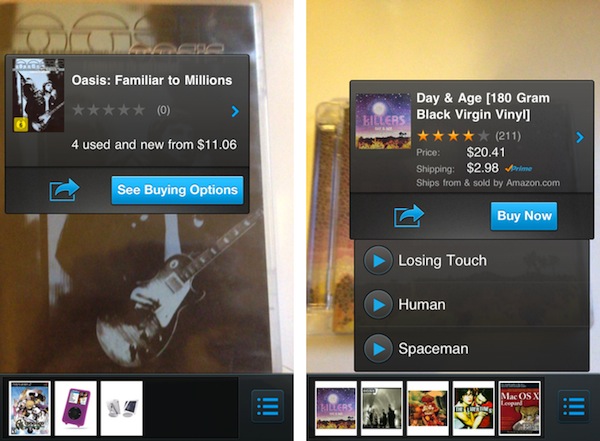
Today A9 Innovations, a subsidiary of Amazon.com, released Flow, a new iPhone app that allows users to scan objects in real-life with the iPhone’s camera, and instantly get results for available “product matches” on Amazon.com. Flow, based on A9’s scanning technology and augmented reality software, can look at a product’s cover or UPC barcode, and find in a few seconds if the selected item is also available for purchase on Amazon.com. Think Google Goggles, only based on Amazon’s retail infrastructure rather than search. Flow works with book and videogame covers, CDs and DVDs and any product barcode, but I’ve managed to find other products such as iPad accessories and Apple gadgets without scanning the barcode, only by pointing my camera at the product’s packaging for a few seconds.

The tech behind Flow for iPhone is quite impressive. As you hold your camera towards a product’s cover or barcode, the app begins “scanning” its contents and matching the image with Amazon.com in real-time. You can see the scanning process in action through a series of colored dots appearing on screen, capturing the “key areas” of a cover – such as the title, lead image, or artwork. Once a product is “found” on Amazon.com, a pop-up overlay appears on screen with options to Buy Now, see more buying options, share it, or even listen to embedded media available on Amazon.com if it’s a CD.

For example, I was able to listen to some Killers and Led Zeppelin songs after I scanned some old CDs of mine. This pop-up interface item is displayed live on screen, on top of the camera view, as Flow takes advantage of augmented reality technologies built by A9. This means that if you have multiple items on your desk, scanning one after the other will close and re-open multiple popups – it’s very neat.

This is our first step towards integrating product search technology with augmented reality,” said Bill Stasior, president of A9.com. “The integration of a live camera display, graphical overlays, and visual recognition technology creates a seamless experience for a customer looking to discover information about objects in their physical surroundings.

Flow uses continuous scan technology developed by A9.com’s visual search team to identify products and provide related information found on Amazon.com. The app displays Amazon’s popular shopping features such as product details, customer reviews and ratings, as well as sharing options via Twitter, Facebook, or email.

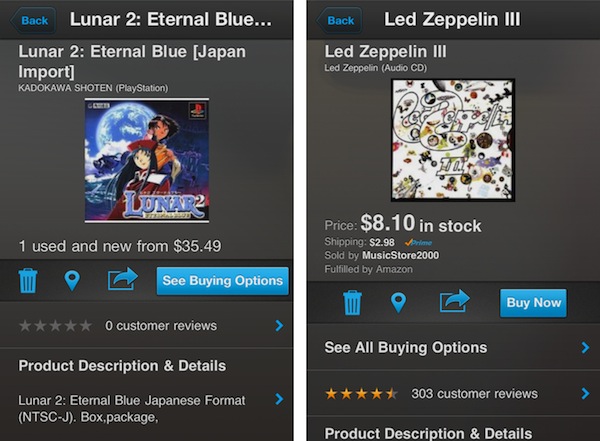
In my tests, Flow managed to recognized old CDs from the early ’90s, Nintendo 64 games, Japan-imported PSX, PS2 and GBA games, European Wii releases, DVDs, books, comic books, iOS accessories and various Apple products. The app also comes with a list view, allowing you to delete scanned items, see the best reviews and buying options on Amazon.com, and even the locations you’ve scanned from through Bing Maps. Alternate Matches, descriptions, related products and previews are also displayed when available.

Flow’s impressive scanning technology will only get better with time, and it’ll be interesting to follow the development of the app and see if Amazon will further integrate with its retail and Prime services. You can get Flow for free on the App Store.