Posts in news

Rovio’s Amazing Alex Is Now Available

The next game from Rovio, creators of Angry Birds, Amazing Alex has today arrived for iPhone, iPad and Android. The game, like Angry Birds, fits into the genrè of a physics puzzler but this time you’re setting up “objects to bounce, pop, ricochet, bash, and crash into each other and create an elaborate Rube Goldberg device”.

Meet Amazing Alex! With his boundless imagination, this whiz kid turns everything into adventure! From cleaning his room to battling cardboard robots in his backyard, Alex creates amazing chain reactions to get the job done. Now he has some challenges for you! What’s the most creative solution YOU can create? With 100 challenging levels, there’s a whole world of creations to explore!

The game features 100 levels across four locations but as Rovio has already said, regular future updates will see more levels added, just like Angry Birds. Where Amazing Alex gets more interesting is the ability for you to create your own levels with “35 interactive objects” and then share them with friends or even the whole world.

You can purchase Amazing Alex for the iPhone ($0.99) or iPad ($2.99).
Read more


Dropbox Doubles Pro Subscribers’ Space


The very popular folder sync service Dropbox is giving every Pro member a big surprise today by doubling the amount of space of their Dropbox account. Pro accounts will now get double the space they had before. Their new blog post says, “Today we’re happy to announce that our upgrades are getting a huge upgrade! Dropbox Pro now comes in flavors of 100 and 200 GB, but at the price of the original 50 and 100 GB plans. For those of you who need even more space, a brand new 500 GB plan is also joining the posse! If you’re already a Dropbox Pro subscriber, just take a seat and enjoy the fireworks — your Dropbox will supersize itself automatically tonight.” Check out the Pricing page this evening to see the all new plans.

In May, Dropbox gave users some new options to increase space by adding the option to auto-upload media from your desktop or iOS device and in April, Dropbox doubled referral credits from 250 MB to 500 MB per link.

In a world of every-increasing asset file sizes, retina displays, and computer hard drive space, Dropbox is doing a fantastic service to all of its Pro customers by doubling the space they give to us. There’s no link to click or web page to activate, they’re simply updating themselves tonight.

  • Dropbox Pro is now 100 and 200 GB, but at the price of the original 50 ($9.99/month or $99.00/year) and 100 GB plans ($19.99/month or $199.00/year )
  • A brand new 500 GB plan will also be available (yet to be announced)
  • Dropbox is giving existing Pro users a three month Pro 100 trial to share with friends or family
  • Free accounts are not receiving the upgrade but with referrals and auto-uploads your 2 GB account can be up to 18 GB

AppBot Sends Developers A Daily Digest Containing New Reviews Of Their Apps

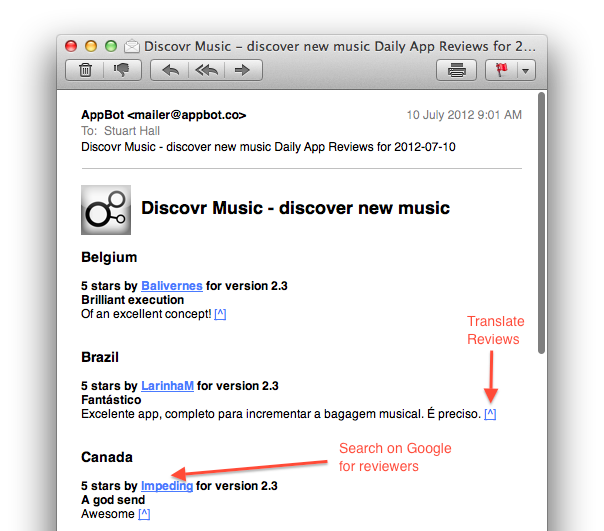
The Filter Squad development team (creators of Discovryesterday launched AppBot, a neat little service that’ll keep track of App Store reviews and email you a daily digest containing the latest reviews of your apps. AppBot was initially an internal tool for the two development teams but is now a free service in beta that’s bound to be helpful to some other developers who are keen to read new feedback from users but don’t want to have to take the effort of finding all the new reviews (in all the various countries).

In a blog post, Discovr’s Stuart Hall writes that despite some “not so amazing” reviews, they are a “good indication of the average user’s feeling towards your app”. By keeping a track of reviews, you can get a “good sentiment of how you are app is being perceived” - a key factor when word of mouth is such a driving factor of success on the App Store.

So the discovr team made AppBot to solve the problem of easily keeping track of new reviews of their apps from multiple countries. It neatly integrates a link to translate reviews from countries that don’t speak English and allows you to Google search the reviewer names. The app will also send you a list of Apple front page features (Editor’s Choice, New & Noteworthy etc.) to you weekly. You can sign up here and it doesn’t require access to your iTunes Connect account, so anyone can technically use AppBot to keep tabs on any new app.


Apple: New iPad Arrives in China on Friday, July 20

Apple has just issued a brief press release to announce that the new iPad will finally launch in China on Friday, July 20th. The recommended retail prices of the new iPad in China will match the current US prices at $499, $599 and $699 for the WiFi version (16 GB, 32 GB and 64 GB respectively) and $629, $729 and $829 for the WiFi + Cellular models (16 GB, 32 GB and 64 GB respectively). Meanwhile, from today the iPad 2 is available for $399.

Customers will be able to purchase the new iPad in China from the Apple Online Store, select Apple Authorized Resellers and by reservation from Apple retail stores. The reservation process will run daily between 9am and 12pm and begin on Thursday, July 19 and allows a customer to reserve an iPad for pick up the following day.

Apple® today announced the new iPad®, the third generation of its category defining mobile device, will arrive in China on Friday, July 20. The new iPad features a stunning new Retina™ display, Apple’s new A5X chip with quad-core graphics and a 5 megapixel iSight® camera with advanced optics for capturing amazing photos and 1080p HD video. The new iPad still delivers the same all-day 10 hour battery life* while remaining amazingly thin and light.


Apple Cracking Down On Sites Selling Access To iOS Betas

Last month, Andy Baio wrote a story for Wired detailing the world of selling access to Apple beta software to non-developers. Specifically, Baio’s piece focused on sites that, for a price, allowed regular people to have their UDID (unique device identifier) activated for installation of iOS betas, which Apple makes available for developers only. To install an iOS beta, a developer has to register his/her account with Apple, which costs $99 per year and allows for the configuration of 100 devices in the so-called “Provisioning Portal” through the aforementioned UDID.

While becoming a registered developer costs $99, sites selling UDID activation did so for a low price, usually within the range of $10. Baio wrote:

For a small developer, unauthorized activations are a lucrative business that’s likely worth the risks. UDID Activation publishes their order queue on their official site, which shows more than 2,300 devices activated in the last week alone. At $8.99 for each activation, that’s more than $20,600 in revenue, with $2,277 paid to Apple for the 23 developer accounts. Their homepage claims that more than 19,000 devices were activated so far, and that’s only one of several services. And since device activations only last for a year, each service can reuse their expired slots with no additional cost.

After noticing several of the sites mentioned in Baio’s article had become unavailable in recent weeks (activatemyios.com, iosudidregistrations.com, activatemyudid.com, udidregistration.com, instantudidactivation.com), we reached out to some of them asking whether Apple was behind the takedown of their “services”, which infringed on Apple’s developer agreement. While most of our emails bounced, we heard back from one of the site owners (who asked to remain anonymous), who confirmed his hosting provider took down the site after a complaint for copyright infringement by Apple. Similarly, the CEO of Fused tweeted in a reply to Andy Baio that Apple had been “fairly heavy-handed” with DMCA requests to UDID-selling sites hosted on their network.

In the email, the site owner said that their website made $75,000 since last June, when Apple released the first beta of iOS 6 to developers. “We do not believe our service was infringing and our services did not violate their guidelines for iOS 6”, the site owner commented, adding that they will soon launch another similar site, “with better and more secure data lines to handle Apple”.

The owner of another site replied to our emails with a “no comment”. According to him, “the Wired article has caused all these sites to go down”.

Indeed, it appears Apple has started taking action against these sites recently, and more precisely after Wired ran the story on UDID activation. Last year, Apple reportedly closed developer accounts of people who sold their available UDID slots to other users; this year, it appears Apple has chosen the more direct path of shutting down websites and their services by filing DMCA requests to their hosting providers.

When Wired published its story, Apple added that “unauthorized distribution is prohibited, and may be subject to both civil and criminal liability”. It is unclear whether Apple terminated memberships to the Developer Program this year as well.

Surprisingly, one of the most popular sites selling access to iOS betas, udidactivation.com, is still online. However, their “UDID order queue” – a webpage displaying the amount of total sales – fails to load, and the same page on their “backup site”, udidactivation.us, displays the latest sales as being from June 28.

Apple seems to have taken action against sites selling access to OS X beta downloads, as well. A popular one, iMZDL.com, put a notice on their website saying “we will no longer be putting up downloads on iMZDL.com for Apple Betas”. Their website is still up, and rather than hosting the download links themselves, they have now switched to torrents for sharing links to iOS and OS X betas.

As we previously wrote, access to Apple beta software should be restricted to developers, as they know how to provide meaningful feedback and report bugs to Apple.



Get A Sense Of What A 7.85” iPad mini Would Be Like

Rumors of a smaller iPad were back again this week with a report from Bloomberg and since then the rumor mill has been in full swing. Not much detail was in the rumor, other than it’s a smaller iPad and that it’ll launch later this year. Earlier in the year, the display was rumored to be around 7.85” and A.T. Faust of AppAdvice gave compelling reasons as to why it makes sense. That number seems to have stuck around with this latest round of iPad mini rumors.

“The reason we [won’t] make a 7-inch tablet isn’t because we don’t want to hit [a lower] price point,” Jobs said. “It’s because we think the screen is too small to express the software. As a software driven company, we think about the software strategies first.” - AllThingsD

When I read the rumors this week I sighed, not again. I wasn’t the only one either, an iPad mini seems like a compromise, with little advantage. Plus the old Steve Jobs quote about 7 inch iPads just kept circling around. But others weren’t so closed minded and were considering whether it might actually have a place in Apple’s product line.

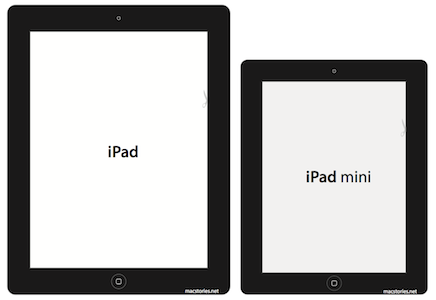
The biggest issue I have is with the screen, and whether the screen can still be sufficiently useful at the smaller size. To find out, I decided to do the old hack of making a little paper template of the iPad mini and see how it looked. I decided to stick with the 7.85” diagonal display size suggested and use a bezel only slightly smaller than those on the current iPad. For comparison I also made a paper template for the current iPad and versions of both with the bevel colored in. You can download, print and cut them out for yourself.

Note: make sure when printing that it isn’t being scaled up or down, as that will adjust the size of the “screen”. Check the little measurement guides to ensure it printed out correctly.

That was all good and well, but it didn’t really give me a sense of what the UI might look like on an iPad mini. So I decided to take some screenshots and shrink them down to the appropriate size. But I also made a duplicate copy of the screenshot and using Photoshop, reconfigured the UI to fit on a 7.85” display without adjusting the size of the buttons. To my mind that’s the only way that Apple would do this - Apple does frequently remind iOS designers to keep buttons at a tappable size (mentioned prominently in iOS Human Interface Guide), just shrinking the current iPad display would make buttons more difficult to tap.

Finally I put it all together into a Keynote presentation so that I could view it on my iPad and visibly see and compare how it would look. I’ve uploaded it, so you can do the same yourself. You just need Keynote for iOS and go into presentation mode to look at it yourself. If you want to go the extra step, cut your iPad mini template out and place it on top of your iPad whilst viewing the screenshots.

Read more


Why Apple’s Passbook Doesn’t Do Credit Cards (Yet)

Why Apple’s Passbook Doesn’t Do Credit Cards (Yet)

Jessica E. Vascellaro of The Wall Street Journal writes:

Apple’s head of iPhone software, Scott Forstall, was interested in the idea, say people familiar with the matter, and engineers on his team began to brainstorm a comprehensive “wallet app.”

They discussed whether Apple should facilitate payments to merchants directly, one of these people said. The idea didn’t go very far, on account of the complexity, including the possibility that the company would need to become a bank.

[…]

Apple’s Mr. Schiller was worried that if Apple facilitated credit-card payments directly consumers might blame Apple for a bad experience with a merchant.

The executives ultimately opted for the more scaled-down version of Passbook, which engineers still referred to as the “wallet app.”

However, what Passbook ended up doing is far more interesting than simply tying in your credit cards. Passbook integrates store cards, movie tickets, flight tickets, concert tickets, and more into a single application. Rather than strictly being a digital wallet solely for bank cards, Apple took the idea of managing paper and plastic (tickets and extraneous store cards that add sometimes senseless bulk to our wallets) and utilized the screen to display the required barcode — not necessarily revolutionary, but it’s simple and effective. Utilizing the iPhone, Passbook can even display location aware notifications on the lock screen, “handing” you your ticket when you reach the airport for example. If the next iPhone does enable some sort of NFC payment system, then that’s great. But from what we already know, Passbook seems like a solid step in the right direction.

Honestly, you only have to look so far as the Samsung Galaxy Nexus and Verizon to understand why Apple executives weren’t so keen on the idea of introducing their own “wallet.” Mobile payments may be a “gold mine,” but it’s a gold mine that’s in a state of flux. When the Galaxy Nexus launched on Verizon, the carrier disallowed the ability to run Google Wallet, Google’s mobile payment app that works with NFC. Instead, Verizon wanted to focus on Isis, a separate mobile wallet being developed in tandem with AT&T and T-Mobile.

Secondly, companies like Square and PayPal are bringing the point of sale straight to mobile devices through innovative combinations of hardware and software. While Square offers features that allows customers to simply have merchants add a bill to their tab, their hardware dongle for iPhones, iPads, and Android devices depends on credit and debit cards for the payment of goods. While it’s early in the game, Square has certainly disrupted the idea of payment processing, allowing virtually anyone to become a seller and distributer of goods practically anywhere Square is supported. Where NFC focuses on modernizing traditional payment systems, companies like Square are focused on turning that idea on its head.

When (not if) Apple does decide to further integrate Passbook with our wallets, they’ll want to be sure that both sides of the spectrum (how to pay and how payments are accepted) are resolved. While companies like Google and Microsoft are testing the waters, Apple’s a company known for making the right moves when it counts.

We can agree that while everyone (okay — just the people who read tech blogs a lot) want the future now, Apple is justifiably err’ing on the side of caution. They clearly can’t ignore mobile payments, but what they can do is build a platform that allows them to utilize the stuff that’s… well, not in flux. It’s not like what we’re using right now is going away anytime soon. And it looks like Apple certainly have a good solution, at least in the meantime, towards managing all of the annoying stuff that also goes in your wallet — the stuff that often seems to be ignored in the course of discussing wallets vs. mobile payments. So while we clamor for phones to become an instant portal into our bank accounts and account balances, let’s not get ahead of ourselves. It looks like mobile payments have a long way to go before people not only get comfortable with the idea, but companies finally agree how to do things.


Permalink

Apple Removes Negative Reviews From Apps Affected By DRM Bug [Updated]

Earlier this week, an error in Apple’s DRM code generation for App Store apps caused a number of app updates to crash on launch. The issue, initially reported by Instapaper developer Marco Arment, began spreading to more than 100 iOS and Mac app updates including GoodReader, Angry Birds HD Free, and The Early Edition. As the bug was causing updated apps to crash immediately after launch without even displaying an error message, several users became upset with the developers of the apps – as they didn’t know the issue was on Apple’s servers – and began leaving negative reviews on the App Store. Developers, on the other hand, had to deal with a issue that they couldn’t fix, while explaining to customers how they should back up their data and wait for a solution.

Last night, Apple officially acknowledged the issue and explained it was associated with DRM code generation on the App Store. Apple said they had fixed the issue, and Macworld reported that, according to their sources, Apple would also remove all negative reviews that had been left during the hours the bug was spreading on various international App Stores.

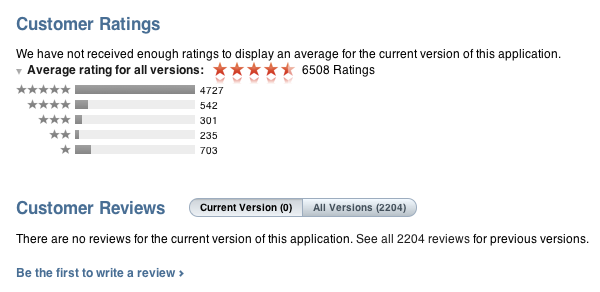
As of this morning, it appears Apple has indeed removed negative reviews from apps affected by the bug. Apps like Instapaper, GoodReader, and The Early Edition are showing no reviews for the latest versions available, which are the ones that were crashing earlier in the week. We haven’t checked on every single app that was affected, but it is safe to assume at this point Apple will remove all reviews (not just negative ones) from any app that received a corrupted update.

Apple hasn’t issued a public apology to developers, but the removal of reviews will definitely help in leaving this issue behind without having to deal with the aftereffects on the App Store as well.

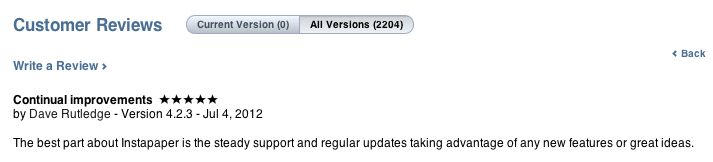
Update: As noted by several readers on Twitter, it appears Apple didn’t completely wipe the old reviews left during the DRM outage – it re-issued app updates for the same version of the app, and moved the “Current Version” reviews to “All Versions”.

In spite of the version being the same – for Instapaper, the affected version was 4.2.3 – the old reviews are not showing up in the Current Version section of the App Store. This helps hiding possible negative reviews from the section that it loaded by default in iTunes.

By re-issuing the old version as an update again, Apple is making sure customers can re-install the fixed version of an app without having to delete it first, as noted by Marco Arment. It is unclear whether the old reviews will still affect overall ranking of an app.


Apple Rectifies Corrupted App Store Downloads, Advises Users to Delete and Reinstall Broken Apps

Late Tuesday evening, Instapaper developer Marco Arment was met with a nasty surprise when some users updating to Instapaper 4.2.3 found that their updated app instantly crashed after opening. Upon investigating and hearing similar reports from other developers, Marco found that the App Store itself was corrupting app updates, leaving users with broken apps and developers with one star reviews from confused and upset customers. Writing at Marco.org, Marco addressed the issue to his audience and began gathering a large list of apps that were also affected, calling on Apple to quickly resolve the problem as developers dealt with the consequences.

On Thursday evening, Apple acknowledged the problem to AllThingsD and Macworld, informing the publications that the issue had been resolved.

Lex Friedman from Macworld writes,

Around 6:00 p.m. PT, Apple acknowledged the problem to Macworld, describing it as “a temporary issue that began yesterday with a server that generated DRM code for some apps being downloaded.” Apple added: “The issue has been rectified and we don’t expect it to occur again.”

Customers with affected applications should be able to delete and reinstall a working application through the App Store.

Additionally from Macworld,

Sources told Macworld that Apple will be removing one-star app reviews developers earned unfairly because of the company’s server issue.

As Matthew Panzarino from The Next Web points out, both Apple customers and developers have little to no recourse when problems like this occur. Developers currently have no way of effectively communicating with customers outside of developer blogs.

When the one-star reviews started rolling in, there was very little that developers could do to notify users of their app that it was an issue with Apple’s packaging of their apps, not the apps themselves. The users just saw that the app was crashing on launch and rated it accordingly.

Reinstalling applications also leads to users possibly losing information — Glasshouse Apps’ is still dealing with the aftereffects as the company prepares an app update and advises users on the best course of action that will keep their news feeds and data intact. The developers of GoodReader have also written a step-by-step guide that helps customers back up, reinstall their app, and restore data onto their devices.

While Apple has acknowledged and fixed the issues disrupting application updates on the App Store, they have not yet issued an apology to developers, nor did they want to themselves acknowledge that they’d be removing one-star app reviews apps received because of the error. If Apple should do anything more, they certainly need to reach out and apologize to developers, who’ve unfortunately had to run damage control to prevent one-star reviews and angry customers.

[Sources: Macworld via AllThingsD]