Posts in news

AppStories, Episode 16 – Evolving the iMessage App Store

On this week’s episode of AppStories, we discuss the current shortcomings of the iMessage App Store and what Apple is changing in iOS 11 to address some of its problems.

Sponsored by:

  • Timing - Stop worrying about time and focus on doing your best work instead.
  • Redox - a modern API for accessing and sharing data across healthcare organizations.
AppStories+ Deeper into the world of apps

AppStories Episode 16 - Evolving the iMessage App Store

0:00
28:19

AppStories+ Deeper into the world of apps

Permalink

Spark for macOS Adds Improved Email Search

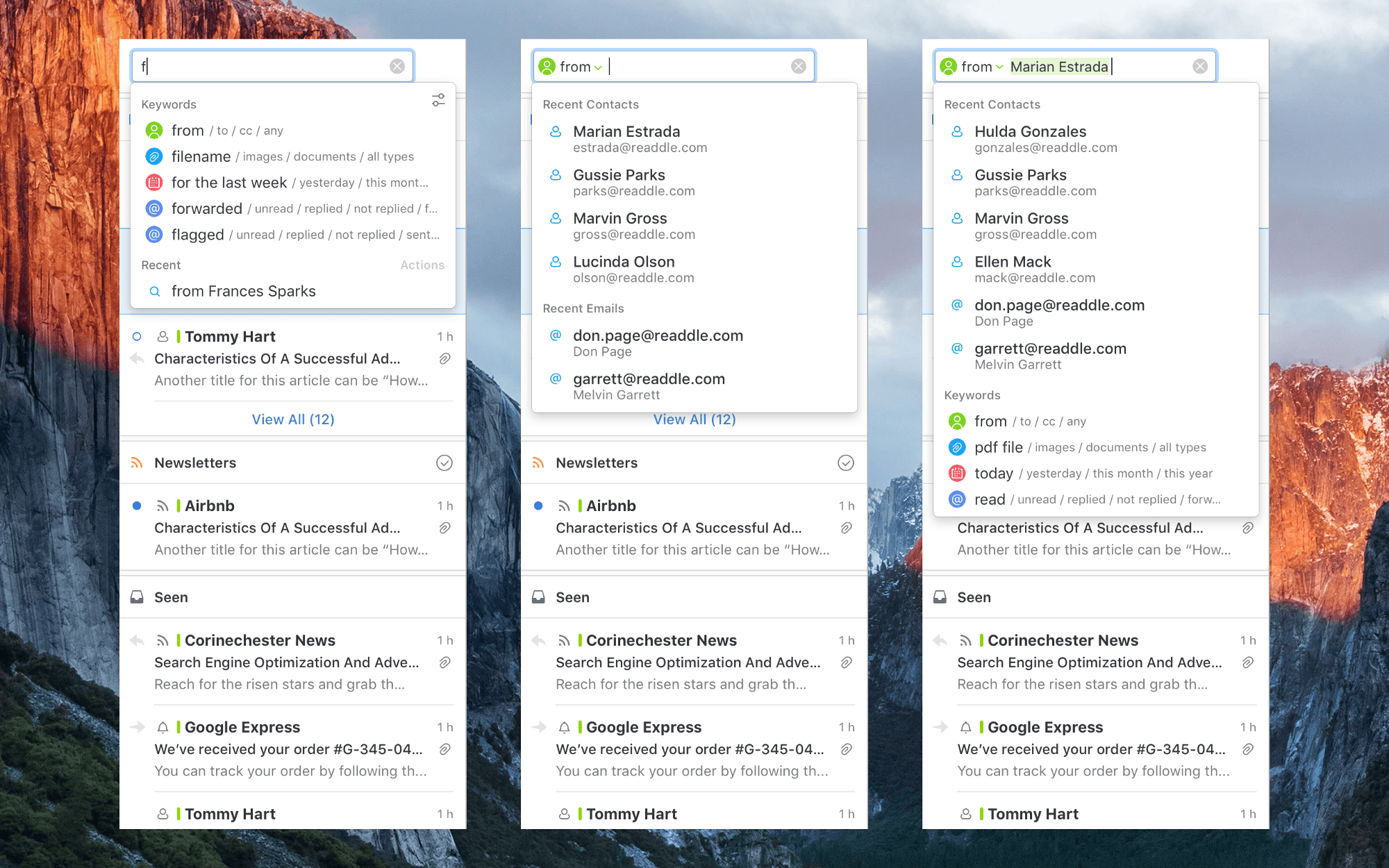
Search isn’t the forte of many email clients. Too often I find myself resorting to gmail.com or the Gmail app on iOS to find a message because Google’s search is so good. However, a downside of Google’s approach is that it requires you to recall or look up special syntax to narrow your search using date, attachment, sender, and other parameters. An update to Readdle’s Spark for macOS avoids that pitfall with improvements to its search functionality that detect keywords in your searches as you type queries in plain English.

I haven’t used Spark’s improved search enough yet to give it a thorough review, but I like what I’ve seen so far. As you type a search query, Spark looks for keywords. For example, start typing ‘att…’ and Spark will suggest searching for attachments. Smart keywords include things like ‘to,’ ‘from,’ ‘attachment,’ ‘flagged,’ ‘forwarded,’ and dates. The parameters can be batched in plain English too, so I can type ‘emails from Federico from yesterday with PDF attachments’, and Spark knows to apply the sender, date, and attachment filters returning results almost instantly.

Spark is already a popular email client with a host of modern features, but the improvements to search have the potential to make a lot of new converts to the app.

Spark for macOS is available on the Mac App Store.


Apple Q3 2017 Results: $45.4 Billion Revenue, 41 Million iPhones, 11.4 Million iPads Sold

Apple has just published its financial results for Q3 2017. The company posted revenue of $45.4 billion. Apple sold 11.4 million iPads, 41 million iPhones, and 4.3 million Macs during the quarter.

“With revenue up 7 percent year-over-year, we’re happy to report our third consecutive quarter of accelerating growth and an all-time quarterly record for Services revenue,” said Tim Cook, Apple’s CEO. “We hosted an incredibly successful Worldwide Developers Conference in June, and we’re very excited about the advances in iOS, macOS, watchOS and tvOS coming this fall.”

Read more


Carpool Karaoke: The Series Launches August 8th

Apple announced today that its next original TV series, Carpool Karaoke: The Series, will premiere on August 8th and air new episodes every Tuesday from that point on. Like its first show, Planet of the Apps, Carpool Karaoke will be released exclusively for Apple Music subscribers.

A new promo trailer for the series was released today alongside the date announcement. It features short clips from many upcoming episodes, showing off a variety of guest star pairings including:

  • James Corden and LeBron James;
  • Ariana Grande and Seth MacFarlane;
  • Planet of the Apps advisors Jessica Alba, Gwyneth Paltrow, and will.i.am;
  • Shaquille O’Neal and John Cena;
  • Alicia Keys and John Legend;
  • And several more.

Gboard Update Brings YouTube and Maps Integrations

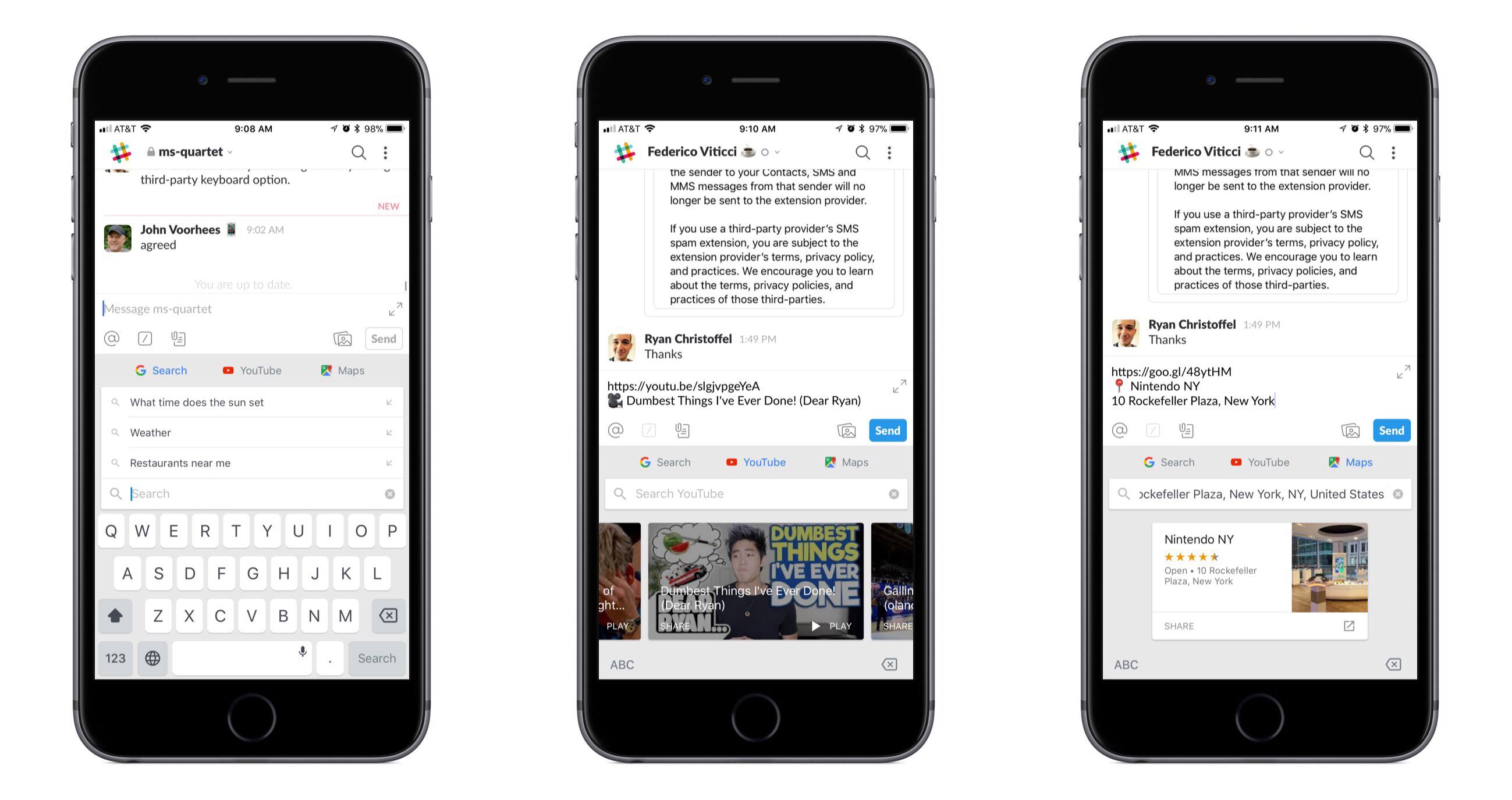
One of the best third-party keyboard options on iOS just got better. The latest update for Gboard adds special integrations with two Google services: YouTube and Google Maps.

When using Gboard, tapping the G button will now present YouTube and Maps tabs alongside the standard Search option. Both new options present an assortment of suggestions when you first open them, along with the expected search function. YouTube’s suggestions appear to be a selection of top trending videos; in my testing Gboard wouldn’t show any videos personalized to me or my watch history, but that may change over time with more use. Maps shows an assortment of nearby locations, as well as your current location if you grant that permission. Making a selection copies a link to the content inside the text box, alongside a brief description of what you’re linking to.

The market for third-party keyboards on iOS has largely grown stagnant, but Google continues to show its commitment to Gboard. While adding new features to a keyboard could clutter its interface before long, YouTube and Maps are natural fits for Gboard, integrating well both from a functionality standpoint and in their placement in the interface.


1Blocker: Make Safari Browsing Fast, Safe, and Productive [Sponsor]

Advertising and trackers have gotten out of hand on many sites. Pages load slowly wasting your time, draining your battery, and using up your mobile data. Even worse, ads sometimes serve up malware to unsuspecting users. To take back control, you need 1Blocker.

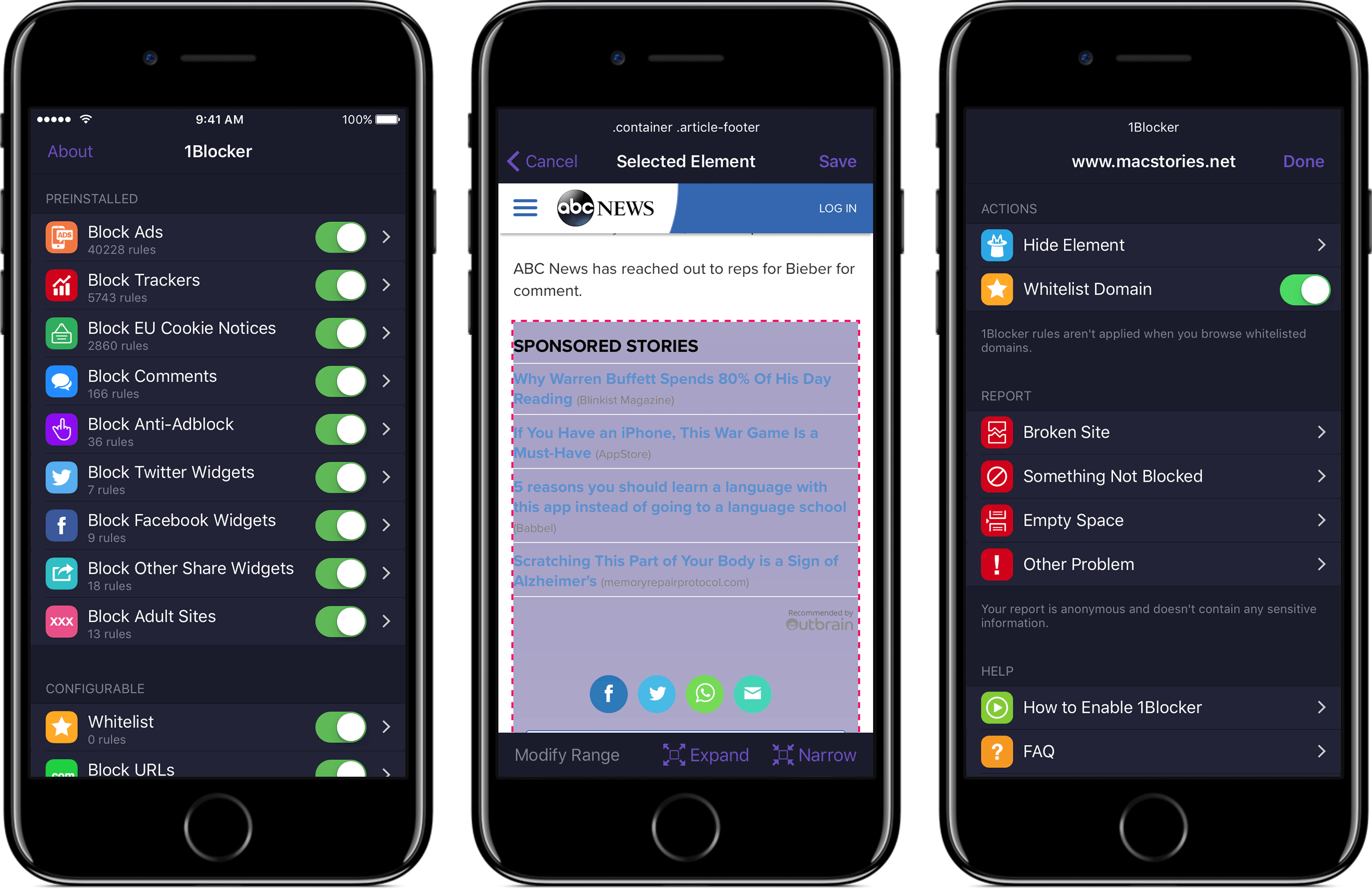
1Blocker fights back by putting fine-grained controls in the hands of its users. The app has rules that block tens of thousands of common ads, trackers, social buttons, and other junk. The ad blocking category alone includes over 40,000 rules. On top of that, there are eight other categories with thousands of additional rules that will make you more productive online by reducing distractions. In the unlikely event that 1Blocker doesn’t have a rule you need, you can add your own too.

You can even hide individual elements on a webpage with 1Blocker’s powerful action extension on iOS. All you have to do is invoke the extension, tap what you want to hide, and then save. It’s incredibly simple and effective for page elements that aren’t already blocked by 1Blocker’s extensive built-in rules.

1Blocker is available on macOS too and syncs with the iOS version via iCloud to keep your blocking rules up-to-date across both platforms. Head on over to 1Blocker’s website for more information about how it can make your browsing better.

Our thanks to 1Blocker for sponsoring MacStories this week.


Mailbutler - To Increase Your Email Productivity [Sponsor]

No one has ever said ‘I want to spend more time on my email.’ Staying on top of important messages is critical, but managing your inbox can quickly become an unproductive time sink. Mailbutler is a productivity tool that supercharges your email client so you can get through your email messages quickly and efficiently.

Just because you are catching up on email messages at 1:00 AM doesn’t mean you want your message to hit someone’s inbox at that hour. With Mailbutler, you can schedule your emails to be sent during normal working hours and then track whether the recipient opened your message. Mailbutler also helps you put your best foot forward with beautifully-designed, professional message templates and signature management.

Mailbutler is just as effective at managing messages you receive. When you need to focus on your work, you can pause your inbox until you are ready to deal with it. Mailbutler also makes unsubscribing from unwanted email much faster than hunting for that tiny ‘unsubscribe’ link buried at the bottom of a message. As you process messages, Mailbutler can even turn them into tasks or Evernote or OneNote notes, which is a more effective way to handle actionable and reference items than letting them sit in your inbox.

Everyone could use help with email. Mailbutler has already conquered Apple Mail and is working on even more tools to help you tame your inbox. Try Mailbutler for free today.

Our thanks to Mailbutler for sponsoring MacStories this week.


Siri Featured in Apple Ad Starring The Rock

Apple released an advertisement showcasing Siri starring former pro-wrestler turned film star, Dwayne (‘The Rock’) Johnson. Teased yesterday by Johnson on Twitter and Facebook, the video, posted to Apple’s YouTube channel, features Johnson accomplishing a long list of life goals with the help of Siri during a single day. The tongue-in-cheek spot highlights several Siri features such as:

  • reading Johnson’s schedule;
  • creating a reminder;
  • scheduling a Lyft ride;
  • getting the weather forecast;
  • reading email;
  • displaying photos;
  • texting someone;
  • converting measurements;
  • playing a playlist;
  • starting a FaceTime call; and
  • taking a selfie.

The Siri ad is a clever and entertaining way of explaining the breadth of tasks that can be accomplished with Siri, from the basics like weather forecasts to less well-known features like taking a selfie.


Apple Names Deirdre O’Brien Vice President of People

Long-time Apple executive Deirdre O’Brien was named Apple’s Vice President of People today. O’Brien, who has worked at Apple for 30 years, most recently as its Vice President of Worldwide Sales and Operations, will report directly to CEO Tim Cook. As Vice President of People, O’Brien will take on HR functions including talent development, recruiting, benefits, compensation, business support, and Apple University.

Tim Cook had this to say:

“As long as I’ve been at Apple, Deirdre has been the glue that bonds our operations, sales, marketing and finance teams to deliver products to our customers,” said Tim Cook, Apple’s CEO. “Deirdre deeply understands Apple’s unique culture and that people join Apple to do the best work of their lives. She is a superb leader and I’m thrilled she will be bringing her experience and talent to this critical role.”

O’Brien added:

“I love Apple and, like so many of my colleagues, I’m honored to have made it my life’s work,” said Deirdre. “I’m excited to begin this new chapter, supporting 120,000 incredibly talented people around the world who are motivated to do amazing things every day. It is a privilege to work among such a diverse and talented team, and to help them thrive here at Apple.”

O’Brien is scheduled to assume her new role in the fall.