Posts in news

Ulysses Announces Move to Subscription Pricing

Ulysses, the popular text editor and 2016 Apple Design Award winner, announced today that it has adopted a new subscription pricing model. A post on the Ulysses blog by Ulysses co-founder, Marcus Fehn, covers the details:

  • Users can try Ulysses for free for 14 days before deciding whether to subscribe. After 14 days, Ulysses works in a read-only mode, but documents can still be exported.
  • Ulysses subscriptions are $4.99/month or $39.99/year.1
  • Subscribing unlocks both the iOS and macOS versions of Ulysses.
  • Students can subscribe for $10.99 for six-month periods.
  • Existing users can take advantage of a limited-time lifetime discount equal to 50% off the monthly subscription price.
  • Users who recently purchased Ulysses on macOS will be given a free-use period of up to 12 months depending on when they purchased the app. Users who bought Ulysses on iOS can receive up to an additional 6 months of free use.

Existing versions of Ulysses for iOS and macOS have been removed from the App Store and Mac App Store, but have been updated for iOS 11 and High Sierra, so they will continue to work for now if you decide to not subscribe. However, new features will be limited to the new versions of Ulysses that were released on the app stores today. I downloaded both versions and was impressed by the seamless transition, which explained the move to subscription pricing, the limited-time discount offer, and automatically gave me two free months of use even though I bought the apps nearly two years ago.
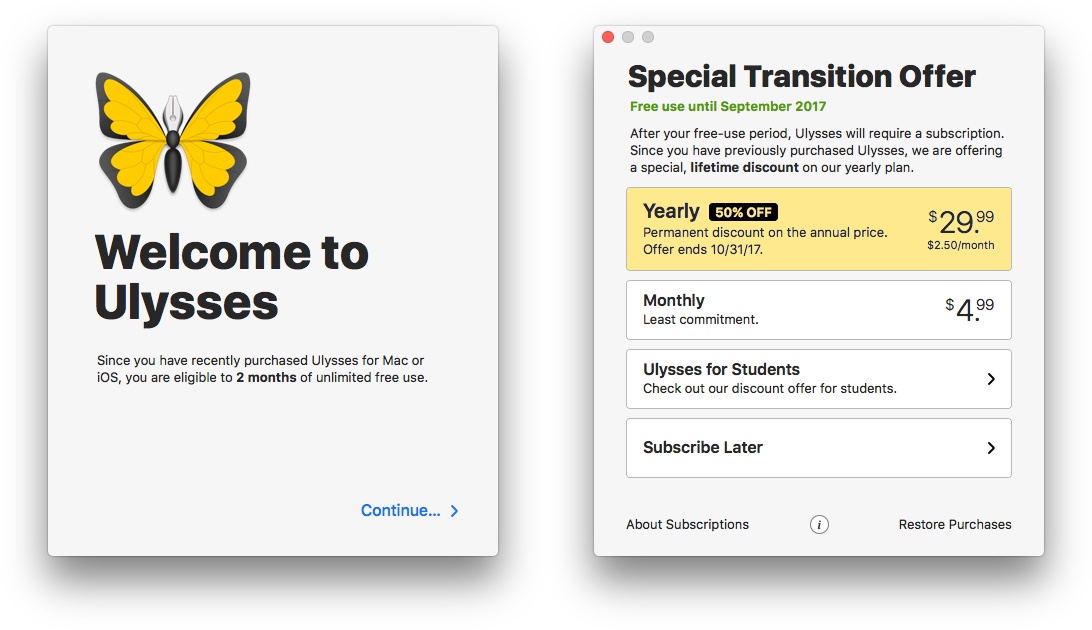
My personalized onboarding for the macOS version of Ulysses.

My personalized onboarding for the macOS version of Ulysses.

In addition to the announcement on the Ulysses blog, Max Seelemann, one of Ulysses’ founders, wrote a post on Medium explaining the company’s thinking behind moving to a subscription model that is worth reading. It’s a backstory that has become familiar. Pay-once pricing is not sufficient to sustain ongoing development of professional productivity apps like Ulysses. While Ulysses has enjoyed success, funding the kind of development that pro users expect through growing the app’s user base is not sustainable in the long-term. As Seelemann explains, several options were considered over a long period, but ultimately it’s subscription pricing that gives Ulysses the security and flexibility needed to maintain the app.

I’m glad to see Ulysses adopt subscription pricing. I can’t say that would be the case for every app I use, but I use Ulysses every day. I want it to be actively developed and available for a long time. The tricky part about subscriptions, as we’ve discussed in the past on AppStories, is that the value proposition for each person is different. One person’s mission-critical app might be another’s nice-to-have app and the success of a subscription model depends on picking price points that appeal to a sustainable segment of users. However, the flexibility that Ulysses has adopted with different monthly, yearly, and student pricing tiers in comparison to its pre-subscription pricing strikes me as an approach that is well-positioned to succeed.

Ulysses is available as a free download with a 14-day free trial on the App Store and the Mac App Store.


  1. A full rundown of pricing for each country where Ulysses is sold is available on its pricing page

OneDrive for iOS Adds Offline Folders, Improved Document Scanning, and New Sharing Options

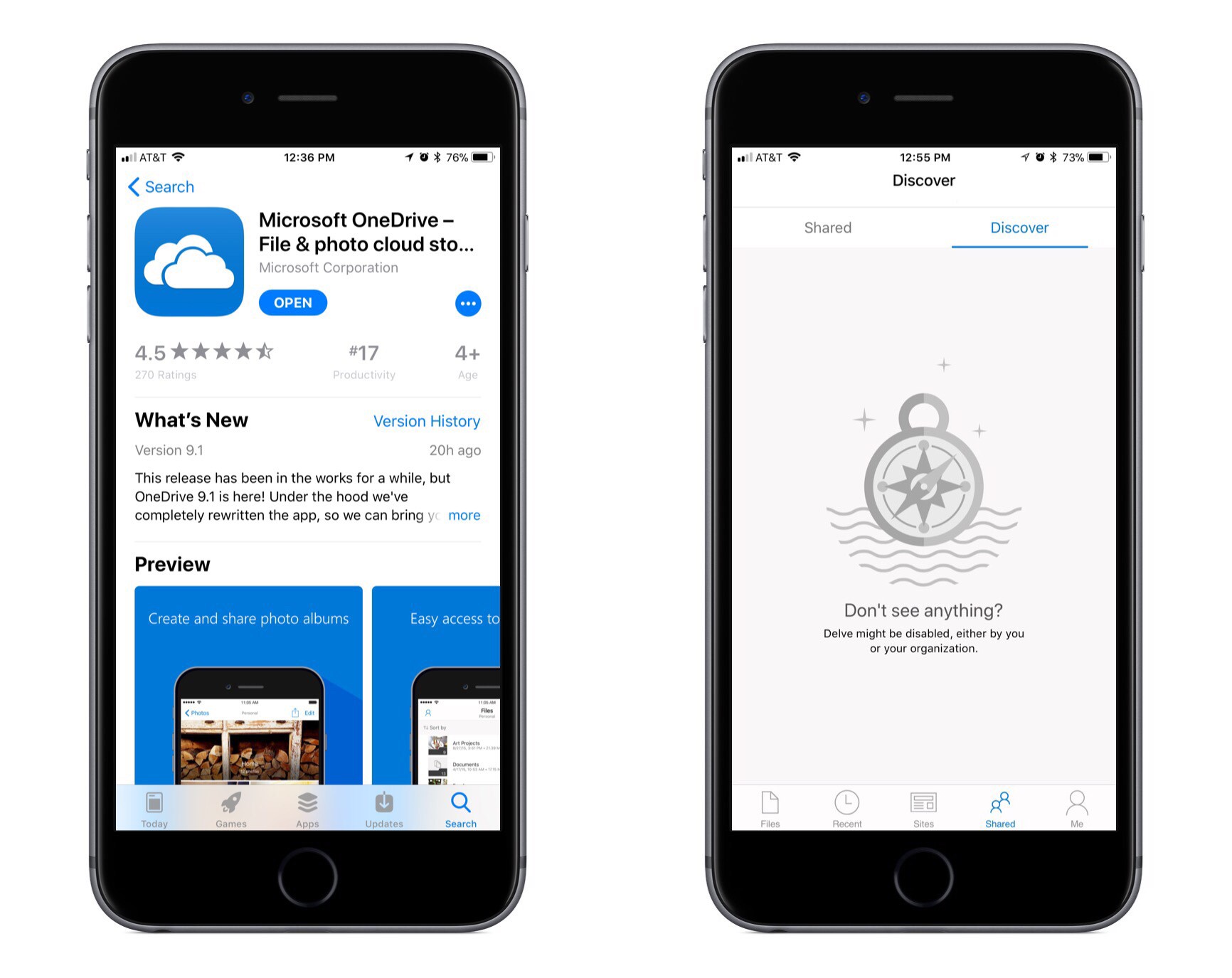
Microsoft has released a big update to OneDrive for iOS, bringing several significant user-facing features as well as a full rewrite of the app under the hood to improve performance. According to the release notes for the update, all the new features are being progressively rolled out over the next couple days, so you may not see them right away. They are also all, at least for now, exclusive to Office 365 subscribers, and it is unclear if that will change in the future or not.

The first new feature of note is offline folders. OneDrive has offered offline files for a while now, but the ability to save entire folders offline has been painfully absent. I expect this feature will make a lot of users very happy.

Earlier this year OneDrive added a scanning tool, but it was very basic and rudimentary, requiring scanned documents to be a single page only; there were also no editing options whatsoever for scanned pages. The latest version of the app remedies these issues by introducing multi-page scanning along with tools to crop, rotate, or delete scanned pages.

The final two changes to OneDrive center around improving file sharing. One of those improvements is that you can now give someone temporary access to a file by creating a shared link with an expiration date of your choosing. The other improvement is found in the app’s ‘Shared’ tab, where users with a work or school account will see a new ‘Discover’ section. This section features an assortment of documents personalized for you based on who you work with and what projects you’re working on together.


Carpool Karaoke: The Series Now Available on Apple Music

Last night Apple launched the premiere of its second original television series, Carpool Karaoke. Like Planet of the Apps before it, Carpool Karaoke will release new episodes every Tuesday for Apple Music subscribers. It can be accessed from the ‘TV & Movies’ section of the Apple Music app’s ‘Browse’ tab. Alternately, you can also find it in Apple’s standalone TV app, which Apple Music has a direct integration with.

The premiere episode of Carpool Karaoke is twenty minutes and features James Corden and Will Smith. The concept for the series comes from the popular segment on “The Late Late Show” where Corden rides around with a celebrity singing songs and exploring the city. Based on previews for the series, Corden will only appear in one other episode of Apple’s spinoff this season, while other episodes will contain a host of other celebrity groupings.

You can see a six-minute clip of the series’ first episode below, followed by an extended preview of the upcoming season.


Anchor Introduces Video Generation for Sharing Audio Clips

Anchor, the service that aims to bring audio creation to the masses, introduced a new feature today in its iOS app that offers a better way to share audio clips on social media: Anchor Video.

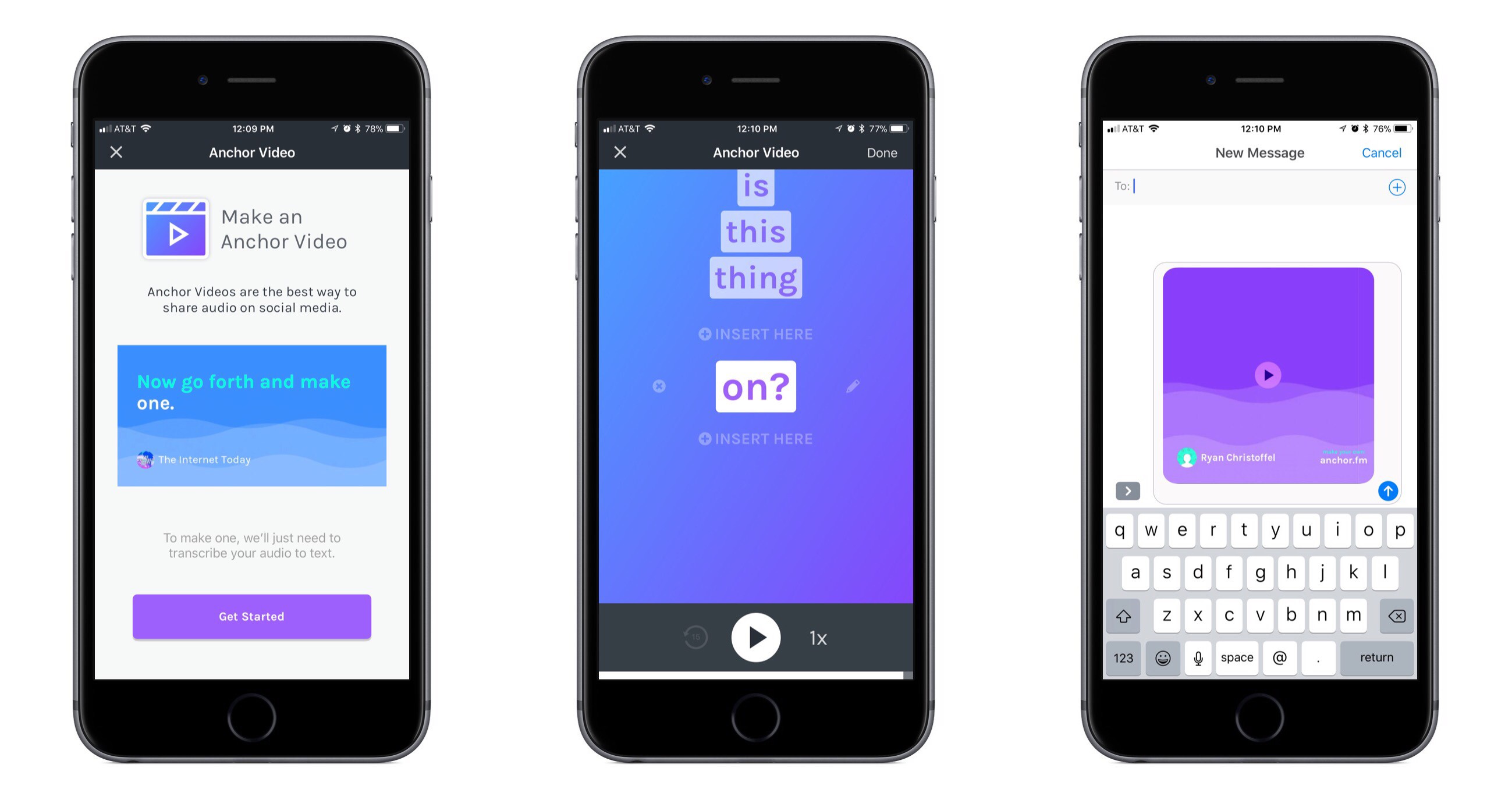
Put simply, an Anchor Video takes your recorded audio, transcribes it, then creates a video out of the content. The finished product includes your original audio complemented by a running stream of the clip’s spoken words in written form; transcribed words animate across the screen as the clip plays, providing an elegant visual way of sharing your content on social media. If a follower comes across your video and doesn’t want to or can’t listen to audio in a given situation, they can simply watch the transcription fly by; and even if they do want only audio, presenting that audio as an Anchor Video will make it stand out more in a social media feed.

The creation of an Anchor Video is smooth and easy. It starts with selecting a recorded clip on your Station and tapping the video button to the left of the share icon. Anchor will then work to transcribe the clip, which for longer clips may take a while, so there’s a feature to get notified when it’s done – a nice touch. After the transcription is complete, you can check to make sure it got everything correct and make any edits as necessary, including adding, removing, or editing words. When it all looks good, the video will generate – again, there’s the option to get notified when it’s finished if you don’t want to wait – and you can then share it in one of three formats: Square (1:1), Wide (16:9), and Stories (9:16). You don’t pick the format until after the video’s generated, so it’s easy after the fact to export in different formats for different services.

Anchor Video is a well-polished solution to the problem of sharing audio across social media. It makes the task simple for users, takes into account how different services are optimized for different aspect ratios, and creates a finished product that looks good enough to share.


Wikipedia for iOS Gains Dark Mode, iMessage Stickers, ‘On This Day’

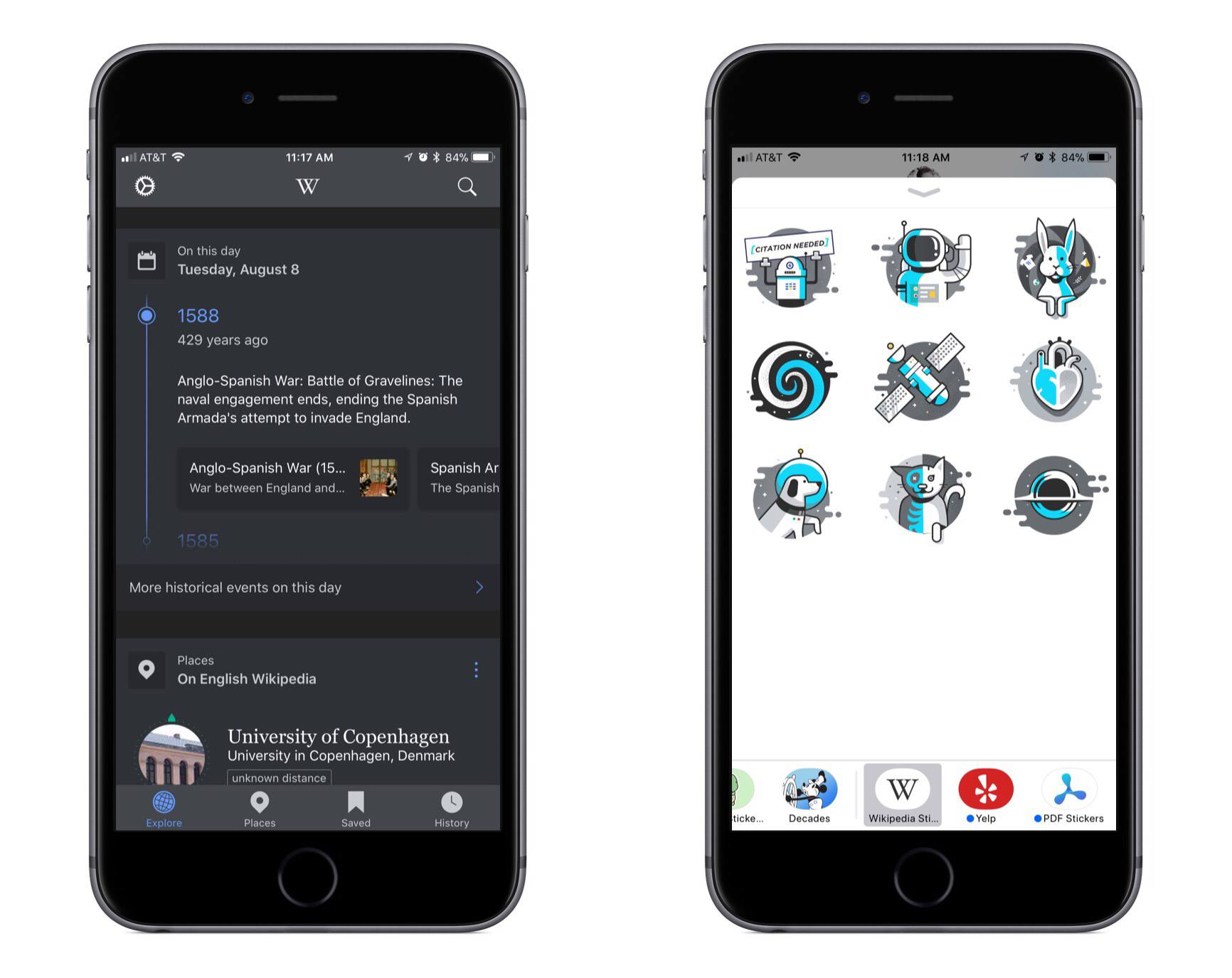
The official Wikipedia app for iOS was updated today with several improvements, most notable of which is a new dark reading theme. While I would enjoy having a dark mode in just about any app, it is especially valuable in an app centered around reading, so I’m grateful for the addition. Wikipedia’s implementation looks sharp, tastefully combining black and grey with a beautiful blue serving as an accent. There’s also the bonus of an optional toggle that dims images while using the dark reading theme.

A small set of nine iMessage stickers has also been added to the app. The clear standout is the robot holding a sign that reads ‘Citation Needed,’ which could be used to playfully question a claim made by your friend.

The final notable feature in today’s update is a new card added to the ‘Explore’ tab called ‘On this day.’ This aggregates historical events of any significance that took place on the current calendar day. In your Explore feed you’ll only see one such event, but there’s also the option to tap through for a full listing in timeline form – for August 8, there are 46 events ranging from 2016 all the way back to 870. Each listed event is accompanied by rich links to all potentially relevant Wikipedia articles.


Apple Joins Instagram, Highlights Photos Shot on iPhone

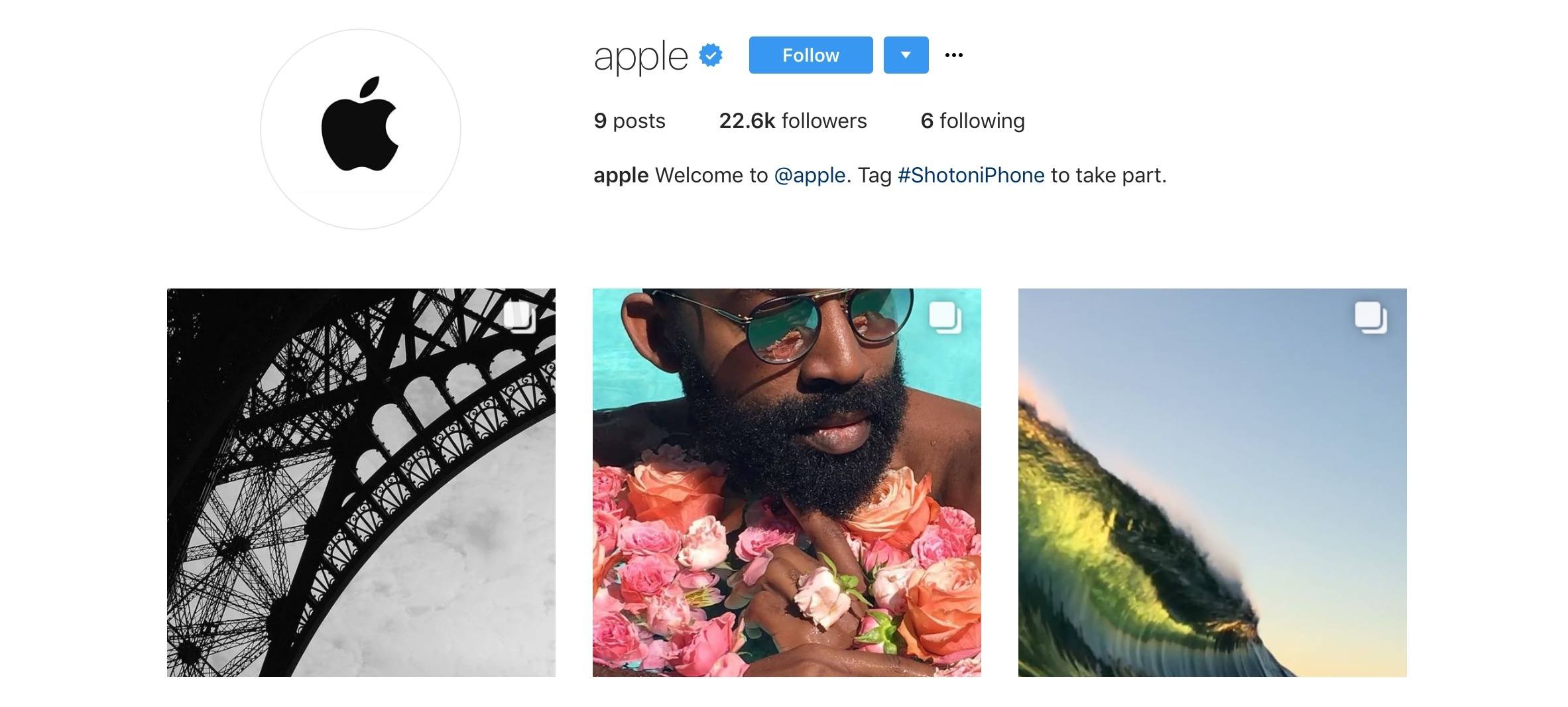
Apple launched an official Instagram account today, @apple. Rather than opting to promote general company news, the primary focus of the account appears to be functioning as an extension of Apple’s long-running ‘Shot on iPhone’ ad campaign.

Nearly all of the initial posts from the account are galleries featuring various photos and videos shot using iPhones. Each post’s caption reads ‘#ShotoniPhone by…’ followed by a list of the names and accounts of those who created the content, and a quote from those content creators about their work. The bio line of the account reads, “Tag #ShotoniPhone to take part.” Presumably using that tag may lead Apple to contact you about including your work in one of their upcoming collections.

While the focus of the account may change in the future, Apple’s current strategy of tying together its photography marketing campaign with the real work of photographers on Instagram is an effective, thoughtful use of the platform. By connecting with content creators and highlighting their work, Apple is not only fostering an environment of social connection among both amateur and professional photographers, but it’s also promoting the iPhone’s strengths as a camera.


AppStories, Episode 16 – Evolving the iMessage App Store

On this week’s episode of AppStories, we discuss the current shortcomings of the iMessage App Store and what Apple is changing in iOS 11 to address some of its problems.

Sponsored by:

  • Timing - Stop worrying about time and focus on doing your best work instead.
  • Redox - a modern API for accessing and sharing data across healthcare organizations.
AppStories+ Deeper into the world of apps

AppStories Episode 16 - Evolving the iMessage App Store

0:00
28:19

AppStories+ Deeper into the world of apps

Permalink

Spark for macOS Adds Improved Email Search

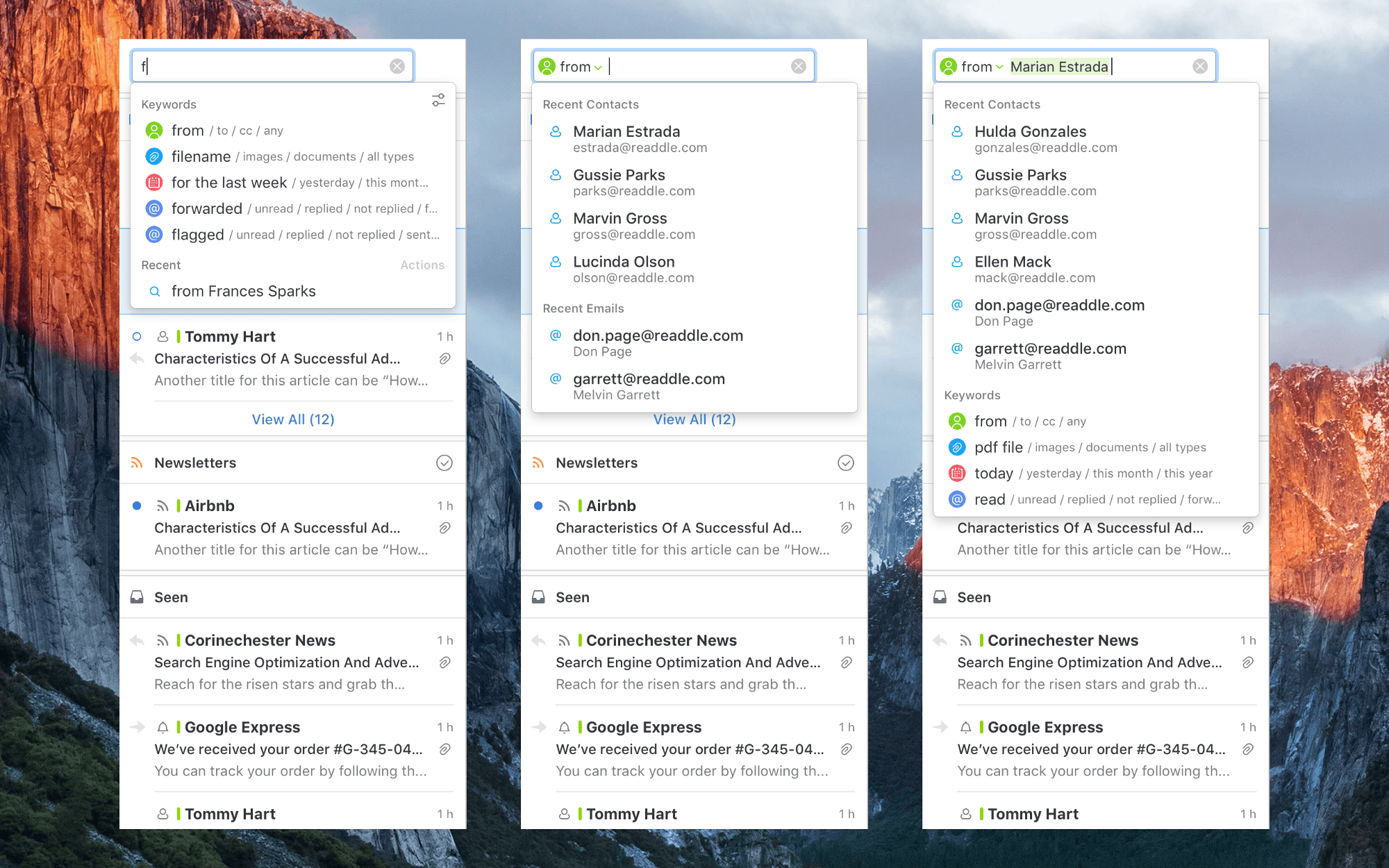
Search isn’t the forte of many email clients. Too often I find myself resorting to gmail.com or the Gmail app on iOS to find a message because Google’s search is so good. However, a downside of Google’s approach is that it requires you to recall or look up special syntax to narrow your search using date, attachment, sender, and other parameters. An update to Readdle’s Spark for macOS avoids that pitfall with improvements to its search functionality that detect keywords in your searches as you type queries in plain English.

I haven’t used Spark’s improved search enough yet to give it a thorough review, but I like what I’ve seen so far. As you type a search query, Spark looks for keywords. For example, start typing ‘att…’ and Spark will suggest searching for attachments. Smart keywords include things like ‘to,’ ‘from,’ ‘attachment,’ ‘flagged,’ ‘forwarded,’ and dates. The parameters can be batched in plain English too, so I can type ‘emails from Federico from yesterday with PDF attachments’, and Spark knows to apply the sender, date, and attachment filters returning results almost instantly.

Spark is already a popular email client with a host of modern features, but the improvements to search have the potential to make a lot of new converts to the app.

Spark for macOS is available on the Mac App Store.