This Week's Sponsor:

Dropzone 5

Improve your Drag-and-Drop Workflow


Posts in news

Developers Show What They Could Make if Apple Opened Up Watch Face Development

Last week we linked to Marco Arment’s article critiquing Apple’s watch faces and calling for Apple to open up watch face design and development to third parties. By the next day, Steve Troughton-Smith had an Xcode project up and running that uses SpriteKit to simulate custom watch faces. Troughton-Smith posted pictures of the watch faces he created on Twitter, which drew a lot of interest from other developers.

Troughton-Smith uploaded his watch face project to GitHub, and in the days that followed, developers, including David Smith, who’s been making Apple Watch apps for his health and fitness apps since the Series 0 was introduced, began playing with Troughton-Smith’s code. Writing about the experience on his website Smith said:

There is something delightful about solving a problem that is superficially so simple and constrained. The constraint leads to lots of opportunities for creative thinking. Ultimately you just need to communicate the time but how you do that can take countless different forms. It reminds me of the various ‘UI Playgrounds’ that have existed in app design. For a while it was twitter clients, then podcast players and weather apps.

I spent the weekend following along as Troughton-Smith, Smith, and others designed all manner of personalized watch faces. The experience reminds me of the flurry of activity and excitement during the first months after the iPhone was released when developers reverse-engineered Apple’s APIs to create the first jailbroken apps even before there was an App Store. Let’s hope that history repeats itself and Apple opens up watch face development to third parties like it did with apps.

Below and after the break, we’ve collected tweets following Troughton-Smith’s work and showing off some of the designs that have been created over the past several days.

https://twitter.com/stroughtonsmith/status/1049733933175369729
https://twitter.com/stroughtonsmith/status/1049739746967203840
https://twitter.com/stroughtonsmith/status/1050010561151475712
https://twitter.com/stroughtonsmith/status/1050022867738484736
Read more


Adobe Unveils Photoshop for iPad, Launching in 2019

Earlier this year Adobe confirmed that it was working on a full-featured version of Photoshop for the iPad, but no real details on the product were given. Today that changed, however, as the app’s official announcement arrived alongside the kickoff of Adobe’s MAX conference.

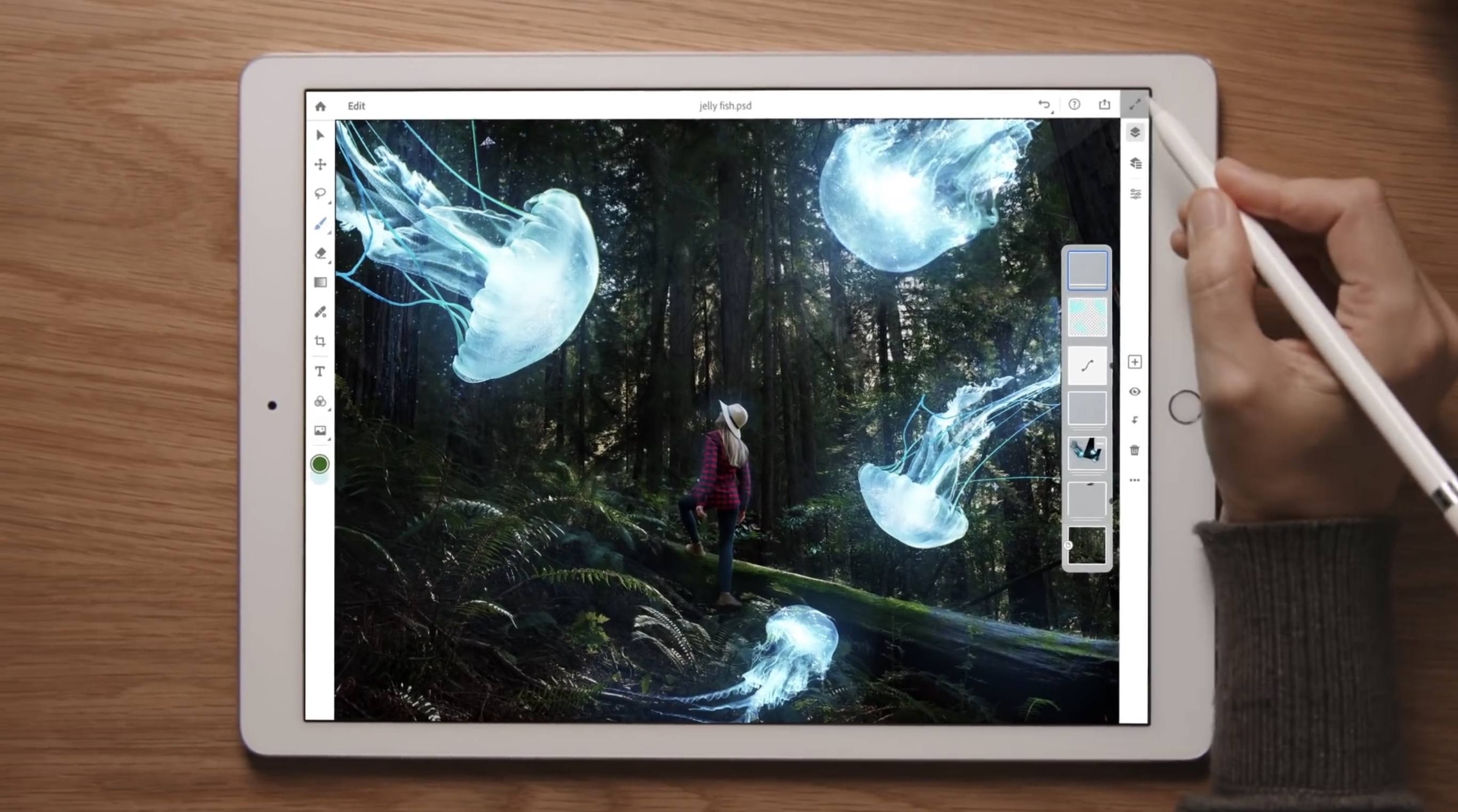
Photoshop for iPad won’t arrive until some time in 2019, but when it does launch it will differ drastically from Adobe’s current lineup of Photoshop-related iOS apps. Rather than focusing on an individual subset of desktop features, like Adobe’s existing Photoshop Fix, Express, and Mix do, the aim with this forthcoming app is to provide the full desktop Photoshop experience on an iPad.

As part of its iPad efforts, Adobe has brought the same underlying codebase of Photoshop for desktop to iOS, and it has also worked to modernize PSD files for the cloud. These new Cloud PSDs will be the default file format on the new iPad app, offering a seamless file experience across multiple devices. Adobe’s chief product officer, Scott Belsky, told The Verge:

“Cloud PSDs, when we ship Photoshop on the iPad, will also run and automatically show up on your desktop…Suddenly, you’ll have this cloud-powered roundtrip experience akin to a Google Docs experience, where literally the source of truth of your Photoshop creation is in the cloud.”

Cloud PSDs will eliminate the need for importing or exporting files, removing a major friction point that currently stands in the way of working with Adobe’s apps on the iPad. With Creative Cloud’s automatic syncing of all files, you should be able to pick up editing on any device at any time without needing to do a thing.

When manual importing or exporting does make sense to your workflow, those options will still be available in Photoshop for iPad. The app will support file providers like iCloud Drive, Dropbox, and more. Based on the preview version of the app, it appears to support Files.app’s document providers, and I’m hopeful that iOS 11’s drag and drop features will be supported as another option for importing and exporting.

The Verge was granted a week of hands-on time with Photoshop for iPad, and has a great video that demonstrates the app in action. It appears very similar to Photoshop on desktop, with some adaptations made for OS differences like iOS’s lack of a menu bar. There are sure to be touch-optimized improvements offered too though, such as a gesture the video highlights where you can tap with two fingers on the screen to undo.

Though Adobe’s goal is full feature parity between desktop and iPad versions of Photoshop, the 1.0 release of Photoshop on iPad will lack certain features that will be added over time with future updates. That full list of missing features is unavailable at this time, but we’re sure to learn more as the launch approaches.

Photoshop for iPad will be available free to all Creative Cloud subscribers, but there’s no word currently on whether a standalone purchase or iPad-only subscription will be possible. It would be a strong vote of confidence in iPad-first users to make the app available for non-CC subscribers, but based on Adobe’s history that appears unlikely.

Today’s announcement highlights what an exciting time it is to be an iPad user. With new iPad Pro models expected to be announced in the coming weeks, and a reported focus on significant iPad features coming in iOS 13, there’s no time like the present for the full power of Photoshop to make its way to Apple’s tablet.


Apple Releases Bug Fix Update to iOS 12

Apple has released iOS 12.0.1, which fixes several bugs that affected users after upgrading to iOS 12.

One of the highest profile issues affected the iPhone XS, which sometimes failed to begin charging when connected to a Lightning cable. Other users reported that after the iOS 12 update, their iPhones would connect to WiFi networks at 2.4 GHz instead of 5.0 GHz even when both were available. Apple’s release notes say both issues have been fixed. The update also addresses a Bluetooth connectivity issue and a problem where subtitles sometimes didn’t appear in video apps.

iOS 12.0.1 includes a small design change on the iPad too. With the iOS 12 update, the ‘.?123’ key was moved. With version 12.0.1, that key has been restored to its previous position on the software keyboard.


Daily Dictionary’s New Watch App Showcases the Latest watchOS Capabilities

Developer Benjamin Mayo released an update this week to his new word of the day app, Daily Dictionary. Version 1.2 adds an Apple Watch app, making it easy and convenient to view each day’s featured word from your wrist.

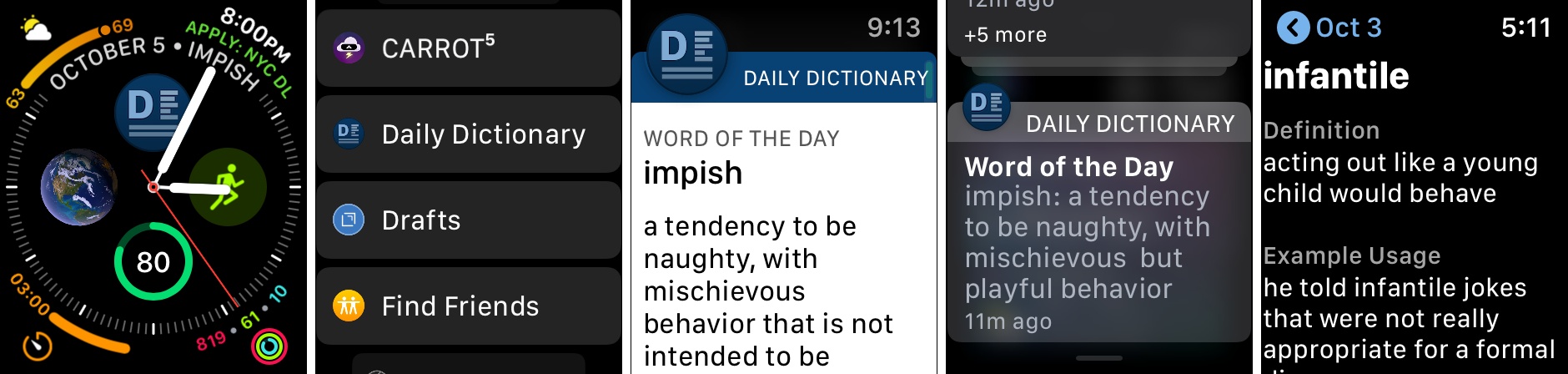
Daily Dictionary’s Watch app is particularly noteworthy due to its complications for the Series 4’s Infograph faces, and its custom UI for notifications. For complications, you can use a smaller option containing the app’s logo which serves as a launcher, or you can select a larger complication that includes the logo alongside the word of the day itself. If you’d like it to, the larger complication can also display the current date, saving you the need for a separate date complication elsewhere on the face.

One of the ways Daily Dictionary can provide its featured word each day is through a push notification, and if you have the new Watch app installed, you’ll get to see a custom notification UI that reflects the design of the full iOS app. Watch developers can take advantage of APIs that enable crafting more customizable notification interfaces, and Daily Dictionary is a great example of that. Now that the Apple Watch is becoming a more mainstream product, and since one of the Watch’s chief strengths is as a notification conduit, I hope we see lots of apps follow Daily Dictionary’s example in providing more creative Watch notifications.

Daily Dictionary is available on the App Store.


Apple Strongly Refutes Bloomberg Report That Its Servers Were Compromised by Malicious Chips

Earlier today, Bloomberg published a story claiming that Apple and Amazon discovered tiny, malicious chips on Elemental network servers built by Super Micro. According to the story, the chips were the work of Chinese spies and designed to infiltrate the tech companies’ networks. Shortly after publication, Apple responded in an email statement strongly refuting Bloomberg’s account.

Amazon’s chief information security officer similarly discredited the claims saying in part:

There are so many inaccuracies in this article as it relates to Amazon that they’re hard to count.

A short time ago, Apple elaborated on its initial statement to Bloomberg on its Newsroom website:

In response to Bloomberg’s latest version of the narrative, we present the following facts: Siri and Topsy never shared servers; Siri has never been deployed on servers sold to us by Super Micro; and Topsy data was limited to approximately 2,000 Super Micro servers, not 7,000. None of those servers have ever been found to hold malicious chips.

Topsy is a startup that Apple acquired in 2013.

For over 12 months, Apple says it repeatedly told Bloomberg reporters and editors that they and their sources were incorrect.

We are deeply disappointed that in their dealings with us, Bloomberg’s reporters have not been open to the possibility that they or their sources might be wrong or misinformed. Our best guess is that they are confusing their story with a previously-reported 2016 incident in which we discovered an infected driver on a single Super Micro server in one of our labs. That one-time event was determined to be accidental and not a targeted attack against Apple.

Security and privacy are cornerstones of Apple’s business that it uses to differentiate the company’s products from competitors’, so the fact that the company takes this sort of claim seriously isn’t unusual. This also isn’t the first time Apple has taken Bloomberg to task on the veracity of its reporting. However, the forcefulness of the responses from Apple and Amazon, followed by Apple’s press release on its Newsroom site is something that is unprecedented. It will be interesting to see whether Bloomberg responds.


Philips Hue App Adds Siri Shortcuts Support

Promised earlier this year, the Philips Hue app now supports Siri Shortcuts allowing users to trigger scenes created in the app.

The Hue app received a major update earlier this year, which significantly improved the creation of scenes. Users can pick from pre-built scenes created by designers to evoke a particular mood or create their own using photos or a color picker to control the color and brightness of a group of Hue bulbs.

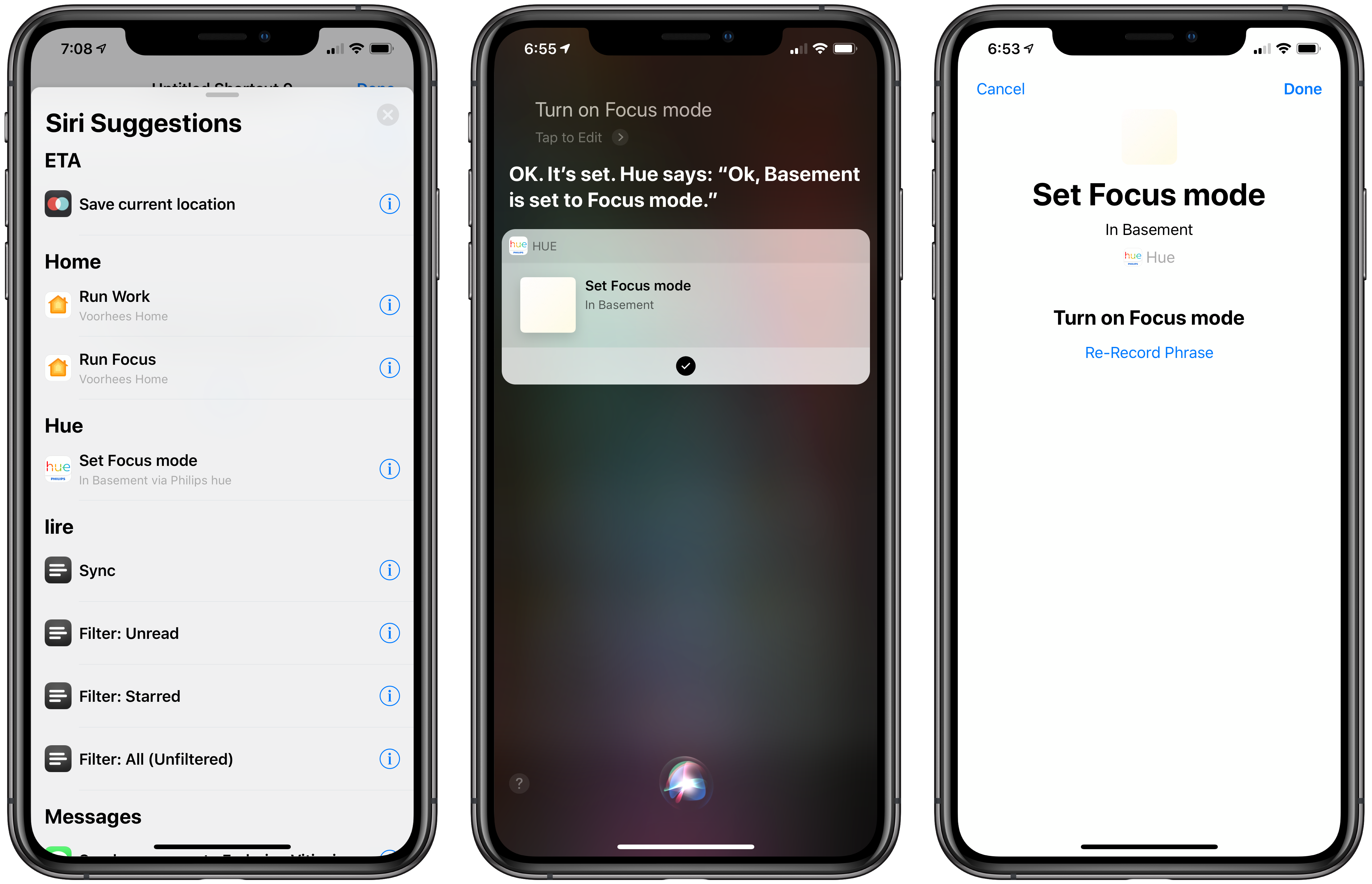
With the new Siri Shortcut support, those scenes can be triggered using Siri and incorporated as actions in custom shortcuts using Apple’s Shortcuts app. I have several Hue bulbs in my studio. They aren’t the kind that supports a wide range of colors, but I can adjust the brightness and warmth of each bulb. To test the Hue’s new shortcut functionality, I created a scene called Focus Mode that turns the brightness up to 100% with a cool blue cast.

After using the scene, the Siri & Search section of the Settings app suggested I add my new scene as a Siri shortcut, which is how many apps approach Siri shortcuts. Frequently-used scenes will also be suggested on the lock screen, Siri watch face, and search.

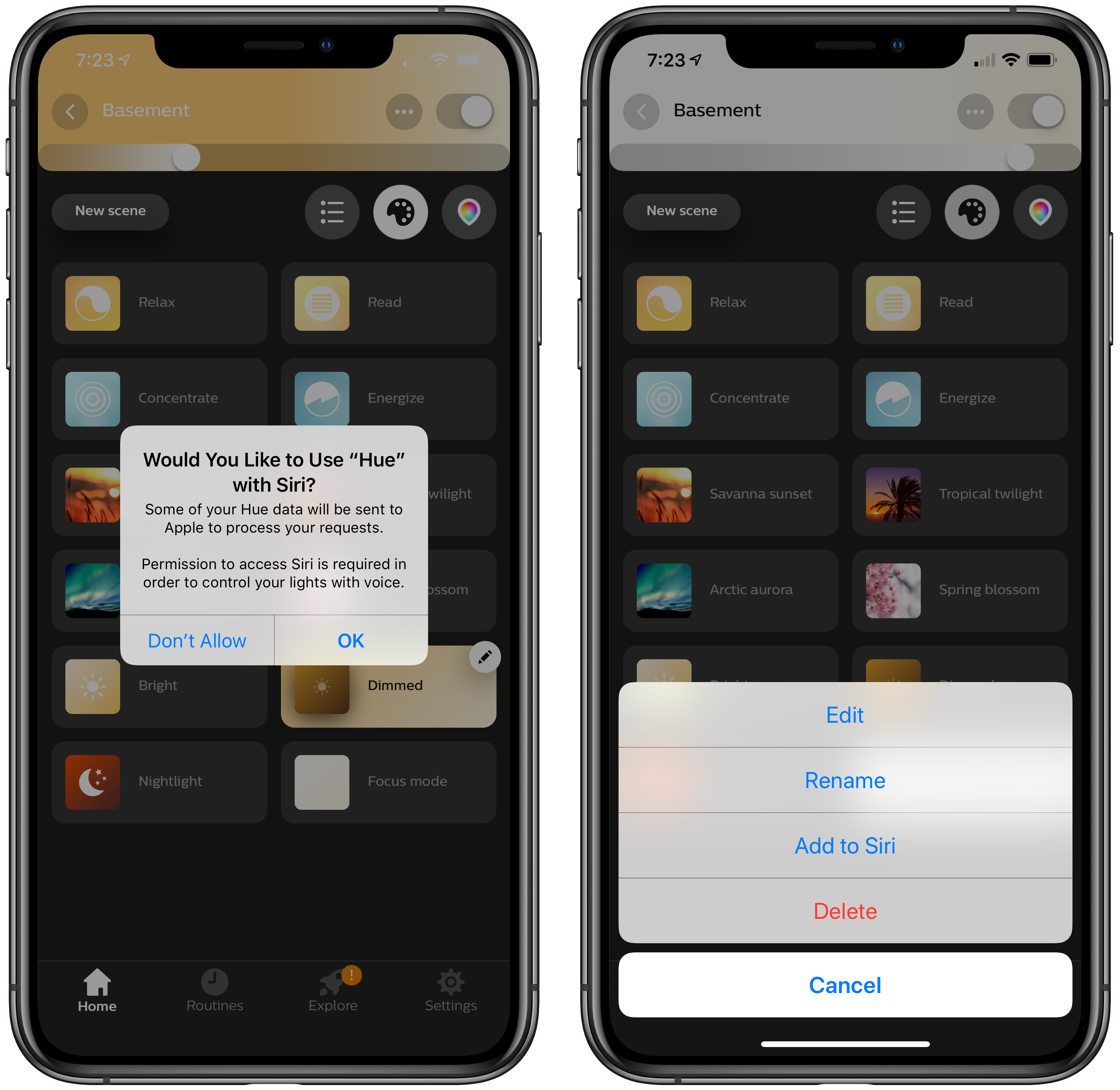
There’s an alternate, better route to setting up a Hue shortcut though. Inside the app, if you tap on a scene, a pencil icon appears in the corner. Tapping on it gives you the option to add the scene to Siri, as well as edit, rename, or delete it. Other developers have added the ability to add Siri shortcuts in their app’s settings, but I especially like Hue’s approach. If you’re in the Hue app creating a scene, that’s the natural spot to add it as a Siri shortcut too.

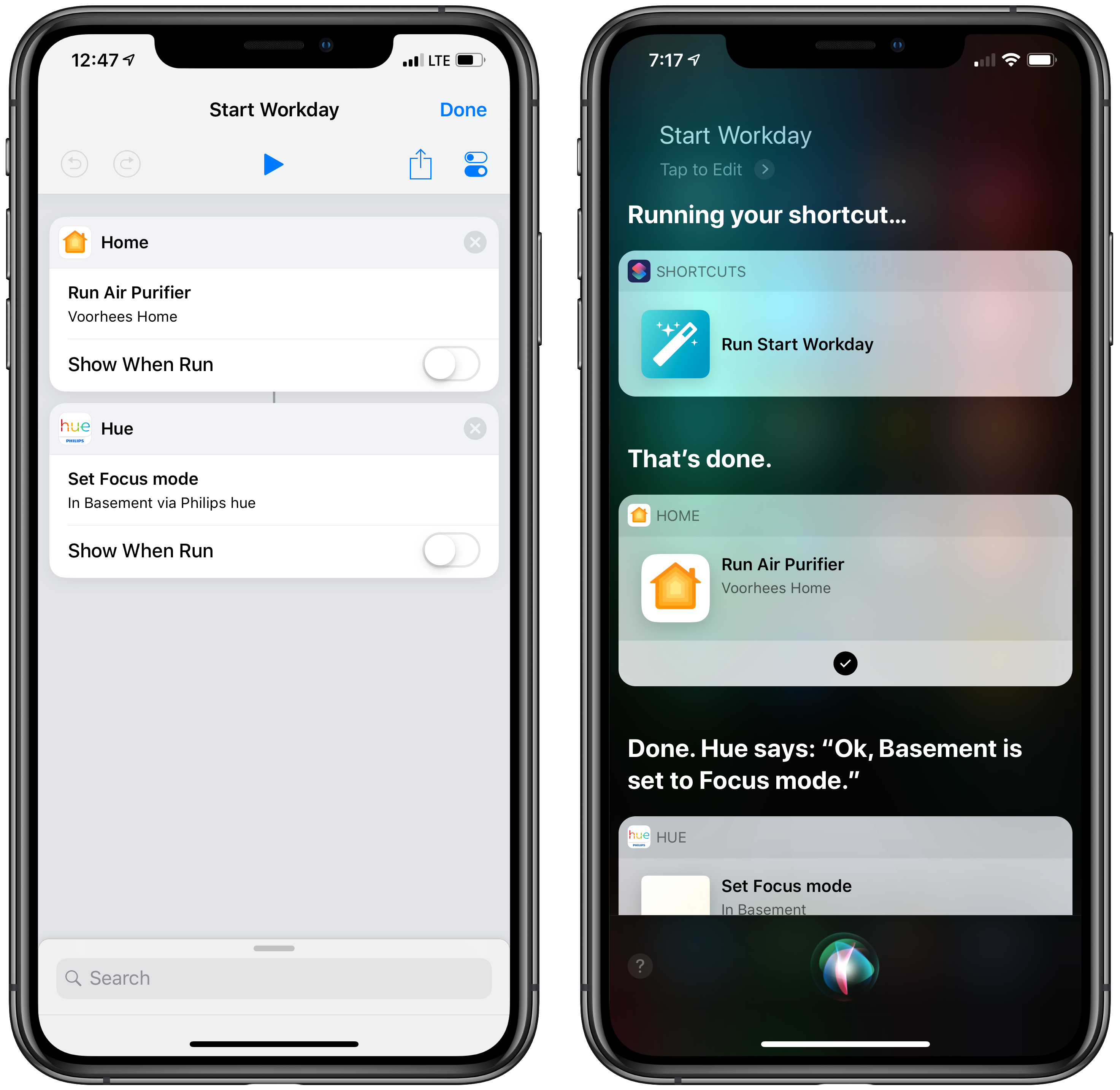
With a Hue Siri shortcut in place, you can also use it as an action in custom shortcuts you create in Apple’s Shortcuts app. I set up a simple shortcut that turns on the lights in my studio and enables a smart electrical outlet that controls an air filter. Now, as I finish my morning coffee, I can say ‘Hey Siri, start Workday’ and the lights and filter come on as I head downstairs. The same sort of shortcut can be created to control lights using Shortcuts’ HomeKit support added with iOS 12, but having similar functionality built into the Hue app is a useful alternative if that’s where you’ve set up your scenes.

The Hue app is available as a free download on the App Store.


Apple Releases Materials for the Everyone Can Create Curriculum

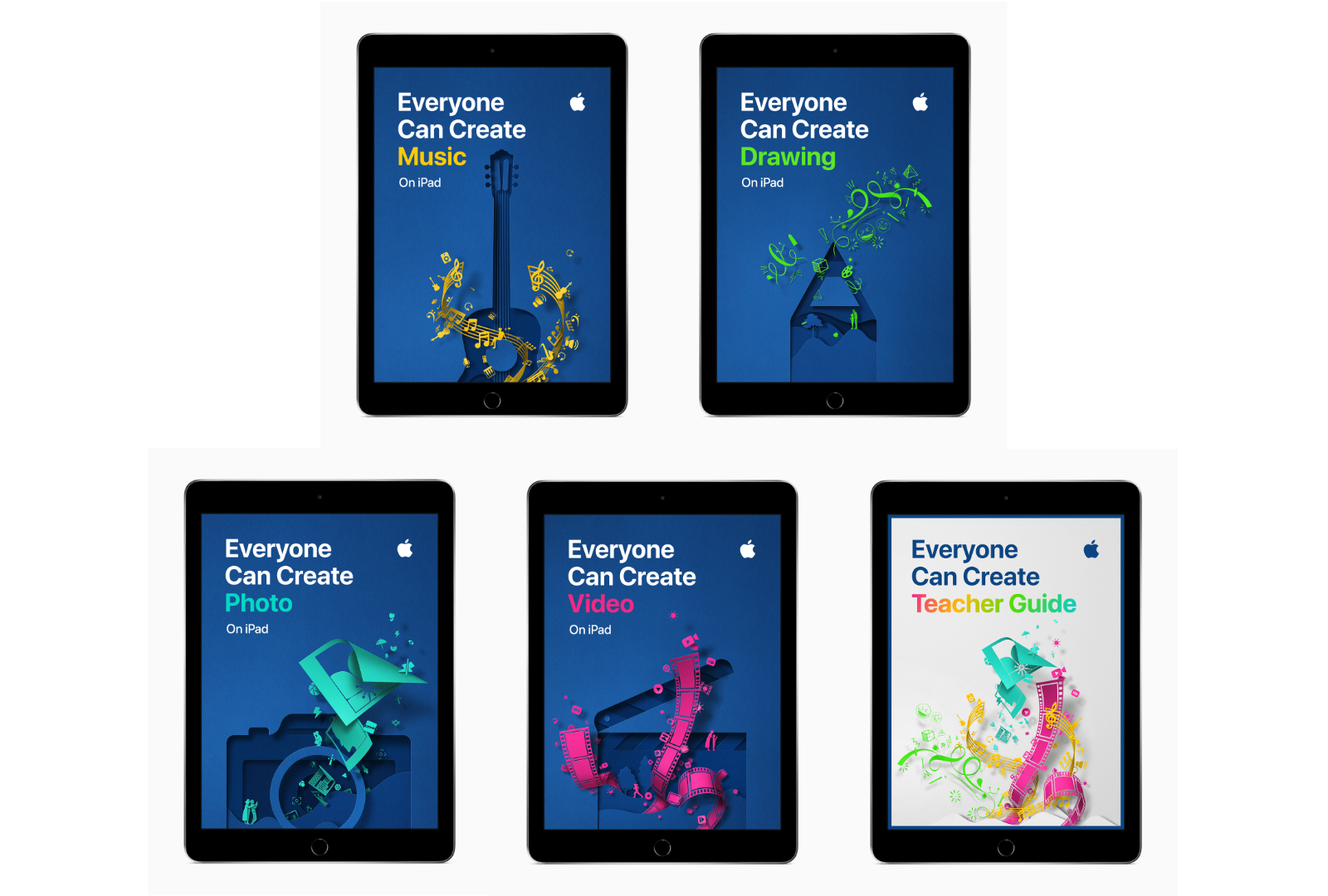
Last March, Apple held an education event in Chicago where it unveiled a 9.7-inch iPad with Apple Pencil support and a new curriculum called Everyone Can Create. Since then, Apple says over 350 schools worldwide have begun working with the program. A complement to its Everyone Can Code initiative, Everyone Can Create is designed to help teachers and students use iPads in creative pursuits such as drawing, music, photography, and filmmaking.

Today, Apple announced that as part of the Everyone Can Create initiative, it has released four student guides and a teacher guide that are available in Apple’s Books app.

“We believe Apple technology can help unleash every child’s creative genius,” said Philip Schiller, Apple’s senior vice president of Worldwide Marketing. “Working closely with teachers, we have built the Everyone Can Create curriculum to help bring creative expression and the arts into the classroom, and to help students stay engaged through creativity and ultimately be more successful.”

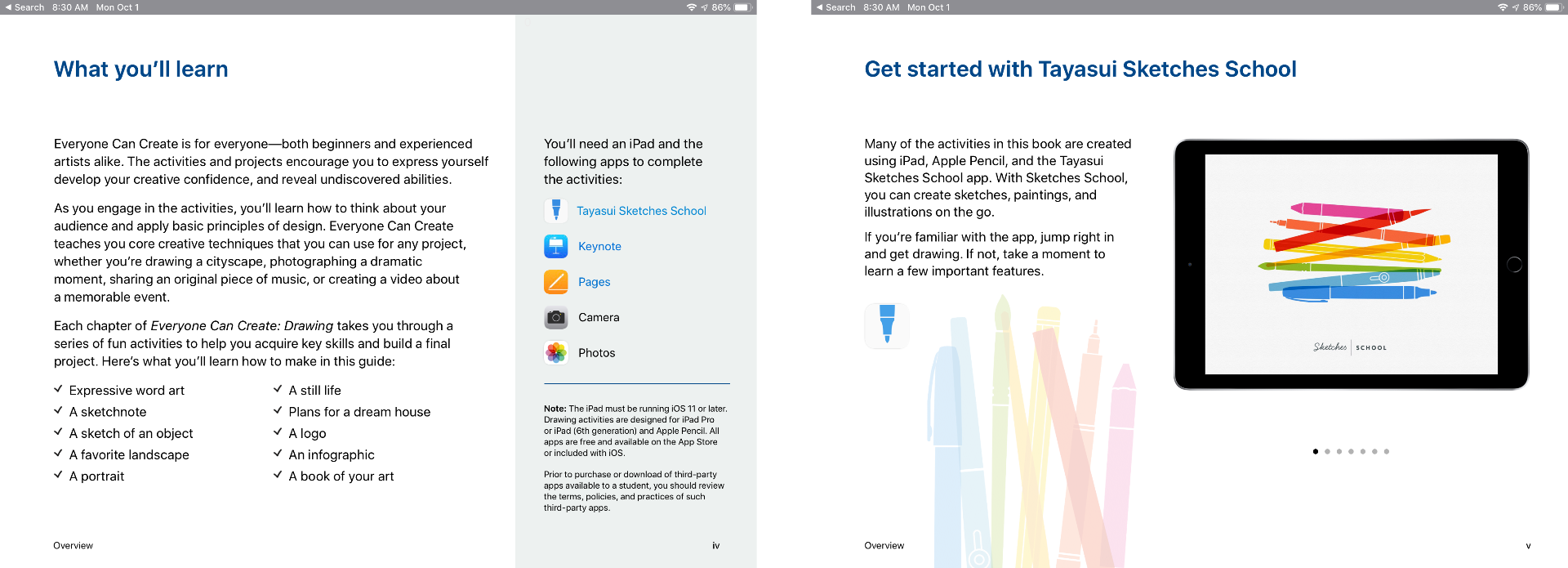
Each student guide, which is free to download in the Books app, includes projects designed to help students learn new creative skills progressively. There is also a teacher guide with over 300 lesson ideas that can be used in a variety of subjects.

The curriculum includes projects that use third-party apps like Tayasui Sketches School as well as Apple’s apps too.

Although the Everyone Can Create guides are being released after many students are already back in school, teachers have had preview materials since the summer, which should help them incorporate the new materials into their lessons if they’d like. Everyone Can Create extends Apple’s curriculum offerings beyond coding, which I like because it should reach a broader group of students. It’s also designed to fit with existing subjects taught in schools, which I expect will make the iPad more valuable to schools that have adopted them.

The Everyone Can Create books are available as free downloads in Apple’s Books app.


Google Maps Adds Commuting Features

Google has announced that later this week, it will add several new features to its Maps app for iOS and Android commuters. The update includes live, personalized traffic data, support for ‘mixed-mode’ commutes, real-time bus and train tracking, and integration with Apple Music, Google Play Music, and Spotify.

The update will include a dedicated ‘Commute’ tab in the Maps app. After users identify their commute, Google Maps will provide live traffic data about the route. The Android app will also include notifications about delays as they happen so you can adjust your trip.

Google Maps will also support mixed-mode commutes. That means, for example, commuters who travel by car, train, and on foot will see commute information relevant to each leg of their journey. Real-time bus and train tracking is being added in 80 cities worldwide too.

Playback controls for Apple Music, Spotify, and Google Play Music is coming to Google Maps. Spotify users on Android will also be able to browse and select content from inside the app.

As someone who used to commute by train every day, I particularly appreciate the focus on public transportation. Google hasn’t said, but hopefully, these new features are included as part of Google Maps’ CarPlay integration too.

Google Maps is available as a free download on the App Store.