This Week's Sponsor:

Dropzone 5

Improve your Drag-and-Drop Workflow


Posts in news

Apple Releases Annual Holiday Video ‘The Surprise’

It’s become a tradition for Apple to release a special holiday season video each year, and this year is no different. Today, the company revealed the 2019 version entitled ‘The Surprise.’

The storyline follows a family as they visit the mother’s father. The video chronicle’s the family’s journey and visit with their two young children. To appease the kids when they fight or get in the way, their parents hand them an iPad to watch movies and play games. However, the children’s use of the iPad evolves over the course of the video, which reveals they’ve used it to create an interactive story about their family and their grandfather’s wife who had passed away.

It’s a touching video packed with emotion that does an excellent job of showing off the kind of creative projects that are possible with an iPad and pulls it off without being overbearing. The video reminds me a lot of the Emmy award-winning video called ‘Misunderstood’ from the 2013 holiday season.


Adobe Previews Features Coming to Photoshop for iPad Through mid-2020

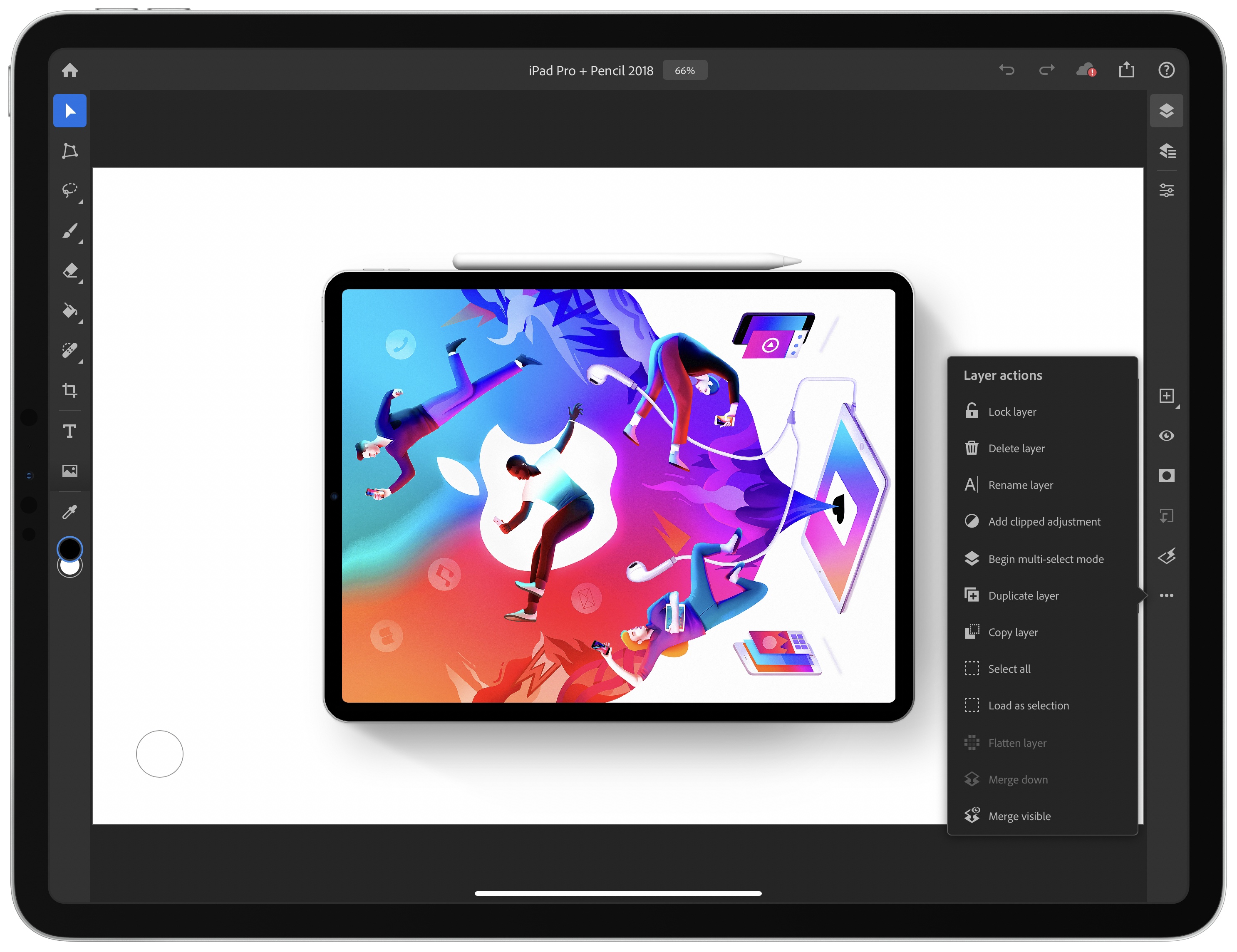
The long-anticipated release of Photoshop for iPad was met with disappointment by many users who felt that significant functionality was missing. Although Adobe explained at the time that version 1.0 was a foundation upon which it intended to build rapidly, the length of time it took to create that foundation left many people skeptical. Today, to try to dispel some of the doubts surrounding Photoshop for iPad, the company published a blog post previewing some of the features coming later this year and in the first half of 2020.

Before the end of 2019, Adobe says it will ship the ‘Select Subject’ feature that it showed off at the Adobe MAX Conference earlier this month. The feature takes advantage of the company’s Sensei AI machine learning technology to facilitate complex subject selection. Adobe also says that cloud PSD files will upload and download faster in December after it makes changes to its systems.

Selection tools will get another boost in the first half of 2020 with Refine Edge allowing for soft edge selections. Curves for tonal adjustments and new adjustment layer options will be available too. Adobe also plans to bring features over from apps like Fresco, including brush sensitivity and canvas rotation. Finally, Adobe says it will integrate Photoshop with Lightroom for iPad, so you can process RAW images in Lightroom and use them in compositing projects in Photoshop.

With the reaction at Photoshop for iPad’s launch, I’m glad Adobe chose to showcase these new features in advance. It makes competitive sense too, given that alternative iPad apps that compete with at least some aspects of Photoshop continue to move forward rapidly. It’s that sort of competition that I expect will make pro iPad apps interesting to watch in 2020.


Connected, Episode 270: Best Trees in the Country

On this week’s episode of Connected:

Federico and Stephen each attempted to use HomeKit Secure Video, and it didn’t go well. Myke is excited about a new folding phone, and the whole crew orders iPhone 11 Pro battery cases before solving many mysteries presented in photos of Apple’s new Mac Pro factory.

You can listen below (and find the show notes here).

AppStories+ Deeper into the world of apps
0:00
01:42:10

Connected, Episode 270

AppStories+ Deeper into the world of apps

Sponsored by:

  • Squarespace: Make your next move. Enter offer code CONNECTED at checkout to get 10% off your first purchase.
  • PDFpen, from Smile : The ultimate tool for editing PDFs on the Mac.
  • Freshbooks: Online invoicing made easy.
Permalink

Timery for Toggl Updated with Shortcut Parameter Support and a Refreshed Design

Timery for Toggl continues to add new iOS 13 features with the release today of version 1.05, which includes improved Shortcuts support and new design elements.

The most significant addition to Timery is support for shortcut actions with parameters and data output. Now users can start a project with a description, tags, and its billable status. The action outputs Time Entry Details, which makes the project name, task, description, tags, start time, duration, billable status, and entry name available.

Projects and tags can be added to the ‘start timer’ action from your list of saved projects and tags when you set up a shortcut or from another source like a user prompt. Any tags applied by a shortcut action that don’t already exist will be added to your Toggl account, but using an incorrect project name will result in an error. Timery also supports adding multiple tags to an entry, although they must be separated by commas or on their own lines. Time is output in total numbers of seconds, in ‘00:00:00’ format, or written out like ‘1 hour, 45 minutes, and 32 seconds.’ The time entry name that the shortcut action generates is a combination of the project name and description. A separate action for stopping a timer outputs the same data.

The other available actions allow users to check the time logged for:

  • The current time entry
  • The current day
  • A project
  • A project with a description and tags

Each of these actions returns duration data in the three formats described above for time logged on the current day only. One thing I’d like to see added in the future is a parameter to adjust the time period reported, so I could use a shortcut to check the total time logged for a project this week or month, for example.

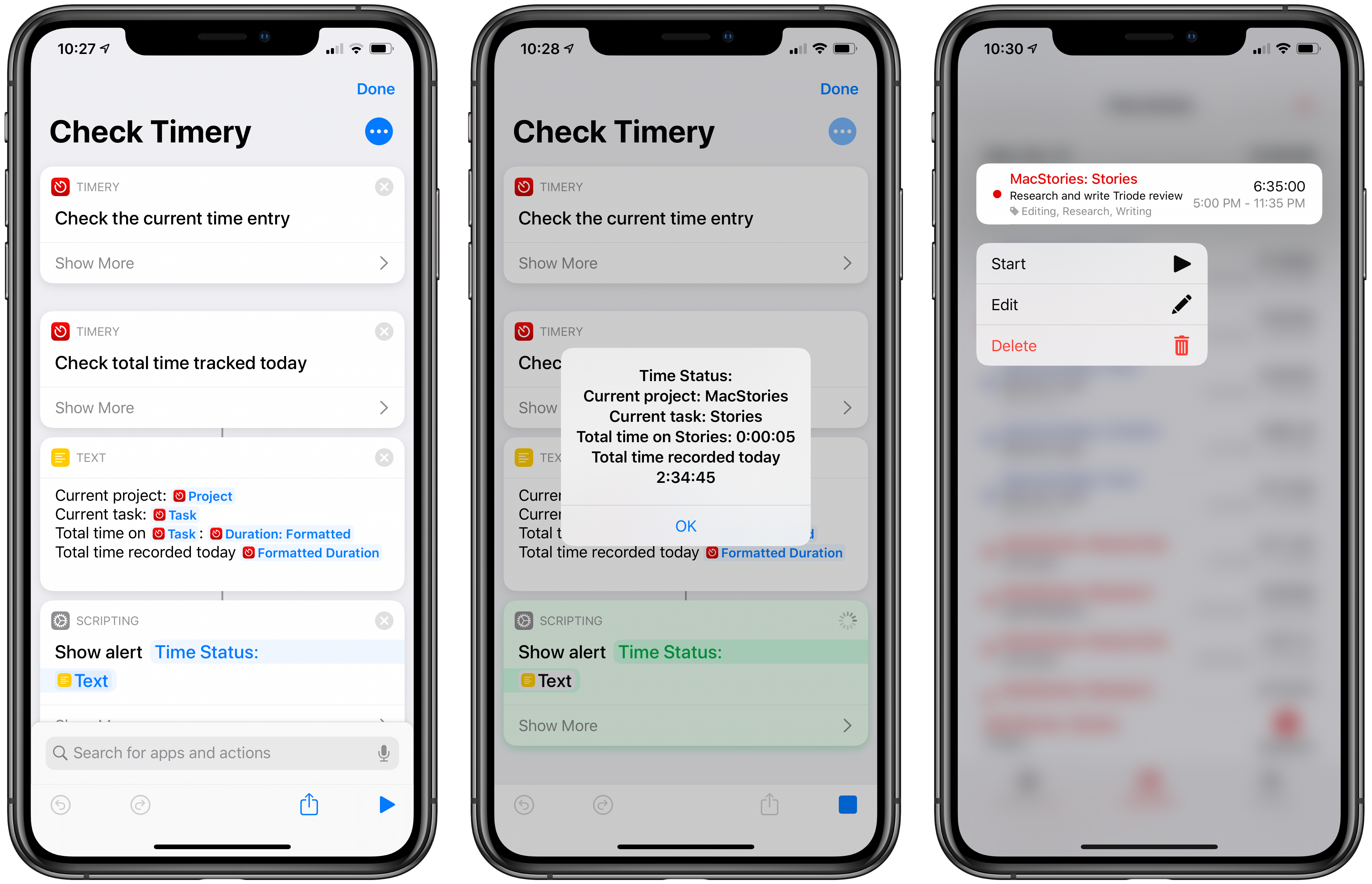
The new shortcut actions open up a lot of interesting possibilities, including the ability to do things like send time tracking data to apps like Numbers, which could be used to create charts. A simple shortcut that I’ve found to be effective is one that checks the current timer I have running and reports back with its elapsed time and the total time tracked today. It’s the sort of shortcut that’s handy to stick in the Shortcuts widget or on your Home screen for a quick time check that doesn’t require opening Timery itself.

Check Timery

Check your currently-running timer and total time logged for the day. Timery for Toggl is required for this shortcut.

Get the shortcut here.

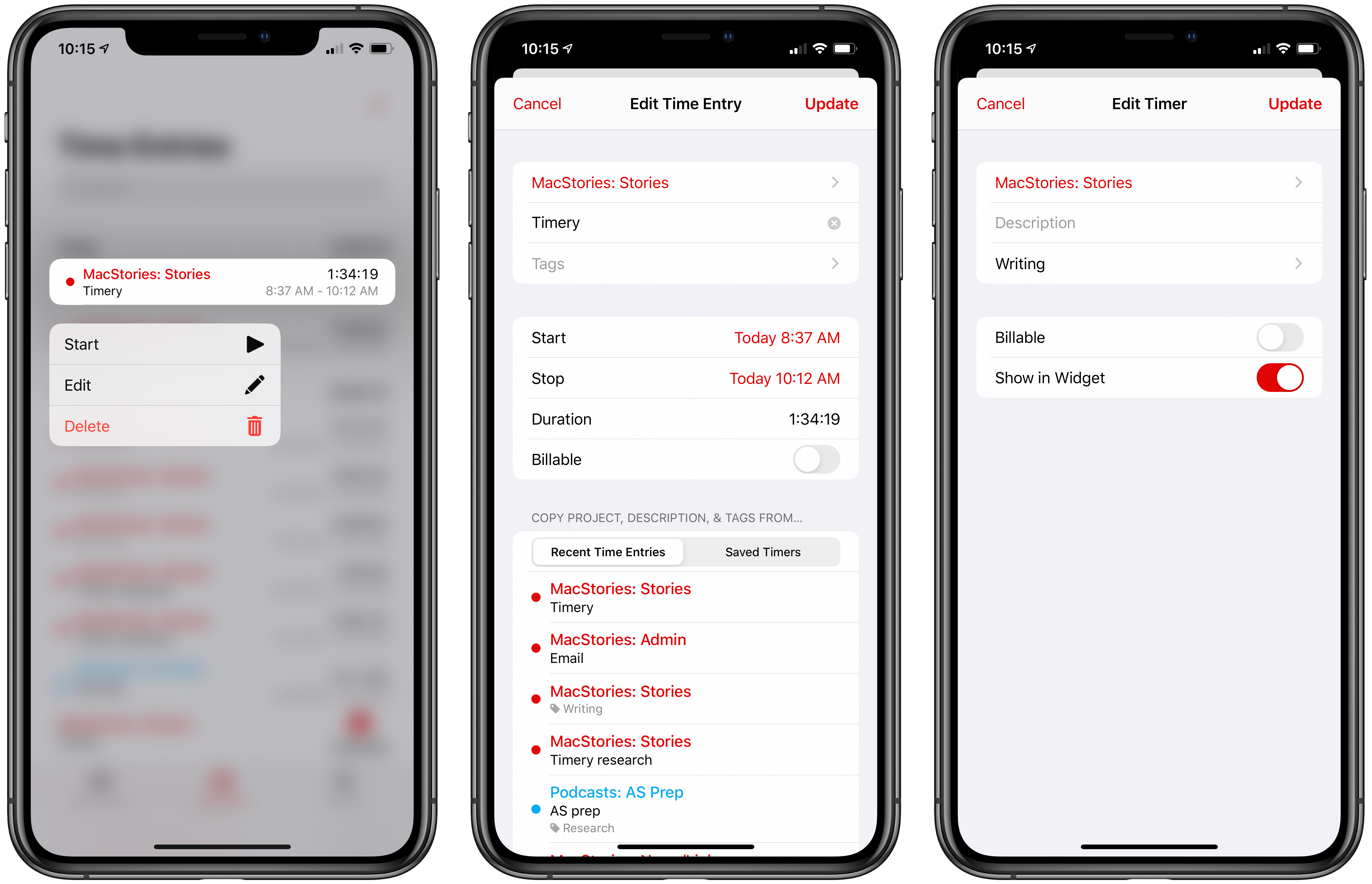
From a design standpoint, Timery has added context menus, which serve as an alternative to swiping left and right on saved timers and time entries, to play, stop, and delete timers and entries. Although the addition doesn’t extend the functionality of the app, I personally prefer context menus to swiping to reveal options and will be using this feature a lot, especially on my iPhone, where using the context menu provides a nice bit of haptic feedback.

New context menus and refreshed UI for editing saved timers and existing time entries.

New context menus and refreshed UI for editing saved timers and existing time entries.

Timery has also made use of inset grouped table views, the card-like UI seen throughout iOS 13. Editing a saved timer or an existing time entry pulls up the card-like UI from the bottom of the screen with the same editing options I covered in my review of version 1.0. Again, the change doesn’t affect the functionality of Timery, but it serves to align the app with current design trends, which prevents it from looking dated.

As I explained in a MacStories Weekly column for Club MacStories members recently, Timery has had a significant impact on the way I work every day. Whether or not you track time for billing purposes, Timery is a valuable tool for anyone curious about how they spend their time. As a result, I’m glad to see it continue to be refined with the latest frameworks and APIs. I particularly appreciate the addition of shortcuts with parameters, which provide a lot more flexibility than was previously possible.

Timery for Toggl is available on the App Store as a free download with certain features available via a subscription.



Apple Releases Smart Battery Case for iPhone 11 and 11 Pro with Dedicated Camera Button

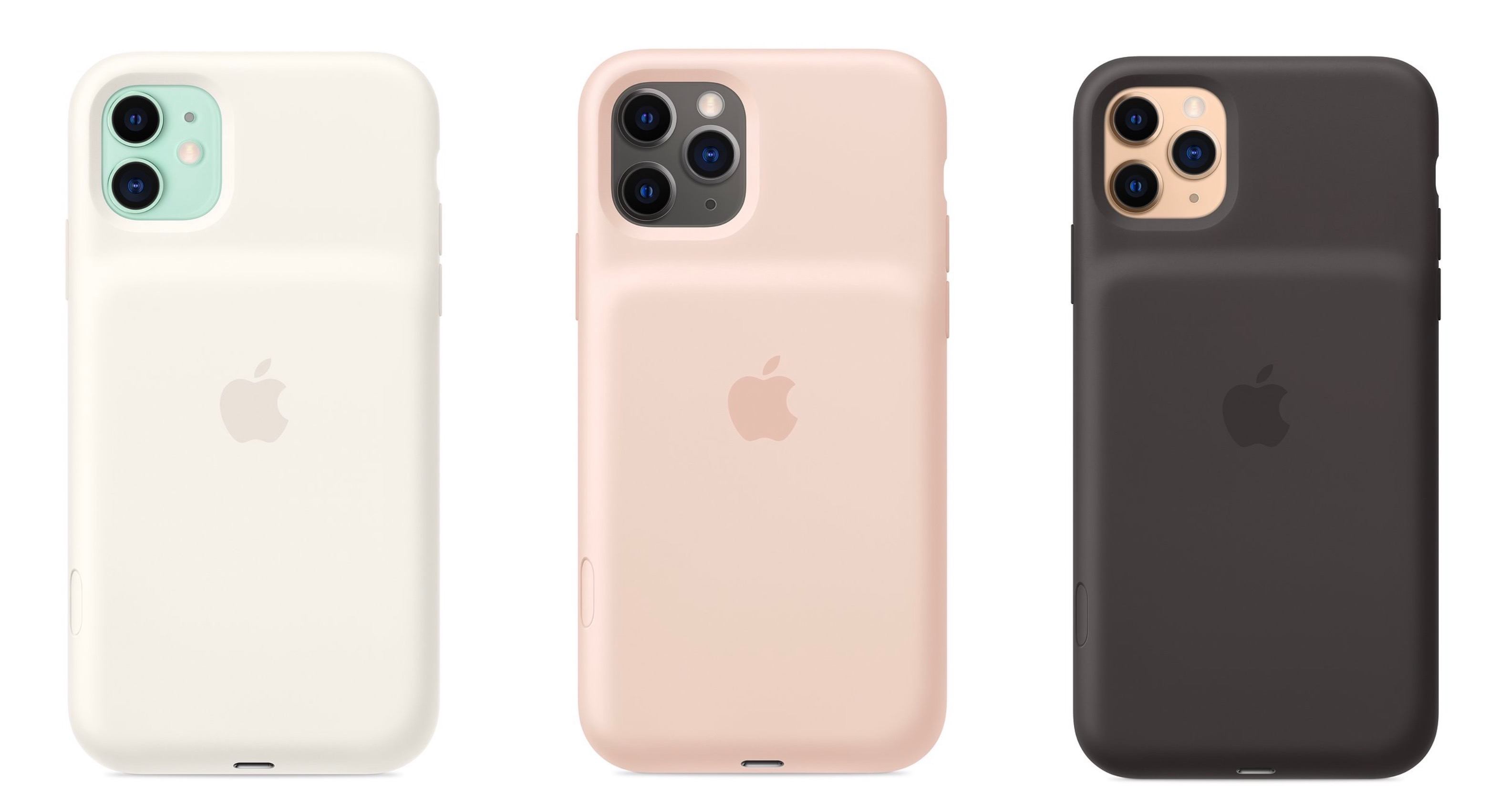
Today Apple has launched new versions of its Smart Battery Case for the latest iPhone models, the iPhone 11, 11 Pro, and 11 Pro Max, which are available to order now from the company’s website with November 25 delivery, which is the same date the case will be available in local stores.

Like previous editions of the Smart Battery Case, the case’s exterior is made of silicone. There are three color options for the 11 Pro and 11 Pro Max case: Pink Sand, White, and Black. The standard 11 case, however, is only available in Soft White and Black. All different versions of the Smart Battery Case are available at the same price: $129.

Links:

Each version of the Smart Battery Case offers a quoted 50% longer battery life, making the already-excellent battery life of this year’s iPhones even better. They also all come with a new feature not available with any other previous case: a dedicated button for launching the camera, which sits on the lower-right side of the case.

From the product listing:

The case features a dedicated camera button that launches the Camera app whether the iPhone is locked or unlocked. A quick press of the button takes a photo and a longer press captures QuickTake video. It works for selfies, too.

This is a very intriguing development, and one that’s particularly fitting for the iPhone 11 lineup due to its heavy emphasis on cameras. Now with the Smart Battery Case, you can shoot photos and videos for much longer than before without killing your battery, while also gaining more convenient access to the Camera app than is possible without the case.


Spark Updated with Multiwindow and Dark Mode Support and a Design Refresh

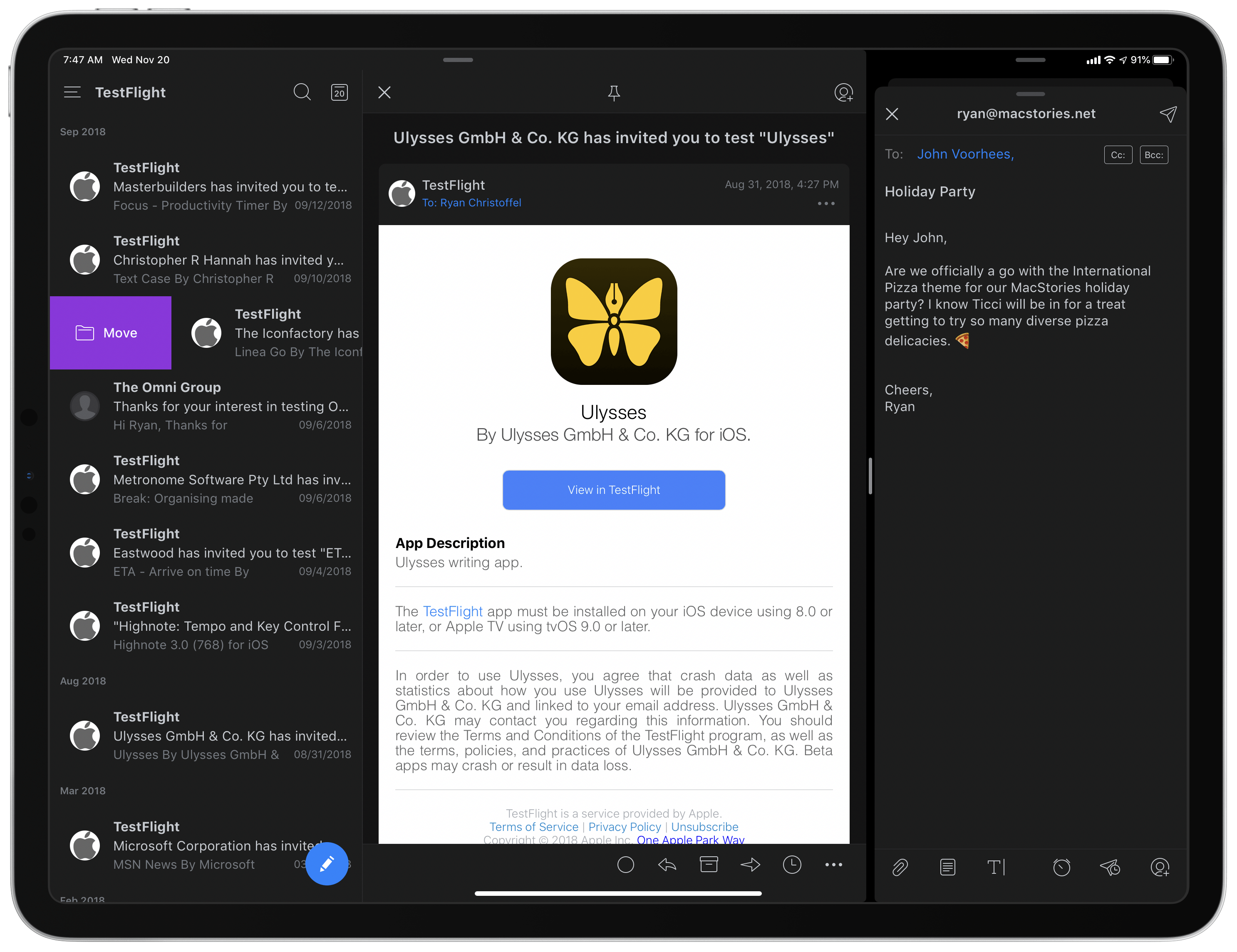
Two Spark windows open in Split View.

Two Spark windows open in Split View.

Spark, the email client from Readdle, received a strong update today that adds support for the latest iOS and iPadOS features, dark mode and multiwindow, while also introducing a design refresh that refines, rather than reimagines what was already there.

Multiwindow on iPad is excellent to have in an email app. I’ve been using Apple Mail in multiple windows since iPadOS first launched, and it’s especially handy for composing a message while still viewing other messages in your inbox, or that you’ve saved for later. Spark is no exception here: the flexibility to browse the app while writing a message, or even compose multiple messages at once, is fantastic. Where apps like the official Gmail client don’t even support Split View yet(!!), I’m happy to see Spark follow Apple Mail’s example in making multiwindow a core functionality.

Unlike many other apps that have added support for iOS 13’s dark mode this fall, today’s update for Spark is especially noteworthy because the app didn’t formerly offer a dark mode option at all. Now, Spark supports both light and dark modes and follows the system setting by default, though you can choose to perpetually keep the app in a single mode. I was happy to find that you can choose from both grey and true black themes, both of which look especially nice with the app’s blue accent colors; the only drawback is that just the grey theme can currently follow iOS’ system setting, so if you want to use true black, the app will stay in that mode until you manually change it.

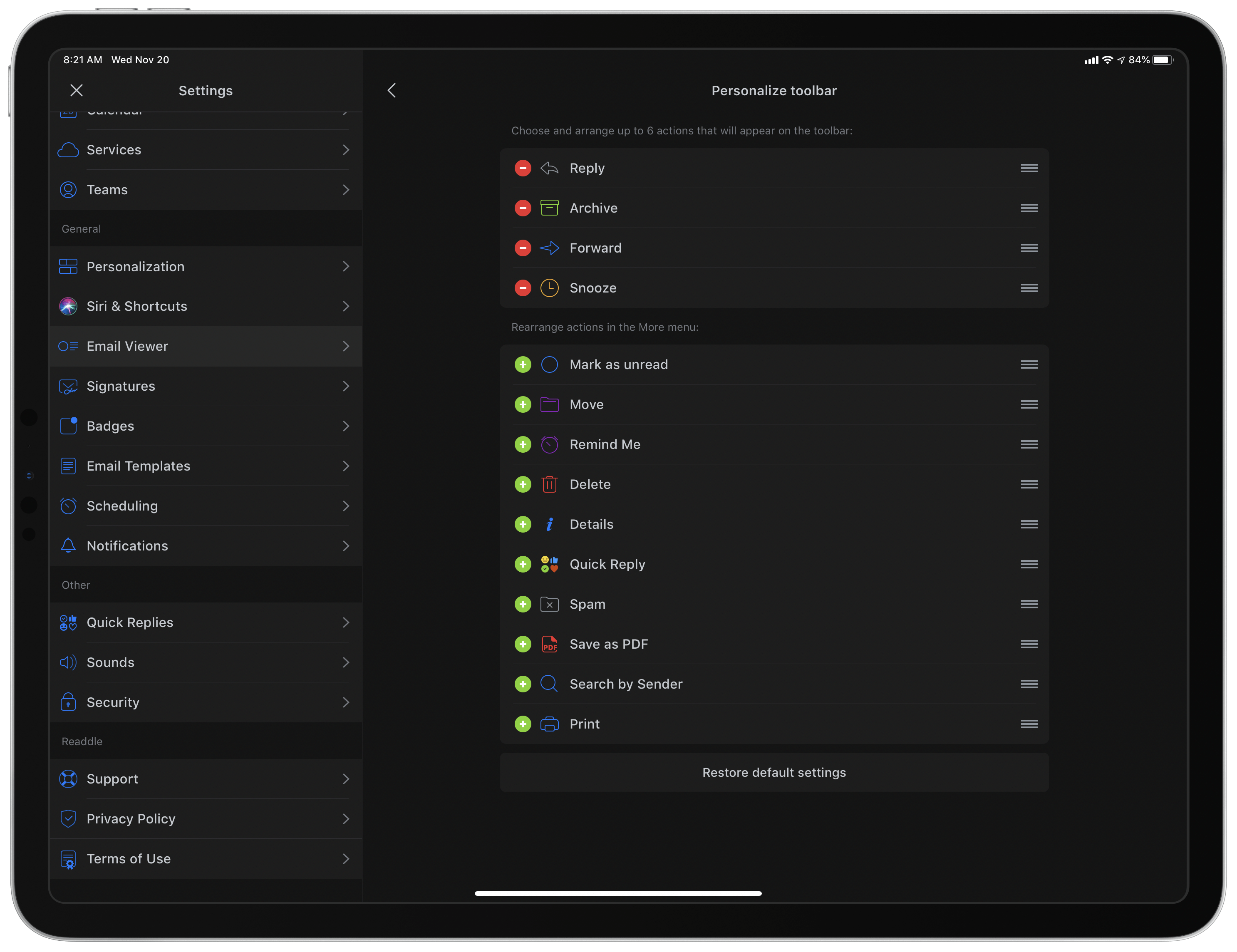
Customizing Spark's toolbar.

Customizing Spark’s toolbar.

Dark mode comes alongside a design refresh for Spark. While the app will still look entirely familiar to existing users, I think the tweaks to font details, spacing, and layout result in a better experience overall. The biggest standout of the redesign is that Spark can now display avatars next to messages, similar to what the official Gmail client offers, which I really value. Also, there’s a new option to customize the toolbar actions when viewing a message. Spark has always been great at providing customization tools, so it’s nice to see yet another added to the app.

Spark is one of the best email options on the App Store, and I especially recommend it for teams. Federico, John, and I use its team features to share and comment on emails together, which is an extremely valuable aid to collaboration. If you’ve tried Spark before and it’s not for you, there may not be enough different in today’s update to tempt you, but if you use an iPad at all, don’t underestimate how nice it can be to employ multiple windows while working through email.


Spotify Announces New ‘Your Daily Podcasts’ Algorithmic Playlist

Spotify aims to do for podcasts what it’s done for music recommendations with today’s announcement of a new algorithmic podcast playlist.

One of the music streaming service’s greatest strengths is the analysis it does of users’ listening habits, which it uses to recommend new tracks through playlists like Discover Weekly and Daily Mix. According to Spotify, its new ‘Your Daily Podcasts’ playlist will analyze recent episodes you’ve streamed and the shows you follow to make recommendations tailored to the type of shows that match your interests. For example, for story-based sequential shows that you haven’t tried before, Spotify will offer the trailer or first episode of a show, while for daily, news-based podcasts, the playlist may include a recent, topical episode.

The addition of ‘Your Daily Podcasts’ is not surprising given remarks by Spotify CEO Daniel Ek when the company acquired Gimlet Media and Anchor. At the time, Ek said Spotify would offer improved ‘curation and customization’ for users and ‘better discovery, data, and monetization to creators.’

Podcast discovery remains an area that a number of companies are working to improve. As Spotify’s share of the podcast listener market increases, its ability to anticipate the podcasts and individual episodes that subscribers will enjoy has the potential to rival what has already made it such an attractive service for many music fans. Given its dominance of podcasting, it will also be interesting to see if Apple counters by enhancing its own discovery tools in the future.

Spotify says that the new playlist is available to subscribers in the US, UK, Germany, Sweden, Mexico, Brazil, Canada, Australia, and New Zealand who have listened to at least four podcasts in the past 90 days.


AppStories, Episode 139 – Interview: How Soulver Reimagined the Calculator with Its Creator, Zac Cohan

This week, we are joined by developer Zac Cohan, the creator of Soulver, a combination notepad and calculator that reimagines how calculations are made on the Mac and iOS.

Sponsored by:

  • Luna Display – Turn any Mac or iPad into a wireless second display.
  • MacStadium – Get 50% off your first two months of a Mac mini subscription now with code APPSTORIES, or get started with MacStadium’s new Orka private cloud.
  • Linode – High-performance SSD Linux servers for all of your infrastructure needs. Get a $20 credit.

AppStories+ Deeper into the world of apps

AppStories Episode 139 - Interview: How Soulver Reimagined the Calculator with Its Creator, Zac Cohan

0:00
49:15

AppStories+ Deeper into the world of apps

Permalink

Apple to Hold Awards Ceremony Celebrating Its Favorite Apps and Games on December 2nd

Apple unexpectedly announced today that it will hold a ceremony in New York City on Monday, December 2nd to honor its favorite apps and games. No other details are currently available, except those in the invitation that was received by some members of the tech press including, as reported by MacRumors, Lance Ulanoff:

Apple’s annual Design Awards at WWDC have served the purpose of recognizing outstanding apps in the past, but an event like this at the end of the year that wraps up the best of 2019 makes a lot of sense and gives the company an opportunity to shine a light on the best offerings from third-party developers in a way that goes beyond the year-end recap lists it has done in the past.