Posts in mac

Promises Kept: MacHeist Offers Exclusive Access To Secret Twitter Features

Purchased the second nanoBundle from MacHeist? You were promised a beta of Tweetie 2, but since that never happened, Twitter for Mac arrived with no signs of exclusive benefits right? Think again. MacHeist has kept their promise by giving purchasers exclusive access to beta, or features in progress for Twitter for Mac. Users who didn’t buy the nanoBundle cannot have access due to the how enabling the secret features work. MacHeist members, keep an eye on your email for how to activate your beta features for Twitter for Mac.

[via MacHeist]


Everything You Need To Know About The Mac App Store

You’ll find that the coolest thing about the Mac App Store is simply how easy it is to find great software. Upon updating to 10.6.6, a new Mac App Store icon is presented next to the Finder. We can’t promise you’ll like the icon if you were disappointed with iTunes 10, but I think you’ll definitely like what’s inside. This morning we’ve got a quick walkthrough so everyone can see what all the hype is about, and how great it is to have an App Store outside of iTunes.

Read more


How To Fix Mac App Store “Error 100”

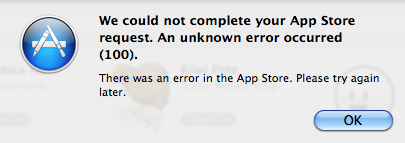
The Mac App Store went live less than an hour ago and as I installed the OS X 10.6.6 update required to use the new Store, I rebooted my computer and logged in the Mac App Store using my Apple ID. As I tried to download a free app, the Mac App Store returned Error 100, saying:

We could not complete your App Store request. An unknown error occurred.

We’re also getting several reports from users still unable to download apps from the Mac App Store because of this error. The cause seems to be lying in the fact that in the first minutes the Mac App Store went live and Apple let users log in with Apple IDs, they didn’t include the updated Terms and Conditions to accept before start using the Store. Thus many users, including me, logged in without accepting the Terms and were unable to download apps because they were stuck in some sort of “limbo”.

Here’s how you can fix it:

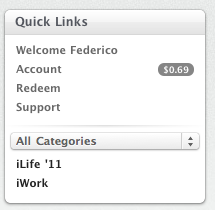
  • Sign out from the Mac App Store. You can do it by accessing the “Quick Links” section in the Mac App Store homepage and clicking on “Account”. Sign out.

  • Quit the Mac App Store app.
  • Log out from your computer; log in again.

  • Open the Mac App Store, sign in with your Apple ID, try to download a free app and accept the Terms and Conditions when asked. After that, the download should start.

  • If a logout doesn’t fix the issue, restart your Mac instead. We’re hearing that a reboot fixed the problem for many users.

If you’re still experiencing the issue, please let us know in the comments.


Twitter for Mac Is Live In The Mac App Store

Finally, it happened. Twitter for Mac, a.k.a Tweetie 2, is now available in the Mac App Store. It’s available here, for free. The long anticipated sequel to the original Tweetie for Mac marks a huge milestone for Twitter, and we’ll have a in-depth review later today.

In  the meantime, go download the app here and enjoy.


Mac App Store Preview: Filr, The Simple File Tagger & Renamer

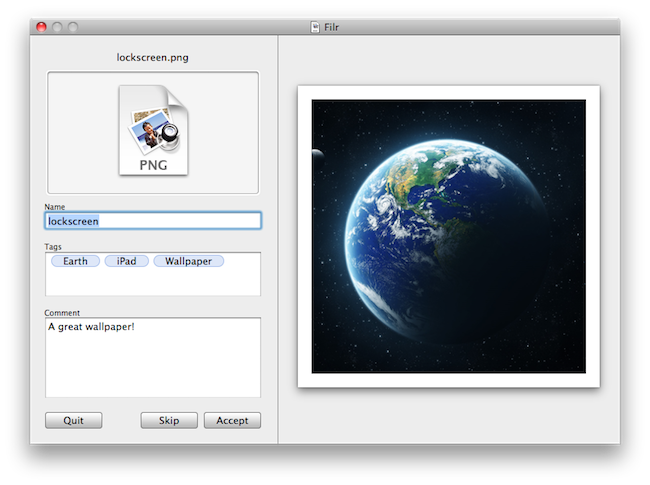
Developed by NovaStorm Software, Filr is a new simple utility for OS X that will be released tomorrow in the Mac App Store. The app, very user-friendly and straightforward in its approach, will let users do three things: rename files, tag them and apply comments to them. Unlike many other batch renaming tools available online, Filr will be focused on letting users modify one file at a time.

Tags you apply to files will be based on the OpenMeta standard, and thus will be compatible with most tagging softwares available for the Mac such as Ironic Software’s Leap 2. The Spotlight comments you’ll be able to attach to files will also be compatible with a variety of Mac apps such as Yojimbo or DEVONthink.

Overall, Filr looks like a really simple and focused app to quickly get more metadata into your Mac files, for more organization and better search functionalities in combination with other apps. Looking forward to it tomorrow, on the Mac App Store.


Preview: Chronos Is A Simple Time Tracking Utility Heading To The Mac App Store

While we’re literally mere hours from the Mac App Store launch in MacStories time, I wanted to show you all a nifty little utility that you can get your hands on tomorrow. While I don’t like the idea of developers simply porting iOS apps to the desktop (I’m afraid of “gunking up” OS X), I do like the idea that small developers such as myself can get encourage to just start making things and have almost instant visibility. Chronos is one of those apps, a tool made to fill a missing spot on the OS X desktop that keeps track of how long you spend on a project, and its various tasks. What’s really neat is that it’s super simple to use: add a project, a few tasks, and start the timer. If you need to, you can add time to an existing task just in case you forgot to set the clock when you began coding away. Little indie apps like this are what I’ll be looking forward to: I like seeing good ideas that fill a gap and can be improved on over time.


Mac App Store Preview: WordCrasher

Coming tomorrow for the Mac App Store launch, WordCrasher is an addictive game already available on the iPhone and iPod touch which is based on a simple concept: create words out of letters falling from the top of the screen. Yes, it sounds a lot like Tetris’ bricks, only you have letters and you have to combine them to create words and empty the screen. As the screen is filled up with blocks, it’s game over.

The Mac version of WordCrasher will take the iOS experience and add some new features to make suitable for the desktop. Together with redesigned graphics and new sounds, Mac users will be able to create words not just by catching letters with the trackpad: you can use the keyboard for fast typing and gaming.

WordCrasher will be available tomorrow and I believe it will be one of the many iOS games ported to the Mac platform. Whether or not this will turn out to be a great or terrible idea, we’ll find out in less than 24 hours.


Mac App Store Preview: Todolicious, The Simple To Do App

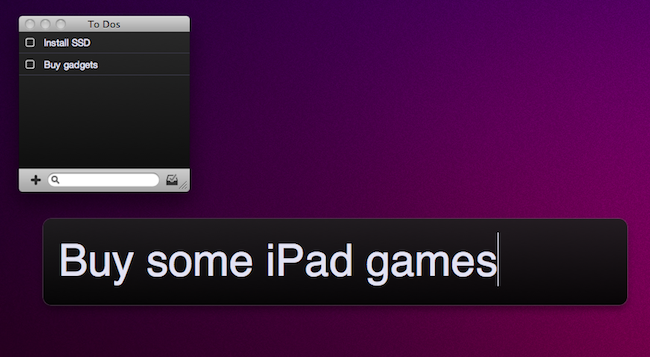
Of all the new apps that are coming out tomorrow in the Mac App Store, Todolicious by Mustacheware is among those we’re most excited about. Created by our friend Steve Streza, who also happens to be the guy behind the great iPhone webapp Swearch.me, Todolicious wants you to stop wasting time organizing your to dos and tasks. Todolicious is a simple app that’s also customizable, and it’s aimed at those people who just want an app to quickly write down the things they need to do. No projects, tags or contexts. Todolicious is a sexy, digital version of the classic sticky notes.

Without giving away all the details just yet (you should be able to play with the app in less than 24 hours), I want to focus on the single most intriguing aspect of the app: the new to do entry field. Instead of displaying a popup window with dozens of options, text fields and buttons, Todolicious provides a simple panel that asks you “What do you need to do?”. It reminds me of Alfred’s straightforward search interface, and you can assign a system-wide shortcut to it so you can enter new to dos no matter what you’re doing with your Mac.

Todolicious will be available tomorrow at $4.99 in the Mac App Store. It’s a simple app we’re really excited about, and we bet that thousands of Mac users who don’t need the functionalities of Things or OmniFocus will give Todolicious a try. Check out the website here, or follow @todolicious for updates.