Posts in mac

Middle East Countries Not Officially Supported In FaceTime for Mac

I don’t know what to think anymore, but to me it seems like this is just a big and confused mess over some carrier restrictions. Oh, and lots of PR gone wrong. Anyway, FaceTime in the Middle East countries: does it work? Yes and no. Yes, you can find a way to make it work, like buying a European iPhone unit. No, Apple doesn’t support it and it’s doing everything they can to remove FaceTime mentions and features from certain countries. Why? “Carrier issues”, or so they say.
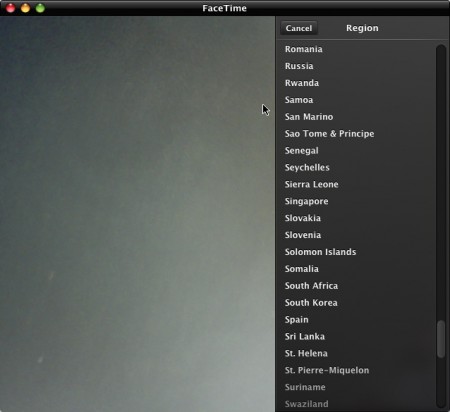
How about FaceTime for Mac? You guess: Apple didn’t include Saudi Arabia, United Arab Emirates, Kuwait and Egypt in the preferences, SaudiMac reports. What’s interesting is that Jordan and Qatar made the list, even though they don’t support FaceTime on the iPhone and iPod Touch. Heh. Still, if you change your country to United States you’ll be able to use FaceTime for mac even from one of the countries not officially supported.

What a mess.


Apple Opens Mac App Store Section on Developer Forums

Since the announcement of the Mac App Store yesterday, many developers started wondering how would the whole thing actually work. Apple then posted its first version of the Review Guidelines for Mac developers, and those guidelines raised even more questions.

Now developers have a better place to discuss their Mac App Store-related questions and problems by going to a specific section in the Developer Forums.

The Mac App Store section is available here for developers.


Secret Feature: iLife ‘11 Still 32-Bit

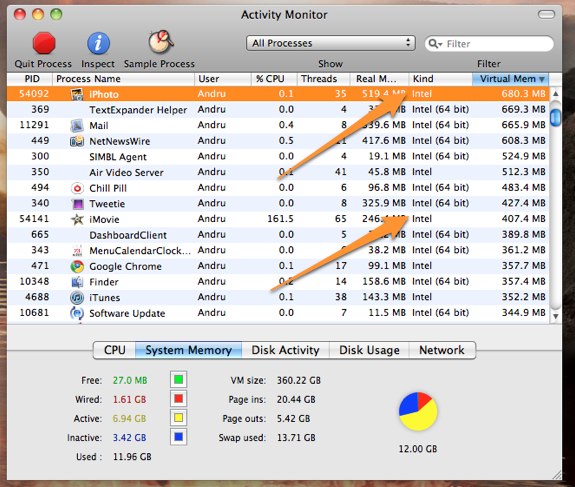
You would expect the shiny new iLife suite to be running at full 64-bit smoothness, wouldn’t you? Not so fast, literally. GearLive reports the bad news:

So we figured that one unannounced “feature” would likely be that the iLife suite had been converted to 64 bit. After all, Snow Leopard has had more than enough time to mature out in the wild, and it seems that developers left and right have jumped onto the 64 bit bandwagon. That’s why we were sorely disappointed when we launched Activity Monitor and found that, unlike just about every other process and application we are running on the Mac Pro, the iLife apps are still labeled as “Intel” rather than “Intel 64 bit.”

Many speculated iLife ‘11 would be 64-bit compatible, but it appears that the engineering team didn’t have time to rewrite the codebase. Here’s to hoping for an update, or - worse - 64-bit coming in iLife ‘13. [via MacRumors]


OS X Lion: The Details We Missed

In yesterday’s preview of Lion, we were shown 4 new features: fullscreen apps, Launchpad, Mission Control and the Mac App Store. In the demo Vice President of Engineering Craig Federighi offered on stage, though, we spotted some neat little touches Steve Jobs didn’t mention, but they were there.

Here’s what we’ve collected so far. Read more


Tip: How To Sort Contacts by First / Last Name in FaceTime for Mac Beta

A surprising high numbers of readers asked me last night if it’s possible to change the way FaceTime for Mac (the current beta version) sorts contacts by first or last name. Basing on readers’ emails, it seemed like sorting was random: some of them were reporting contacts sorted by last name, some by first name, Apple’s website shows contacts sorted, indeed, by last name.

It’s really very simple. Like I wrote last night, FaceTime for Mac depends on your existing Address Book and doesn’t let you create additional buddy lists, or FaceTime-specific ones. Hopefully Apple will bring this feature in a future version. So to change how contacts are sorted in FaceTime.app, you actually have to change how your contacts are sorted in the Address Book. Is that simple.

Fire up the Address Book app, open the preferences, see the screenshot below.