This Week's Sponsor:

Copilot Money

The Apple Editor’s Choice App for Managing Your Money


Posts in Linked

Project Geneva: David Smith’s New Approach to Third-Party Watch Faces

Developer David Smith has often expressed a desire to design third-party faces for the Apple Watch, a feature that many users wish Apple offered. But recently, after launching his latest Watch app Geneva Moon (formerly known as Moon++), Smith realized he could take a different view of face customization, inspired by his newest app.

Geneva Moon exists mainly to provide a complication which displays an astronomically accurate representation of the moon. It takes advantage of the new ability in watchOS 6 for Watch apps to be offered independently of iOS counterparts, so you can download Geneva Moon directly from the Watch’s App Store and then install its complication on your watch face. Smith’s experience with this app inspired him to shift his focus from the aspects of watch faces that Apple doesn’t let developers customize, to the extensive areas that they can. He writes:

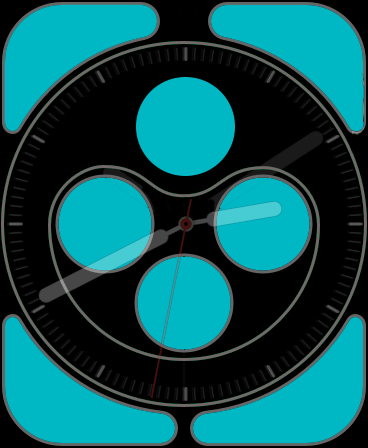
The Infograph face's customizable areas. (Source: david-smith.org)

The Infograph face’s customizable areas. (Source: david-smith.org)

I have extensive control over what is shown here and for many of the watch faces, this area makes up the vast majority of the screen. Other than the design of the watch hands or appearance of the digital time numerals, I can do a whole lot with the complication tools I already have.

To that end, I’m starting a journey I’m calling Project Geneva, in which I’m going to see just how far I can push customizability and design of complications for the Apple Watch.

Though Apple doesn’t permit the distribution of third-party watch faces, by focusing on creating new complications that can be used across a variety of different first-party faces, Smith will provide users more flexibility in crafting each existing face to their own preferences and needs.

To a degree, third-party faces are already here. An entire watch face can’t be customized, but for those faces which are largely populated by complications – which many are – there exists enormous freedom for developers and users alike to craft their ideal watch face.

I can’t wait to see what new complications are spawned by Project Geneva, and hope other developers may take inspiration from Smith’s new initiative themselves.

Permalink

PCalc Developer James Thomson Shares His Catalyst Experience

James Thomson, the creator of PCalc, has written about his experience with Catalyst. Thomson, who was one of the developers that spoke with Bloomberg’s Mark Gurman about the challenges Catalyst poses to developers and their customers, expounds on what he told Gurman, saying about PCalc that:

It became pretty clear to me that I would need to rewrite a lot of the user interface, to find a happy middle ground between the iPad and the Mac. Which would probably benefit both in the long run, to be fair. But with everything else that was going on this summer, I couldn’t justify that work, with no guarantees at the end of the day that I would have something I was happy to ship. So, I mainly focused my time on things like Shortcuts and Dark Mode, and iOS 13 support in general.

Thomson goes on to explain that while it was simple to get a version of PCalc’s iOS app running on the Mac, the APIs for dealing with macOS-specific features felt rough and unfinished.

That’s something I’ve heard from a lot of developers who were initially excited about Catalyst. They also had their hands full dealing with iOS and iPadOS 13, and bugs in both OSes slowed them down over the summer. As a result, many put their Catalyst plans on the back burner.

Thomson also says that:

Documentation for Catalyst has been almost non-existent too, which has made things a lot harder than they should be.

From the business side, there is also no way for somebody to get the Catalyst version of the app for free when they buy the iOS version. And no great way to share in-app purchases either if you have a free app. That generally means that somebody will have to pay a second time to get a copy.

Instead of pushing forward with a Catalyst version of PCalc, which is already available for the Mac as a traditional AppKit app, Thomson created a Catalyst version of Dice by PCalc, his physics-based multi-sided dice simulation that can be used for games like Dungeons & Dragons. Based on his experience with Dice, which is available on the Mac App Store now, Thomson concluded that Catalyst isn’t far enough along to build a version of PCalc that is better than his existing Mac app, but he remains hopeful that the situation will improve.

From what I’ve heard from developers, Thomson is not alone in his experience with Catalyst. That’s not to say there aren’t useful apps being made with Catalyst, but so far, the pool of apps is small, and if it’s going to grow, Catalyst is going to have to evolve rapidly.

Permalink

Catalyst’s Rough Edges Risk Alienating Developers and Users Alike

Catalyst, the technology that allows developers to bring their iPadOS apps to the Mac, is off to an uneven start, as Mark Gurman of Bloomberg recounts through interviews with several developers. According to the developers interviewed, there’s a big difference between getting an iPad app up and running on a Mac, and using it to build a high-quality Mac app. According to Gurman:

[PCalc developer James] Thomson said the Mac version of his iPad calculator app initially looked like an iPad app floating on a larger Mac screen, so he had to redesign much of the user-facing software. However, all of the lower-level code pretty much worked out of the box, he said. Lukas Burgstaller said it was initially easy to copy over his Fiery Feeds iPad app, but then he “ran into all sorts of walls” trying to adapt the software to a Mac interface.

Those and other rough edges experienced by developers are exacerbated by a long-standing limitation of the Mac App Store: Mac apps can’t be bundled with iOS and iPadOS apps. That means developers have no choice but to charge separately for their new Catalyst apps, risking the ire of customers.

Although I remain optimistic about Catalyst, it’s off to a rougher start than I’d hoped, as I discuss in my macOS Catalina review. The quality of the relatively small crop of early Catalyst apps demonstrates that the technology holds promise, but Apple needs to move quickly to close the gaps. Otherwise the company risks alienating both developers and users, which would be a significant blow to its Mac strategy.

Permalink

The Future of Apple Music

Sophie Charara interviewed Apple’s Zane Lowe for Wired about where Apple Music is heading next. One answer, interestingly enough, is a greater focus on radio:

Apple doesn’t break out Beats 1 monthly listening figures; various commentators have speculated they are relatively low, the official line is “tens of millions”. What we do know is that one of Lowe’s priorities is to merge the two elements of Apple’s £9.99 a month Music offering: its Spotify-style streaming service and the Beats 1 radio shows.

“I want more people to listen and discover this stuff,” says Lowe. “And I want to integrate what we do at Beats 1 into Apple Music more thoroughly. I would guess there are still subscribers who don’t realise Elton John has done over 200 shows. Those shows are works of art in their own right.”

Apple Music for years has been producing quality radio work, yet the way that’s been surfaced hasn’t been the most discoverable. Promoting existing radio shows in more places sounds like a positive step forward, and I hope another addition would be an option for push notifications when there’s a show you want to listen to live. Apple could put a little bell icon, YouTube-style, on a show’s artwork in the app for enabling such notifications, because unless you schedule a show into your normal routine, you’ll almost certainly never think to listen to it at the right time.

Another potential content area for greater exposure would be the interviews Zane Lowe and his colleagues do with artists regularly, which Apple Music often features in both audio and video forms. To me those interviews feel like a perfect fit for highlighting in Apple Podcasts as well as the Music app. Apple has actually dabbled in that, such as with a Billie Eilish interview earlier this year, but I think it’s an area ripe for expansion.

One other change Apple’s pursuing, according to Lowe, will bring about increased initiatives around live music:

There’s also the matter of how livestreams fit into the picture. After events with Shawn Mendes, French rap group PNL and Tyler the Creator, who did a live performance of his album IGOR, streamed on Apple Music the night before it came out, Lowe says “live music is definitely on the horizon” for the service. It’s all part of the team’s bid to “eventise” – his word – album launches. In the case of Tyler the Creator, “fans can tune in, then after watching it maybe you go to the album.”

Making album launches more of an event could be an effective way to compel a switch to Apple Music over Spotify. If Apple can arrange live content with a wide appeal timed with an album launch, then people will tweet about that live content as it’s being shared, and anyone not on Apple Music will feel like they’re missing out.

Permalink

AppStories, Episode 133 – Building an iOS Media Companion

On this week’s episode of AppStories, Federico helps John set up an iPod touch as a media companion for watching TV and movies, enjoying music, and controlling HomeKit devices.

Sponsored by:

  • MacStadium – Get 50% off your first two months of a Mac mini subscription now w/ code APPSTORIES, or get started with MacStadium’s new Orka private cloud.
  • Linode – High-performance SSD Linux servers for all of your infrastructure needs. Get a $20 credit.
  • Kolide – User focused security for teams that value productivity, transparency, and employee happiness. Try it free for 30 days.

Permalink

14-Year-Old Developer Created Game for Apple Arcade’s Launch

Patrick Klepek writes for VICE about the 14-year-old developer, Spruce Campbell, whose game Operator 41 was part of the Apple Arcade launch:

“When I saw the Apple Arcade announcement in March I dropped everything and decided to build a whole new game for Arcade,” [Campbell] told VICE via email. “I thought that the games that really fit Apple Arcade will probably be designed for it from the ground up, so I came up with a stealth game that would work on all the Arcade platforms.”

Campbell has quite a personal story. As Klepek notes, the young developer taught himself to code starting at the age of 8, and when he was 12 he designed a game, CyberPNK, that netted him a BAFTA award. He also received a scholarship to attend WWDC this June, which is where he was able to personally pitch Operator 41 to Apple for Arcade inclusion. Campbell says following that pitch:

“I went back to the dorms, and over the next week I was accepted onto the service,” he said. “I’d say that was the luckiest moment of production—so many stars had to align for me to be accepted onto the service and everything went so well.”

Klepek’s concluding words put into perfect context what this story means for the potential of Arcade’s future.

Operator 41 doesn’t have many reviews. It didn’t get a big marketing push, and wasn’t on Apple’s big stage…But what’s remarkable is that Operator 41 exists at all, and shows Apple having a willingness to give people a shot. Apple Arcade isn’t a place where, like the App Store, anything can get published. There is a curation element. Campbell wasn’t signed because he made a hit that Apple thinks will bring new people into Apple Arcade. In this case, Apple decided it was worth including a game by a mostly unknown 14-year-old designer.

Arcade’s launch has been fantastic, and with the near-certainty of more stories like Campbell’s moving forward, the service’s future looks bright.

Permalink

Adapt, Episode 10: Home Screen and Share Sheet Shortcuts

On this week’s episode of Adapt:

The iPadOS 13 Shortcuts series continues with an exploration of what’s changed with shortcuts run from the Home screen and share sheet. Afterward, Clips drives Federico crazy, so he gets his revenge with a challenge for Ryan.

You can listen below (and find the show notes here), and don’t forget to send us questions using #AskAdapt and by tagging our Twitter account.

0:00
01:02:10

Adapt, Episode 10

Permalink

Connected, Episode 263: Moon Plus Sign Plus Sign

On this week’s episode of Connected:

This week, Stephen tells a story about his Apple Watch accomplice, Myke reviews tvOS 13 and Federico explains how Deep Fusion and Capture Outside the Frame work.

You can listen below (and find the show notes here).

0:00
01:34:09

Connected, Episode 263

Sponsored by:

  • Squarespace: Make your next move. Enter offer code CONNECTED at checkout to get 10% off your first purchase.
  • Care/of: Personalized vitamins, protein and more, delivered to your door. Use ‘connected’ for 25% off.
  • Freshbooks: Online invoicing made easy.
Permalink

Apple’s Deep Fusion Camera Feature Launching as Part of the iOS Developer Beta Program

According to TechCrunch’s Matthew Panzarino, Apple will roll out the Deep Fusion camera feature announced at the company’s fall iPhone event today as part of the iOS developer beta program.

Deep Fusion is Apple’s new method of combining several images exposures at the pixel level for enhanced definition and color range beyond what is possible with traditional HDR techniques. Panzarino explains how Deep Fusion works:

The camera shoots a ‘short’ frame, at a negative EV value. Basically a slightly darker image than you’d like, and pulls sharpness from this frame. It then shoots 3 regular EV0 photos and a ‘long’ EV+ frame, registers alignment and blends those together.

This produces two 12MP photos – 24MP worth of data – which are combined into one 12MP result photo. The combination of the two is done using 4 separate neural networks which take into account the noise characteristics of Apple’s camera sensors as well as the subject matter in the image.

Apple told Panzarino that the technique “results in better skin transitions, better clothing detail and better crispness at the edges of moving subjects.”

There is no button or switch to turn Deep Fusion on. Like the over-crop feature that uses the ultra wide lens to allow photo reframing after the fact, Deep Fusion is engaged automatically depending on the camera lens used and light characteristics of the shot being taken. Panzarino also notes that Deep Fusion, which is only available for iPhones that use the A13 processor, does not work when the over-crop feature is turned on.

I’ve been curious about Deep Fusion since it was announced. It’s remarkable that photography has become as much about machine learning as it is about the physics of light and lenses. Deep Fusion is also the sort of feature that can’t be demonstrated well onstage, so I’m eager to get my hands on the beta and try it myself.

Permalink