

In last night’s interview, Tim Cook didn’t reveal new Apple products or hint at new software features specifically (not a surprise), but he did share his thoughts on the “grand vision” for TV, opening up iOS APIs to third-parties, and letting Jony Ive contribute to the next version of iOS. I am watching this today.
Posts in Linked
Tim Cook at D11: The Full Video→
Dark Sky 3.0→
Today, Dark Sky 3.0 has been released with much anticipation since the release of their own forecasting API / website forecast.io with incredibly accurate weather prediction packaged with an elegant, simple user experience.
Version 3.0 is now powered by the Forecast API and support for the UK and Ireland is now available. Gone are the brief text summaries which have been replaced by ‘intelligent’ ones that are more detailed with current conditions, next hour, and the rest of the day. They also include more than just precipitation, which is a big addition I have been waiting for.
Another new feature to Dark Sky 3.0 is the ‘Personal Weather Reporter’: any user can submit their own current conditions with a simple shake of the iPhone and then selecting conditions. You can even include a weather photo with your submission as well. The radar screen is still the same with the exception of a new magnifying glass icon in the upper left. I don’t plan on dumping the forecast.io web app or my other favorite, Today (which also uses the forecast.io API), but now that Dark Sky is more than just precipitation, I will use it for more than just alerts. It is awkward that notifications are still considered “beta”, but the Dark Sky team is still actively making changes to them.
The Dark Sky team has done a really great job with this update (and in the last few months) and they have proved their dedication to this genre of apps. Be sure to check out their other web app, Lines. Dark Sky 3.0 is $3.99 or a free update for existing users. The app is universal and available now on the App Store.
Connecting An iPad To A Floppy Disk→
Via TUAW, a cool, albeit useless hack demonstrated by YouTube user napabar (make sure to check out his other videos featuring a Mac 512K).
I guess “useless” is subjective, though. Maybe there are people out there who need to import QuickTake photos or ClarisWorks documents on an iPad today.
TextExpander Snippet To Replace Spaces With Dashes→
I ever had to put them on the web. (I don’t like %20 signs…)
This is a shell script that you can use with TextExpander which replaces spaces with dashes in whatever input it gets from a fill-in field.
This is a good trick by Sid O’Neill. I plan to integrate it with my file renaming workflow.
Using Tweetbot Searches to Replace RSS→
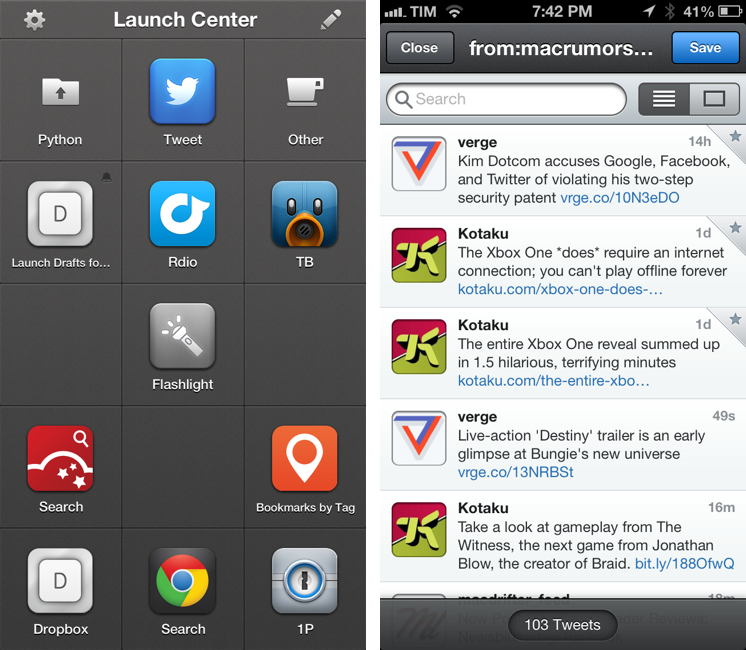
Sean Korzdorfer shares a Tweetbot tip that I didn’t know about: you can construct complex searches with boolean operators and filters and launch them with a URL scheme, both on OS X and iOS. And not just regular searches – you can apply a query to look for specific keywords inside a Tweetbot search.
Basically, Sean is using Tweetbot searches to replace RSS feeds. By saving searches that filter out RTs, mentions, and tweets in foreign languages, he receives a stream of tweets containing links from a specific set of users. Sean has turned his searches into Alfred workflows for Tweetbot on the Mac, and I thought I could do the same on iOS.
Sure enough, here’s a Launch Center Pro action to launch a Tweetbot search for links (no RTs, no mentions) from users I care about:
tweetbot:///search?query=from%3Amacrumors%20OR%20from%3Averge%20OR%20from%3Adaringfireball%20OR%20from%3Apolygonall%20OR%20from%3Akotaku%20OR%20from%3Amacdrifter_feed%20OR%20from%3Areneritchie%20OR%20from%3Amattalexand%20OR%20from%3Anateboateng%20OR%20from%3Adujkan%20OR%20from%3Amarkgurman%20OR%20from%3Apanzer%20filter%3Alinks%20-filter%3Amentions%20-filter%3Aretweets%20lang%3Aen%20[prompt]
And here it is decoded for reading purposes:
tweetbot:///search?query=from:macrumors OR from:verge OR from:daringfireball OR from:polygonall OR from:kotaku OR from:macdrifter_feed OR from:reneritchie OR from:mattalexand OR from:nateboateng OR from:dujkan OR from:markgurman OR from:panzer filter:links -filter:mentions -filter:retweets lang:en [prompt]
The URL action ends with a [prompt] for Launch Center Pro, but that can also be a [[draft]] for Drafts. You’re not forced to launch the search URL with a keyword – if you don’t enter anything in the prompt, Tweetbot will display all links from the search (which is why you probably don’t want to use Drafts for this, as it can’t launch an action from an empty draft). Also, you can see that the first portion of the URL isn’t percent-encoded, but the one after the query parameter is. For this, Launch Center Pro’s encode/decode actions can come in handy.
I am subscribed to a series of Twitter lists to discover interesting links on a daily basis, but these complex searches have the advantage of filtering out RTs and mentions, providing a cleaner, links-only experience.
Save Keyboard Maestro Macro Screenshots with Keyboard Maestro→
Patrick Welker goes all meta with a macro to save Keyboard Maestro macros as screenshots – a new feature of version 6.0.
Mailbox Now Available for the iPad→
As I said in my own review, Mailbox helps me get rid of all the unimportant stuff before I even sit down at my computer. I’ve described Mailbox as a complement to the inbox, not a replacement, and that continues to be true. I still log into Gmail when I need to compose a message or search for an invoice, but otherwise I flick through and browse notifications and messages when I’m away from my laptop or PC.
Mailbox on the iPad doesn’t offer any distinct advantage over its iPhone counterpart, the app being the same right down to the compose view. Oddly, Mailbox is locked to the landscape orientation, meaning that your email messages can only be viewed in half the space next to the sidebar. My guess is Orchestra felt that seeing the big picture — the entirety of the inbox — would be better for previewing and triaging email over opening individual messages as you’d have to in the portrait orientation.
Twitter for Mac Gets Notification Center Support→
Twitter updated its official Mac app today to include support for Notification Center and fixes for Growl (among other improvements). Notifications can be configured in the Settings, and, in my initial tests, they worked fine for mentions and direct messages.
In my Mountain Lion review, I noted that I didn’t like clicking on Twitter notifications because they were taking me to Twitter’s website instead of an app (they still do). It’s good to see Twitter updating their Mac app again.
Latest Chrome Release Includes Voice Search Support→
Jerry Hildenbrand:
Google Now style voice search has just went live in the latest Chrome stable version for the desktop (Version 27.0.1453.93). As far as we can tell from
playing aroundtesting things, the full contextual search isn’t running like we saw in the demo during the Google I/O keynote, but the basic voice search and response is ready to go.
Announced and demoed at I/O last week, Voice Search for the desktop mimics the experience launched on Google’s Search app for iOS last year. Voice Search for the desktop lets you dictate search queries to Google, which will transcribe them in (almost) real-time and take you directly to results, powered by the Knowledge Graph. Like on iOS, certain queries will trigger a voice response by Google itself, whereas others will display cards of information or regular results.
It appears Google is rolling out the feature this morning, as the new voice interface is available in Chrome but leading to frequent “No Internet connection” dialogs; I was able to try Voice Search twice, and it worked as expected.
You can watch a demo of Google’s Voice Search for the desktop from I/O 2013 here; an announcent will likely be posted on the official Google Chrome blog.