Posts in Linked

Listen: A Gesture Driven Music Player

It’s not for me but I think the app looks good and the animations are gorgeous. Listen lacks traditional playback controls or buttons, relying on gestures, swipes, and taps to play, pause, and skip music. The idea is that you can drag the album artwork around to trigger various actions, but it works well for some things and not so much for others. I think developers have to keep in mind that removing buttons adds a lot of complexity — in this case something simple like playing a song over AirPlay requires a very specific drag gesture. Listen’s great for shuffle play, but not so much for rummaging through your music collection. Also, what’s up with circular artwork lately?

Check it out on the App Store — it’s free to download.

Permalink

Apple and Inter-App Sharing

Ole Begemann writes about the dilemma Apple may be facing with adding new inter-app communication features to iOS:

I think Apple faces a real dilemma here. Any API that facilitates data sharing between apps without user interaction can easily be abused for tracking purposes, a practice Apple has opposed pretty strongly – at least in word if not in actual rejections of apps.

After Apple forced Smile to stop using the Reminders database to sync TextExpander snippets across apps, this was often mentioned as the reason behind the removal of named pasteboards (which Smile used to leverage): advertisers were abusing the system to track users.

Ole’s proposed solution is “an official sharing API that only works with user interaction”, and I agree with that idea. I have lost hope over the years and I don’t think that Apple will bring something like Automator to iOS any time soon (though I’d always accept a surprise), but adding user-controlled app sharing features would be a good start.

My idea is still the same one from May:

This is an issue that I have been pondering for years. In 2010, Chris Clark posted a prototype (powered by Briefs) of a “services menu for iPhone”, and I keep thinking that such menu could be the solution to iOS’ inter-app communication woes. I don’t see Apple moving away from the one-app-at-a-time model, but I think that allowing users to invoke a menu (either for text selection or general shortcuts) to activate actions could help in better linking apps together. The menu would be sanctioned by Apple and available with a new API, so that developers would also be able to integrate it in more classic versions of “Open In” and “Share” menus.

Furthermore, by leveraging technologies like XPC, I’d like to see Apple enabling users to do less switching back and forth between apps. Today, you can tap on “Email” buttons to bring up a Mail.app modal view that doesn’t yank you out of the current app. Imagine, with iOS 7, being able to “read this later” by tapping on a link and saving it in a Pocket popup; pasting text and links from Safari into a Pages popup of the document you are working on; or, tweeting a photo from the Camera app with a Tweetbot menu and composing a Drafts note from anywhere.

Today, Greg Pierce tweeted about a possible “OAP” (Other-App Purchase) concept, and that’s also something I’ve been thinking about. If apps could better communicate with each other, apps could become “features” to unlock. Imagine if the user could choose to save a photo to Evernote or Dropbox from any app using a Mail-like popup that doesn’t take you out of the current app. Maybe next year?

Permalink

Streaming Music and the Lack of Substance

Khoi Vinh, writing on Medium:

[…] what I find is absent from streaming music is everything that complements the act of listening to music. It’s the very thing that digital music, more even than records and CDs, should excel at: metadata.

Who produced that debut album from Lorde? Who were the musicians who played with her on it? Where was it recorded, and when? Does Lorde thank God, her parents, and/or her cat for making the record possible? I don’t know the answer to any of these questions, because I’ve only ever experienced Lorde’s music via Spotify, where such information is absent entirely.

Remember when Apple promised richer, digital equivalents of liner notes and album artwork with iTunes LP?

What I don’t want is a PDF copy of that album’s included artwork, nor do I want glitchy Flash-like interactive experiences that sidestep my music app when I purchase music from the iTunes store. The former feels lazy and the latter feels like a cheap gimmick. I’d rather see lyric metadata in the songs I purchase from iTunes, which would show up when that album artwork is tapped on iPads, iPhones, and iPod touches. Heck, Nine Inch Nails was doing simple stuff like embedding individual pieces of artwork into their digitally downloaded songs and that was actually cool. Making digital music feel like it has more substance doesn’t need to be complicated. And if it’s just metadata we’re talking about, then there’s no reason little things like this couldn’t be done by any service to make music feel much more tangible.


Permalink

An iPad For Ben

Such a great story about an Apple retail store’s staff opening early to make a kid’s day feel special. Read the post to see why, look at the photos, and remember the importance of Apple’s work on Accessibility features for iOS:

Over the last few years Ben’s various vision team members have talked about how wonderful the iPad is as an assistive device. Kit researched and learned more about the amazing technology it has to help people with visual impairments, the list of apps great for kids with visual disabilities, even built in features like Siri can make a significant difference in the day to day lives of someone with a vision challenge. We just didn’t know how to make that happen with the budget, so it was something we kept in the back of our minds but hadn’t pursued. Once again little miracles started to fall into place with offers of help and surprises here and there and so much support and love from friends and family.

Permalink

The New Mac Pro Arrives Tomorrow

With a press release, Apple today announced that the new Mac Pro, originally introduced at WWDC, will be available tomorrow, December 19. From the PR:

The Mac Pro is available with a 3.7 GHz quad-core Intel Xeon E5 processor with Turbo Boost speeds up to 3.9 GHz, dual AMD FirePro D300 GPUs with 2GB of VRAM each, 12GB of memory, and 256GB of PCIe-based flash storage starting at $2,999 (US); and with a 3.5 GHz 6-core Intel Xeon E5 processor with Turbo Boost speeds up to 3.9 GHz, dual AMD FirePro D500 GPUs with 3GB of VRAM each, 16GB of memory, and 256GB of PCIe-based flash storage starting at $3,999 (US). Configure-to-order options include faster 8-core or 12-core Intel Xeon E5 processors, AMD FirePro D700 GPUs with 6GB of VRAM, up to 64GB of memory, and up to 1TB of PCIe-based flash storage.

As we wrote in October:

The new Mac Pro is all about being small, quiet, yet entirely capable of delivering performance for today’s audio and visual professionals. The Mac Pro, unlike desktop towers of old, has been designed into a compact round aluminum canister that sucks heat away from components using a single unified thermal core. While uniquely shaped, components in the new Mac Pro are user accessible, with connectivity to server racks and other peripherals being mitigated through an array of Thunderbolt 2 ports.

The new Mac Pro is Apple’s latest crown jewel, assembled in the US and packing an incredible amount of hardware innovations. More details are available at the Mac Pro’s official webpage.

Permalink

How iOS 7 Affects App Development

TidBITS’ Matt Neuberg wrote about how iOS 7 is turning app development on its head, for better and for worse. As an interface molded by transparency and text, Apple has made several improvements under the hood that put content front and center. Of those improvements, rendering and laying out text is one area in iOS which has been completely overhauled.

iOS 7 also provides developers with full access to the Mac OS X text layout engine, Text Kit. How developers will use this new-found power is anybody’s guess, but drawing styled text in sophisticated ways will be vastly easier. Expect to see inline images, tab stops, text “decorations” of various sorts (such as special colored underlines or word backgrounds), and text arranged in interesting shapes.

Permalink

Typeset Lets You Mix and Match iOS 7 System Fonts for Finding the Perfect Combination

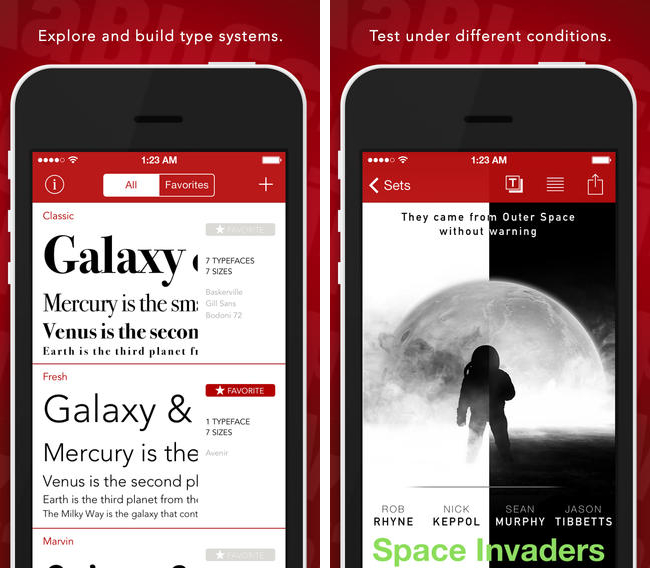
Developers building iOS 7 apps may want to download Typeset by MartianCraft, a free app that lets you preview iOS 7 system fonts side by side. Typset includes layout cards for previewing how fonts look in various configurations, tools for adjusting line spacing and font sizing, and the option to mark saved sets as favorites for later browsing. A $5.99 in-app purchase unlocks Typeset Pro, which enables the option to export the end result as a predefined stylesheet or PDF. Download it from the App Store.

Permalink


Mailbox for iOS Updated With Support for iCloud and Yahoo Mail

Now available on the App Store, the latest iteration of Mailbox adds support for iCloud and Yahoo Mail accounts. While iCloud and Yahoo Mail are the most likely alternatives to Gmail, I am surprised to see Outlook.com left out of the mix. Personally, I’m still looking forward to having general IMAP support so I can add my self hosted email accounts. The latest version also introduces background syncing for devices running iOS 7, which means your email will already be in your inbox before you even open the app (previously you had to wait for the app to pull down the latest emails after it was opened). Download the latest update for free from the App Store.

Permalink