
Posts in Linked

Spotify Acquires The Echo Nest

The Echo Nest, a music data company that specializes in recommendations, playlists APIs, and artist/fan understanding, has been acquired by Spotify. From their blog post:

Spotify shares the intense care for the music experience that was the founding principle of our company, and it’s clearly winning the hearts and minds of music fans around the globe. Our dedicated team of engineers, scientists, music curators, business, and product people are utterly electrified with the potential of bringing our world-leading music data, discovery, and audience understanding technology directly to the biggest music streaming audience out there.

The Echo Nest is the artificial intelligence that powers several features of over 400 modern music streaming and online radio services, including Rdio, iHeartRadio, and SiriusXM. The Echo Nest provides features that are often essential to some of these services, such as audio recognition and fingerprinting, music discovery based on listener tastes and patterns, metadata cleanup and artist bio updates, and playlist personalization.

According to The Echo Nest, the API that allows apps to use their features will remain available:

You’re about to see some great stuff from the new Echo Nest-enabled Spotify, and we’re excited to hear what you think. We’re all staying in town, our API stays up, and every single person at our company will continue to focus on building the future of music. Talk to you soon; we’ve got some work to do.
Permalink


2014’s Battle For Dashboard Supremacy

Carmakers have spent years and millions of dollars creating ever-more-advanced infotainment systems and, tragically, none holds a candle to the appeal of any current mobile operating systems. To most consumers, it seems blatantly obvious that the phone should simply handle all the heavy lifting. In 2014 that finally begins to become a reality across the industry, but the issue isn’t as simple as it seems.

This week’s announcement of Apple CarPlay is a good opportunity to learn more about the status of infotainment systems and how consumer electronics companies have been working with auto makers to achieve technical and safety-related standards.

Tim Stevens has an excellent overview at CNET covering CarPlay, MirrorLink, Ford’s AppLink, and Google’s Open Automotive Alliance. When thinking about SDKs for developers to build apps for the car, it’s important to remember that there are safety implications, design challenges, and regulations to consider – which may be why Apple’s initial announcement only includes a few third-party partners.

Permalink

CarPlay Demo In A Ferrari FF

Matt Brian of Engadget spoke with an Apple representative at the International Motor Show in Geneva about CarPlay, and he recorded a video of a CarPlay demo in a Ferrari FF coupe.

The video is interesting for several reasons. First, as with Volvo, CarPlay is (unsurprisingly) a feature of the onboard system, as Ferrari is keeping its existing infotainment system and letting drivers with an iPhone access CarPlay separately. There’s an “Apple CarPlay” physical button to load the Apple UI, which, when in the foreground, takes over other physical buttons’ functions – for instance, pressing the “Navi” button when in CarPlay mode will go directly to Apple Maps. The screen appears to be a resistive touch screen: there are no multitouch gestures or swipes in the demo, and horizontal/vertical navigation is always done with software arrows rather than regular scrolling; it’s not clear whether scrolling will be possible on other screens or if it’s a design decision by Apple.

Update: A demo by Volvo shows various instances of scrolling, which suggests Ferrari chose a different implementation of CarPlay navigation for their demo.

The demo shows Apple’s reliance on Siri, which speaks texts and other information (preventing the driver from being distracted by the screen), and it demonstrates how CarPlay looks into email, messages, and calendar appointments for addresses to use in Maps destinations.

Brian also asked about third-party app support: apps that will receive CarPlay integration through the App Store will be automatically transferred from an iPhone to CarPlay and show up on the CarPlay UI, although Apple hasn’t confirmed whether there will be an SDK for developers just yet.

There’s a lot of early details and information to be seen in Brian’s video, which you can watch here.

Permalink

Norman Foster On The Design Of Apple’s Spaceship Campus

Architectural Record (via MacRumors) has published an interview with architect Norman Foster, which includes two questions about Apple’s future spaceship campus:

So what made the form of a ring the logical choice for this building?

It’s interesting how it evolved. First of all, there was a smaller site. Then, as the project developed, and the Hewlett-Packard site became available, the scale of the project changed.

Meanwhile, the reference point for Steve [Jobs] was always the large space on the Stanford campus—the Main Quad—which Steve knew intimately. Also, he would reminisce about the time when he was young, and California was still the fruit bowl of the United States. It was still orchards.

Demolition of existing structures at the location of future Apple Campus 2 is well underway after the company received final approval from the Cupertino City Council in November.

Permalink

xsuc.es for Mobile Safari

Joseph Schmitt, writing in response to Greg Pierce’s hack to simulate x-callback-url support in Chrome:

Wouldn’t it be great if Safari supported Chrome’s back button behavior? It sure would. However, Apple’s laissez faire attitude towards inter-app communication keeps me from holding my breath on this front. Therefore, I was truly excited when I saw this post by the father of x-callback-url himself, Greg Pierce, wherein he launches a simple HTML page in Safari and uses JavaScript to add x-success links to the page on his own. Woah, awesome!

However, Greg’s technique depends on loading a full-screen iframe on the page and overlaying a back button on top to trigger the x-success url. That gets the job done, but I really prefer how Chrome handles this: make the last page jump to the previous app. I brainstormed for a bit and figured I could probably replicate Chrome’s behavior’s using Greg’s idea, and I was right: xsuc.es was born.

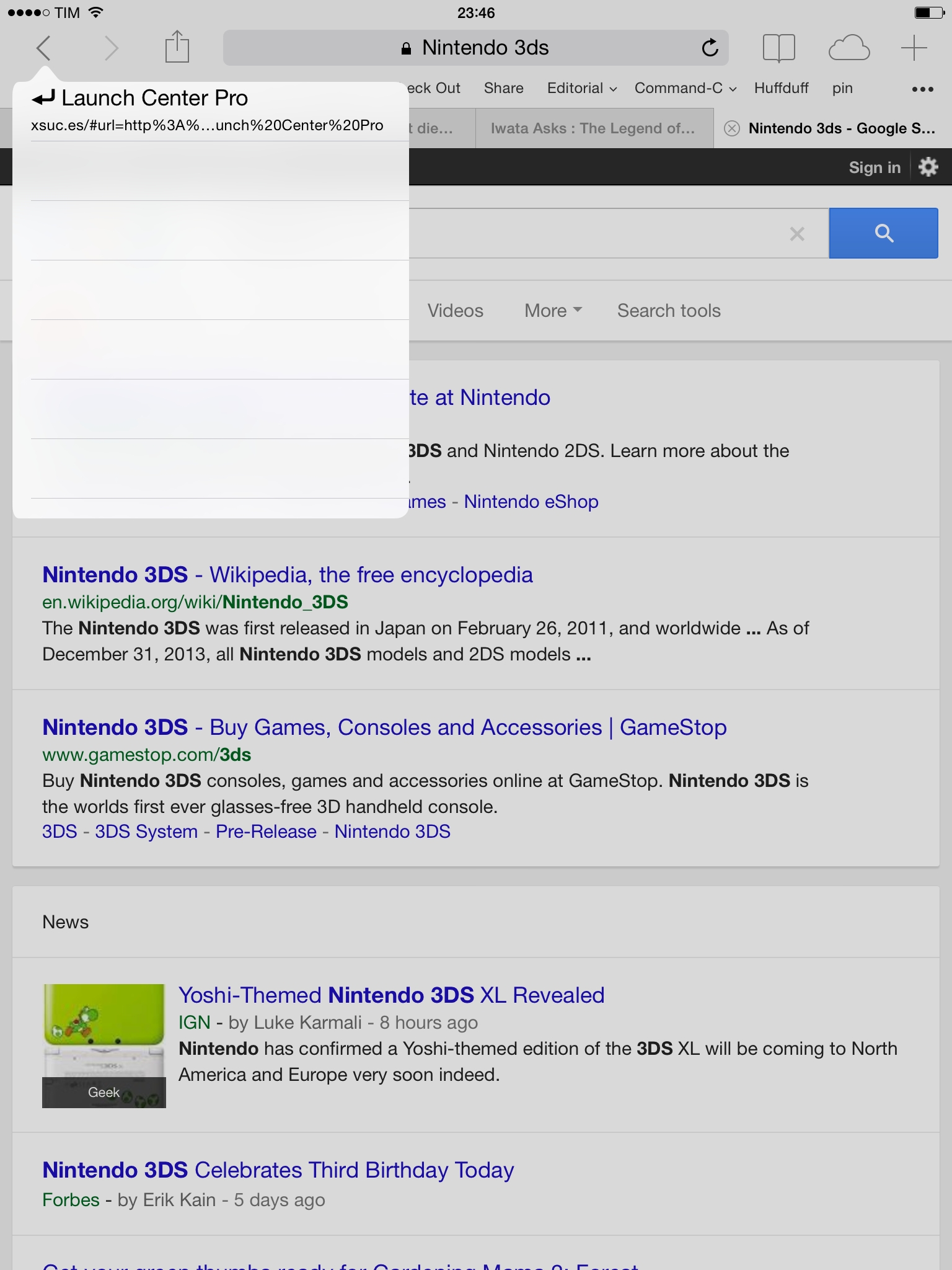
To build actions with xsuc.es, see the URL parameters in Joseph’s blog post. The format is easy to understand if you’re already familiar with URL schemes; here’s a demo action to launch a Google search in Safari based on xsuc.es from Launch Center Pro.

xsuc.es is a nicer hack that takes over Safari’s Back button to go back to a previous app like Chrome does, albeit without the app’s name visible alongside the button. You can, however, tap & hold the back button to see the app you’re going back to. It would be nice to mix a success URL scheme with the address of the webpage you’re currently viewing, although I believe that’s beyond the limit of how much it’s possible to work around Safari’s JavaScript.

Permalink


Mimic Google Chrome’s x-callback-url Support In Mobile Safari

Speaking of Greg Pierce, I’m intrigued by the workaround he found to mimic support for x-callback-url in Safari for iOS:

For those not familiar, it is possible to use x-callback-url support in Google Chrome on iOS to open a URL from another app, and have Chrome present a “Back” button to return to the app you opened the URL from. Safari does not offer this level of integration.

To mimic this feature in Safari, I have created an intermediate HTML page with a little javascript that can take a “url” and “x-success” parameter. If it gets these, it will load the “url” in an iframe that displays full screen, and present a “< Back” button in the top left of the screen, which when tapped will open the URL in the “x-success” parameter.

Here’s what I did: I downloaded Greg’s HTML file on my Mac, put it in my Public folder in Dropbox, and got the direct link that can be accessed by any web browser. With that, I edited the Drafts action Greg made and now I have a custom “callback page” that I can integrate with Safari and actions from Drafts, Launch Center Pro, Editorial, or Mr. Reader. I’m thinking of how I could take advantage of this solution in my workflows – the nice part: you can navigate across pages inside the frame – but I believe I will mostly use it to quickly check a webpage in Safari and go back to the previous app quickly.

It’s an interesting workaround, but still a hack. For instance, it’s not possible to dynamically generate a callback address from the address that’s currently loaded in the frame. Still, if you want to put together a basic alternative to Chrome’s excellent x-callback-URL support, check it out.

Permalink

Phraseology Adds “Show Spelling Issues” Option

Cool new addition to the latest update to Phraseology by Greg Pierce:

This update adds a cool new “Show Spelling Issues” option in syntax highlighter. When used, possible spelling errors (based on the same spell checking used by auto-correct) will be highlighted in red. Tapping on one triggers the suggestion menu for replacements. The spelling issue highlighting cannot be used at the same time as part of speech highlighting, so will disable other highlights when turned on.

With version 2.0, Phraseology (which was already a great app) turned into a powerful solution for writers who want to enhance their writing workflow on iOS. Today’s update brings a minor but important addition: when I write in Editorial, I keep spelling turned off because I want to reduce distractions as much as possible. Phraseology is meant for highlighting words, so adding native spell checking to the app makes sense.

Phraseology is $2.99 on the App Store.

Permalink