
This Week's Sponsor:

Dropzone 5

Improve your Drag-and-Drop Workflow


Posts in Linked

Apple Acquires Israeli Camera Tech Company LinX Imaging

LinX Imaging is the latest in Apple acquisitions, as reported by MacRumors:

Apple has purchased Israeli camera technology company LinX Imaging for approximately $20 million, reports The Wall Street Journal. LinX specializes in creating multi-aperture camera equipment for mobile devices and it’s possible that Apple will use the company’s technology in upcoming iOS devices.

Reading through what LinX Imaging had developed, there’s lots of interesting possibilities for the future of iPhone cameras.

The simple truth is that Apple thinks portable cameras can still aspire to higher degrees of quality and convenience, edging towards SLR-like photos without the complexity, cost, and additional hardware of SLR cameras. The iPhone’s camera is one of the features that is improved every year, and it sounds like we’re going to see notable breakthroughs over the next iPhone iterations.
Permalink

1Password for Apple Watch Released

With an update to their iOS app released today, AgileBits has officially introduced 1Password for Apple Watch, which users will be able to install once the Watch launches this month.

On the Watch, 1Password will enable the creation of “bookmarks” to pin important information to the Watch app, where it’ll be easily accessible. From their blog post, an example:

After a couple months of diligently attending the gym, you’ve earned a coveted private locker. Of course, remembering your locker combination is probably not a priority when you’re counting reps. But if you store that combination in 1Password, it only takes a couple of taps for you to see the combination in 1Password for Apple Watch when you’re back at your locker.

Also interesting: AgileBits made the Apple Watch app a Pro feature, which can be unlocked through 1Password’s $9.99 In-App Purchase. I wonder if more developers will follow this route and try to monetize Watch apps as extra features of iPhone apps with IAPs.

Permalink

Apple Releases ResearchKit to Medical Researchers

A few ResearchKit apps were launch partners when Apple first announced the framework, but starting today it is being released to all medical researchers who want to make use of it.

From Apple’s press release:

The first research apps developed using ResearchKit study asthma, breast cancer, cardiovascular disease, diabetes and Parkinson’s disease, and have enrolled over 60,000 iPhone users in just the first few weeks of being available on the App Store. Starting today, medical researchers all over the world will be able to use ResearchKit to develop their own apps and developers can also contribute new research modules to the open source framework.

As noted above, Apple is releasing ResearchKit as an open source framework, and they’ve actually uploaded the entire framework to GitHub, so anyone can see, use, and contribute to the project.

You can find our complete overview of ResearchKit here, or check out Federico’s assessment of the framework’s possible impact in his Thoughts on Apple’s March 9th Event.

Permalink

Apple Releases First iOS 8.4 Beta with Revamped Music App

Juli Clover, reporting for MacRumors:

Apple today seeded the first beta of iOS 8.4 to registered developers for testing purposes, just five days after releasing iOS 8.3 to the public. The beta, build 12H4074d, is available for download from the iOS Developer Center, alongside the Xcode 6.4 beta.

The new Music app in the first iOS 8.4 beta doesn’t appear to be including any music streaming functionality powered by Beats, but the service is expected to be folded into the app later this year. New features detailed by Apple in the beta such as global search and Up Next would make sense in combination with an on-demand streaming service.

Apple is, in many ways, late to music streaming. And this is why I’m curious to see what they’re planning – the company has a chance to reinvent how the Music app (pre-installed on hundreds of millions of devices) works, and I believe they chose the right service to do so.

Over the past year, I’ve been trying all of the existing music services again – Spotify, Rdio, Beats Music, and, lately, even Google Play Music. There’s something unique to each one of them, and I’m looking forward to seeing how Apple will differentiate Music.

Permalink

Beats Launches New Solo2 Wireless Headphones in iPhone Colors

Juli Clover, reporting for MacRumors:

Apple-owned headphone company Beats by Dre today announced the launch of several new Solo2 Wireless headphones, in colors that match Apple’s iPhone, iPad, and new MacBook. Available in Gold, Silver, and Space Gray, the headphones are otherwise identical to the company’s existing Solo2 Wireless headphones.

I don’t think it’s surprising that Apple hasn’t rushed to redesign the Beats product line – Beats headphones are clearly popular as they are, and I suspect they would make for a good complementary purchase once the company’s new rumored streaming services launches, presumably later this year.

The timing of the new colors is spot-on – I bet those headphones would look good next to a new gold MacBook or while controlling music from an Apple Watch.

(Note how the Beats link says “Apple Color”, not “iPhone Color”. Silver, Space Gray, and Gold are increasingly becoming the colors of modern Apple devices.)

Permalink

Photo Flashback 1.4

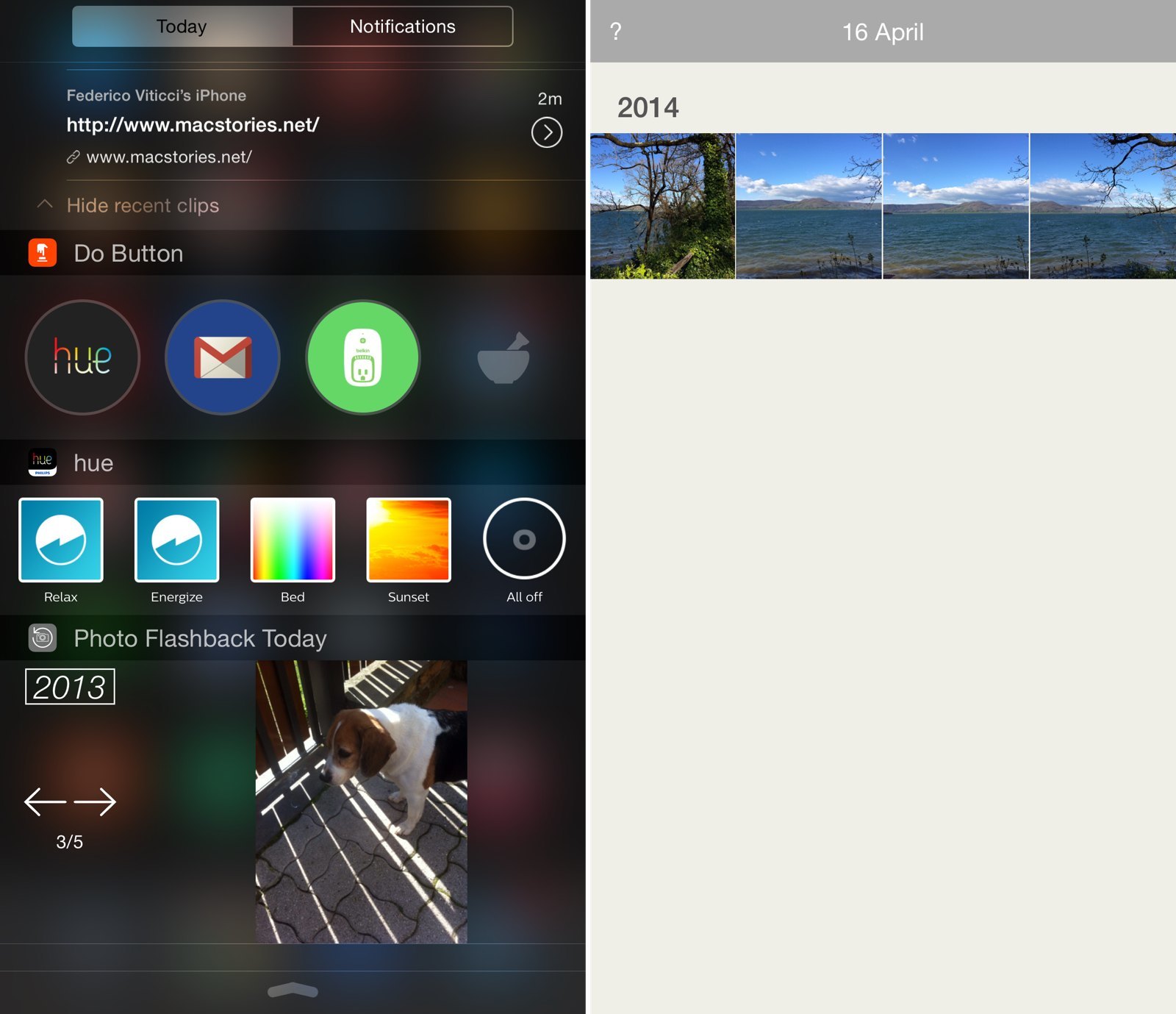
Pictured above: Clips, Do Button, Hue, and Photo Flashbacks widgets.

Pictured above: Clips, Do Button, Hue, and Photo Flashbacks widgets.

I’ve mentioned Photo Flashback on MacStories before – a simple utility for iPhone and iPad, this app lets you easily find photos taken on the same day in the past. Unlike web services like Carousel or Timehop, Photo Flashback is entirely local to your device, as it looks for photos that match the current date in your photo library.

Photo Flashback works well with iCloud Photo Library (I have nine years of photos in it) and today’s version 1.4 makes it even better. Soon, you’ll be able to check flashbacks on your Apple Watch (clever idea, considering the presence of a Photos app for the device) and the Today widget now takes you directly to a photo in the app. If a photo you tap in the widget is stored in iCloud, Photo Flashback will download it for you.

I know that Timehop supports photos from the local photo library as well, but I’ve never needed all the other social features of Timehop, and I like how Photo Flashback works for me.

Rediscovering memories through old photos can be hard, and I’m glad that something like Photo Flashback exists for iOS. The app is $0.99 on the App Store.

Permalink

Connected: Crazy Uncle Figure

With Myke back from vacation, the trio returns to action to discuss MacBook and Apple Watch reviews before tackling “Becoming Steve Jobs.”

On this week’s Connected, Myke and Stephen also help me through my MacBook issues, although the conclusion of said discussion is quite sad. You can listen to the episode here.

Sponsored by:

  • 1Password: Put passwords in their place.
  • Igloo: An intranet you’ll actually like, free for up to 10 people.
  • Wealthfront: The automated investment service that makes it easy to invest your money the right way.
Permalink

Steven Aquino on Apple Watch and Accessibility

Steven Aquino got the opportunity to meet with Apple for a hands-on briefing of the Watch and its accessibility features:

There are two accessibility features of the Apple Watch that stand out to me: Extra Large Watch Face and Zoom. Regarding the Large Watch Face, it does what it says: shows the time in a ginormous font. It’s very well done, although for my needs, I’m confident that I can get by just as well with Large Dynamic Type. Overall, however, Large Watch Face will be great for those who need the clock to be extra big in order to read it. Likewise, the Zoom feature was helpful for me in identifying icons on the Home screen, as they’re a tad small at normal size. I found that Zoom works best for me using the digital crown, as the two-finger pan was more difficult to do using my partially-paralyzed right hand (caused by my cerebral palsy).

As he suspected, Force Touch could play an important role for people with disabilities.

Permalink

The Apple Watch’s Many Faces

Wired’s David Pierce, writing again about the design of Apple Watch:

Yet what Dye seems most fascinated by is one of the Apple Watch’s faces, called Motion, which you can set to show a flower blooming. Each time you raise your wrist, you’ll see a different color, a different flower. This is not CGI. It’s photography.

“We shot all this stuff,” Dye says, “the butterflies and the jellyfish and the flowers for the motion face, it’s all in-camera. And so the flowers were shot blooming over time. I think the longest one took us 285 hours, and over 24,000 shots.”

I never thought I’d read a story about jellyfish and say “Wow, that’s cool”.

Permalink