

Useful site by Sandro Roth (via Six Colors) to browse every command supported by Siri in Apple’s apps. I almost wish iOS had a similar interface to explore commands. I wonder if we’ll start seeing more sites like this pop up after iOS 10 and SiriKit.
Posts in Linked
Collecting Siri’s Supported Commands→
An Ode to the iPod Classic→
Lindsay Zoladz, writing for The Ringer, has a great story on the role of the iPod Classic in today’s music streaming landscape. I understand where she’s coming from, and I found this passage on the paradox of choice particularly accurate:
“When I’m searching for something to listen to on Spotify, I feel like I end up listening to the same albums and artists again and again,” my friend Becca wrote in an email, after I asked a handful of acquaintances about their post-iPod listening habits. “My brain by itself isn’t good at cataloguing everything I love.”
The psychologist Barry Schwartz has written (or, if you don’t have too much time on your hands, has TED-Talked) about a related phenomenon he calls “paradox of choice” — the notion that, although we tend to think of freedom of choice as an inherently good thing, too much choice can leave us feeling paralyzed and anxiety-ridden. “With so many options to choose from,” he says, “people find it very difficult to choose at all.” I personally have proven this theory many times over in the past few months, when I’ve stared for a few moments at the infinite void that is the Apple Music search bar and decided, “I guess I will just listen to Pablo or Lemonade again.” Another friend I emailed summed up the Paradox of Digital Music Listening succinctly: “With device-bound listening, I absolutely feel limited by [storage] space. With streaming, I feel limited by my own memory.”
This is why I often buy videogames from a small shop in my hometown. I could open the App Store, or the eShop, or the PlayStation Store, and buy anything I want. But there’s just so much stuff. There’s too many games and too many reviews and too many Let’s Plays to choose from. Sometimes, it’s nice to have fewer options.
Bluetooth Headphone Revenue Overtook Non-Bluetooth for the First Time in June→
According to The NPD Group’s Retail Tracking Service, Bluetooth headphone revenue overtook non-Bluetooth for the first time in June accounting for 54 percent of headphone dollar sales and 17 percent of unit sales in the U.S.
And:
Beats and LG have led the Bluetooth headphone market throughout the first half of the year, accounting for approximately 65 percent of dollar sales.
Not necessarily a direct indication of decline in wired headphones, but a sign that, as average prices of Bluetooth headphones go down, consumers may prefer wireless.
Removing the headphone jack from the next iPhone will be annoying; at the same time, limitations notwithstanding, I can’t deny how nice it is not to deal with wires anymore.
Apple Maps vs. Google Maps vs. Transit→
Concise, well-illustrated comparison of transit maps from the developers of Transit for iOS:
Transit maps are hard. Really hard. Even for Apple and Google. Piecing a transit map together, city by city, agency by agency, stop by stop, without it turning into a hairy mess is INCREDIBLY difficult. So far, no one (not even Apple or Google) have been able to create a transit map that is both automatically generated and well designed. Why is that?
As Apple outlined at WWDC, their approach to transit takes a long time because it involves manually curated details (things like signs, directions, and cultural conventions that match the real world), which wouldn’t be possible with an algorithm alone.
That said, I can vouch for Transit in Rome. The app is excellent. Well designed, with some clever interactions (such as an “arrive by” option to plan a trip on a timeline), and a joy to use. It’s also the only decent transit app that combines public transit with local car sharing services on the same map.
I wish Apple Maps transit data was a) available in Rome and b) as flexible as Transit.
Parkopedia and Apple Strike Maps Deal→
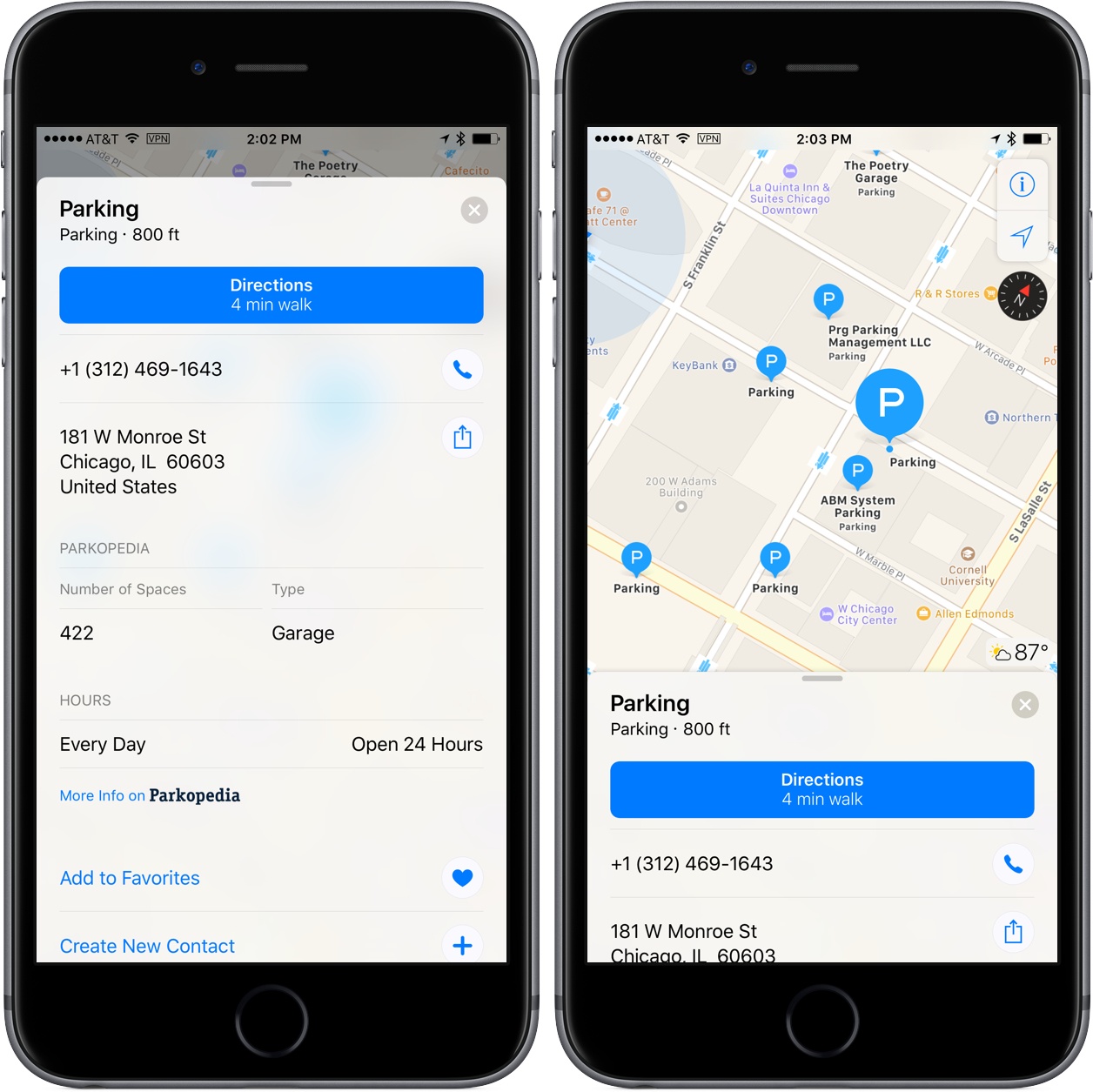
Parkopedia, a parking service provider with data on over 40 million parking spots world-wide, has struck a deal with Apple to provide parking data to Apple Maps. Parkopedia announced that Apple Maps users in North America, Europe, Asia and Latin America:
will be able to view key information about parking garages and lots around the world. In addition, users will have the option to click through to Parkopedia’s website and iOS app to view more detailed information including pricing, user reviews, special offers and real-time space availability. They will also be able to make reservations.
I ran a parking search for downtown Chicago, and many of the parking lots are still listing Yelp ratings and information, but I did find one nearby with Parkopedia information that included the number of spaces, the type of parking lot, payment methods accepted, height limits, hours, and a link to Parkopedia for more information.
It’s good to see Apple continuing to work with other companies to provide additional information for Apple Maps. The last week has seen a couple Google Maps announcements and with today’s news, it seems as though the competition to provide rich map data will only heat up from here.
One Billion iPhones→
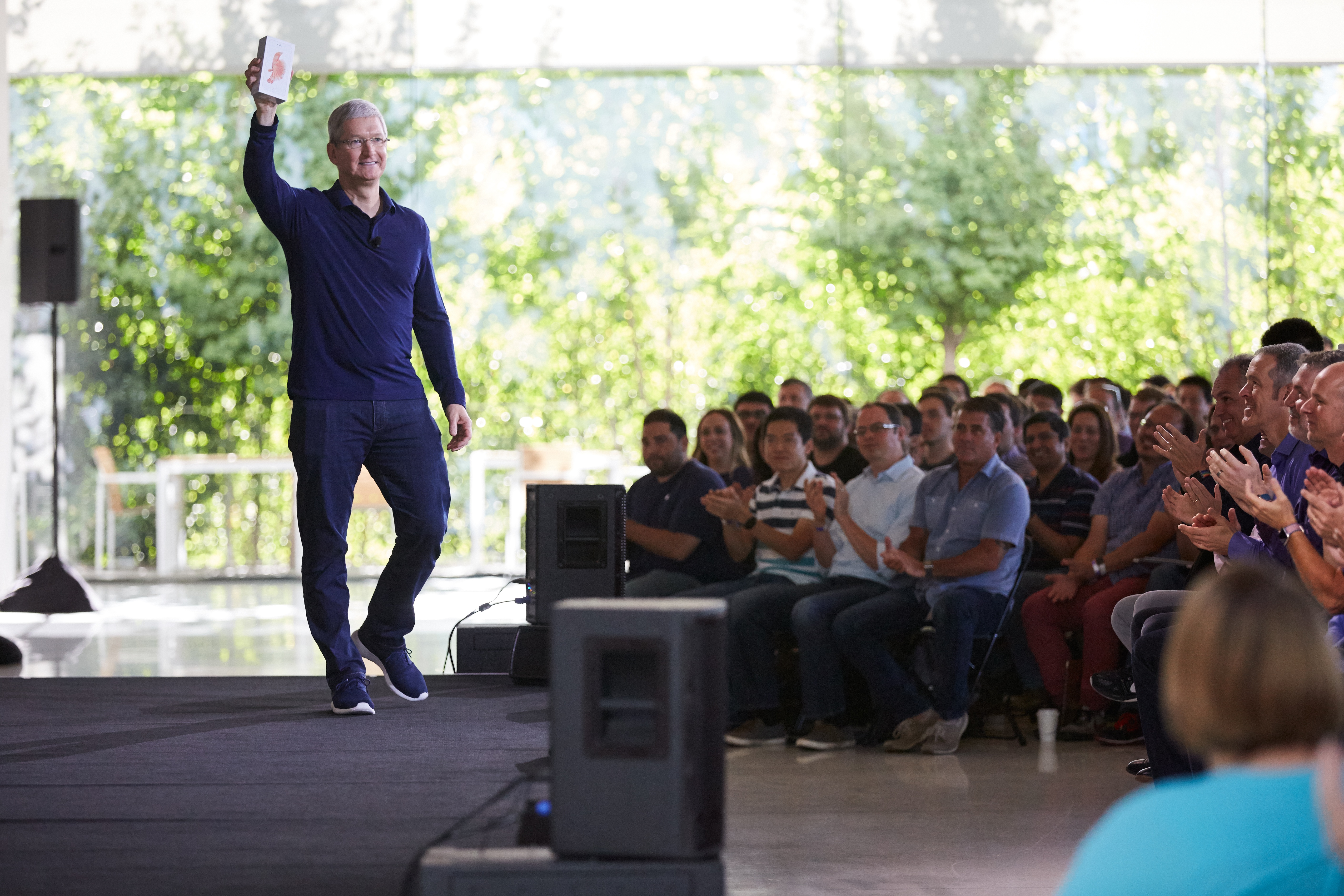
This morning, Apple CEO Tim Cook celebrated the one billionth iPhone, holding it aloft at an employee event in Cupertino, California. Cook said:
”iPhone has become one of the most important, world-changing and successful products in history. It’s become more than a constant companion. iPhone is truly an essential part of our daily life and enables much of what we do throughout the day,” said Cook. “Last week we passed another major milestone when we sold the billionth iPhone. We never set out to make the most, but we’ve always set out to make the best products that make a difference. Thank you to everyone at Apple for helping change the world every day.”
It’s remarkable to think that less than ten years ago, Apple launched the iPhone with 2007 sales of just 3.7 million units.
Remaster, Episode 14: Pokémon Go→
This time the guys discuss why Pokémon Go has been so successful, and what this means for Nintendo.
If you haven’t had enough of Pokémon yet, this week’s discussion on Remaster tries to understand the phenomenon through the lens of how smartphones changed society and how the App Store can still generate overnight successes. You can listen here.
Sponsored by:
- Zombies Run: Running is really boring, but the Zombies, Run! Virtual Race makes it fun!
Apple Music Buys ‘Carpool Karaoke’ TV Series→
Cynthia Littleton writing for Variety:
Apple has emerged as the surprise buyer of the unscripted TV series based on the “Carpool Karaoke” segment of CBS’ “The Late Late Show with James Corden.”
The tech giant’s Apple Music service will distribute the series to its members in 100 countries worldwide. Apple sees the show as a natural vehicle to drive online activity for its streaming-music venture.
This is not Apple’s first foray into original video content, and at this point it is quite clear that Apple is actively exploring the idea. For now at least, most of the focus (including today’s announcement of Carpool Karaoke) has been on video content that can be part of Apple Music, but if these early projects go well it’s likely that we’ll see Apple’s video ambitions expand in scope and scale. In the last year Apple has reportedly approved a scripted series from Dr. Dre, launched a music docu-series from Vice, partnered to produce the ‘Planet of the Apps’ reality competition series, and exclusively streamed a Taylor Swift concert from her 1989 world tour.
“We love music, and ‘Carpool Karaoke’ celebrates it in a fun and unique way that is a hit with audiences of all ages,” said Eddy Cue, Apple’s senior vice president of Internet software and services. “It’s a perfect fit for Apple Music — bringing subscribers exclusive access to their favorite artists and celebrities who come along for the ride.”
It should be noted that James Corden, who has hosted the Carpool Karaoke segments as part of ‘The Late Late Show’ will not be hosting these standalone episodes of Carpool Karaoke for Apple - though he will be an executive producer. The new host and premiere date has not yet been announced, but Variety reports that production is expected to begin soon. Apple has licensed 16 episodes of Carpool Karaoke and they will air the episodes weekly to members of Apple Music in over 100 countries.
Connected, Episode 101: Best Represent Pineapple→
In a stunning break with tradition, Connected tackles the multi-iPad lifestyle and photo management in this week’s episode.
On this week’s Connected, more on Apple’s intelligence-based features in iOS 10, with a focus on Memories in Photos. You can listen here.
Sponsored by:
- Textexpander, from Smile: Simply indispensable.