

Here are today’s @MacStoriesDeals on iOS, Mac, and Mac App Store apps that are on sale for a limited time, so get them before they end!
Posts in iPad
#MacStoriesDeals - Tuesday

Access Extra Content and Perks
Founded in 2015, Club MacStories has delivered exclusive content every week for nearly a decade.
What started with weekly and monthly email newsletters has blossomed into a family of memberships designed for every MacStories fan.
Club MacStories: Weekly and monthly newsletters via email and the web that are brimming with apps, tips, automation workflows, longform writing, early access to the MacStories Unwind podcast, periodic giveaways, and more;
Club MacStories+: Everything that Club MacStories offers, plus an active Discord community, advanced search and custom RSS features for exploring the Club’s entire back catalog, bonus columns, and dozens of app discounts;
Club Premier: All of the above and AppStories+, an extended version of our flagship podcast that’s delivered early, ad-free, and in high-bitrate audio.
#MacStoriesDeals - Monday

Here are today’s @MacStoriesDeals on iOS, Mac, and Mac App Store apps that are on sale for a limited time, so get them before they end!
Access Extra Content and Perks
Founded in 2015, Club MacStories has delivered exclusive content every week for nearly a decade.
What started with weekly and monthly email newsletters has blossomed into a family of memberships designed for every MacStories fan.
Club MacStories: Weekly and monthly newsletters via email and the web that are brimming with apps, tips, automation workflows, longform writing, early access to the MacStories Unwind podcast, periodic giveaways, and more;
Club MacStories+: Everything that Club MacStories offers, plus an active Discord community, advanced search and custom RSS features for exploring the Club’s entire back catalog, bonus columns, and dozens of app discounts;
Club Premier: All of the above and AppStories+, an extended version of our flagship podcast that’s delivered early, ad-free, and in high-bitrate audio.
PDF Expert 3.2 Brings Full PDF Searching And Better Support For Bluetooth Keyboards

PDF Expert for iPad was updated last night to version 3.2, adding some nice new features to further improve the capabilities of the excellent PDF manager, viewer and annotation iPad app. The big new addition is full text search, allowing you to search through all your PDFs, rather than just their file names. I gave this new feature a quick try and whilst the initial indexing took a few minutes, I did have 535 files saved in PDF Expert. Furthermore, once it was indexed, subsequent searches worked virtually instantly.
A new sorting panel is also present in PDF Expert 3.2, now allowing you to reorder your files by name, date or modified date. If you use a Bluetooth keyboard with your iPad you can now use those “Tab” and arrow keys for faster data entry, particularly for PDF forms.

Readdle has also improved the Handwriting and Wrist Protection features in PDF Expert so they work better with less accidental annotation because you have rested your wrist on the iPad’s screen. Included in this is a new eraser tool for your handwriting, so if you do make a mistake it is now easy to erase just what you want. Finally, yesterday’s update included the use of data protection APIs, so all your PDFs are now stored securely inside the app.
PDF Expert for iPad is available for $9.99 on the App Store.
Access Extra Content and Perks
Founded in 2015, Club MacStories has delivered exclusive content every week for nearly a decade.
What started with weekly and monthly email newsletters has blossomed into a family of memberships designed for every MacStories fan.
Club MacStories: Weekly and monthly newsletters via email and the web that are brimming with apps, tips, automation workflows, longform writing, early access to the MacStories Unwind podcast, periodic giveaways, and more;
Club MacStories+: Everything that Club MacStories offers, plus an active Discord community, advanced search and custom RSS features for exploring the Club’s entire back catalog, bonus columns, and dozens of app discounts;
Club Premier: All of the above and AppStories+, an extended version of our flagship podcast that’s delivered early, ad-free, and in high-bitrate audio.
#MacStoriesDeals - Friday

Here are today’s @MacStoriesDeals on iOS, Mac, and Mac App Store apps that are on sale for a limited time, so get them before they end!
Access Extra Content and Perks
Founded in 2015, Club MacStories has delivered exclusive content every week for nearly a decade.
What started with weekly and monthly email newsletters has blossomed into a family of memberships designed for every MacStories fan.
Club MacStories: Weekly and monthly newsletters via email and the web that are brimming with apps, tips, automation workflows, longform writing, early access to the MacStories Unwind podcast, periodic giveaways, and more;
Club MacStories+: Everything that Club MacStories offers, plus an active Discord community, advanced search and custom RSS features for exploring the Club’s entire back catalog, bonus columns, and dozens of app discounts;
Club Premier: All of the above and AppStories+, an extended version of our flagship podcast that’s delivered early, ad-free, and in high-bitrate audio.
#MacStoriesDeals - Thursday

Here are today’s @MacStoriesDeals on iOS, Mac, and Mac App Store apps that are on sale for a limited time, so get them before they end!
Access Extra Content and Perks
Founded in 2015, Club MacStories has delivered exclusive content every week for nearly a decade.
What started with weekly and monthly email newsletters has blossomed into a family of memberships designed for every MacStories fan.
Club MacStories: Weekly and monthly newsletters via email and the web that are brimming with apps, tips, automation workflows, longform writing, early access to the MacStories Unwind podcast, periodic giveaways, and more;
Club MacStories+: Everything that Club MacStories offers, plus an active Discord community, advanced search and custom RSS features for exploring the Club’s entire back catalog, bonus columns, and dozens of app discounts;
Club Premier: All of the above and AppStories+, an extended version of our flagship podcast that’s delivered early, ad-free, and in high-bitrate audio.
Apple Releases An iTunes U App
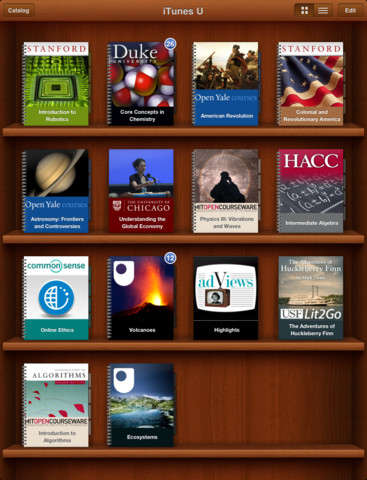
Apple has just announced and released the iTunes U App for iPhone and iPad. It’s a new app that lets teachers manage their iTunes U course and an app that helps students track all the content, assignments and messages from the courses that they study. iTunes U gives teachers the ability to customise their topics that they teach, give students information about office hours, post messages to their class and give students assignments.
The all-new iTunes U app enables students anywhere to tap into entire courses from the world’s most prestigious universities. -Eddy Cue
Effectively this new iTunes U app is similar to the various content management systems that are available for universities and other educational institutions. It’s fully featured with all the various video lectures, documents, apps and books available from within the app along with messages from teachers, the syllabus and even iBooks integration. In effect, it could be a great companion for any teacher or student. Over 100 courses have currently been created with the new iTunes U app from various universities and colleges across the US and further to that iTunes U is now available for K-12 institutions as well.
With the iTunes U app for iPad, iPhone and iPod touch, those barriers no longer exist. Students anywhere can take an entire course with complete access to all course materials right at their fingertips. With the iTunes U app, students are able to access new books right from within the app, and any notes taken in iBooks® are consolidated for easy reviewing.
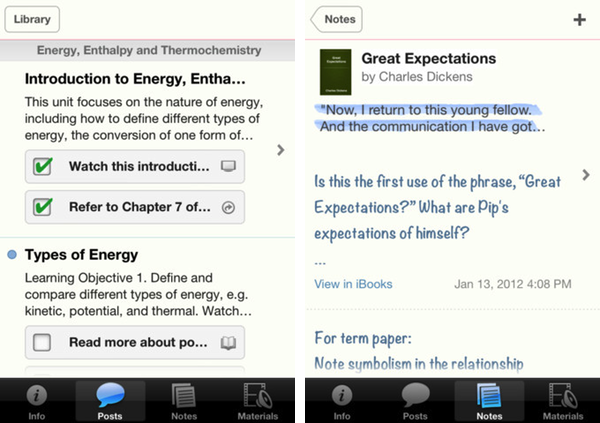
Jump the break to view Apple’s press release on iTunes U for iOS. iTunes U for iOS is available here.
Access Extra Content and Perks
Founded in 2015, Club MacStories has delivered exclusive content every week for nearly a decade.
What started with weekly and monthly email newsletters has blossomed into a family of memberships designed for every MacStories fan.
Club MacStories: Weekly and monthly newsletters via email and the web that are brimming with apps, tips, automation workflows, longform writing, early access to the MacStories Unwind podcast, periodic giveaways, and more;
Club MacStories+: Everything that Club MacStories offers, plus an active Discord community, advanced search and custom RSS features for exploring the Club’s entire back catalog, bonus columns, and dozens of app discounts;
Club Premier: All of the above and AppStories+, an extended version of our flagship podcast that’s delivered early, ad-free, and in high-bitrate audio.
Apple Unveils iBooks 2.0 and iBooks Textbooks
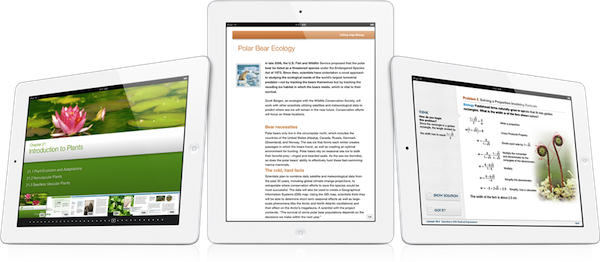
Apple has just announced iBooks 2 at its education themed event in New York. It’s the next evolution of eBooks for the iPad that Phil Schiller calls “amazing — graphic, fun, engaging”. Apple also announced iBooks Textbooks, a new initiative to bring digital textbooks to students thanks to content deals with publishers, starting with the United States.
The new iBooks will support multitouch gestures to move throughout an iBook which can be full of “rich, engaging interactive experiences” — even featuring 3D models so a student can see, for example, inside a cell. In the demo iBook, switching the iPad to portrait re-orientated the content so that the student could focus on reading the text. That way, books can have two completely different experiences, simply by re-orientating the iPad.
As you can see, authors have total freedom in terms of laying out text and graphics.
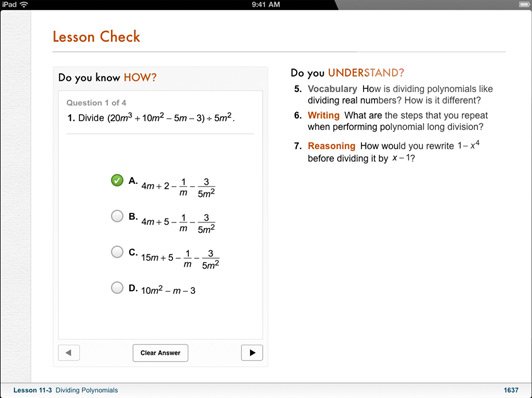
The iBooks can also bring up definitions that can include images; there is search within the book, links between pages, pages can have slideshows and more. As for those end of chapter review questions that are so common in textbooks, iBooks can now feature ”visual, interactive Q&A sections” that are much more engaging than the typical, long list of unengaging questions.
Note Taking
Another super critical study tool is highlighting and notetaking — your finger is always a highlighter. You just swipe. You can change the color. If you want to leave a note just tap.
With iBooks 2.0, Apple has brought a range of note taking features to help students with their study routine. There is everything from the traditional highlighting (just drag your finger over the desired text) to adding notes by tapping and then typing. An awesome feature here is that iBooks automatically takes all of your notes and highlights, chucks in any glossary terms and creates some study cards for revision.
I don’t think there’s ever been a textbook that made it this easy to be a good student.

Textbook Section in the iBookstore
These new textbook iBooks are now all available in a new ‘Textbook’ section that is on the iBookstore - all collated in one section. As is standard with iBooks, you can even get a free sample to see what the textbook is like.
These are stunning books. They take full advantage of what can be created.
Apple has worked with some partners and has brought some high school textbooks to the iBookstore and they’ll be available for $14.99 or less. Some of the publishers that have begun creating textbook iBooks includes Pearson, McGrawHill and Houghton Mifflin Harcourt - the three publishers that make 90% of textbooks. DK Publishing is also on board with four iBooks – they’re publishers of educational books for younger children. Finally, the E.O. Wilson Foundation is also on board, bringing the book ‘Life on Earth’ exclusively to the iBookstore - the first two chapters are available for free with the rest coming as they are completed for a “reasonable price”.
Of course, the authors can make these books and keep them up to date. But what’s most exciting is that it’s their book, for students. They keep it.
iBooks 2.0 will be available as a free update to the iBooks app today. Jump the break for Apple’s full Press Release.
Access Extra Content and Perks
Founded in 2015, Club MacStories has delivered exclusive content every week for nearly a decade.
What started with weekly and monthly email newsletters has blossomed into a family of memberships designed for every MacStories fan.
Club MacStories: Weekly and monthly newsletters via email and the web that are brimming with apps, tips, automation workflows, longform writing, early access to the MacStories Unwind podcast, periodic giveaways, and more;
Club MacStories+: Everything that Club MacStories offers, plus an active Discord community, advanced search and custom RSS features for exploring the Club’s entire back catalog, bonus columns, and dozens of app discounts;
Club Premier: All of the above and AppStories+, an extended version of our flagship podcast that’s delivered early, ad-free, and in high-bitrate audio.
#MacStoriesDeals - Tuesday

Here are today’s @MacStoriesDeals on iOS, Mac, and Mac App Store apps that are on sale for a limited time, so get them before they end!
Access Extra Content and Perks
Founded in 2015, Club MacStories has delivered exclusive content every week for nearly a decade.
What started with weekly and monthly email newsletters has blossomed into a family of memberships designed for every MacStories fan.
Club MacStories: Weekly and monthly newsletters via email and the web that are brimming with apps, tips, automation workflows, longform writing, early access to the MacStories Unwind podcast, periodic giveaways, and more;
Club MacStories+: Everything that Club MacStories offers, plus an active Discord community, advanced search and custom RSS features for exploring the Club’s entire back catalog, bonus columns, and dozens of app discounts;
Club Premier: All of the above and AppStories+, an extended version of our flagship podcast that’s delivered early, ad-free, and in high-bitrate audio.
Apple Expands iTunes Match To 19 Countries Across South America & Europe
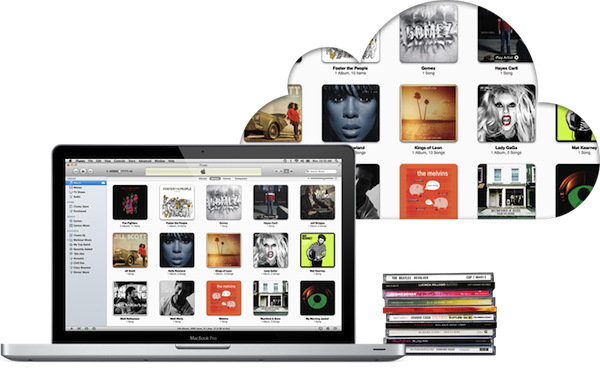
iTunes Match has today gone live in 19 more countries across South America and Europe, taking the total number of countries that now have iTunes Match to 37. iTunes Match first launched in the US just over two months ago, followed by Brazil and then Canada, Australia and some European countries in December. Today’s launch brings iTunes Match to the following countries:
Argentina, Bolivia, Chile, Colombia, Costa Rica, Dominican Republic, Ecuador, El Salvador, Estonia, Guatemala, Honduras, Latvia, Lithuania, Netherlands, Nicaragua, Panama, Paraguay, Peru, and Venezuela.
Most of these countries already had support for iTunes in the Cloud (the ability to re-download iTunes Music purchases for free), but Estonia, Latvia, Lithuania, and the Netherlands did not until today.
Apple is making quick work of finalising licensing agreements for iTunes Match, the service is certainly rolling out faster internationally than some of their previous efforts. The iBookstore or even the availability of TV Shows (which is still only available in a small selection of international iTunes Stores) come to mind as examples of Apple taking a long time to seal agreements internationally.
[Via MacRumors]
Access Extra Content and Perks
Founded in 2015, Club MacStories has delivered exclusive content every week for nearly a decade.
What started with weekly and monthly email newsletters has blossomed into a family of memberships designed for every MacStories fan.
Club MacStories: Weekly and monthly newsletters via email and the web that are brimming with apps, tips, automation workflows, longform writing, early access to the MacStories Unwind podcast, periodic giveaways, and more;
Club MacStories+: Everything that Club MacStories offers, plus an active Discord community, advanced search and custom RSS features for exploring the Club’s entire back catalog, bonus columns, and dozens of app discounts;
Club Premier: All of the above and AppStories+, an extended version of our flagship podcast that’s delivered early, ad-free, and in high-bitrate audio.