This Week's Sponsor:

Dropzone 5

Improve your Drag-and-Drop Workflow


Posts in iPad

BMW Seriously Committed To iOS Integration

Looks like BMW is getting serious about iOS devices integration with their new car models. Engadget first detailed the system BMW was building to integrate iPads in their cars back in September; like it or not (I personally think it’s a little bit overkill) BMW thinks that’s how you’re supposed to enjoy using the iPad in the back seat.

A few days ago BMW launched an ad campaign to prove that what they have is the best way to use the iPad (and iPhone) on board – there’s no room for homemade stands and ugly wooden solutions. That’s really what the video is all about, check it out below.

Read more


The Washington Post App for iPad Now Available, Free Access Until February 2011

An official Washington Post app for iPad was approved earlier today, and it’s available for free in the App Store here. What’s so interesting about it? Just like the official New York Times app, full access is granted until February 2011 (NYT app grants fere full access until January 2011) for free. No need to submit payment information, but an existing washingtonpost.com account is already required.

You can also create an account in-app. After February 2011, the service will go paid (with a so-called “paywall”) and you’ll need to have a subscription to enjoy the contents of The Washington Post on the iPad. Read more


You Too Can Have An iPad Origami

You know I’m not a case guy. I’m not a fan of sleeves either. Then I find most stands cheap and bulky. I like my iPad naked, all glass and aluminum black. It’s hard to come up with an accessory elegant enough to match Ive’s design skills. Some accessory makers, though, can get things quite right. Incase surely does.

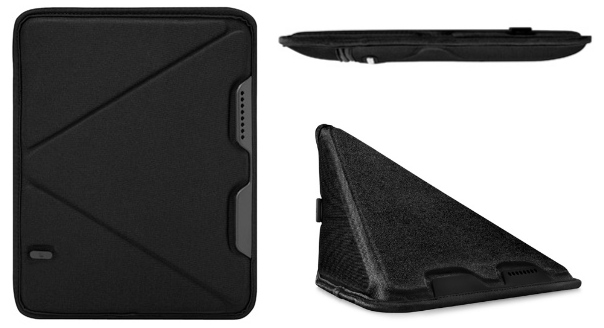
Their latest product looks like a rather anonymous sleeve, until you put the iPad out and start folding the sleeve. Just like the old paper-folding art this thing’s name is inspired to, you can turn the Incase Origami Sleeve into a completely different thing with a few folds. You can turn it into a stand.

At $35 it ain’t exactly cheap – but it’s cool, right? You too can be an origami Apple geek now. [CrunchGear via Incase]


iPads Become Light Source for Professional Photoshoot

We’ve heard a lot of stories about the iPad being used in many original and innovative ways. So many of them, actually, that it’s not easy to remember all the photos, videos and stories detailing the iPad as a revolutionary device used for something else than it was originally meant to – a portable computer.

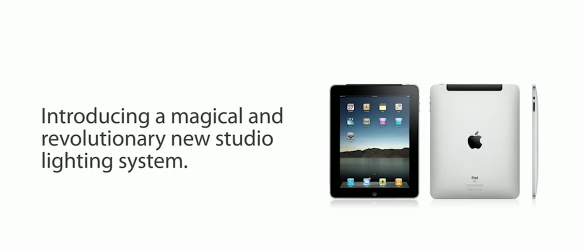
Today we take the iPad-related stories a step further with this video where photographer and filmmaker Jesse Rosten (hey, he’s the same guy behind iPad + Velcro, the video that even got featured by Apple) used an array of 9 iPads as a light source for a model photoshoot. With a light background at full brightness, the iPads managed to generate enough light to let Jesse shoot the great pictures you can see in the video below. Read more


Quake 3 Arena Coming To Jailbroken iPads Today

If you have a jailbroken iPad and happen to like first-person shooters, you must be happy to know that Quake 3 Arena is coming to the tablet in a glorious full-resolution version with high-res textures and on-screen controls.

Based on the original id Software game and the iPhone port released by Seth Kingsley in 2008, Quake 3 Arena for iPad has gone under a complete makeover thanks to Alexander Pick’s efforts, who squashed lots of bugs and turned the game in a full tablet-enjoyable experience. It can even run on non-jailbroken devices using a developer certificate and on a jailbroken iPad running iOS 4.2, with installation happening via manual APT, I guess.

The game can be played offline and online, levels can be added via iTunes file sharing and you can also drop high resolution texture files into it. We can’t wait. Additional info available on Paduser. [9to5 via Giz]


Elements 1.5: Sub-folders, Markdown Preview, Better File Saving

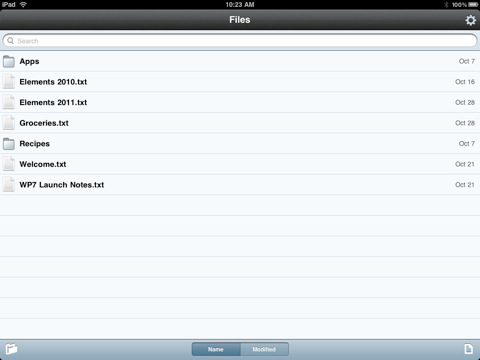
Second Gear’s Elements for iPhone and iPad has been updated to version 1.5 today, a major revision of the popular Dropbox-based text editor that adds lot of new (and much requested) features together with a plethora of bug fixes. We previously covered Elements here and here.

First off, Elements now supports sub-folders and Markdown previews. Sub-folders are really a huge deal for many users out there, as now you’ll be able to hook Elements up with other Dropbox-based apps that organize their documents with a similar structure, such as Plaintext. The family of Dropbox text editors keeps on getting more connected and better integrated.

For me, however, the really huge deal is the improved Markdown support: the app can now view Markdown formatted files (.md, .markdown, .mdown, .mdwn) and open Markdown files from external applications that support the “Open in…” feature. Similarly to Second Gear’s own MarkdownMail, Elements can now generate a live HTML preview of Markdown formatted text for you to instantly check on. Read more


Newsday’s New iPad Ad Doesn’t Really Impress

This is what happens when Apple legal forces you to take a genius commercial down and release a more “normal” one. In case you missed Newsday’s story, they once released a clever commercial in which a man killed a fly using an iPad instead of a regular newspaper. The iPad, of course, was shattered.

That ad was aimed at proving that tablets are anything like old media, and you shouldn’t think of them in that way. Like I said, a clever advertisement that went viral. But Apple didn’t like and Newsday was forced to take the ad down (copies can still be found on Youtube, though).

Now Newsday is coming back with a new ad, but it doesn’t really impress much. There are some trippy animations here and there, as RazorianFly also notices, but the style and cleverness of the first attempt is far, far away.

This is exactly what happens when Apple legal messes up with your stuff. We’ve embedded the old ad below. Read more


3D Rotating Molecules On The iPad Will Blow Your Mind

Speaking of cool webapps running just fine on the iPad and iPhone: check out this cool demo of molecules rotating in 3D on the iPad (where the jaw-dropping effect is guaranteed), iPhone and any other browser that supports 3D transformations. Everything is accomplished through CSS, the developer says.

To accomplish this in CSS, we take advantage of a technique called “billboarding”. Billboarding involves rotating an object (in our case, each of the colored balls), in such as way that it remains facing directly at the camera at all times. This is a fairly common technique in the world of 3D gaming, used to render things such as trees and grass — and in our case, it gives the illusion that the circles are really spheres.

Try it yourself, it’s impressive. Yet more proof that the open web is more than welcome on iOS.


Chalk: Sketching Webapp for iPad by 37Signals

We have already seen what can be achieved with the power and knowledge of open web technologies on iOS thanks to our buddy Steve Streza’s Swearch for iPhone. A webapp that lets you search on a variety of different search engines without requiring you to go look for the app in the App Store and wait for Apple to approve updates.

Great things can be achieved with HTML5, Javascript and a few lines of CSS.

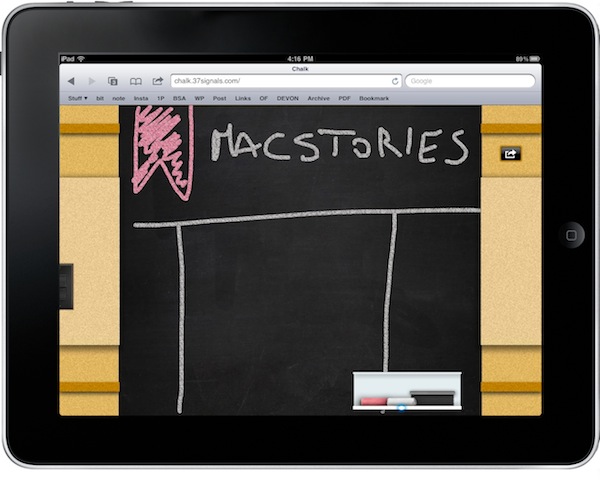
37Signals unveiled today a side project they’ve been working on “just for fun”, available as a free webapp for iPad users at chalk.37signals.com. Chalk is very similar to 37Signals’ Draft (which is sold in the App Store) but it’s entirely browser-based and you can add it to your homescreen to get a nice icon and easy web access. As the name suggests, Chalk allows you to sketch on a chalkboard: you can use white and red colors, pick up the eraser, turn off the lights to focus on what you’re sketching and saving the result to your image library. All within Safari. Read more