
SoundPrism by Audanika is one of the coolest music apps available for iPhone and iPad. Allowing you to create “always great music” that sounds “just right” by letting you tap on colored panels that produce different sounds, SoundPrism has gained attention amongst App Store dwellers thanks to its peculiar interface and innovative feature set. Read more
Posts in Featured
SoundPrism 1.1 Adds Recording Features, Ringtones for iPhone

Access Extra Content and Perks
Founded in 2015, Club MacStories has delivered exclusive content every week for nearly a decade.
What started with weekly and monthly email newsletters has blossomed into a family of memberships designed for every MacStories fan.
Club MacStories: Weekly and monthly newsletters via email and the web that are brimming with apps, tips, automation workflows, longform writing, early access to the MacStories Unwind podcast, periodic giveaways, and more;
Club MacStories+: Everything that Club MacStories offers, plus an active Discord community, advanced search and custom RSS features for exploring the Club’s entire back catalog, bonus columns, and dozens of app discounts;
Club Premier: All of the above and AppStories+, an extended version of our flagship podcast that’s delivered early, ad-free, and in high-bitrate audio.
A 58-inch Multitouch Table For Your iPhone
You’d think the iPad has a pretty large display. Think again. These guys are working on a 58-inch multitouch table that accepts connections from a jailbroken iPhone 4, basically a giant surface with just a 30-pin dock connector. 58 inches of multitouch goodness right under your hands.
Now, this could either be the most awesome hack ever or the stupidest thing some guys ever wasted their time on. The project is nearing completion and a first demo video will be shown in 3 days, but you can check out the mockups below.
Why would someone need something like this is a different story. Perhaps for digital ping pong. [Engadget via Table Connect] Read more
Access Extra Content and Perks
Founded in 2015, Club MacStories has delivered exclusive content every week for nearly a decade.
What started with weekly and monthly email newsletters has blossomed into a family of memberships designed for every MacStories fan.
Club MacStories: Weekly and monthly newsletters via email and the web that are brimming with apps, tips, automation workflows, longform writing, early access to the MacStories Unwind podcast, periodic giveaways, and more;
Club MacStories+: Everything that Club MacStories offers, plus an active Discord community, advanced search and custom RSS features for exploring the Club’s entire back catalog, bonus columns, and dozens of app discounts;
Club Premier: All of the above and AppStories+, an extended version of our flagship podcast that’s delivered early, ad-free, and in high-bitrate audio.
Fotopedia, The Best Photo Encyclopedia App for iOS, Got Even Better
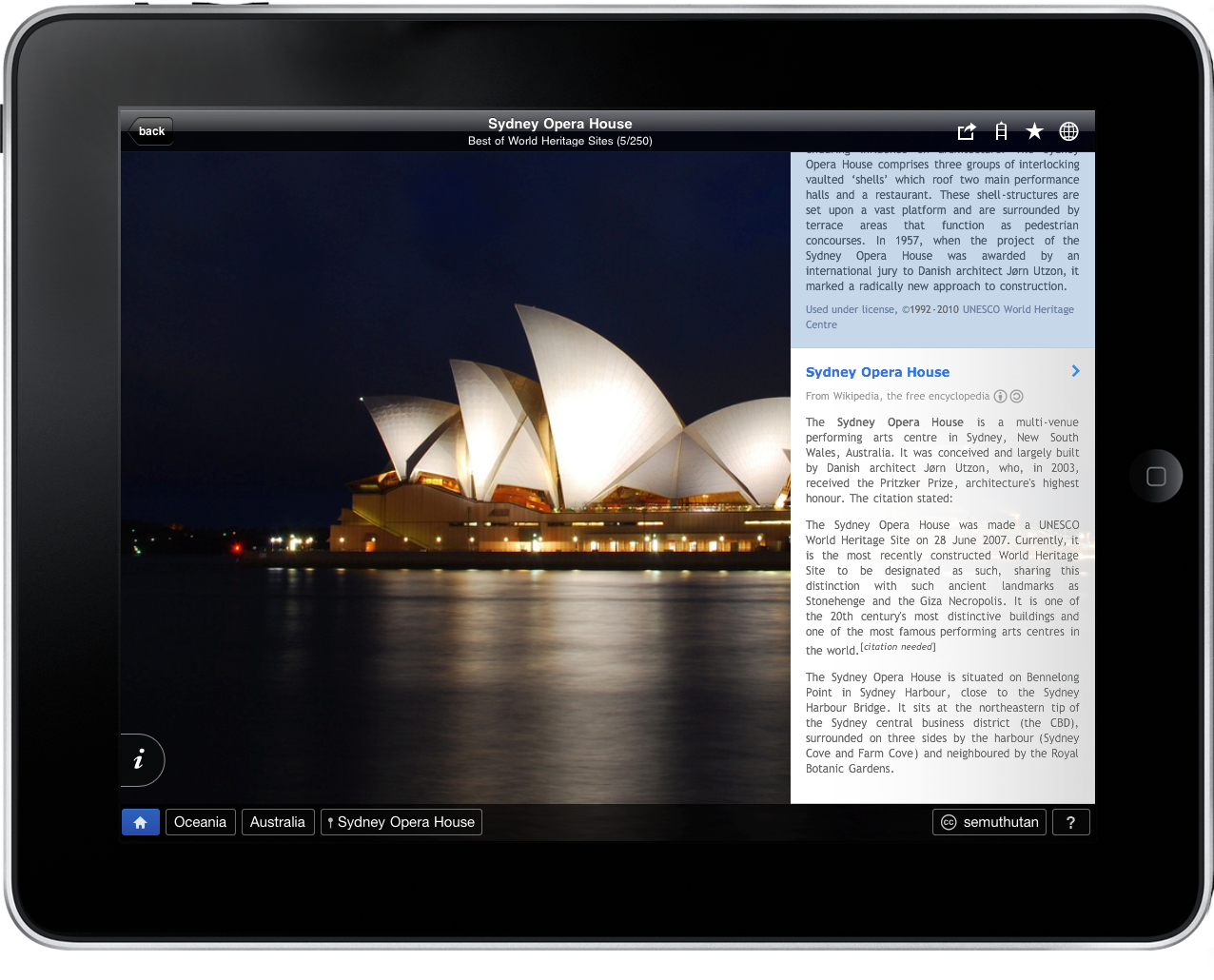
In case you missed our previous coverage, Fotopedia Heritage is a beautiful app for iPhone and iPad that aims at becoming “an encyclopedia for humanity” based on stunning photographs from around the world.
Cody wrote:
Described as an endless photo journey, I imagine fans of Discovery’s Planet Earth would really enjoy sinking their teeth into this app. There’s a great wealth of information that can be uncovered with each photograph, making us aware of scenic, historic, and cultural locations.
Access Extra Content and Perks
Founded in 2015, Club MacStories has delivered exclusive content every week for nearly a decade.
What started with weekly and monthly email newsletters has blossomed into a family of memberships designed for every MacStories fan.
Club MacStories: Weekly and monthly newsletters via email and the web that are brimming with apps, tips, automation workflows, longform writing, early access to the MacStories Unwind podcast, periodic giveaways, and more;
Club MacStories+: Everything that Club MacStories offers, plus an active Discord community, advanced search and custom RSS features for exploring the Club’s entire back catalog, bonus columns, and dozens of app discounts;
Club Premier: All of the above and AppStories+, an extended version of our flagship podcast that’s delivered early, ad-free, and in high-bitrate audio.
BulletTrain Express Keyboard: MacBook, Meet Desktop Mac
I bought an iMac about a month ago. It’s a great machine, it’s sexy and it’s powerful. Still, when I’m working on it I do miss one thing: they keyboard and trackpad configuration of the MacBook Pro. Having a full-size keyboard above the trackpad is undoubtedly more comfortable than having to constantly switch from the keyboard to a Magic Trackpad on its side. Placing the Magic Trackpad under the keyboard doesn’t help either as it’ll end up moving and sliding on your desk.
So what we have here is possibly the coolest gadget we’ve covered on MacStories in a while: the BulletTrain Express Keyboard is a solid aluminum platform that can embed a Magic Trackpad and an Apple keyboard, all in one single and ergonomic surface. Read more
Access Extra Content and Perks
Founded in 2015, Club MacStories has delivered exclusive content every week for nearly a decade.
What started with weekly and monthly email newsletters has blossomed into a family of memberships designed for every MacStories fan.
Club MacStories: Weekly and monthly newsletters via email and the web that are brimming with apps, tips, automation workflows, longform writing, early access to the MacStories Unwind podcast, periodic giveaways, and more;
Club MacStories+: Everything that Club MacStories offers, plus an active Discord community, advanced search and custom RSS features for exploring the Club’s entire back catalog, bonus columns, and dozens of app discounts;
Club Premier: All of the above and AppStories+, an extended version of our flagship podcast that’s delivered early, ad-free, and in high-bitrate audio.
Friendly Gets Huge 3.0 Update, Aims At Becoming Best Facebook App for iPad
Well, at least until Facebook comes out with its official app for iPad. Until then, Friendly for Facebook, an app that’s been around for a few months now, is seriously aiming at being the ultimate solution to access Facebook from your tablet.
Criticized in the past for being nothing more than a custom stylesheet for Facebook sold at full price, Friendly was updated earlier today to version 3.0, which brings a lot of new features and a new login system. Friendly 3.0 now uses Facebook Connect to access your wall and friend lists, so I guess that means the app is an actual app now. Also, the developers added multi-account support to easily switch between accounts from a single dashboard screen with big profile pictures. If your iPad has become a “family device”, your kids and wife must be happy about this. Read more
Access Extra Content and Perks
Founded in 2015, Club MacStories has delivered exclusive content every week for nearly a decade.
What started with weekly and monthly email newsletters has blossomed into a family of memberships designed for every MacStories fan.
Club MacStories: Weekly and monthly newsletters via email and the web that are brimming with apps, tips, automation workflows, longform writing, early access to the MacStories Unwind podcast, periodic giveaways, and more;
Club MacStories+: Everything that Club MacStories offers, plus an active Discord community, advanced search and custom RSS features for exploring the Club’s entire back catalog, bonus columns, and dozens of app discounts;
Club Premier: All of the above and AppStories+, an extended version of our flagship podcast that’s delivered early, ad-free, and in high-bitrate audio.
Meet My New Gmail App for iPad
Every day I check on 7 different Gmail accounts. Both personal and work-related, I have to keep an eye on them. On the desktop I use Mailplane, which is a must-have application that wraps Google’s Gmail web UI around a Cocoa native interface for the Mac, and adds a lot of features to it. If you haven’t tried it yet, go get Mailplane right now.
On iOS we don’t have anything like Mailplane. There’s Mailroom, but it’s not as rich or powerful as Mailplane and it’s only for iPhone. I use Mailroom, but I’d like to be able to do more stuff with it and have a full-featured iPad version as well.
So I’m forced to either keep on switching between accounts on Google.com (not a chance in hell), or use different apps on the iPhone and iPad to enjoy this useful “easy multi-account” feature. Like I said, I use Mailroom on the iPhone; on the iPad I’ve been using MailWrangler and Mailboxes for months, but I think I’ve found something that’s faster, equally powerful and free.
MultiG is a simple app for iPad that lets you switch between regular Gmail accounts and Google Apps ones, it’s got a lightweight and fast integrated browser and it even comes with Instapaper support. Read more
Access Extra Content and Perks
Founded in 2015, Club MacStories has delivered exclusive content every week for nearly a decade.
What started with weekly and monthly email newsletters has blossomed into a family of memberships designed for every MacStories fan.
Club MacStories: Weekly and monthly newsletters via email and the web that are brimming with apps, tips, automation workflows, longform writing, early access to the MacStories Unwind podcast, periodic giveaways, and more;
Club MacStories+: Everything that Club MacStories offers, plus an active Discord community, advanced search and custom RSS features for exploring the Club’s entire back catalog, bonus columns, and dozens of app discounts;
Club Premier: All of the above and AppStories+, an extended version of our flagship podcast that’s delivered early, ad-free, and in high-bitrate audio.
Back to the Cloud
When I bought my first iPhone, I didn’t realize I would need the cloud someday.
By “cloud” we usually mean “online sync” nowadays. The possibility to keep different devices’ settings, email accounts, app databases in persistent synchronization. OmniFocus uses the cloud, for example. Simplenote is a cloud-based note taking application. Dropbox is the non-plus ultra of cloud-connected setups.
Then there’s MobileMe. Apple’s own sync infrastructure / online drive / web-based app suite that has managed to gain quite a few users over the years but, according to many, is still struggling to find an identity. What is MobileMe? Why does Apple keep on redesigning its web interface and doesn’t ship a major overhaul of the underlying engine instead?
OS X left the desktop and landed on the iPhone to gave birth to iPhone OS. Years later, iPhone OS evolved into the 2.0 version of Apple’s original mobile vision, iOS for iPhone and iPad. The once-OSX-now-iOS is going back to the Mac with Lion.
.Mac and iTools were tied to the Mac. The newly renamed MobileMe later approached the web and iPhone as lovechilds to keep safe and constantly connected. Two years after the introduction of MobileMe, it is time for Apple to go back to the cloud. Read more
Access Extra Content and Perks
Founded in 2015, Club MacStories has delivered exclusive content every week for nearly a decade.
What started with weekly and monthly email newsletters has blossomed into a family of memberships designed for every MacStories fan.
Club MacStories: Weekly and monthly newsletters via email and the web that are brimming with apps, tips, automation workflows, longform writing, early access to the MacStories Unwind podcast, periodic giveaways, and more;
Club MacStories+: Everything that Club MacStories offers, plus an active Discord community, advanced search and custom RSS features for exploring the Club’s entire back catalog, bonus columns, and dozens of app discounts;
Club Premier: All of the above and AppStories+, an extended version of our flagship podcast that’s delivered early, ad-free, and in high-bitrate audio.
Rumor: The White iPhone 4 Has Been Canceled

Boy Genius Report claims that Apple has not only delayed the white iPhone 4, it’s been canceled:
According to a previous source of ours, we have been told that Apple in fact has no plans to release the white model iPhone 4. Our source hypothesizes another “delay” communicated around March leading us into an iPhone 5 release time-frame in June / July.
BGR also reports another delay will be announced in March. Truth be told, it makes sense. Why should Apple release “just a white model” a few months before the announcement of the iPhone 5 after all the manufacturing issues they had and they’re probably still having? To keep up with the promises they once made?
If the white iPhone 4 is just a color update and it’s got nothing more than that (ehm, Verizon), then it’s time to move on. On, as in iPhone 5.
Access Extra Content and Perks
Founded in 2015, Club MacStories has delivered exclusive content every week for nearly a decade.
What started with weekly and monthly email newsletters has blossomed into a family of memberships designed for every MacStories fan.
Club MacStories: Weekly and monthly newsletters via email and the web that are brimming with apps, tips, automation workflows, longform writing, early access to the MacStories Unwind podcast, periodic giveaways, and more;
Club MacStories+: Everything that Club MacStories offers, plus an active Discord community, advanced search and custom RSS features for exploring the Club’s entire back catalog, bonus columns, and dozens of app discounts;
Club Premier: All of the above and AppStories+, an extended version of our flagship podcast that’s delivered early, ad-free, and in high-bitrate audio.
TabCloud, Useful Chrome Extension to Sync Sessions Between Computers
I have a MacBook Pro and an iMac, and Google Chrome is installed on both the machines. I need to keep tabs in sync, otherwise it’s a giant “let’s email open tabs links to myself” mess. In the age of sync anywhere, anytime it amazes me that Google still hasn’t come up with a reliable solution to keep tabs and sessions in sync between different machines.
I’ve been using the Xmarks service for some months now, and while I don’t really care about bookmarks and passwords sync (1Password all the way), it’s been tremendously useful to keep tabs in sync between my two computers. I just don’t like the way it forces me to open tabs: one at a time and I have to hit the Xmarks button for each tab, as they can’t open in the background. Read more
Access Extra Content and Perks
Founded in 2015, Club MacStories has delivered exclusive content every week for nearly a decade.
What started with weekly and monthly email newsletters has blossomed into a family of memberships designed for every MacStories fan.
Club MacStories: Weekly and monthly newsletters via email and the web that are brimming with apps, tips, automation workflows, longform writing, early access to the MacStories Unwind podcast, periodic giveaways, and more;
Club MacStories+: Everything that Club MacStories offers, plus an active Discord community, advanced search and custom RSS features for exploring the Club’s entire back catalog, bonus columns, and dozens of app discounts;
Club Premier: All of the above and AppStories+, an extended version of our flagship podcast that’s delivered early, ad-free, and in high-bitrate audio.