Federico Viticci

10637 posts on MacStories since April 2009

Federico is the founder and Editor-in-Chief of MacStories, where he writes about Apple with a focus on apps, developers, iPad, and iOS productivity. He founded MacStories in April 2009 and has been writing about Apple since. Federico is also the co-host of AppStories, a weekly podcast exploring the world of apps, Unwind, a fun exploration of media and more, and NPC: Next Portable Console, a show about portable gaming and the handheld revolution.

The Pleasures of Conversing via Voice Text

Fun story by Rachel Syme, writing for The New Yorker last week, on rediscovering the simple pleasure of sending audio messages (voice texts) to friends during the pandemic:

Voice texts (also called audio messages), by contrast, are text messages with a pulse, phone calls with none of the pressure; they are fizzy zaps of connection that demand little of the recipient except that she listen and enjoy before they’re gone. They are not a new feature—on iPhones, they launched as part of the iOS8 update, way back in 2014 (and users of WhatsApp have long communicated with a similar service). But voice texting has gained obvious new appeal during the past year of isolation. At the site nofilter, the reporter Kate Lindsay wrote that she had been prepared to dismiss voice texting as “a Gen Z (or, rather, z-lennial) fad. Then the pandemic hit, and before I knew it all my text message conversations were replaced with disappearing audio snippets.”

Audio messages have been the default communication method among my friends and family for the past several years (primarily via WhatsApp; no one I know here in Italy uses iMessage’s voice text UI since it’s, frankly, quite clunky). During the pandemic and through our various stages of lockdown, however, I’ve also rediscovered the joy of sending audio messages, which strike a nice balance between the immediacy of a text and the additional context of a phone call.

Permalink

Imagining the Perfect Read-It-Later App

AppStories+ Deeper into the world of apps

AppStories Episode 210 - Imagining the Perfect Read-It-Later App

0:00
58:29

AppStories+ Deeper into the world of apps

This week, Federico and John, who are always on the lookout for new ways to read and process the stories they find, discuss the features and approaches they’d like to see in the ideal read-it-later app.

Read more


Automating Markdown with Taio, Part 2

In this week’s installment of the Shortcuts Corner, I’m continuing to explore the automation possibilities offered by Taio, the all-in-one text editor and clipboard manager that comes with a built-in action editor. Last week, I shared the first actions I created for the app’s editor to speed up various tasks related to Markdown writing...


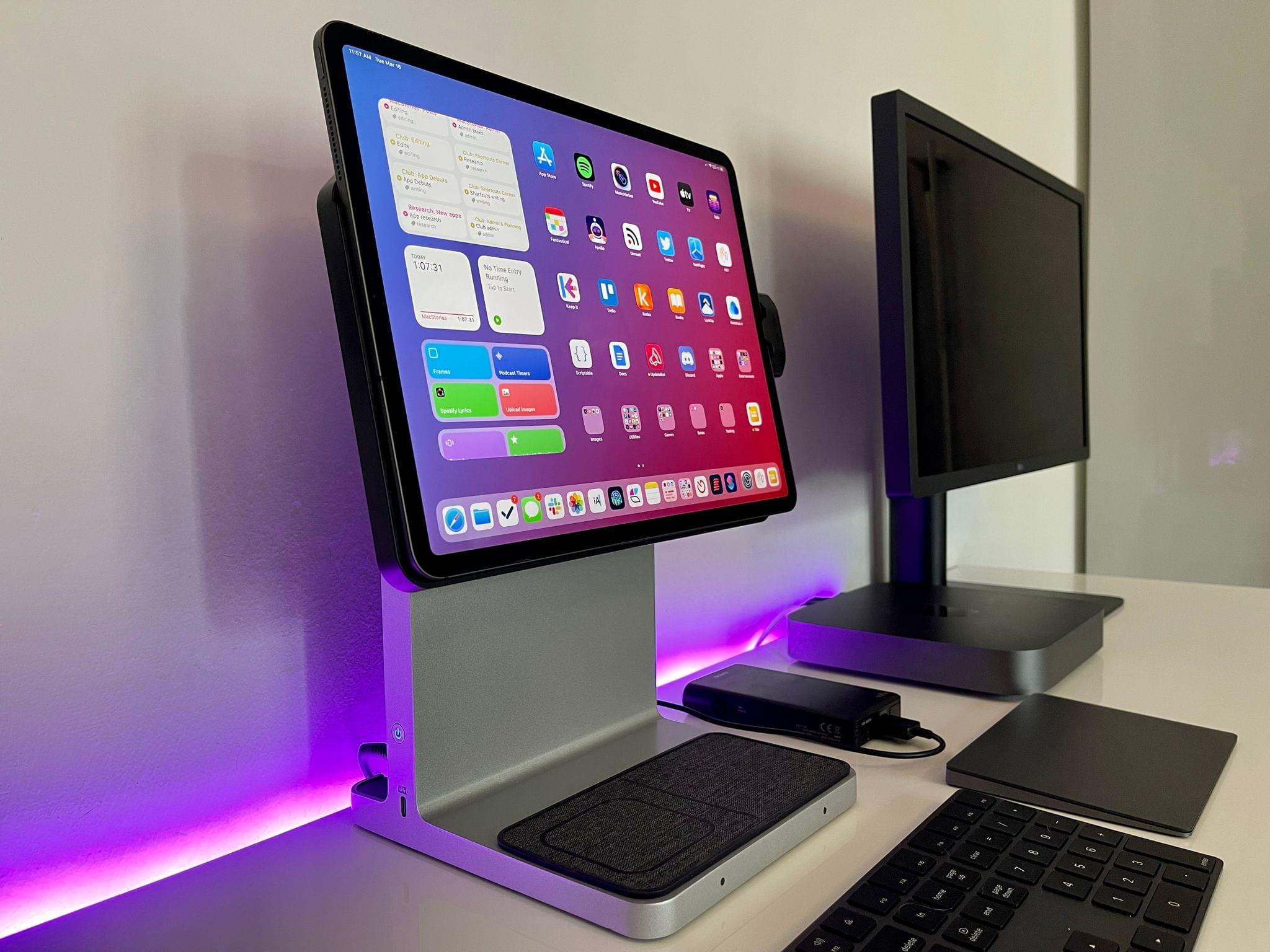
First Impressions: Kensington’s StudioDock Aims to Turn Your iPad Pro into an Expandable Desktop Workstation

The Kensington StudioDock.

The Kensington StudioDock.

Nearly a year ago in the middle of the first wave of the COVID-19 pandemic here in Italy, I published an article that would turn out to feel obsolete in less than a month: in my Modular Computer story, I detailed my experiments with various accessories for the iPad Pro and how the device was capable of filling different roles in my computing life thanks to the Smart Keyboard Folio, an external 4K monitor, Apple’s Magic Trackpad, and a set of kickstands. About a month later, my laptop setup for the iPad Pro was upended by the arrival of Apple’s Magic Keyboard; as a result of the Magic Keyboard’s floating design and integrated keyboard/trackpad approach, I’ve preferred using my iPad Pro in laptop mode more often, even when I’m sitting at my desk.

A year later, Italy is going through the so-called “third-wave” of the pandemic (with a terribly mismanaged vaccine rollout and, for whatever reason, a different government) and I’ve spent the past 24 hours testing Kensington’s long-anticipated StudioDock, a $400 docking station1 that aims to turn the iPad Pro into a desktop workstation with support for display rotation, expansion via USB-C, USB-A, and SD card slots, and integrated Qi charging for iPhone and AirPods. And just like last year, I find myself torn between appreciating the potential of this product and concerned about its timing given rumors of an impending iPad Pro refresh just around the corner.

A day of usage2 isn’t enough time to evaluate this kind of product and its long-term impact on an iPad user’s daily workflow. I feel particularly uncomfortable giving MacStories readers any sort of buying advice here because of the price tag (again, $400 for the StudioDock version I tested) and the short amount of time I was able to spend with the accessory. For these reasons, I’ll try my best to focus on what the StudioDock is, what I like about it in the context of modularity and converting the iPad Pro into something it’s not (or, at least, something Apple probably didn’t anticipate), and a few features it’s missing.

Read more


Can Apps Still Surprise Us?

AppStories+ Deeper into the world of apps

AppStories Episode 209 - Can Apps Still Surprise Us?

0:00
58:02

AppStories+ Deeper into the world of apps

This week, Federico and John consider why surprising apps seem increasingly rare and share some of the apps that have surprised them the most over the past year.

Read more


Automating Markdown with Taio, Part 1

For this week’s installment of the Shortcuts Corner, I wanted to try something different and cover an app I’ve been meaning to explore more in depth for a while: Taio. I mentioned Taio a couple times on AppStories and Connected before, and I also covered it here on MacStories Weekly when it launched in...


Reading Newsletters

AppStories+ Deeper into the world of apps

AppStories Episode 208 - Reading Newsletters

0:00
40:08

AppStories+ Deeper into the world of apps

This week, Federico and John dig into email newsletters and how they manage and read them.

Read more


Home Screen: Federico Viticci

As MacStories readers may have noticed, for the first time in several years I didn’t publish my annual ‘Must-Have Apps’ list in 2020. I don’t want to get into the details of what happened in my personal life over the past six months (everything’s fine now), so I’m just going to say that 2020...


Apple Clarifies Ability to ‘Set Default’ Audio Apps in iOS 14.5

Earlier today, Apple provided TechCrunch with a fascinating clarification regarding the ability in iOS and iPadOS 14.5 to pick “default” audio apps for music, podcast, and audiobook playback.

From Sarah Perez’s article:

Apple has clarified that the iOS 14.5 beta is not actually allowing users to select a new default music service, as has been reported. Following the beta’s release back in February, a number of beta testers noticed that Siri would now ask what music service they would like to use when they asked Siri to play music. But Apple doesn’t consider this feature the equivalent to “setting a default” — an option it more recently began to allow for email and browser apps.

Instead, the feature is Siri intelligence-based, meaning it can improve and even change over time as Siri learns to better understand your listening habits.

For example, if you tell Siri to play a song, album or artist, it may ask you which service you want to use to listen to this sort of content. However, your response to Siri is not making that particular service your “default,” Apple says. In fact, Siri may ask you again at some point — a request that could confuse users if they thought their preferences had already been set.

On the surface, it appears as if Apple’s argument boils down to semantics. Because iOS 14.5 will not offer a proper page in Settings to configure “default” audio apps (like you can for browsers and email clients, as I argued on yesterday’s episode of Connected), then it’s not correct to say you’ll be able to change the default music app on your iPhone or iPad. We could debate why Apple is not building a page in Settings for this but still allowing Siri to integrate with third-party streaming services and apps (competitive advantages vs. antitrust concerns?), but that’s besides the point. What I find more interesting is that Apple explains this feature is actually doing more than just sticking to a default option:

The audio choice feature, of course, doesn’t prevent users from requesting a particular service by name, even if it’s not their usual preference.

For instance, you can still say something like “play smooth jazz radio on Pandora” to launch that app instead. However, if you continued to request Pandora by name for music requests — even though you had initially specified Apple Music or Spotify or some other service when Siri had first prompted you — then the next time you asked Siri to play music without specifically a service, the assistant may ask you again to choose a service.

From this perspective, given the dynamic nature of this functionality, I understand why Apple may be uncomfortable comparing it to the ability to switch default browser and email apps. At the same time, I want to mention how I’ve been using iOS 14.5 for the past month, and after an initial configuration, Siri continued to default to Spotify and never prompted me to pick another one again. I’m giving Apple’s explanation the benefit of the doubt, but I’m curious to see how this feature will work in the final release of iOS 14.5.

Permalink