Federico Viticci

10876 posts on MacStories since April 2009

Federico is the founder and Editor-in-Chief of MacStories, where he writes about Apple with a focus on apps, developers, iPad, and iOS productivity. He founded MacStories in April 2009 and has been writing about Apple since. Federico is also the co-host of AppStories, a weekly podcast exploring the world of apps, Unwind, a fun exploration of media and more, and NPC: Next Portable Console, a show about portable gaming and the handheld revolution.

This Week's Sponsor:

Inoreader

Build your own newsfeed and cut through the noise


They’re Back: Banned iPad 2 Promo Video

Last year, a US-based agency known as jLE made the rounds of the Internet with a series of fake “banned promo videos” for Apple products. They did videos for the white iPhone 4, the iPad, and even the iPhone 4 Antennagate. They were hilarious and spot-on, and now they’re back to their usual game with a banned iPad 2 promo video.

Once again, it’s funny. The “only Apple black employee” complains and jokes about the availability of a white iPad 2 at launch, other fake Apple executives comment on the two cameras they managed to put in the iPad 2, or the Photo Booth app that allows you to take “silly pictures with two heads”. There’s even a Charlie Sheen joke in there.

Check it out below. Once again, we love it. Read more


Personal Hotspot Lets Another iPhone Connect and Use FaceTime Over 3G

Here’s an interesting feature we didn’t know had been implemented on iOS 4.3 that has been brought to our attention this morning by German blog Macerkopf.de [Google Translation]: on the iOS 4.3 GM (released last night) you can start Personal Hotspot and let a second iPhone connect to use FaceTime over 3G.

Personal Hotspot creates a WiFi connection, but we know that’s actually a shared 3G one. Starting with an active 3G connection on the first iPhone running iOS 4.3, up to 5 other devices can connect to the Personal Hotspot, which is recognized in the Settings as a WiFi network. Macerkopf speculates that the fact that iPhones can connect to Personal Hotspot and use FaceTime is new to the 4.3 GM build seeded to developers yesterday.

I’ve tested this with my two iPhone 4s and a Mac running FaceTime, and it works. With the first iPhone, I made sure I had 3G active and created a WiFi network with Personal Hotspot. With the second iPhone 4, I connected to Personal Hotspot and called my Mac using FaceTime. It worked the other way around as well. Video quality and sound weren’t excellent (like I said, it’s a 3G connection) but definitely acceptable.

This is an interesting little detail because Apple doesn’t want you to use FaceTime over 3G. A number of Cydia tweaks surfaced in the past to overcome Apple’s restrictions, like Facebreak and My3G. But if you happen to have two iPhones (say, your wife’s) and you really need to use FaceTime on the go to call someone, Personal Hotspot will let you do that. Even if it’s actually a 3G connection, it appears that as long as the iPhone “sees” the network as a WiFi one, it’s fine. Clearly the second iPhone isn’t able to tell whether the connection comes from 3G or not.

We don’t know if this was possible on the previous betas of iOS 4.3, so if you’re still running one of those and the method works, please let us know in the comments below.


RSS Reader Byline Updated with iPad Support

Back in the day when Reeder was not around and Google didn’t have a great optimized version of Reader for iPhones and iPod touches, RSS app Byline was the choice of many. The app featured a minimal and elegant UI following the standards of Apple’s interface guidelines (something that Silvio Rizzi’s Reeder eventually did not), synced with Google Reader and, again, was just popular. With time and the invasion of RSS apps in the App Store many users switched over to something else, some grew tired of RSS apps entirely, some stayed with Byline.

The app is making a comeback today, with a shiny new version 4.0 that introduces a couple of new features, design improvements and, finally, iPad support. As for the new features and fixes, this update introduces a new Edit button you can actually slide to mark all feeds as read. It’s a kind of neat gesture I’d personally like to see implemented in other apps. It’s not something Apple created, of course, but it feels native. Speed of Google Reader sync has been improved as well – Byline feels more responsive now and it’s almost as fast as Reeder at syncing unread feeds and caching items for offline usage. In the Settings, the old options have been kept: Twitter sharing, Instapaper and Read It Later support for articles you don’t want to check out right away. A couple of touches to the UI here and there are a welcome addition, too.

The iPad version comes bundled in the new Universal application, which can be upgraded to ad-free for a limited-time offer of $5.99 through in-app purchase. The iPad counterpart of Byline unsurprisingly follows Apple’s standards for UI approach: you’ve got a sidebar in landscape mode with all your feeds and folders, a popover in portrait with the same functionalities. The article view is as clean as before, although I would have liked to see some additional interface love here. Sometimes it almost feels too clean. But I have to say, it’s fast, reliable and definitely gets its job done. Byline for iPad looks a lot like the iPhone version – your call if this is a bad thing or not.

Byline 4.0 (universal) is available for free here.


Want To Get Rid of Twitter’s Quick Bar? There’s A Cydia Tweak For That

By now you’ve probably updated your iOS Twitter app and noticed that the iPhone version comes with a new “Quick Bar” at the top that’s meant for letting you cycle through…the popular and beloved Twitter trends. Really, that translucent bar doesn’t do anything else but putting trends and promoted tweets (thus, ads) in your timeline. It doesn’t follow you around as you scroll, but it appears every time you tap on the timeline tab or switch back and forth between, say, mentions and the Twitter timeline. We get it: it’s annoying and partially ruins the design of Tweetie – ehm, Twitter for iPhone.

But here comes a solution: if you’re running a jailbroken device and you want to get rid of the Quick Bar, go install Twizzler now from Cydia, for free. It removes the Quick Bar and gives you control back over what appears in your timeline. That’s it.

Did we say it’s free?


MacStories Interviews: Dave Caolo, Author of “Using Your iPad as a Business Productivity Tool”

If you live in a corporate environment these days, chances are your employer has given you an iPad to try out. It is no secret that hundreds of companies are piloting or deploying iPads and iPhones, but when it comes to a machine that’s less than a year old and has created a new category of portable computing, trying to make it fit in your daily workflow can become a problem. What apps do I need to install? What about email settings? What’s the best way to manage my calendar? And Exchange?

Author Dave Caolo provides answers to these questions in his first book “Using Your iPad as a Business Productivity Tool”. The book is available now in the iBookstore for iPad at $5.99, but you can also pre-order it for your Kindle on Amazon. We had the chance to chat with Dave about the background of this book, and why he decided to focus on the iPad, a relatively young device for a business audience.

So head after the break for the full interview, and go download the book for your iPad here. Read more


Xcode 4 GM Seed 2 Released

Together with the GM seed of iOS 4.3, Apple has updated the developer center with a new build of Xcode 4 GM. The “seed 2” available for developers includes performance and stability improvements.

The first Xcode 4 GM seed was released in February. It included support for submitting iOS and Mac apps to the App Store and brought along the impossibility to build apps for OS X 10.5 Leopard. Xcode 4 is a major new version of Apple’s development suite which sports lots of new features and a new single-windowed UI.


Apple Releases iOS 4.3 GM [Update: Gestures, Home Sharing]

A few minutes ago Apple seeded the GM seed of iOS 4.3 to developers. It’s available now in the iOS Dev Center. Build number is 8F190. Updated versions of the iOS SDK and Apple TV pre-release software have been released as well. iOS 4.3 beta 3 was released on February 1st.

iOS 4.3 is set to come out on March 11 together with the release of the iPad 2. This GM build should include the new iTunes Home Sharing feature announced by Apple yesterday.

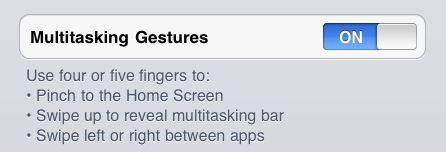
Update: We have received word from several developers that the multitasking gestures for iPad can still be activated in the GM build with Xcode. At this point it sounds like Xcode will be able to activate gestures in the final release as well, but the general public won’t have this feature – it’s exclusive to developers for testing. Read more


MobileMe Photo and Video Sharing Pulled From iPad 2?

As noted by iLounge, it appears that among the functionalities of the iPad 2 announced yesterday there is the notable lack of photo and video sharing through MobileMe. The device has two cameras capable of shooting photos, videos, do video calling with FaceTime and apply effects in Photo Booth, but there was no mention of MobileMe media sharing and Apple’s website confirms you’ll only be able to upload HD video to Youtube, or share via email.

Obscured by the many iPad 2-related announcements yesterday, Apple failed to make any mention of MobileMe-based video or photo uploading during its media event. A quick scan of Apple’s iPad 2 mini-site shows that no references are made to sharing photos or videos via MobileMe, although the service is still mentioned by name in references to synchronization and location-based services.

Recent rumors suggested Apple is working on a major revamp of MobileMe, which is reportedly becoming a digital-only, free service with access to cloud backups for music and movies and social / location features. Code references found in iOS 4.3 also pointed to a new MediaStream service built in iOS devices to (likely) share photos and videos with your friends through MobileMe.

But, then again, the lack of MobileMe sharing in the iPad 2 camera app might just be a last-minute removal from the  iOS 4.3 built demoed to journalists in San Francisco yesterday, and perhaps will be integrated again come the final release on March 11. Or maybe Apple is planning more surprises for the iPad 2 on March 11? We’ll see.


Twitter Updates iOS App with Lots Of New Features

An interesting (and rather huge) update to the official Twitter app for iOS was released a few minutes ago, and it includes improvements both for the iPhone and iPad version of the client. New features has been added to this release as well, which unlike previous updates doesn’t only focus on bug fixes and stability improvements.

First off, the tweet compose screen has been greatly improved and redesigned to have a much cleaner UI and buttons to attach media for easier photo uploading; location info and usernames shortcuts are part of the redesigned screen, too. There’s even username auto-completion now, which is very nice on the iPhone considering one doesn’t always have time to type a long username on the virtual keyboard.

Trends have been improved, the app now shows trends for your specific location and there’s also a bar on top of the timeline called “Quick Bar” that allows you to cycle through trends. I wonder if there’s a way to disable it from the new Settings view. Twitter for iOS can also look in your local address book now to find friends that you might want to follow. This has been enabled both on the iPhone and iPad. Local trends, on the other hands, can be ignored thanks to an option in the Settings.

We are looking for new features and details right now and we’ll update this post as we find more interesting stuff. Check for more screenshots below, and go download the app here.

Update: The app seems a lot stable on the iOS 4.3 beta, and the bug that caused DMs and mentions to be marked as “unread” on each launch has been fixed. Finally, DM conversations behave like you would expect, too.

Update #2: Surprisingly enough, Twitter for iPad doesn’t seem to have the Quick Bar. Also, Quick Bar on the iPhone only stays at the top of the list and doesn’t follow you when scrolling the timeline.

Read more