Federico Viticci

10761 posts on MacStories since April 2009

Federico is the founder and Editor-in-Chief of MacStories, where he writes about Apple with a focus on apps, developers, iPad, and iOS productivity. He founded MacStories in April 2009 and has been writing about Apple since. Federico is also the co-host of AppStories, a weekly podcast exploring the world of apps, Unwind, a fun exploration of media and more, and NPC: Next Portable Console, a show about portable gaming and the handheld revolution.

Tweetbot for Mac Review

When the first alpha of Tweetbot for Mac came out in July, I said I would take a look at the app again. Here we are, three months later, with the final version of Tweetbot for Mac available on the App Store.

I concluded my review of the public alpha version with:

Right now, Tweetbot for Mac is, in my opinion, already superior to any other client for OS X — and it still can be improved. More importantly, Tweetbot makes better use of Twitter features than Twitter’s own Mac app, and that says a lot about the importance of third-party clients in this ecosystem.

In calling the alpha version of Tweetbot a “superior” product, I took quite a stance. I had been using the alpha for weeks before the public release, and I had the perspective and context to make a conscious and reasonable decision about my statement. I knew I was going to like Tweetbot and use it on a daily basis. Three months later, that’s still the case.

I’ll get to the point right away. Tweetbot is, in my opinion, the best Twitter client for Mac. From my perspective, no other app gets closer to the amount of polish and functionality that Tapbots poured into their latest creation, making it the most powerful, fast, and elegant Twitter app I’ve seen on OS X to date. In hindsight, it’s also a superior product than Twitter for Mac, which, as you may recall, used to be my go-to client. Three months ago I reviewed an app that I knew was going to be great.

In thinking about how I should approach this new review, I came to the conclusion that you don’t need me to go through the backstory of Twitter clients on the Mac. Here’s what I wrote, again, for context:

Ever since Loren Brichter (creator of the original Tweetie, who sold his app to Twitter and went on to work there) left the company, Twitter for Mac — what I had deemed as the best Twitter client for OS X — fell into an unexplainable state of abandon and lack of updates. You would think it’s in Twitter’s best interest to keep a native client up to date with the latest features of the service; and yet, after a solid first version — which came after years of speculation on Tweetie 2 — Twitter started ignoring the app, failing to bring several of Twitter’s new features (such as inline media and updated search) to the desktop. It only got worse recently: after many updates to Lion, Twitter for Mac has started showing new bugs and glitches that haven’t been fixed by Twitter, alongside the ones that have always been there and were never corrected. And then with the release of the Retina MacBook Pro, Twitter’s lack of support for high-res text and graphics became the proverbial final nail in the coffin of what used to be a great app.

Twitter for Mac still hasn’t received an update since last year. Some say it’s no longer in development.

In my review of Tweetbot Alpha, I briefly touched upon features that were missing from the app:

For instance, there is limited support for keyboard shortcuts, there are some rough edges around the interface, and one of my favorite features of Twitter for Mac — being able to navigate and switch sections with gestures — isn’t yet available. Indeed, Tapbots say that features like better management of multiple windows will be coming in the future, and they confirmed in a blog post that they are planning “ on making everything as beautiful and pixel perfect” as they can. Don’t be surprised if, in this version, some pixels will look misaligned or out of place. Eventually, it will all be fixed.

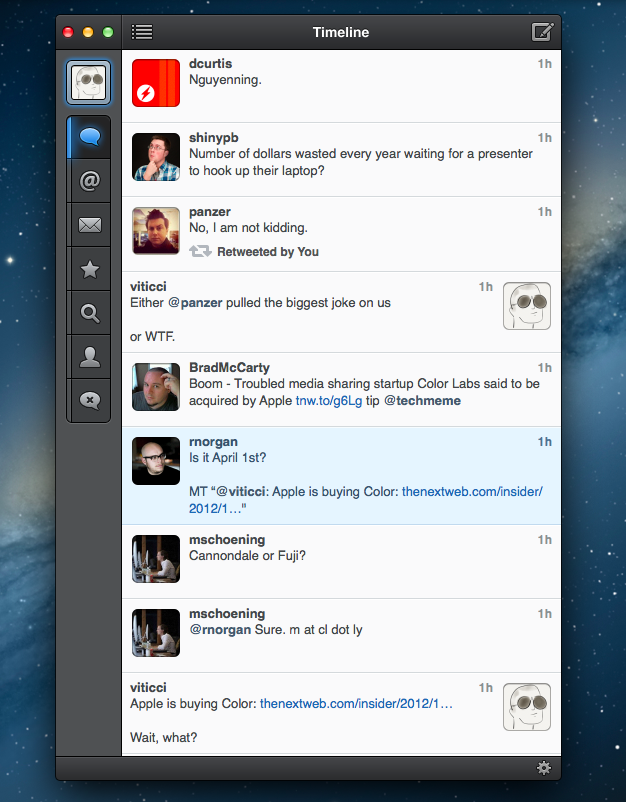
It is with this standpoint that I want to look at Tweetbot again: you don’t need me to know what Tweetbot is or what it looks like. Between the Mac and iOS, we’ve covered Tweetbot extensively here at MacStories.

What follows is my review of Tweetbot 1.0 based on how I use the final version of the app. The little features and the details I’ve come to rely upon, and the overall functionality that makes Tweetbot the best Twitter client for Mac. Read more
Check the Weather

I’m not obsessed with weather apps as much as I am with text editors. Throughout 2012, several developers came out with their own takes on presenting weather data in beautiful interfaces with custom designs; however, when it comes to weather, in spite of my non-obsession, I demand efficiency. Most of the time, many of the “great-looking” weather apps only focus on capturing the user’s attention with pixels, whereas weather software should, in my opinion, pay attention to data quality and information density more than anything else.

For the past week I’ve been using Check the Weather by David Smith, and, interestingly enough, I haven’t gone back to Apple’s Weather app yet. Like I said, I’m not obsessed with weather apps for iOS, but I like to try a new one every once in a while. In the past months I’ve always ended up going back to Apple’s app after a few hours – so there must be something Check the Weather is doing well.

I don’t want advanced data that I don’t understand from a weather app. To grasp the reason why I’m liking Check the Weather, I made a list of the features I need from a weather app:

  • What’s the weather like today
  • What’s the weather going to be like later today
  • What’s the temperature going to be like today
  • When is the sun rising (I live in Italy, work on a US timezone, so I see the sunrise every morning)
  • What’s the weather going to be like tomorrow
  • What’s the weather going to be like this week

With these few “requirements”, I can get a pretty clear overview of weather conditions and temperatures. Check the Weather is remarkably good at this because it presents many data points without cluttering the interface.

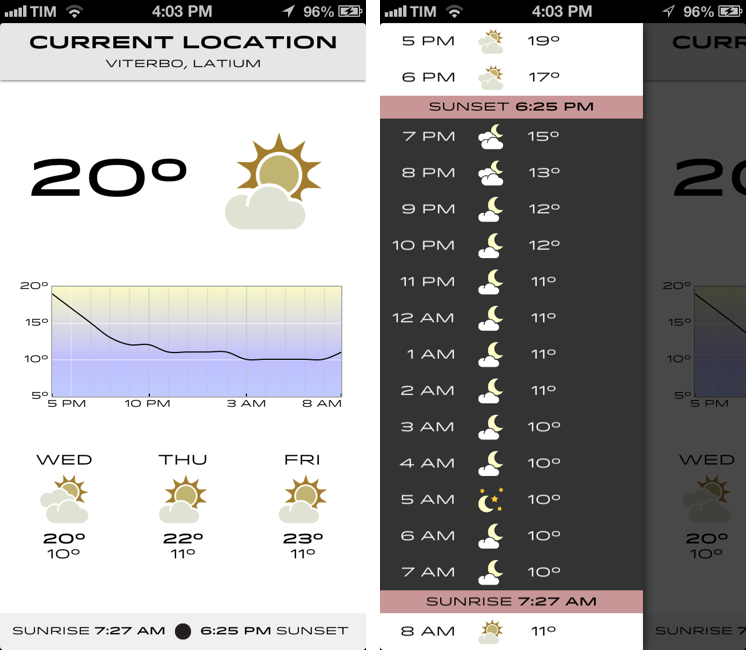
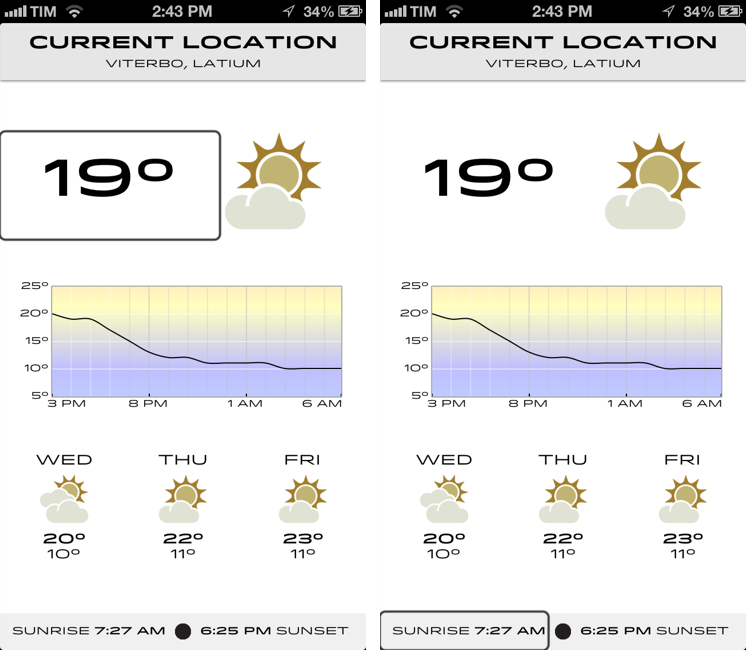
Check the Weather is a dashboard for weather conditions. At the top, there’s a bar that indicates your current location and, through a subtle animation, when the app is checking for updated data. Immediately below this bar, you’ll find the current temperature and weather conditions for your location. And then, underneath conditions, one my favorite features of the app: a graph of temperature for the next 12/15 hours. It’s a simple and effective way to visualize temperature changes (like how it dramatically drops between 6 and 8 PM).

Continuing with the main screen, the bottom part is dedicated to showing weather conditions and low/high temperature forecasts for the next three days and sunrise/sunset times. I particularly appreciate the sunrise functionality, as I mentioned above, and I find it somewhat curious that several developers decide not to include it. I also found it accurate for my location (Viterbo, Italy), and I only noticed a few days ago that moon phase is included in this section as well.

One thing that’s immediately distinctive about Check the Weather is its design. Different from any other weather app I’ve tried, Check the Weather makes extensive use of Hoefler & Frere-Jones’ font Idlewild for all its weather forecasts. While I wasn’t sure about this choice at first, within a few days I’ve come to appreciate the unique look of Check the Weather – this app is not yet another Clear clone. Check the Weather is different (a weather app with a very specific font and focused on data rather than prettiness isn’t something you see every day), and I like it. I can see, though, why this is also a very bold (no pun intended) move on Smith’s side: sometimes, people just want pretty pixels heavy on graphics and animations.

Check the Weather is unique in how it approaches the trend of placing additional information in a panel on the side. The app, in fact, uses two panels to display hourly forecasts and extended forecasts for the next 12 days. Hourly forecasts are nicely implemented, as “dark hours” are embedded between sunset and sunrise – as they should be. I don’t typically use extended forecasts (I think predicting 10 days in advance is a bit too much), but I like how they’re presented nevertheless.

As an Italian who reviews weather apps, the typical dreaded moment arrives when it’s time to talk about data. Simply put: if you live in the US you’ll have more features. While Check the Weather tries to be “global” with accurate data by HAMweather, there are several functionalities that are US-only, such as hazardous weather alerts from the National Weather Service, a doppler radar precipitation map, and integration with Dark Sky for minute-by-minute precipitation forecasts. I haven’t been able to test this, but David told me that Dark Sky API data is available in the precipitation view (swipe up from main screen). I believe Check the Weather is the first app to integrate with the recently announced Dark Sky API, and, even though it doesn’t support push notifications yet, it is a huge plus for US customers. As an Italian, all I can say is that weather data and forecasts were accurate and in line with Yahoo weather (the provider Apple uses).

One thing I’ve noticed about Check the Weather: it is localized in 7 languages (including Italian), and it is fully VoiceOver-enabled.

Check the Weather accessibility

Check the Weather accessibility

Check the Weather’s support for VoiceOver allows users to listen to forecasts.

Check the Weather is refreshingly different. It doesn’t look like any other weather app I’ve tried, and it leverages its uniqueness to provide weather data in a variety of ways that I find useful and intuitive. What I like most about Check the Weather is that it brings me the information I need without confusing me with custom menus or complicated interface designs. At this point, I only hope David will find a way to add more international weather providers and release an iPad version of the app.

Check the Weather is available at $2.99 on the App Store.


RSS.app

RSS.app

RSS.app is a very simple Mac app developed by Joost Schuttelaar following the removal of RSS feeds from Mail and Safari in Mountain Lion. RSS.app sits in the menubar, and checks for updates to your feeds every few minutes or hours. It then displays new article alerts using Notification Center.

The app is almost invisible: It is embedded in the status menu and uses Mountain Lion’s Notification Center to alert you of new posts. You can use RSS.app to import your existing list of RSS feeds from Apple Mail — even after you’ve updated to Mountain Lion.

The list of feeds to check can be configured in the app’s preferences, and you can import feeds from Mail even if you’ve already upgraded to Mountain Lion. The app is extremely simple: it’s got no keyboard shortcuts, menus, or distracting interface elements – it’s just a menubar checker for RSS feeds. Clicking on a notification will take you to the article using your default browser, and that’s it.

As Michael Tsai noted, the app has been rejected by Apple because of rule 2.8, which says “Apps that are not very useful or do not provide any lasting entertainment value may be rejected”.

If you think RSS.app can be useful to you, download it here.

Permalink

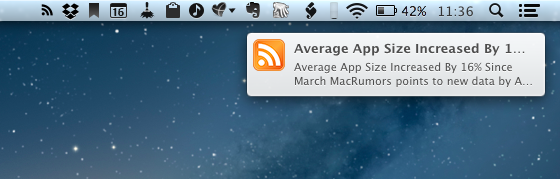
Average App Size Increased By 16% Since March

Average App Size Increased By 16% Since March

MacRumors points to new data by ABI Research, showing that, since March 2012, the average app size has increased by 16%:

The iPad 3’s Retina display and Apple’s more liberal submission policy have caused the file sizes of leading iOS apps to grow substantially, especially in games. The latest data from ABI Research shows that the global average app size across all categories was 23 megabytes in September, 16% more than in March.

On March 1, I wrote:

I see two solutions. Either Apple gets the carriers to agree to larger download sizes, establishing a new “average” that should work for most apps (let’s say 60 MB as Panzarino suggests), or they rebuild the download mechanism completely by allowing devices to “ignore” resources they don’t need. The second solution would be a “cleaner” approach, in that it would address the root of this likely scenario — that is, devices downloading apps containing all kinds of images and resources for Retina and non-Retina displays.

As we know, Apple decided to increase the maximum download size over cellular to 50 MB. This, combined with LTE networking, has allowed developers to be more relaxed in regards to their app sizes, and users to have reasonable download times on 4G (or DC-HSDPA). The solution I proposed earlier this year – a way to identify which assets to download for an app on a specific device – would still require a major rework of iOS.

Due to international pricing, this year I had to get a 16 GB iPhone 5. But I regret my decision. Something we’ve learned in the past two years (since the Retina display was introduced in 2010) is that that app sizes are only going up, and you’re never going to wish you got a device with less capacity. You’ll either be fine, or want more. With the iPhone 5 and Retina + Universal games, I find myself having to keep an eye on my available space, which is something I despise doing.

For the future, I hope 32 GB will become the new 16 GB, and I’m looking forward to 128 GB iPhones and iPads.

Permalink

SearchLink: Markdown Links Without The Browser

I don’t know how Brett Terpstra finds the time to do everything he does, but I do know I enjoy the results.

Brett’s latest effort is SearchLink, a system Service to generate Markdown links automatically for a variety of web services. In Brett’s words:

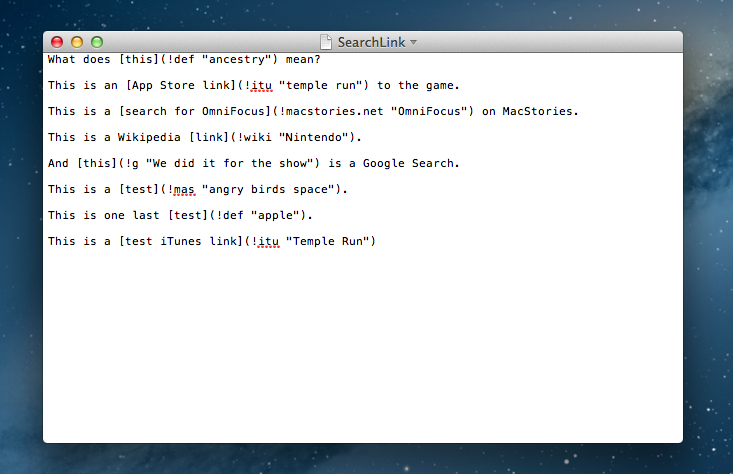
SearchLink is a System Service for OS X that handles searching multiple sources and automatically generating Markdown links for text. It allows you to just write, marking things to link as you go. When you’re done, you run it on the document and — if your queries were good — have your links generated automatically without ever opening a browser.

Essentially, SearchLink is a Ruby script that, in the background, generates valid Markdown for inline links inserted in plain text. These can be links pointing to a Google search, a Mac App Store or iTunes search, last.fm, Wikipedia, and more. Instead of having to switch to the browser when you’re writing, you can just write using SearchLink’s simple syntax. Once you’re done, run the Service, and SearchLink will contact web APIs to transform your text into the first/best result for your query, formatted in Markdown. Read more


Apple Confirms: Media Event on October 23

As first reported by The Loop’s Jim Dalrymple, Apple just sent out invitations to the press for a media event taking place on October 23 in San Jose. The invitations show an Apple logo with the tag line “We’ve got a little more to show you”.

Unlike other recent events that have been held at the Yerba Buena Center for the Arts in San Francisco, Apple will hold this event at the California Theatre in San Jose .

According to recent speculation, Apple will unveil a new, smaller 7.85-inch iPad at the event dubbed “iPad Mini”. The device has been long rumored to be a smaller version of the last-gen iPad 2, carrying the same 1024x768 non-Retina display in a thinner and lighter body with a smaller display. The core feature of the iPad Mini should be portability, as well as a reduced price for consumers.

Curiously enough, the invitation is somewhat reminiscent of the one sent for the original iPad event in January 2010.

As noted by Jason Snell, the last time Apple held an event in San Jose at California Theater was for the iPod photo announcement with a Bono/Edge live performance.

Based on more recent rumors, next week may also see the introduction of refreshed iMac, MacBook Pro, and Mac mini lines. Specifically, Apple is rumored to be planning a 13-inch version of the MacBook Pro with Retina display, a thinner iMac, and a new Mac mini model.

To get a sense of what a 7.85” (as opposed to 9.7”) iPad Mini would be like, check out our mockups from July.


Watermark Releases iPhone App

Watermark Releases iPhone App

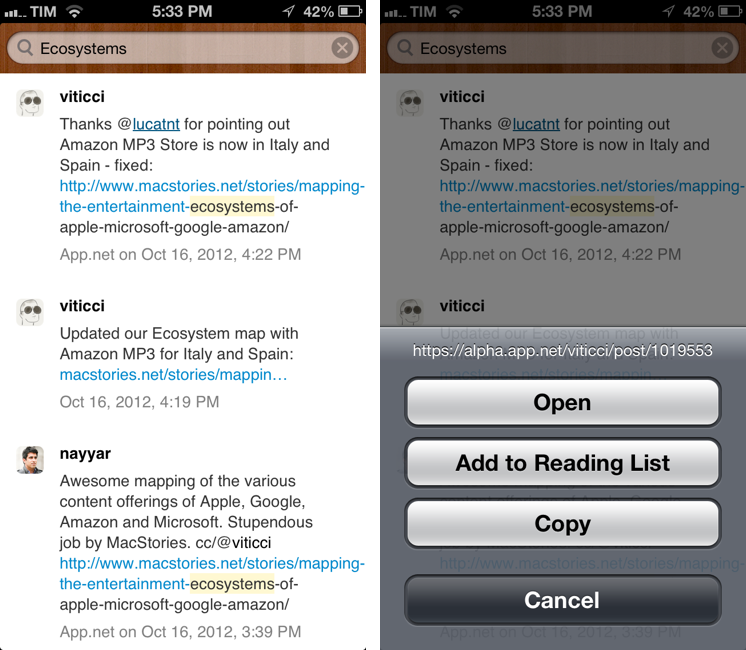
Twitter and App.net archiving and search tool Watermark.io gained a first official mobile companion today, a native app for iPhone. Dubbed “Watermark Mobile”, the free app is very simple, as it’s solely focused on letting you search and copy links to tweets or posts.

Watermark is a searchable archive of tweets and App.net posts. It downloads tweets from everyone you are following, so you can go back and find older tweets later. And it provides a backup of all your own tweets and favorites forever.

Watermark Mobile is, for now, an interface to your archive. There are no options or sidebars – just a search bar to retrieve posts from your Watermark archive. Right now, you can search and tap & hold on a post to copy its link; you can tap on usernames to open their profiles on Twitter or App.net. For a future version of the app, I hope developer Manton Reece will add native integration with Watermark filters and saved searches.

You can download Watermark Mobile for free on the App Store. You can catch up on our previous coverage of Watermark here.

Permalink

Tracking Stolen Macs with Undercover 5

I’m a big fan of Orbicule products. Aimed at making your Mac more secure, I’ve previously taken a look at Witness, a background application that, once activated, “blocks” your Mac’s screen and activates the built-in camera to snap pictures to see who’s using your computer. It can also do fancy things like running AppleScripts and recording sounds using the Mac’s internal microphone.

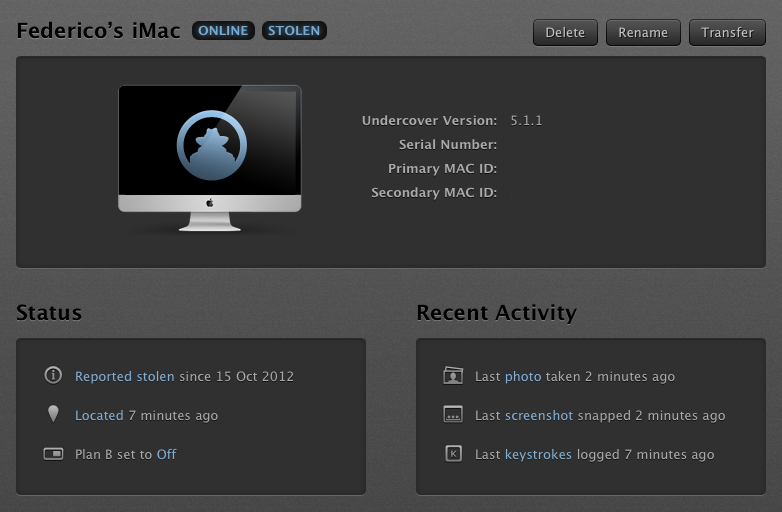
I recently installed Undercover 5, the latest version of Orbicule’s OS X tracking solution for stolen Macs, and I’m very impressed by it. Think of Undercover 5 as Find My Mac on steroids.

In my coverage of the new iCloud web apps launched in September, I mentioned the improvements made to Find My iPhone, which included a new UI and more iOS-related functionalities, but nothing new on the OS X side. With Find My Mac, you can visualize computers on a map, lock them, and erase them, but there isn’t much you can do to identify the person using your computer or to gather information about his/her habits and identity. This is were Undercover comes in. Read more


Pinbook: A Fast Pinboard Client for iPhone

For all its popularity, there’s always been a shortage of great Pinboard clients for iOS. Pinboard, a bookmarking service I use on a daily basis, has a very clean and fast website that works fine on the iPhone and iPad, but I’ve always been looking forward to having a client with all the perks of native code: clipboard integration, support for URL schemes, and caching are just a few options that come to mind. However, in spite of the service’s growing userbase, I haven’t been able, in four years of App Store, to find a Pinboard app I could rely on.

Pinbook by Collin Donnel finally provides a (partial, for now) solution to this problem. Released a few days ago on the App Store, Pinbook for iPhone is the best Pinboard client to date, in spite of the lack of numerous Pinboard-related functionalities in the app.

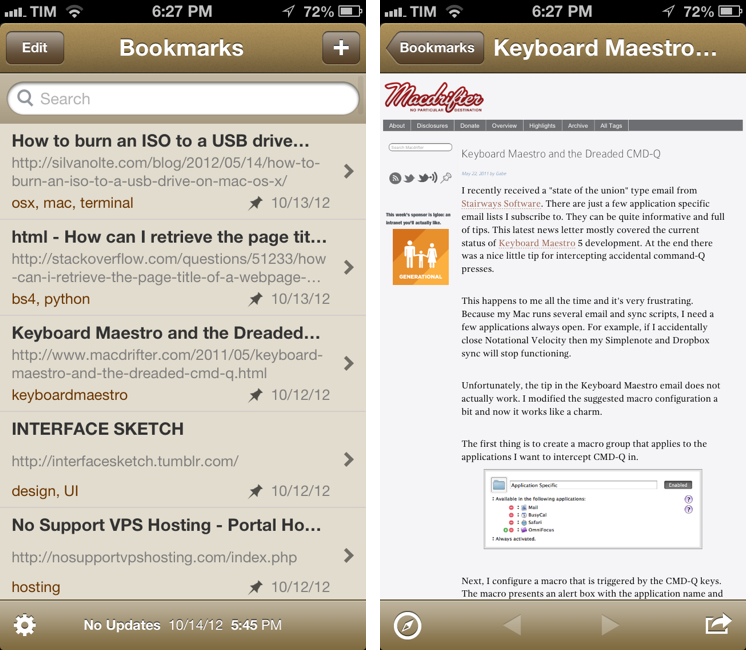
Pinbook is fast. Using Apple’s own pull to refresh mechanism, the app takes a second to refresh your Pinboard account and fetch the latest bookmarks. From my tests, the initial sync (I have 388 bookmarks) took just a few seconds. Pinbook is snappy, and scrolling through hundreds of bookmarks is butter-smooth, as you’d expect from any great iOS app. You can tap on a bookmark to open it in the in-app browser, which features a button to open the link in Safari, and another one to bring up the native iOS 6 share sheet (which includes an Instapaper button). As far as browsing bookmark is concerned, Pinbook’s workflow is extremely simple and effective.

In the main screen, you can swipe on a bookmark to delete it, or tap & hold to open the share sheet. However, as you’ll notice, you won’t be able to tap on the tags underneath a bookmark’s title: one of Pinbook’s current limitations is the inability to explore the various sections offered by Pinboard. In Pinbook 1.0, you can’t browse the global feed of a specific tag, open a user’s profile, or view the Popular page (something I do every day on my Mac); you can only view your bookmarks and search amongst them. For search, you can refine your query by title, tags, or notes; unfortunately, there’s no auto-complete for existing tags.

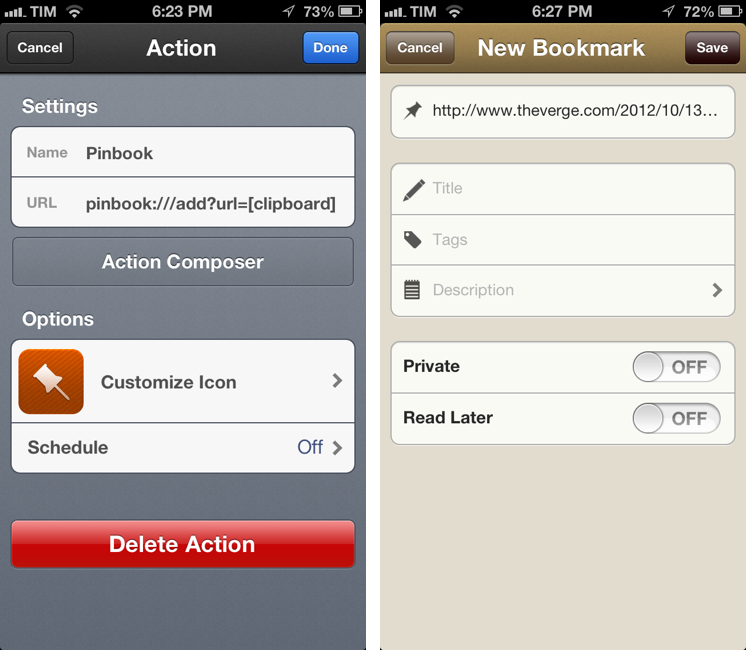
Pinbook lets you add new bookmarks directly from the app. The New Bookmark screen allows you to add a URL, title, tags, a description, and to choose whether you want a bookmark to be “private” or set to “read later”. The app comes with clipboard detection: it recognizes when a URL has been copied, but just like lack of tag auto-complete (which is absent from this screen as well), Pinbook can’t automatically fetch a webpage’s title. So when you add a URL, unless you type a title manually you’ll end up with the URL itself being the bookmark’s title.

Pinbook comes with a URL scheme. Documented here, it has arguments for URL, titles, tags, and description; if you’re thinking about setting up Pinbook with Launch Center Pro, be aware the arguments will have to be properly encoded.

I think there are several additions the developer could make to Pinbook to make it a more complete app with a faster workflow. Firstly, I’d like to have a bookmarklet that sends a page’s URL and title to Pinbook; for as much as Launch Center support is handy, it doesn’t allow me to copy two arguments simultaneously to the iOS clipboard. The great thing about the Pinboard bookmarklet is that it grabs a link’s URL and title automatically, and then offers suggested tags with auto-completion: Pinbook should do the same.

An iPad version and more navigation options would also be welcome. Like I said, I don’t just use Pinboard to add new bookmarks, but also to discover new ones added by someone else. Access to Popular page and user profiles would be a start.

In spite of the features it lacks, Pinbook is still the best Pinboard client for iPhone to date. Not simply because of the shortage of competition – the app really is fast, easy to use, and responsive. Here’s to hoping more functionalities will come relatively soon without hampering the app’s focus on simplicity and speed.

Pinbook is available at $4.99 on the App Store.