Federico Viticci

10762 posts on MacStories since April 2009

Federico is the founder and Editor-in-Chief of MacStories, where he writes about Apple with a focus on apps, developers, iPad, and iOS productivity. He founded MacStories in April 2009 and has been writing about Apple since. Federico is also the co-host of AppStories, a weekly podcast exploring the world of apps, Unwind, a fun exploration of media and more, and NPC: Next Portable Console, a show about portable gaming and the handheld revolution.

The iPad 2 and Education

Good take on why Apple may be keeping the iPad 2 around for the educational market by Elia Freedman:

While the iPad mini and iPad Air keep changing on schools and forcing them to consider new devices during the period they are trying to purchase, the iPad 2 remains beautifully the same, keeping a reliable device on hand for them to consider.

Permalink

IFTTT 1.2

Released earlier this week, IFTTT for iOS 1.2 improves on native Reminders and Photos integration by allowing users to create recipes that save new items into the Reminders and Photos apps. Previously, IFTTT could only read data from Reminders and Photos and use that as a trigger for other actions.

I wanted to wait a couple of days before posting about this update to test how frequently the new background refresh API in iOS 7 would let IFTTT check for triggers and launch recipes. Unfortunately, I haven’t seen notable changes in execution times – for instance, bookmarks that I add on Pinboard sometimes take about an hour to be added to Reminders. My understanding is that IFTTT isn’t using silent push notifications to instantly trigger recipes in your account, therefore iOS 7 background app refresh can make the app check for updates more often in the long term, but that will require several weeks of testing. Thus, I’m happy to keep testing the feature and report back.

The improved Reminders and Photos integration is very nice. You can add new photos from URLs, create reminders into a specific list, and even set a priority for them. I wouldn’t rely on Reminders integration to save work-related tasks, but I find it very useful to let IFTTT check on, say, Instagram or Facebook from time to time and save the photos I want locally on my device.

I’m still impressed by what IFTTT is doing with their iOS app, and I’m looking forward to seeing what’s next for iOS 7 background sync.

Permalink

Better Document Management On iOS

Steven Aquino, writing at Tech.pinions:

The reality is that, as a nerd, I get by fine with Dropbox. However, just because one solution works for me doesn’t mean Dropbox is the answer, or that iOS and iCloud are above improvement. On the contrary, this piece (hopefully) illustrates that iOS and iCloud can be much better at certain things, like document management.

This topic isn’t new, but it’s still relevant because Apple’s implementation is anachronistic and strange considering other advancements in iOS. There’s a glimmer of hope in iPhoto for iOS 7, but nothing more. Open In is not the solution.

Permalink

Apple Releases Mail Update for Mavericks with Gmail Fixes

Apple:

Mail Update for Mavericks includes improvements to general stability and compatibility with Gmail, including the following:

Fixes an issue that prevents deleting, moving, and archiving messages for users with custom Gmail settings

Addresses an issue that may cause unread counts to be inaccurate

Includes additional fixes that improve the compatibility and stability of Mail

I don’t use Gmail as my primary email anymore, so I’m looking forward to reading reports about the stability of this update (will Joe Kissell tell us?). You can download it here or through the Mac App Store.

Permalink

Resolve and Clean URLs with Clean Links for iOS

Clean Links

Clean Links

In July, I wrote about my Pythonista script to resolve and clean URLs copied from apps that used shortening services. Clean Links, developed by Griffin Caprio, is a free iOS app that does more than my script as it resolves URLs, removes useless parameters, and supports x-callback-url for inter-app communication.

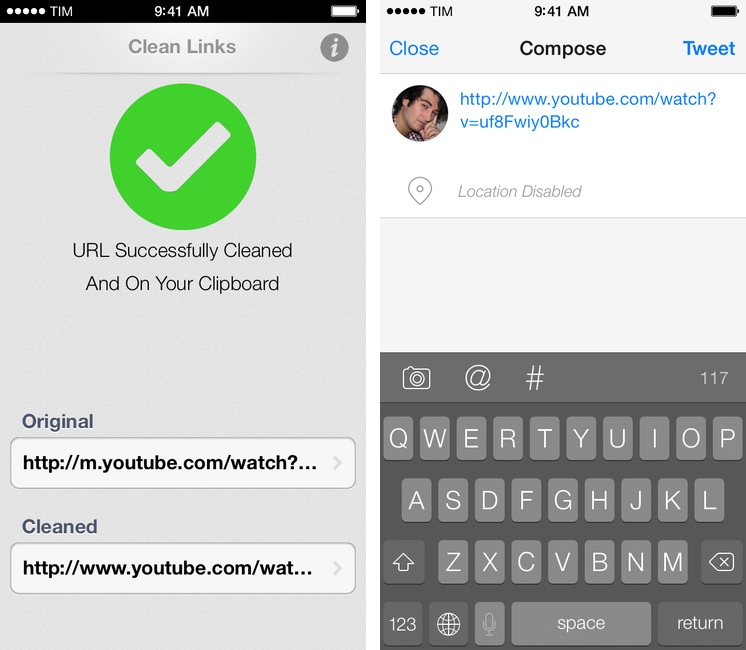
Clean Links’ sole purpose is to receive a URL that was shortened, put behind a proxy, or cluttered with parameters/tokens and turn it into the clean, basic version that’s the one you want to share with your friends and followers.1 Clean Links can resolve YouTube URLs, links to blog posts generated by FeedBurner, classic Bitly URLs, and more. In my tests, Clean Links never failed to clean up a URL that I gave to it – the recent addition of YouTube URL support is extremely welcome as YouTube mobile redirects are particularly annoying. By default, Clean Links cleans a URL you’ve copied and puts the cleaned version back in the iOS clipboard.

With callbacks, Clean Links can be used with other apps as a “URL cleaning service” in the middle of a workflow. Here’s an example: I’ve found a link in Tweetbot and I want to tweet it, but the URL is ugly. With Clean Links, I can copy the URL and launch this Launch Center Pro action to have it cleaned up and return to Tweetbot’s Compose screen automatically. Or, with this action, you can resolve a URL and automatically add it to the “URL” field of a new event in Fantastical 2.

A tip for x-callback-url power users: when chained to other apps, Clean Links can automatically insert text not by using clipboard hacks, but through a “return parameter” called retParam. If you take a look at the URL schemes that power the actions above, you’ll see that, for Tweetbot, the text parameter is omitted from the Tweetbot URL scheme and given to retParam (same concept for Fantastical). If you want to pass along cleaned URLs with x-callback-url keep this in mind and take a look at the app’s documentation.

Clean Links has a very utilitarian approach to the problem it solves: it’s powerful, but it doesn’t come with a pretty UI for iOS 7. You’re not supposed to be looking at Clean Links all the time though, and the app’s functionality makes it the best solution to clean URLs and send them to other apps I’ve found. Clean Links is Universal and available for free on the App Store.


  1. Tweeting URLs with “mobile.” domains and UTM tokens is comparable to this

Thoughts On The Nexus 7 From The Perspective Of A Longtime iOS User

As someone who primarily works on iOS, I won’t lie – I considered buying an Android device to see how customizing some parts of the user experience would benefit my workflow. The Services-like menu and improved document management framework seem like features that Apple should be inspired from instead of relying on the clumsy Open In menu.

Richard’s article offers a good, honest perspective that includes many of the reasons why I don’t want to switch to an Android device.

Permalink

A List of New iOS 7 Keyboard Shortcuts

With iOS 7, Apple has introduced the possibility for third-party developers to support custom shortcuts with external (Bluetooth) keyboards in their apps. Keyboard shortcuts, longtime favorites of OS X power users, can now be enabled in iOS apps and, in the past few months, we’ve seen some notable examples such as OmniOutliner by The Omni Group adding support for this feature.1

Apple itself has been experimenting with keyboard shortcuts in built-in iOS 7 apps, and I thought I’d provide a list of the ones that I’ve found to be working on iOS 7.0.3 with my iPad mini and a Logitech tablet keyboard due to the lack of official documentation. This list was inspired by Rui Carmo, who first found out about keyboard shortcuts in Safari for iOS 7. Since Rui’s post (and my link to it), the issues with the Logitech keyboard that he described have been fixed (the Spotlight key works on iOS 7.0.3) and I’ve collected some new shortcuts.

Right now, new keyboard shortcuts have only been added to Safari, Mail, and Pages in a very limited fashion. While they are consistent with their OS X counterparts, Apple has only brought a few of the Mac’s shortcuts to its iOS 7 apps, leaving other apps like Messages or Reminders without shortcut support. It’s likely that, with time, Apple will bring more shortcuts to Safari, Mail, and other stock apps. I couldn’t find official documentation on Apple’s website and I’ve tested every possible shortcut with a simple trial and error procedure on my iPad.

I will update this list regularly as Apple adds more keyboard shortcuts to its iOS apps. If you have discovered other keyboard shortcuts that are new to iOS 7 and haven’t been mentioned here, please ping me on Twitter or send me an email.

Update 11/11: New shortcuts added thanks to Steven Troughton-Smith.

Read more


Ramp Champ 1.2

Ramp Champ was one of the first iPhone games I bought in 2009 after I got my iPhone 3GS. I remember spending hours with Ramp Champ trying to beat my records and get the highest scores – we’re talking about the days when you couldn’t buy Smurfs with In-App Purchases and he called the shots.

The Iconfactory then sold Ramp Champ, which is back today with a version 1.2 that adds Retina graphics and support for the 4-inch screen. I’ve been playing Ramp Champ after three years and I can gladly confirm that it’s still fun and powered by great graphics and sounds. As reported by TouchArcade, Ramp Champ 2 is in the works under the new owner Seven Gun Games.

Ramp Champ is an App Store classic – and it’s a free update if you bought the original app in 2009. If you’re not familiar with the game, make sure to read Louie Mantia’s original design article.

Permalink