Federico Viticci

10865 posts on MacStories since April 2009

Federico is the founder and Editor-in-Chief of MacStories, where he writes about Apple with a focus on apps, developers, iPad, and iOS productivity. He founded MacStories in April 2009 and has been writing about Apple since. Federico is also the co-host of AppStories, a weekly podcast exploring the world of apps, Unwind, a fun exploration of media and more, and NPC: Next Portable Console, a show about portable gaming and the handheld revolution.


Launch Center Pro 2.3.1 for Power Users

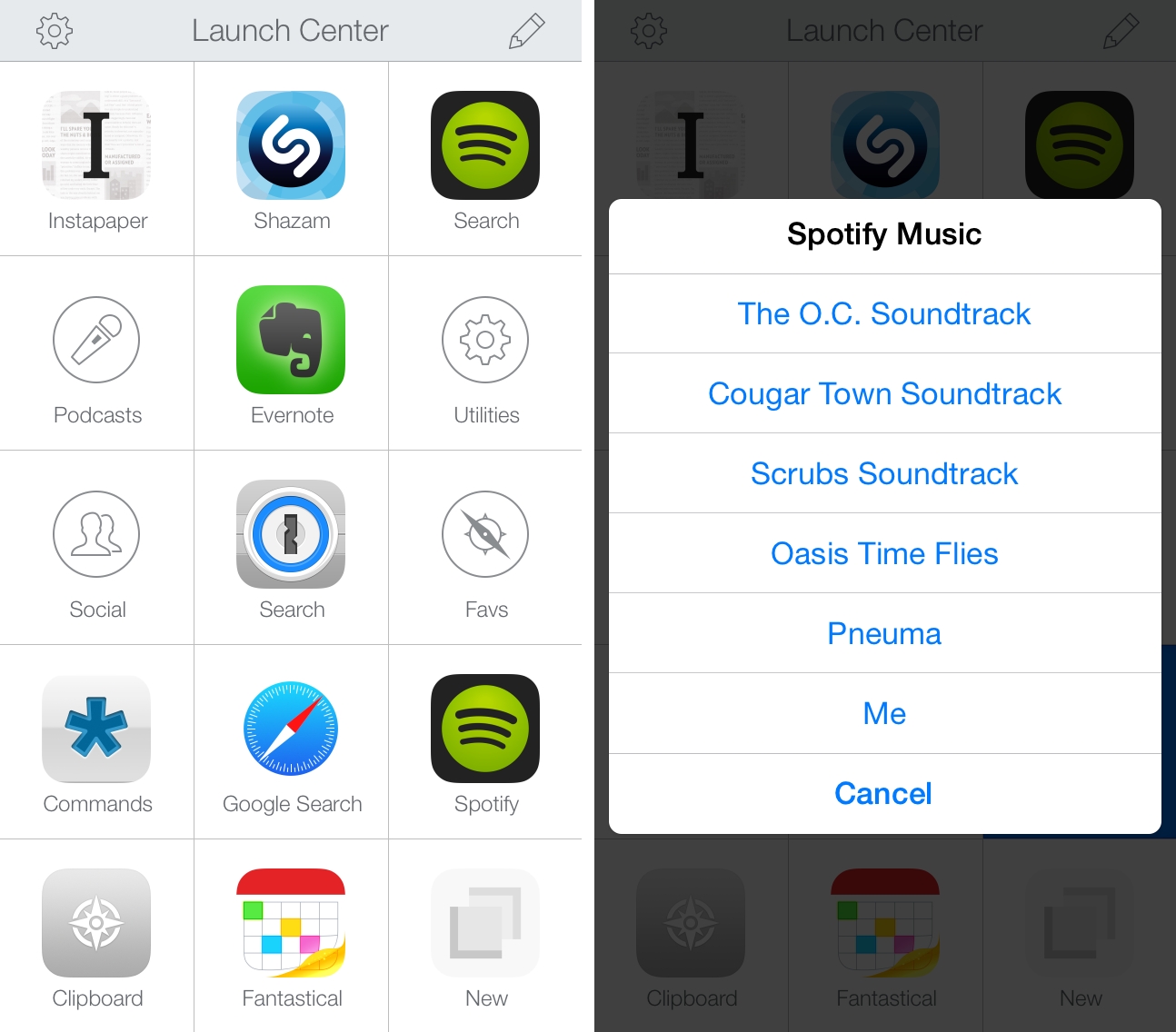
My Launch Center Pro home screen and Utilities folder.

My Launch Center Pro home screen and Utilities folder.

Earlier this month, I wrote that Launch Center Pro 2.3 extended iOS automation by integrating with IFTTT and bridging the gap between iOS apps and web services. Launch Center Pro 2.3.1, released today and seemingly a minor update, is packed with major changes for advanced users who want to build complex URL actions in the app.

If you’ve struggled to build actions that connect multiple apps in Launch Center Pro before, you’ll want to check out the new version and read through the full documentation on Contrast’s website. We’re still working on a big update to our Launch Center Pro guide, but, in the meantime, I’m going to give you an overview of what’s possible to achieve with Launch Center Pro 2.3.1.

Read more


xScope 4.0

Version 4.0 of The Iconfactory’s tool for measuring, inspecting, and testing layouts and graphics on OS X has been released today, adding powerful new features for designers and developers.

We’ve covered xScope on MacStories before, and the new release adds an Overlay feature to check alignments and mockups over a browser (useful when working on responsive designs) and a Text palette to “search, decipher, and reformat text and character glyphs”. xScope works with Retina displays and many of the app’s existing functionalities have been redesigned and updated to have faster performance, more flexibility (just take a look here), and Yosemite support.

I’m no designer, but I’ve used xScope before and I know it’s a solid app; I’ve downloaded the trial from The Iconfactory’s website, and the changes in this version look fantastic. For a limited time, you can get xScope 4.0 at $24.99 (50% off) on the Mac App Store.

Permalink

The Apple QuickTake 100 Turns 20

Stewart Wolpin, writing at Mashable:

Back in Apple’s dark ages — during Steve Jobs’ interregnum in the mid-1990s — the company experimented with some strange products. Everyone remembers the ill-fated Newton PDA, for instance, which was considered ahead of its time. Less memorable was the QuickTake 100, the first mass market color consumer digital camera.

First unveiled at the Tokyo MacWorld Expo on February 17, 1994, the QuickTake 100 went on sale 20 years ago from yesterday — June 20, 1994. It was priced at $749 and initiated the age of consumer digital photography.

The Apple QuickTake 100 was one of the first digital cameras, a market that, in a curious turn of events, has shrunk because of smartphones.

See also: Shrine of Apple’s QuickTake 100 page (and video embedded below).

Permalink

Starting Anew

Angela Ahrendts, Apple’s SVP of Retail, in a post published on LinkedIn:

Also, trust your instincts and emotions. Let them guide you in every situation; they will not fail you. Never will your objectivity be as clear or your instincts sharper than in the first 30-90 days. Cherish this time and fight the urge to overthink. Real human dialogue and interaction where you can feel and be felt will be invaluable as your vision, enabled by your instincts, becomes clearer. In honor of the great American poet Maya Angelou, always remember, “People will forget what you said, people will forget what you did, but people will never forget how you made them feel.” I would argue this is even more important in the early days.

It’s strange (and great) to see an Apple executive sharing this kind of thoughts publicly. The post is beautifully written, especially the last few paragraphs.

Permalink


Essential

The iPhone is good at many trivial tasks such as playing games and watching videos, but this week I experienced firsthand how much its portability and apps matter when dealing with an emergency situation.

Read more