Federico Viticci

10924 posts on MacStories since April 2009

Federico is the founder and Editor-in-Chief of MacStories, where he writes about Apple with a focus on apps, developers, iPad, and iOS productivity. He founded MacStories in April 2009 and has been writing about Apple since. Federico is also the co-host of AppStories, a weekly podcast exploring the world of apps, Unwind, a fun exploration of media and more, and NPC: Next Portable Console, a show about portable gaming and the handheld revolution.

This Week's Sponsor:

GoodLinks

Save articles for later and enjoy them when you have time


Ten Years of Mac Mini – A Timeline→

This weekend marks the ten year anniversary of the first Mac mini. I feel confident in saying that no one has watched this little machine grow more intently than I have watched it. It’s the center of everything I do here at Macminicolo.

Macminicolo’s Brian Stucki has put together a timeline with highlights from the past 10 years of the Mac mini. It’s fun to look back at the original “iHome” rumor and I’m glad the mini (the small but powerful machine that runs this website) is still around today.

Permalink

Connected: 50% My Duty→

To ring in 2015, the boys spend some time with weird old browsers, Hackintoshes, the rumored 12-inch MacBook Air and Federico’s attempts to reinvent his nerd life.

This week’s Connected includes notes about my experiments with new apps and services as well as a good discussion about the rumored 12-inch MacBook Air. You can listen to the episode here.

Sponsored by:

  • Hover: Simplified Domain Management. Use code ‘RECONNECTED’ for 10% off your first purchase.
  • Loot Crate: a monthly subscription box service for epic geek and gamer items and pop culture gear. Use code VIRTUAL for 10% off.
Permalink

The Ultimate Unofficial Dropbox Guide [Sponsor]

Dropbox isn’t just a folder, and you can maximize its potential to simplify your work and personal life.

The Ultimate Unofficial Dropbox Guide was created to help the modern knowledge worker who wants to make their digital life more organized and efficient. The guide is a comprehensive look to power-using Dropbox, whether you’re just setting up your Dropbox account or already think you’re a pro.

Sample topics include: Comprehensive walk-throughs for photo sharing; best practices for organizing your folders and documents; keeping your files secure; and automating tasks using IFTTT.

Complimentary bonus products include a handy keyboard-shortcut reference page, 15 Tips and Tricks for Families, and Photosharing Guides for you and a beginning photo guide to giv eaway to your less-savvy family members who still want to see photos of your kids.

For more information and to preview free samples, check out The Ultimate Unofficial Dropbox Guide’s website here.

Our thanks to The Ultimate Unofficial Dropbox Guide for sponsoring MacStories this week.


The 2014 Panic Report→

Panic is one of my favorite software companies and I’m happy to see Cabel Sasser posting this today:

Panic is a multi-million dollar business that has turned a profit for 17 years straight.

It just hit me, typing those words, that that’s a pretty insane thing to be able to say. (And, sure, we barely qualify). Believe me, I know it won’t last forever — but wow, what a kind of crazy deal.

All the problems mentioned by Cabel in the post are related to the App Store. If you look closely, the 2014 Panic Report is also a well written summary of areas where Apple’s App Stores (plural, for iOS and Mac) could improve.

Permalink

Improving iOS 8 Keyboards→

David Chartier sums up my feelings on custom iOS 8 keyboards so far:

As interesting as iOS keyboards can be, their initial implementation at the OS level is severely flawed. They’re cumbersome to setup, switching between them is needlessly tedious, and limitations make it difficult to teach users about keyboard features. As far as I can tell, all these problems require solutions and improvements from Apple at the OS level.

I only use custom keyboards that solve a specific problem: Clips, for copying multiple bits of text; KuaiBoard, for visual snippets; Emoji++, because it’s better than Apple’s emoji keyboard. Even with these keyboards (which I only activate when I need them – as utilities) I’ve been annoyed by the system’s tediousness in switching between them and lack of consistency.

I haven’t been able to stick with any replacement keyboard as my primary one. In the first version of iOS 8, keyboards were too buggy to be used as daily drivers, but even after fixes I can’t use a non-Apple one on a daily basis. I’d miss the system autocorrection, QuickType, dictation, and shortcuts that I’ve grown to know over the years. Hopefully Apple will soften its stance on what’s off-limits to custom keyboards with iOS 9. Personally, I quite like Apple’s keyboard – I just wish it supported multiple languages at once.

Permalink

Balance

When I started MacStories in 2009, two pillars sustained the narrative around Apple: its “attention to detail” and the “just works” aspect of its software. Since iOS 7, it feels like those pillars have begun eroding at a quicker pace.

Read more


Connected: The Illusion of Choice→

At the end of 2014, Stephen and Myke reflect on what proved to be a wild year in technology.

I wasn’t available for episode 20 of Connected, but Myke and Stephen did a great job in recapping 2014 and what we saw in technology last year. You can listen to the episode here.

Sponsored by:

  • lynda.com: An easy and affordable way to help individuals and organizations learn. Free 10-day trial.
  • Sketchparty TV: the fun, fast drawing and guessing game for Apple TV.
  • Squarespace: Start Here. Go Anywhere. Use code WORLD for 10% off
Permalink

Virtual: Skipping the Zombie Dinner→

This week Federico and Myke share their holiday experiences, before discussing what games are coming in 2015, Federico’s further time with Minecraft and Myke’s impressions of the Wii U.

And if you’re interested in getting started with Minecraft after listening to Virtual, don’t miss episode 20 of Inquisitive with John Moltz, co-author of The Visual Guide to Minecraft. You can listen to the episode here.

Sponsored by:

  • Squarespace: Start Here. Go Anywhere. Use code INSERTCOIN for 10% off
Permalink

Twitter’s Native Video Player→

A post on TechCrunch from yesterday claimed to offer details on Twitter’s previously announced native video service for users, but the company refuted the rumor. According to Twitter, the details uncovered on the video.twitter.com website refer to native videos for Twitter Amplify users, another initiative announced in August 2014.

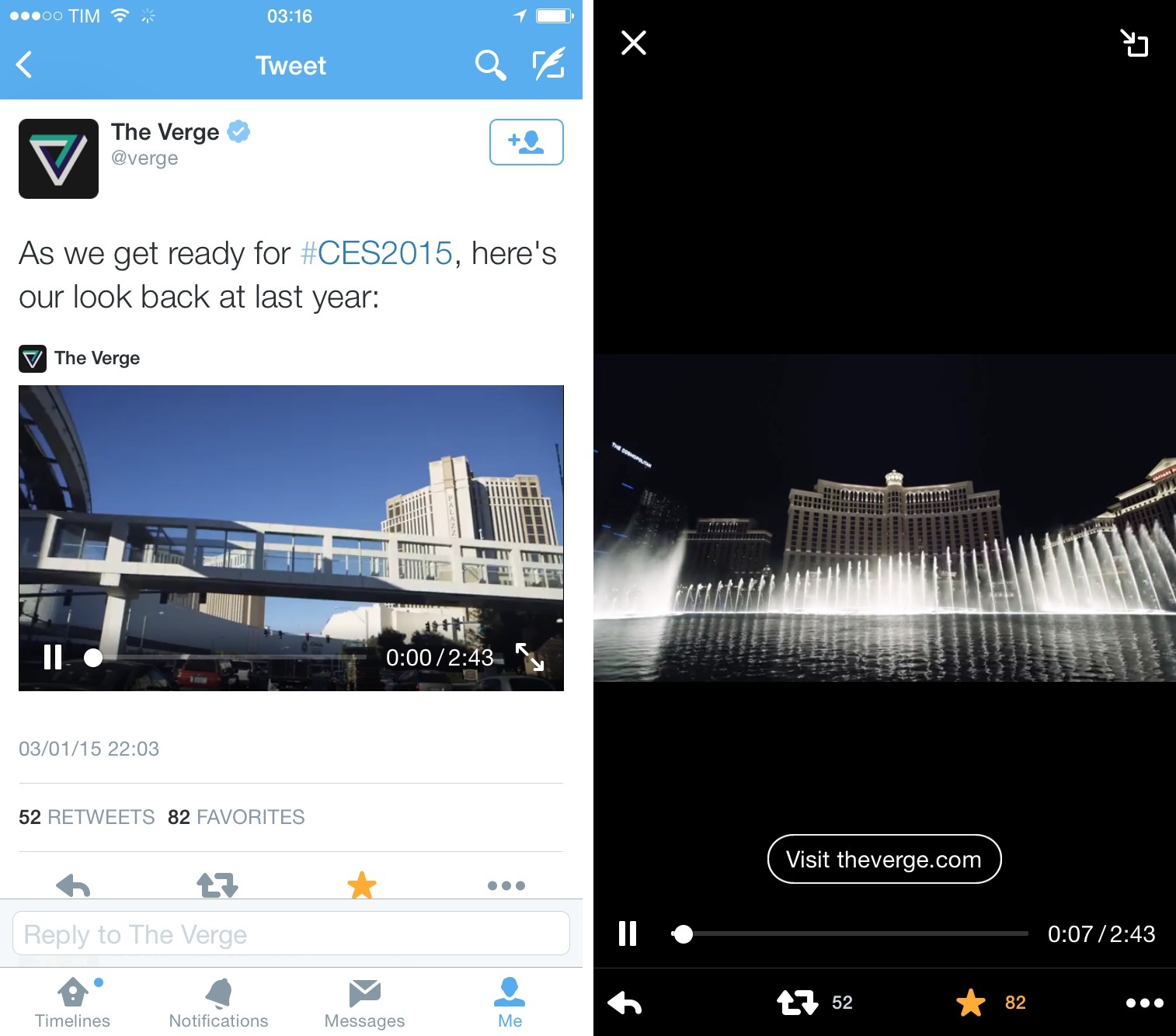
As a user of the Twitter app for iOS, I’ve noticed native Twitter videos (promoted or not) for a while now. They’re actually not terrible: they don’t have all the options of YouTube, but the play inline with a card and have essential playback controls.

This tweet, for example:

Looks like this on the iPhone:

I only noticed today, however, that The Verge’s video has a button to open an associated webpage in Twitter’s inline browser, which was new to me. I also didn’t know that videos could be minimized on the iPad, just like SoundCloud audio cards can be minimized on the iPhone:

Twitter Video is expected to be rolled out in the first half of this year, and I’m curious to see what the company will do with it. As a fan of Twitter’s move towards integrated cards on mobile, I think that native videos (that are longer than Vines) have potential to integrate nicely with other media types in the timeline. It’ll be interesting to see how users and companies that are currently using YouTube will react to native Twitter videos. Considering the impact that Twitter photos had on how content is shared on Twitter, I’d keep an eye on native videos enabled for every user (not just promoted tweets or selected publications).

Permalink