

Ivory Following the major update to version 2.0 last week, Tapbots has already released Ivory 2.1 with some welcome improvements. For starters, the app now integrates with Apple’s Translate tool – a wise decision, especially considering how Translate will offer third-party apps an API in iOS 18 for even deeper integration. Furthermore, Ivory is now...
 iOS and iPadOS 18 Preview
 John
John
iOS 18 After One Month: Without AI, It’s Mostly About Apps and Customization
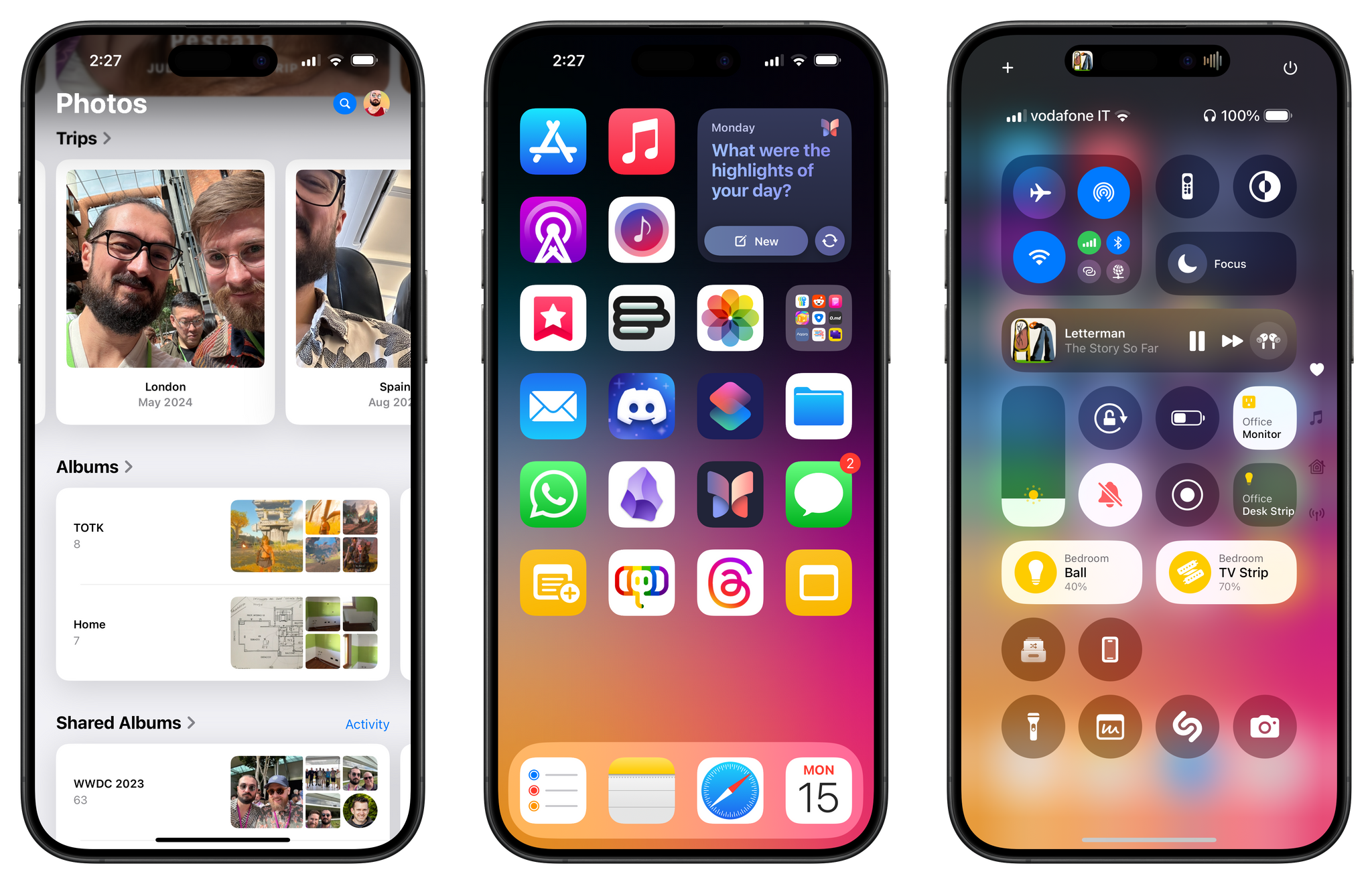
My experience with iOS 18 and iPadOS 18, launching today in public beta for everyone to try, has been characterized by smaller, yet welcome enhancements to Apple’s productivity apps, a redesign I was originally wrong about, and an emphasis on customization.
There’s a big omission looming over the rollout of these public betas, and that’s the absence of any Apple Intelligence functionalities that were showcased at WWDC. There’s no reworked Siri, no writing tools in text fields, no image generation via the dedicated Image Playground app, no redesigned Mail app. And that’s not to mention the AI features that we knew were slotted for 2025 and beyond, such as Siri eventually becoming more cognizant of app content and gaining the ability to operate more specifically inside apps.
As a result, these first public betas of iOS and iPadOS 18 may be – and rightfully so – boring for most people, unless you really happen to care about customization options or apps.
Fortunately, I do, which is why I’ve had a pleasant time with iOS and iPadOS 18 over the past month, noting improvements in my favorite system apps and customizing Control Center with new controls and pages. At the same time, however, I have to recognize that Apple’s focus this year was largely on AI; without it, it feels like the biggest part of the iOS 18 narrative is missing.
As you can imagine, I’m going to save a deeper, more detailed look at all the visual customization features and app-related changes in iOS and iPadOS 18 for my annual review later this year, where I also plan to talk about Apple’s approach to AI and what it’ll mean for our usage of iPhones and iPads.
For now, let’s take a look at the features and app updates I’ve enjoyed over the past month.
Apple Executives on the Photos Overhaul in iOS 18→
Alvin Cabral, writing for The National, got a nice quote from Apple’s Billy Sorrentino on the redesigned Photos app in iOS 18:
“As our features, users and libraries have grown, so has the density of the [Photos] app. So rather than hunt and peck throughout, we’ve created a simple streamlined single view photos experience based on deep intelligence,” Billy Sorrentino, senior director at Apple’s human interface design unit, told The National.
“Ultimately, we wanted to remove friction” in how Photos is used, he added.
It’s been a few weeks since I installed iOS 18 on my primary iPhone, and I feel pretty confident in saying this: I was wrong about the new Photos app at first.
I’ll reserve more in-depth comments for the public beta and final release of iOS 18; of course, given the drastic redesign of the app, there’s also a chance Apple may scrap their plans and introduce a safer update with fewer structural changes. However, over the past few weeks, I noticed that not only do I find myself discovering more old photos in iOS 18, but the modular approach of the more customizable Photos app really works for me. I was able to fine-tune the top carousel to my liking, and I customized pinned collections with shortcuts to my favorite sections. Put simply, because of these changes, I use the Photos app a lot more and find navigating it faster than before.
Anecdotally, when I showed my girlfriend the new Photos app, she argued that the single-page design should be nicer than iOS 17 since she never used the other tabs in the app anyway. I don’t think she’s alone in that regard, which is why I believe Apple should stick with this major redesign this time around.
A Feature-Packed Fall
The Tip Jar
Rethinking Email
This week, Federico and John attempt to clear up confusion about MacStories’ position on AI web crawlers before rethinking email apps in light of the update to Apple’s Mail app coming this fall.
iPadOS 18 Adds Support for Formatting External Drives→
Nice find by Kaleb Cadle in the first beta of iPadOS 18:
Now in the Files app on iPadOS 18, when we right click or hold press on an external drive and select “Erase”, new options appear for reformatting the drive. Currently, the format options here are APFS, ExFAT, and MS-DOS (FAT), the same format options available in Disc Utility. This is a major improvement for iPad power users and it will be interesting to keep an eye out for new improvements to this functionality and others within the Files app over the course of the iPadOS 18 beta cycle. It seems Apple may be taking a similar tact to the way they incorporated much of the functionality of the Preview app into the Files app via Quick Look, but now with functionality from Disc Utility.
Check out the blog post for a screenshot of what the feature looks like. Given the growing number of handhelds that store their games (or OS) on SD cards that I have to manage for NPC now, I’m very glad I no longer have to use my Mac to reformat those drives.
 Using Drag and Drop with the Action Button to Get Deep Links from the Mail App
I’m in process of taking notes and doing research for my annual iOS and iPadOS review, and, like every year, this means I’m reassessing the state of all native Apple apps on my devices. One of these apps is Mail, which, unfortunately, won’t be receiving AI-powered enhancements for smart message categorization as soon as iOS...