Federico Viticci

10863 posts on MacStories since April 2009

Federico is the founder and Editor-in-Chief of MacStories, where he writes about Apple with a focus on apps, developers, iPad, and iOS productivity. He founded MacStories in April 2009 and has been writing about Apple since. Federico is also the co-host of AppStories, a weekly podcast exploring the world of apps, Unwind, a fun exploration of media and more, and NPC: Next Portable Console, a show about portable gaming and the handheld revolution.

Home Screen: Federico Viticci

My iPad Home screen has gone through some changes over the past year, primarily aimed at focusing on apps I truly use on a daily basis. Since I started using iOS 9 (beta 1) on my iPad in June (risky, I know, but had to be done), I found myself liking more Apple apps...


Markup Webpages as PDFs in iOS 9

Ever needed to point out something on a webpage to someone else from your iPhone or iPad? In iOS 9, there’s an easier way to do that. First, Safari has a new ‘Save PDF’ iBooks extension that takes the current webpage and saves it as a PDF into iBooks. This creates a paginated and fully...


Tim Cook on PCs and iPads

BuzzFeed’s John Paczkowski was able to spend 20 minutes with Tim Cook in his recent visit to the Fifth Avenue Apple Store. The entire article has a few interesting gems, and I’m going to quote Cook’s comment on PCs and the iPad Pro:

Two last questions as we turn the corner onto Fifth Avenue: The first — how close are we to a time when people are going to stop buying home computers and laptops and use only tablets? Will they give up their Macs for the iPad Pro? “I think that some people will never buy a computer,” Cook says. “Because I think now we’re at the point where the iPad does what some people want to do with their PCs.” Cook is quick to point out, however, that this doesn’t foreshadow the end of the Mac. “I think there are other people — like myself — that will continue to buy a Mac and that it will continue to be a part of the digital solution for us,” he adds. “I see the Mac being a key part of Apple for the long term and I see growth in the Mac for the long term.”

Permalink

How the New Apple TV Uses On-Demand Resources

Writing for iMore, Serenity Caldwell has a great overview of On-Demand Resources and how they’ll work on tvOS:

Instead of making the user download 4GB off the bat, you slice up your app into a bunch of sections, called tags. You include the essential parts of the app—loading and launch screen, scores, settings, and the first five levels—in that 200MB bundle.

Other levels and assets are split into multiple tags that range in size from 64MB to 512MB. If you sliced up tags that all sized out to 100MB for your game, for instance, you’d have 38 additional items for download once a user installs the game. Those don’t come all at once, however: They’re called on-demand, when a user needs them.

(Extremely geeky thought: I wonder how this could affect the speedrunning community and level-skipping glitches if similar technologies are adopted by more platforms.)

Permalink

Readdle’s Documents for iOS 9 and Safari File Downloads

Documents' downloader UI (left).

Documents’ downloader UI (left).

Given iOS Safari’s baffling lack of a proper file management interface in 2015, I was relieved to see an update to Readdle’s file management app Documents with iOS 9 support yesterday.

Documents is a good file manager for iOS: its options aren’t overwhelming, it lets you organize files in folders with decent search filters (unlike others), and now it can be used alongside other apps thanks to Slide Over and Split View. More importantly, it comes with a built-in web browser that, upon tapping download links, will bring up a downloader UI to start a download, choose where to save it, and monitor its progress.

Since releasing our eBook version of my iOS 9 review yesterday, the question I’m being asked the most is how to download the .zip archive containing two EPUB files directly on iOS. The problem is twofold: readers need to download a .zip file and expand it, then choose to open one of the EPUBs in iBooks for iPhone or iPad.

The main issue is that Safari seems to do nothing when tapping a download link (such as a link to a .zip file) in a webpage. In reality, Safari starts the download invisibly in the background (something I mentioned in the past) without showing any indicator or progress bar: if you leave the tab open long enough, the download will eventually complete and show you an outdated Open In menu to send the downloaded file to another app. In our case, because the .zip archive is well over 100 MB, tapping its download link in Safari may result in nothing showing in the browser for several minutes while the download is actually happening in the background, without the user knowing.

For this reason – and this goes beyond our eBook – I recommend using Readdle’s Documents app to download and manage files on iOS 9: it’s been updated for iOS 9 multitasking and search, it has a web browser with a downloader feature, and it’s free on the App Store.


Apple Rolls Out Updated iCloud Storage Pricing

Apple:

If you purchased a monthly plan before September 16, 2015, your account was upgraded automatically. If you’re currently on an annual plan, you’ll continue to renew annually at that rate. If you select a new monthly plan, your annual plan won’t be available to you.

I missed this last night, but Apple has rolled out the updated iCloud pricing scheme they announced last week. My account was automatically upgraded to the 200GB/€2.99 plan, which I’m primarily using for storing photos and videos. I’m going to keep paying for iCloud storage, but I wish I could use it more.

Permalink

Apple’s New ‘Move to iOS’ Android App

Zac Hall, writing for 9to5Mac on Apple’s first Android app to move user data to iOS:

Once you complete the selection process, the app creates a private Wi-Fi network used by both devices to wirelessly transfer content. After the transfer process is complete, Move to iOS will notify you if any content was not able to move to your new iPhone or iPad, then recommend recycling your old Android phone at a local Apple Store. After continuing the setup process on the iPhone or iPad, the settings and content should appear intact.

The process is integrated with iOS 9’s new setup flow – you get an option to import data from Android when setting up an iOS 9 device for the first time. The Android app is available here (and it’s got some…interesting customer reviews.)

Permalink

Twitter Updates iPad App for iOS 9

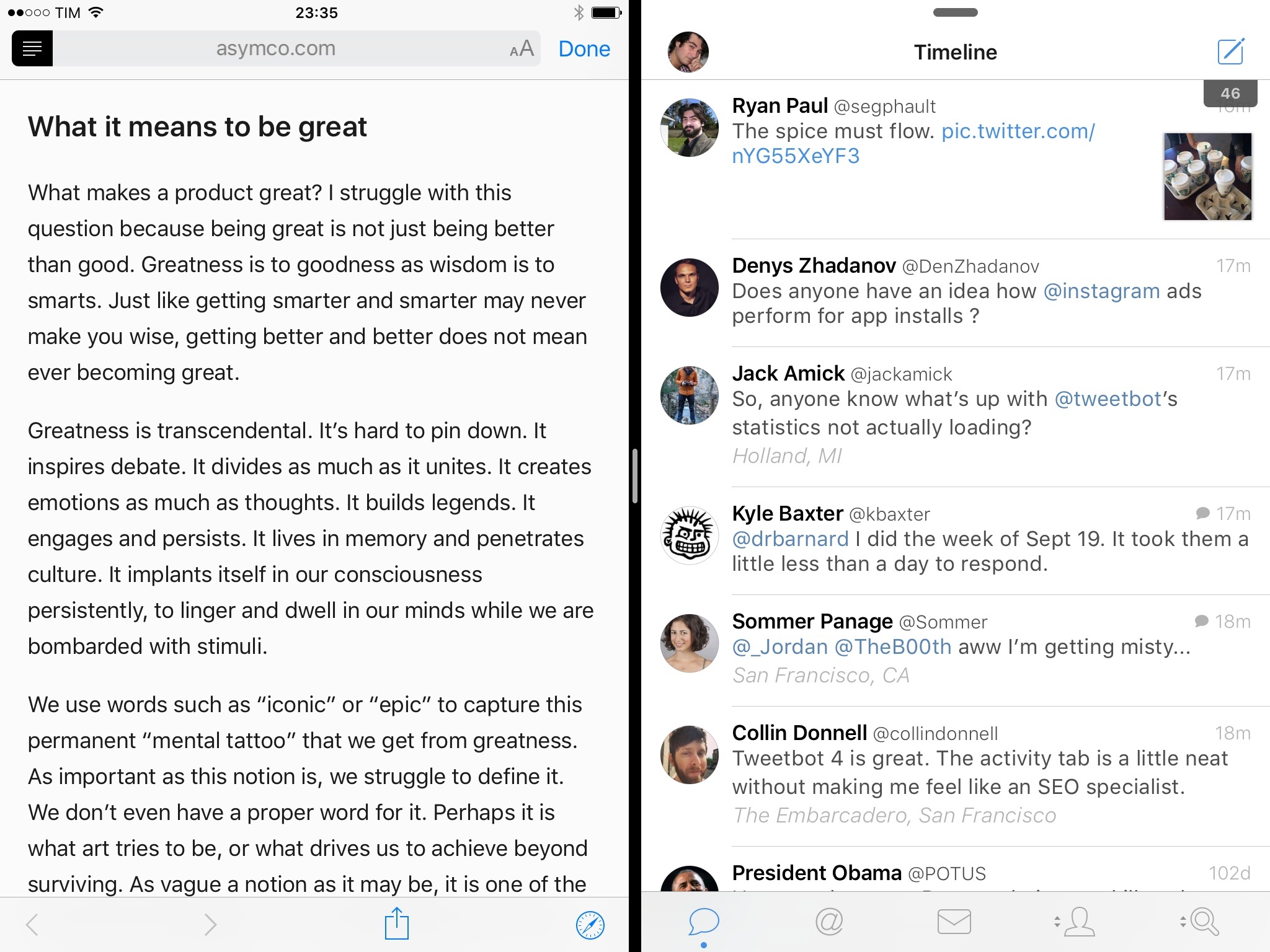
Good on Twitter for living up to their end of the bargain: the redesigned, uninspired iPad app has already been updated with Slide Over and Split View, which lets you keep your Twitter timeline next to other apps. (Be careful, as that may lead to decreased productivity.)

Kind of odd that Twitter isn’t supporting Universal Links for twitter.com links on iOS 9, though. It’d make perfect sense to be able to tap a link to a tweet and view it in the native app.

Also absent, but not surprising: Safari View Controller. But we already know why.

Permalink

1Password 6.0 for iOS 9 Adds iPad Multitasking, Spotlight Search

Terrific update to 1Password for iOS released today: version 6.0 adds iPad multitasking support so you can manage your 1Password in other apps, plus a refreshed design, a new Diceware password generator, and Spotlight search.

Besides Slide Over and Split View, I’m excited about the ability to find 1Password items directly from iOS search thanks to CoreSpotlight indexing. Once enabled in Settings > General, 1Password search will let you look up logins, notes, and other items by searching for their title. iOS search will show a 1Password icon for these results, vault information, and it’ll let you tap an item to open it in 1Password.

I search for logins and secure notes in 1Password every day. The ‘Favorites’ shortcut and last year’s action extension helped in getting to often-used items more quickly, but I still do quite a bit of manual search in my vault on a daily basis. Being able to easily search for 1Password content shows why local app search in iOS 9 will change how we navigate and launch apps, and it’s a clever addition by AgileBits.

1Password 6.0 is available on the App Store.