

A couple of weeks ago on MacStories, I wrote about how I turned the iPad Pro into a portable gaming display for my PC using Moonlight, an app that lets me stream games from Windows to iPadOS over my local network. Over the past week, I’ve further optimized my setup and discovered several details about...
 Our 2024 macOS and visionOS WWDC Wishes
 John
John
I Turned the New 13” iPad Pro Into a MacPad and Portable Gaming Display
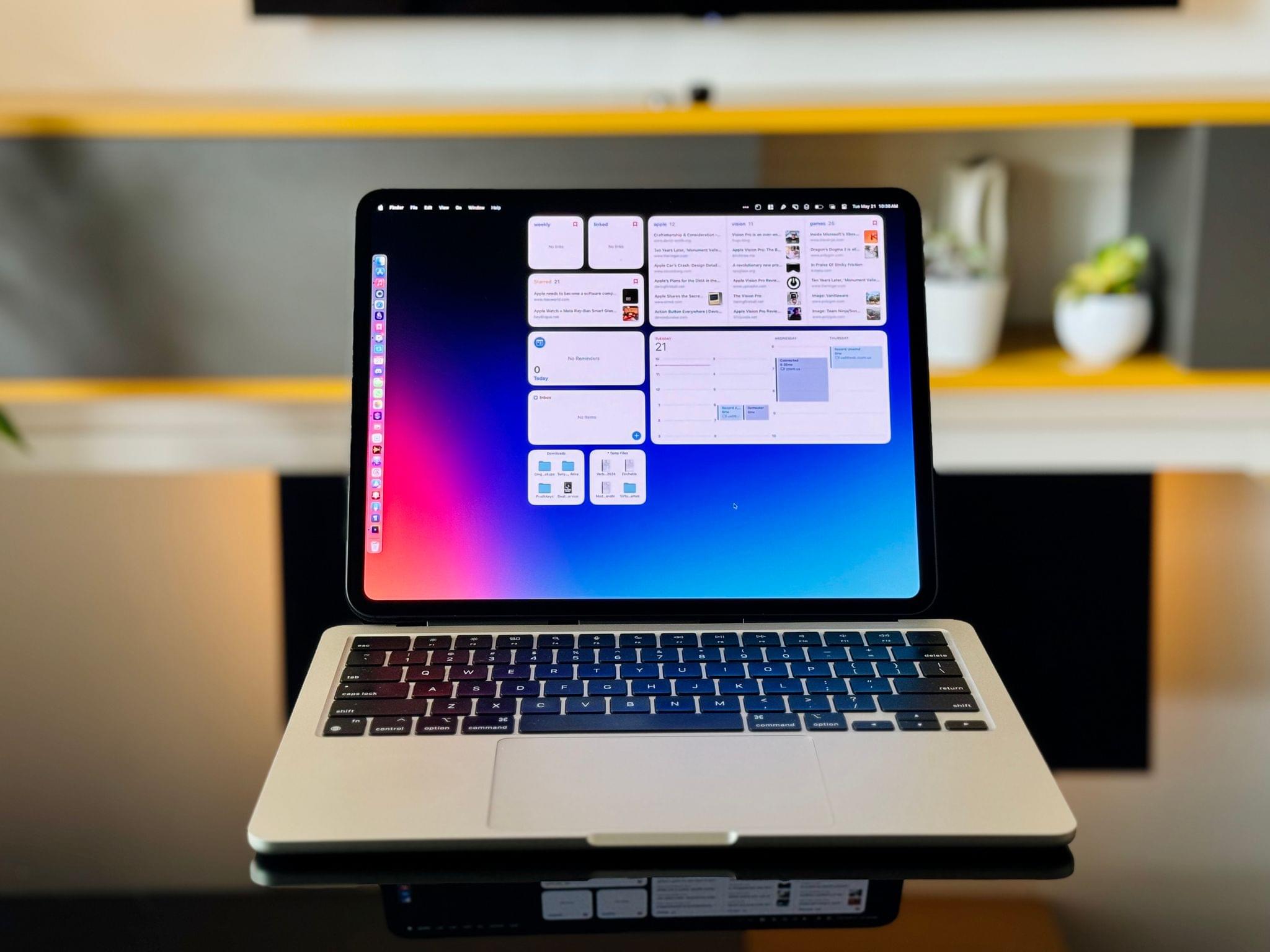
As I hinted in my story on the issues of iPadOS last week, I upgraded from an 11” iPad Pro to a 13” iPad Pro (1 TB, Wi-Fi-only model). While I was very happy with the 11” form factor, I decided to return to the larger model for two reasons:
- I wanted to have maximum thinness with the ultimate iPad Pro model Apple makes.
- I sacrificed the physical comfort of the 11” iPad Pro to get a larger display for my MacPad as well as portable gaming.
Today, I will explain how I was able to immediately turn the brand-new 13” iPad Pro into a convertible MacPad using a combination of accessories and some new techniques I’ve been exploring. I’ll also share my experience with using the iPad’s glorious Tandem OLED display in a variety of gaming setups ranging from streaming to emulators.
Let’s dive in.

Access Extra Content and Perks
Founded in 2015, Club MacStories has delivered exclusive content every week for nearly a decade.
What started with weekly and monthly email newsletters has blossomed into a family of memberships designed for every MacStories fan.
Club MacStories: Weekly and monthly newsletters via email and the web that are brimming with apps, tips, automation workflows, longform writing, early access to the MacStories Unwind podcast, periodic giveaways, and more;
Club MacStories+: Everything that Club MacStories offers, plus an active Discord community, advanced search and custom RSS features for exploring the Club’s entire back catalog, bonus columns, and dozens of app discounts;
Club Premier: All of the above and AppStories+, an extended version of our flagship podcast that’s delivered early, ad-free, and in high-bitrate audio.
The One Where Quinn Nelson Tries to Create a Window with iPadOS’ Stage Manager→
I’ve published my fair share of criticism regarding the iPadOS version of Stage Manager over the years. I wrote about it again last week, but most of its underlying issues date back to the original release in late 2022, which I documented here.
But let’s say you don’t want to read my articles and would prefer to have a more practical example of the issues I described. In that case, go check out this three-minute video by Quinn Nelson, in which he tries to have a Freeform window on the iPad and another Freeform window on an external display:
Post by @snazzyqView on Threads
This video has everything:
- It shows the confusing lack of Mission Control/Exposé to see all active windows for an app in Stage Manager.
- It highlights the lack of a window picker in Stage Manager. Quinn points out that he can see a window picker on the iPad’s display, but that’s because the iPad is running in traditional Split View mode, which does come with the shelf.
- Quinn is (rightfully) perplexed by what ‘Add Another Window’ means.
- The video shows the inconsistencies of Spotlight as an app launcher.
- It also showcases the inconsistent implementation of keyboard shortcuts for multitasking.
- The video shows how downright unintuitive the solution is. An alternative solution mentioned in Quinn’s replies is equally non-discoverable.
I’m sure someone at Apple may argue that this is the kind of feature people buy another computer for. But it’s always the same story: if Stage Manager for iPad exists, what’s the point of leaving it in this state for two years?
Our 2024 iOS and iPadOS WWDC Wishes
Previously, On MacStories
Stories Assassin’s Creed Shadows Is Coming to the Mac Day and Date with Consoles and Other Platforms Apple Marks Global Accessibility Awareness Day with a Preview of OS Features Coming Later This Year The iPad Pro 2024 Manifesto iPad Review Roundup: Cutting Edge Hardware and OS Frustrations Not an iPad Pro Review: Why iPadOS Still...
Up Next
Next week on AppStories, Federico and John kick off their annual WWDC wishlist episodes with iOS and iPadOS 18. Next week onMagic Rays of Light, Sigmund and Devon highlight the return of Trying, recap the first season of Sugar, and revisit their 2023 WWDC hopes to see what came true and what remains on...
In This Issue
Jonathan recommends Tusks, Niléane explains the process she went through to buy her mom an iPhone, plus the usual Links, App Debuts, the latest happenings in the Club MacStories+ Discord community, a recap of MacStories articles, and a preview of next week’s episodes of AppStories and Magic Rays of Light....
The iPad Pro 2024 Manifesto→
There are so many parts of Steve’s iPad Pro manifesto I would quote here on MacStories, but I’m going to limit myself to just a couple of excerpts.
What I like about this story is that it’s a balanced take on the limitations of iPadOS from the perspective of a developer, laid out in a comprehensive roundup. It serves as a great companion piece to my story, but from a more technical angle.
Here, for instance, is a well-reasoned assessment of why Stage Manager isn’t ideal for developers of iPad apps:
Stage Manager was such a missed opportunity: it tried to bolt-on a windowing model onto iPadOS without providing developers any way to optimize for it, and has had virtually no meaningful improvements in two years. What I really want to see are APIs. APIs to know when an app is running in Stage Manager and give it an opportunity to enable extra functionality to accommodate that — like having an ‘open in New Window’ context menu option that it would otherwise hide. APIs to set window size/shape, minimum and maximum size. APIs to open a window in split view if possible, with a preferred screen side. APIs to drag a window on mouse-down. Auxiliary views or inspector panels that can be floated on/near a primary window, like visionOS’ ornaments.
Many of these features are available as APIs to apps using the iOS SDK… on macOS and visionOS. Which is why it boggles the mind that iPad’s own Stage Manager spec completely shunned them, and ignored the explicit intent provided by developers as to how they want their apps to work. Stage Manager wasn’t provided as an opportunity to make our apps better, it was inflicted on developers in a way that harmed the developer, and user, experience. Which is why today you can very quickly stumble upon apps that don’t quite resize correctly, or have important parts of the UI covered by the virtual keyboard, or toolbars floating in strange places.
To this day, developers have no way to fine-tune their apps so that they behave differently (and better!) when Stage Manager is active. This part about JIT is also worth calling out:
Just-in-time compilation is essential to power things like web browsers, console and PC emulators, and language-based virtual machines. It is used by Apple’s own apps, like Playgrounds, to empower key functionality that no third party app can match. And it is provided in a very limited way (with a ton of asterisks) to Alternative Web Browsers in the EU under the DMA, so they can implement their own JavaScript engines. The DolphiniOS project, which emulates Nintendo’s GameCube, recently posted a video that perfectly encapsulates the problem and demonstrates why emulators for newer consoles just can’t come to iPadOS. Other app stores, like Microsoft’s Windows Store, offer a JIT entitlement as standard, and I think Apple should, too.
It’s not like JIT cannot exist on iPadOS; it’s that Apple has chosen not to offer it as an entitlement for third-party developers.
I also want to point out two more aspects of Steve’s manifesto. It’s almost a 1:1 match of a story he wrote for us in 2019, which is quite sad as it tells you a lot about iPadOS’ state of affairs. Five years later, and we’re still asking for the same changes. Additionally, it should be noted that Steve is not asking for Apple to call it a day and put macOS on iPad. Claiming that someone who criticizes iPadOS does so because “they just want the iPad to turn into a Mac” has become the de rigueur dismissal for some reply guys these days, and it completely misses the point.
I highly recommend reading Steve’s full story here.