
I was recently asked by my friend Myke if it was possible to inspect the raw contents of an RSS feed on iOS. Mac users have long been able to look at the XML structure of an RSS feed on the desktop: both Safari and Chrome can display a feed as structured XML with...
Gboard Adds 3D Touch Cursor Movement, Contacts Integration→
Google released a nice update to their iOS keyboard, Gboard, earlier today.
Cursor control can now be activated with 3D Touch, which is consistent with the behavior of Apple’s keyboard. Gboard can’t move the cursor freely on the screen like the system keyboard, though, which makes it more limited when it comes to swiping across multiple lines of text. Also, Google didn’t implement haptic feedback when switching between contextual keyboard menus (such as holding down on the dash key), which is another detail that I appreciate in Apple’s keyboard on the iPhone 7.
Similarly, Gboard now features Contacts integration to look up a person’s contact card directly from the keyboard – but it’s not as tightly integrated as QuickType suggestions in iOS 10. However, I prefer the presentation of contact cards in Gboard and I think Google’s is a sweet solution as well.
Gboard is shaping up nicely, but I continue to wish Google paid more attention to the iPad layout and built true multilingual support for international users.
Workflow Update Brings Ability to Interact with Any Web API
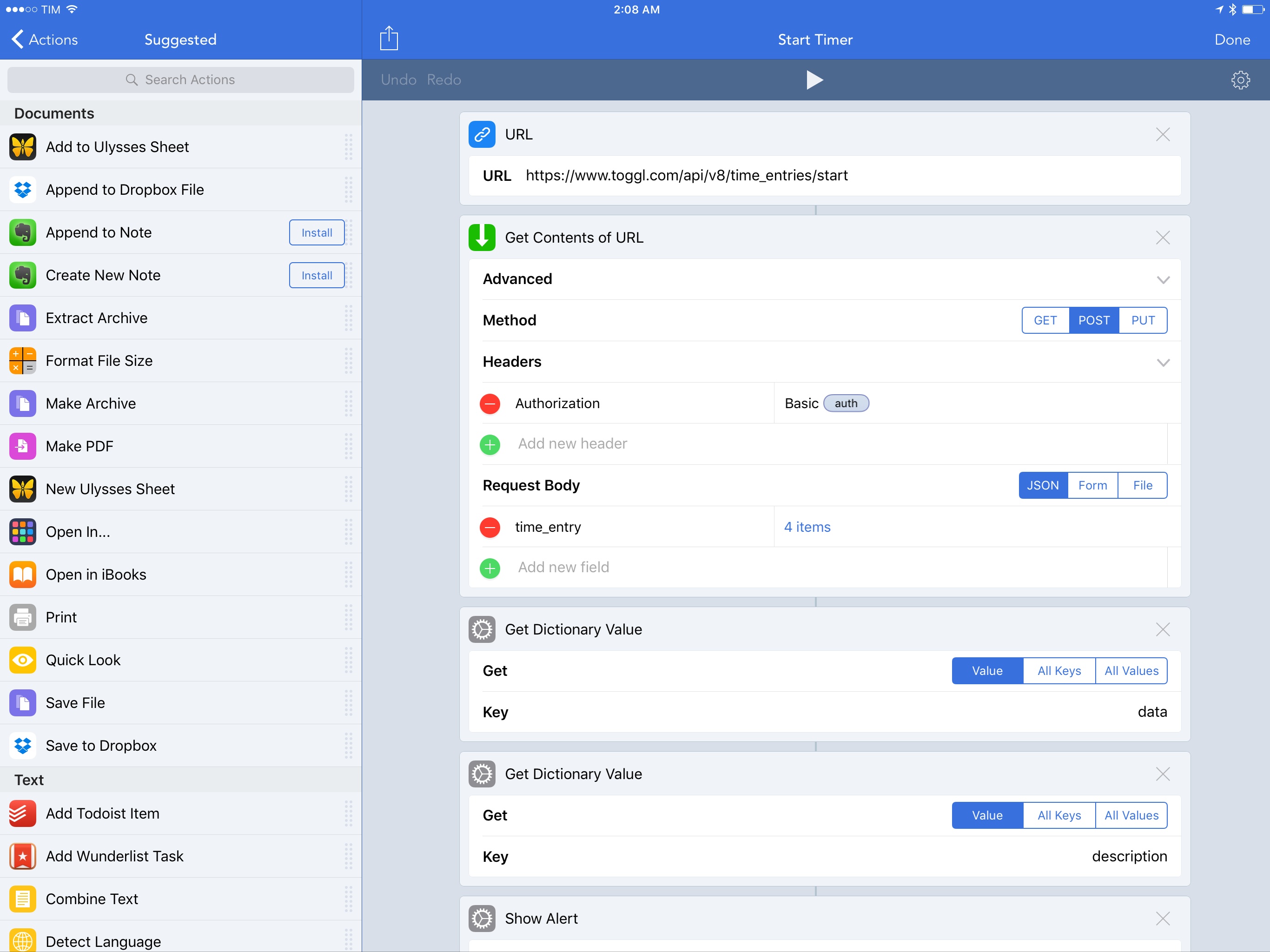
Integration with native iOS features and apps has always been one of Workflow’s strong suits. With an update released today, however, the Workflow team is considerably expanding the scope of the app to work with any web API, giving Workflow a virtually infinite feature set that goes beyond iOS alone.
Connected, Episode 113: Here is Smart Phone→
This week, Myke goes to the Apple Store, the group reads Pixel reviews and Federico brings back Weekly Picks.
A fun episode of Connected this week, with a brief discussion of Google’s new Pixel phone and the return of weekly app picks. You can listen here.
Sponsored by:
- TextExpander, from Smile: Communicate smarter with TextExpander.
- The Nuisance Committee: Please stay tuned after the show for a special message about the 2016 election.
Daylite: A Business Productivity App for Mac and iOS [Sponsor]
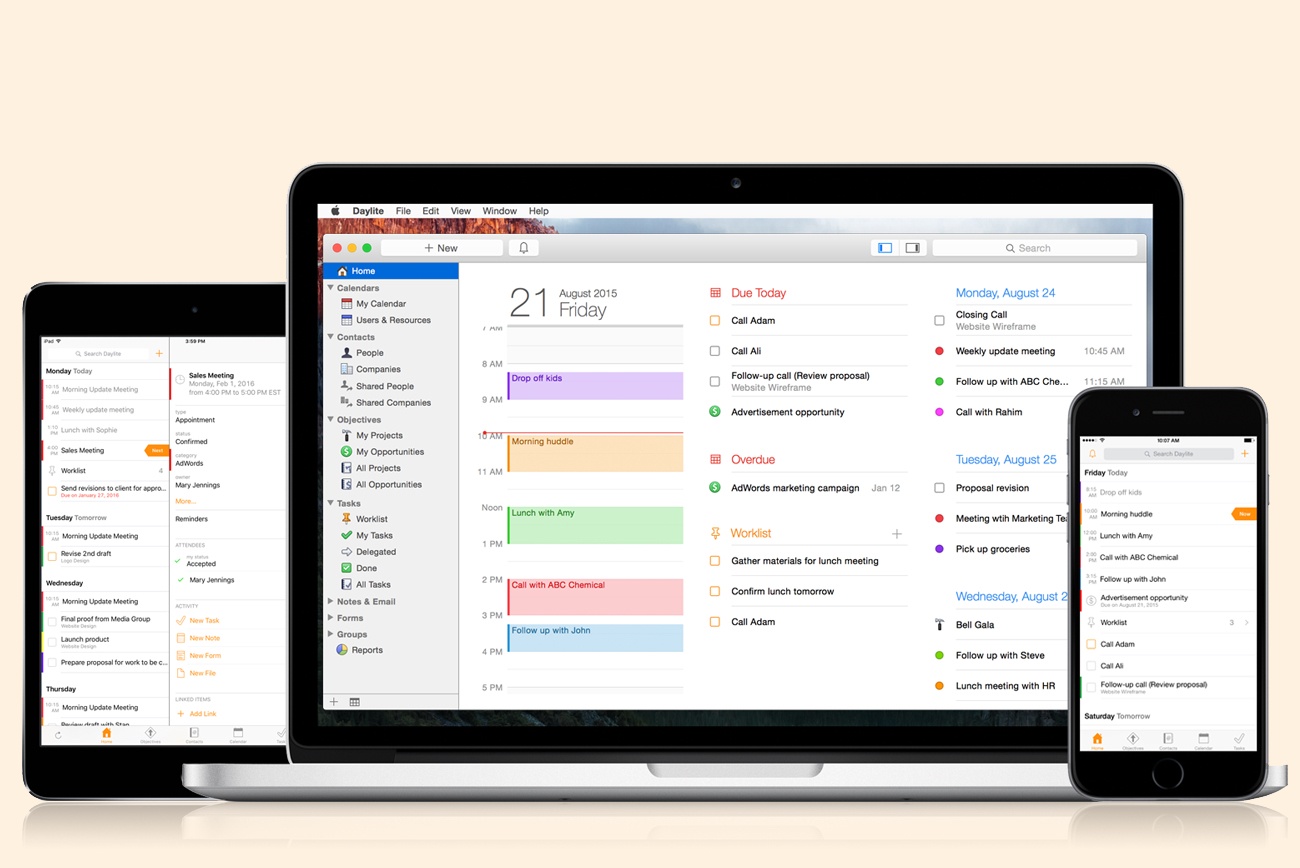
Daylite is a business productivity app for Mac, iPhone, and iPad.
Organize you and your team’s contacts, calendars, projects, tasks, emails, notes, and new business opportunities all in one app.
Track sales and set reminders for follow-ups. See a full history of all emails, calls, and notes for each customer. Customize your own pipelines to track sales and projects. View your whole team’s calendar to make scheduling meetings simple. Daylite even integrates with Apple Mail so you can update customer info, set tasks and reminders, and add appointments to your calendar – all without leaving Mail.
Automate lead generation from online web forms with Daylite & Zapier integration. When someone fills out a form on your website through Google Forms or Wufoo, a new contact and business opportunity are creating in Daylite. You can then segment leads for specific email campaigns and track all of your communication with them in Daylite.
Always have your business info no matter where you go. Daylite is a native app so you can access your information on your Mac, iPhone, or iPad even when you don’t have an Internet connection.
Read how businesses all over the world are becoming more efficient with Daylite.
Our thanks to Daylite for sponsoring MacStories this week.
Siri and the Suspension of Disbelief→
Julian Lepinski has a thoughtful response to last week’s story by Walt Mossberg on Siri’s failures and inconsistencies. In particular, about the way Siri handles failed queries:
Apple’s high-level goal here should be to include responses that increase your faith in Siri’s ability to parse and respond to your question, even when that isn’t immediately possible. Google Search accomplishes this by explaining what they’re showing you, and asking you questions like “_Did you mean ‘when is the debate’?_” when they think you’ve made an error. Beyond increasing your trust in Siri, including questions like this in the responses would also generate a torrent of incredible data to help Apple tune the responses that Siri gives.
Apple has a bias towards failing silently when errors occur, which can be effective when the error rate is low. With Siri, however, this error rate is still quite high and the approach is far less appropriate. When Siri fails, there’s no path to success short of restarting and trying again (the brute force approach).
The comparison between conversational assistants and iOS’ original user interface feels particularly apt. It’d be helpful to know what else to try when Siri doesn’t understand a question.
Remaster, Episode 20: The PlayStation VR Review→
The PlayStation VR is finally out. Federico, Myke, and Shahid share their views on the hardware, the experience, and the launch lineup.
Sony’s PlayStation VR platform launched earlier this week, and we’ve been playing with several launch titles for the past few days. On the latest Remaster, we discuss our impressions of the hardware, the gaming experience, and its future potential. You can listen here.
Sponsored by:
- The Nuisance Commitee: Please stay tuned after the show for a special message about the 2016 election.
Canvas, Episode 21: Office and Google Docs→
This week Fraser and Federico complete the set and talk about Microsoft Office and Google Docs on iOS.
This week on Canvas, we conclude our mini-series on office apps for iOS with a look at the Microsoft Office suite and Google’s iOS clients. You can listen here.
Sponsored by:
- Boom for iOS: Redefine the way you listen to music on your iPhone and iPad.
 Television Time

My girlfriend and I watch a lot of TV shows every week (in English without subtitles, which helps improve our understanding of the language) and, over the years, I’ve been switching between different clients to keep track of the episodes I’ve watched and those coming next. I’ve been using Television Time for the past...