
This is a quick tip for Soulver, the excellent free-form calculator for Mac and iOS. I recently remembered this feature was supported by the app, and it came in handy this week as I had to reconcile multiple transactions from different currencies into a total amount in EUR. Soulver allows you to write a...
 Q&A
Q&A
Question: If you were setting up something like MacStories today, would you use Medium, WordPress, Squarespace, or something else? What if you had limited coding ability? (Anonymous)
I would still go with WordPress because of the extensible nature of the platform and amount of resources available online. I’m a big believer in controlling my...
Workflow 1.7 Introduces Magic Variables for Easier, More Powerful Visual Automation
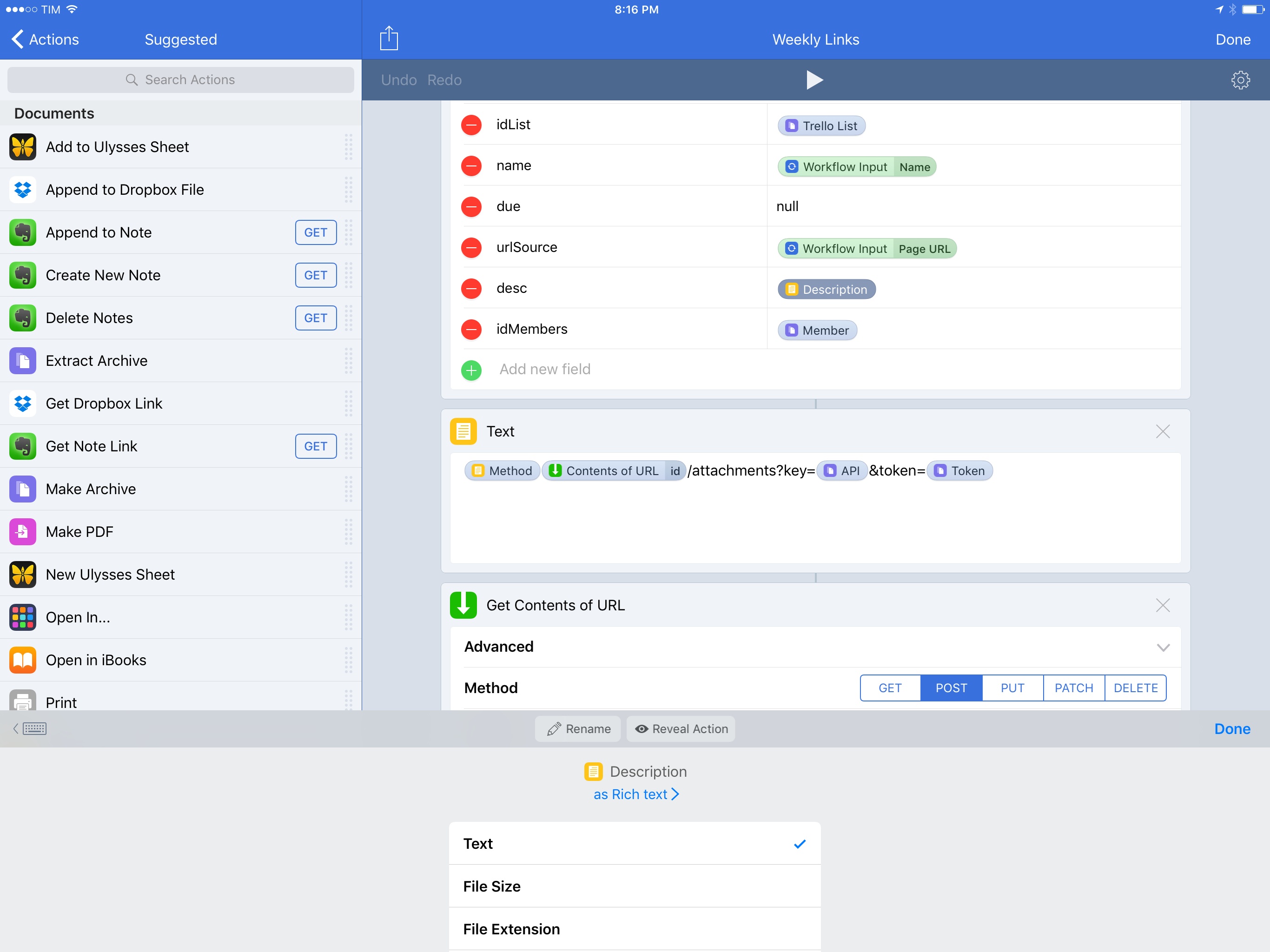
At its core, Workflow is a visual programming app that deals with variables. Data flows through actions and is altered by the user until it has to be stored in a variable – a local reference that can be recalled in subsequent steps.
Since the app’s original release, the Workflow team has done a commendable job at abstracting the complexity behind variable creation and management, but the feature itself is a vestige of traditional programming languages. The manually-saved variable is fundamentally ill-suited for Workflow’s visual approach predicated on direct manipulation of actions. Workflow revolutionized several automation concepts, yet it was always anchored in the common practice of declaring variables between actions.
For the past year, I’ve been lamenting the sluggishness involved with setting variables and extracting additional details from them. Anyone who’s ever created complex workflows has likely come across the same problem:
- There’s a “master variable” that contains rich metadata (such as an iTunes song or an App Store app);
- You want to extract details from the master variable – e.g. an app’s name, icon, or price;
- Each of the variable’s sub-items has to be extracted by repeating a combination of ‘Get Variable-Get Details of Variable-Set Variable’ over and over.
Not only did this limitation make workflows slower to create – it also made variables difficult to explain and workflows harder to read for people who aren’t proficient in iOS automation.
As someone who writes about iOS workflows on a weekly basis, I’ve been thinking about this issue for a while. Every time I had to explain the inner workings and shortcomings of variables, I kept going back to the same idea: Workflow needed to get rid of its clunky variable management altogether.
Here’s what I proposed when Workflow 1.5 launched in May 2016:
“Instant Variables” to get details of a macro variable without doing the Get Variable-Get Details-Set Variable dance every time. You could save a lot of time if instead of fetching details of a variable multiple times you could use a single master variable and only specify where necessary which sub-details to use;
With today’s 1.7 update, the Workflow team isn’t introducing Instant Variables. Instead, they’ve rebuilt the engine behind variables on a new system called Magic Variables, which completely reimagines how you can create workflows and connect actions for even more powerful automations.
More than a mere tweak for power users, Magic Variables are the next step in Workflow’s goal to enable everyone to automate their iOS devices. By making workflows easier to create and read, Magic Variables are the app’s most important transformation to date, and the result far exceeds my expectations.
Stagehand Review: Living Platforms

One of my first memories of a portable platform game takes place in the summer of 1996 and it involves Super Mario Land 2 for the original Game Boy. I was 8, and until that point, my only console experience had been with a Super Nintendo my parents bought me for Christmas. I could play with it a few hours each week, which didn’t satiate my infinite curiosity for videogames. When I saw Super Mario Land 2 on a friend’s Game Boy, I was taken aback by two distinct aspects: the contagious fun of a platformer (my only SNES game was Stunt Race FX – don’t ask) and its ubiquitous availability – provided you had enough daylight and 4 AA batteries.
Later that year, I convinced my mom to buy me a Game Boy. A couple of years later, I got a Game Boy Color. For the past 20 years, portable consoles and Nintendo’s Mario games have shaped my taste in videogames and defined my moments of quiet downtime. From Super Mario Advance 1 and 3 (both remakes of games I had never played) to New Super Mario Bros and, to an extent, the recent Super Mario Run for iOS, all my favorite 2D platform games agreed on a basic idea: you control a surprisingly athletic plumber who runs and jumps from left to right.
Conversely, Stagehand, the latest creation by Big Bucket (makers of The Incident and Space Age), upends decades of platformer conventions by turning the genre on its head. You don’t maneuver a character with meticulously timed jumps across retro-styled stages filled with floating platforms and spikes; rather, you sloppily modify the stage itself with touch, dragging platforms to accomodate the hero’s run and making sure he doesn’t run headfirst into cliffs, fall into pits, or get eaten by the inexorable advance of the left side of the stage.
Stagehand is an endless runner combined with a dynamic platform game, only you don’t control the character – you facilitate his run by reshaping the stage around him.
Connected, Episode 128: Better Pizza and Better Pasta→
Myke has caused a chain-reaction of purchases, Stephen talks about the PowerPC transition and Federico tries some apps.
On this week’s Connected, Myke makes some great points about the iPad’s sales compared to the Mac, and I explain why I’ve been using Twitterrific and Apple News. You can listen here.
Sponsored by:
iOS Stiffness: The Neglected Touch Down State→
I would love to see iOS 11 bringing subtle touch down animations to standard system elements, such as navbar buttons, table view cells etc. By doing it to the default components, third party apps would be affected by it as well. This would make for a consistent and more compelling experience when touching iOS. And that sense of stiffness would be replaced with a much more fluid experience.
I like this idea. Apple Music’s new play button has a great touch-down state – I wish more parts of iOS followed the same approach.
Google Updating AMP Pages with Easier Way to View, Copy Source URLs→
A few months ago, I decided to remove Google AMP support from MacStories due to the obfuscation of our permalinks by the AMP plugin. There was a good discussion about publishers’ AMP concerns, including a story on The New York Times.
Today, Google has announced that they’re introducing a new feature that makes it easier to see a publisher’s full URL and copy it. Here’s Alex Fischer, writing on the Google Developers Blog:
Today, we’re adding a feature to the AMP integration in Google Search that allows users to access, copy, and share the canonical URL of an AMP document. But before diving deeper into the news, let’s take a step back to elaborate more on URLs in the AMP world and how they relate to the speed benefits of AMP.
And:
In addition to the above, many users have requested a way to access, copy, and share the canonical URL of a document. Today, we’re adding support for this functionality in form of an anchor button in the AMP Viewer header on Google Search. This feature allows users to use their browser’s native share functionality by long-tapping on the link that is displayed.
Google is also hoping that browsers will add support for a new Web Share API (which sounds nice as long as it can only be manually activated by the user; I can imagine websites abusing programmatic activation of the system share sheet).
I’m still not going to re-enable AMP in the short term, but I’m glad to see Google is listening to publishers and iterating quickly.
Déxter

A couple of weeks ago, I picked up Pokémon Sun again and started playing where I left off in early December. While most of my friends with iOS devices are obsessed with Pokémon GO, I prefer the series’ traditional games for Nintendo consoles, and I find the latest generation of Pokémon games to be...
Putting iPad Pro and iPhone Plus Screenshots into Device Frames (Early 2017)
For this week’s Workflow Essentials column, I wanted to follow-up on an image editing workflow I first published on MacStories in March 2016. These are two short and simple workflows, but they’re saving me a lot of time every week, and I think they could be useful for other writers or developers who share...