Federico Viticci

10669 posts on MacStories since April 2009

Federico is the founder and Editor-in-Chief of MacStories, where he writes about Apple with a focus on apps, developers, iPad, and iOS productivity. He founded MacStories in April 2009 and has been writing about Apple since. Federico is also the co-host of AppStories, a weekly podcast exploring the world of apps, Unwind, a fun exploration of media and more, and NPC: Next Portable Console, a show about portable gaming and the handheld revolution.

The Beta Releases that Will Change the App Economy

AppStories+ Deeper into the world of apps

AppStories Episode 149 - The Beta Releases that Will Change the App Economy

0:00
39:41

AppStories+ Deeper into the world of apps

This week, Federico and John discuss the updates to Apple’s OSes and developer tools, the changes to the app economy they signal, and the impact they’ll have on users and developers.

Read more


An Adventure with OCR, Raindrop Uploads, and Hundreds of PDFs

When I covered the Raindrop.io bookmarking service in my Must-Have Apps roundup and Issue 208 of MacStories Weekly, I mentioned the possibility of uploading your own images and documents in addition to bookmarking webpages. Last week, Raindrop rolled out an update that brought full-text search (along with permanent copies) to the iPhone and iPad...


Adapt, Episode 18: Fixing Multitasking

On this week’s episode of Adapt:

Multitasking is key to using the iPad as a primary computer, but the current drag and drop-centric system is flawed. Ryan shares his idea for a new approach, then Federico details his email app discoveries.

You can listen below (and find the show notes here), and don’t forget to send us questions using #AskAdapt and by tagging our Twitter account.

AppStories+ Deeper into the world of apps
0:00
01:24:27

Adapt, Episode 18

AppStories+ Deeper into the world of apps

Sponsored by:

Permalink

Connected, Episode 280: Peanut Butterpeanut Butterpeanut Butter

On this week’s episode of Connected:

This week, most of the show document got shredded as a bunch of breaking news took place during recording. iOS 13.4 is bringing a bunch of changes, Mac Catalyst could become more useful and universal apps are coming to the Mac. When not breaking news, Federico shares a sad story, Myke reads a tweet about bread and Stephen struggles with how to edit the episode.

You can listen below (and find the show notes here).

AppStories+ Deeper into the world of apps
0:00
01:30:51

Connected, Episode 280

AppStories+ Deeper into the world of apps

Sponsored by:

  • Pingdom: Start monitoring your website performance and availability today, and get instant alerts when an outage occurs or a site transaction fails. Use offer code CONNECTED to get 30% off. Offer expires on January 31, 2021.
  • Health IQ: Insurance for the Health Conscious. Save up to 41%. Take the quiz now to see if you qualify.
  • Boll & Branch: The Softest Organic Sheets & Luxury Bedding. Save $50. Try them for 30 days in a risk free trial.
Permalink

The Elements of Modern iOS and iPadOS Apps

AppStories+ Deeper into the world of apps

AppStories Episode 148 - The Elements of Modern iOS and iPadOS Apps

0:00
48:31

AppStories+ Deeper into the world of apps

This week, Federico and John discuss the features and technologies that go into building a modern iOS or iPadOS app with examples of some of their favorite implementations.

Read more


Jason Snell’s 2019 Apple Report Card

Jason Snell, writing at Six Colors:

It’s time for our annual look back on Apple’s performance during the past year, as seen through the eyes of writers, editors, developers, podcasters, and other people who spend an awful lot of time thinking about Apple.

This is the fifth year that I’ve presented this survey to a hand-selected group. They were prompted with 12 different Apple-related subjects, and asked to rate them on a scale from 1 to 5 and optionally provide text commentary per category.

It’s always a pleasure to share my thoughts about Apple’s past year in Snell’s annual report. Not only is it a great read – at this point, it’s also a fantastic historical resource collecting years of commentary about Apple.

You can read Snell’s complete report card here. For context, I’ve included my full responses to Snell’s questionnaire below.

Read more


Reading Newsletters with Feedbin and Reeder

As I’ve mentioned in previous issues of our newsletters as well as my Must-Have Apps story, I used the holiday break as an opportunity to do some cleanup of various kinds of digital cruft on my devices. I reorganized apps on my Home screen; I deleted old shortcuts with LaunchCuts and installed custom icons...


Connected, Episode 279: Like, Zero Bubbles

On this week’s episode of Connected:

This week, the gang reflects on the iPad 10th’s birthday, complains about Google AMP and then reviews Fantastical 3.

You can listen below (and find the show notes here).

AppStories+ Deeper into the world of apps
0:00
01:48:20

Connected, Episode 279

AppStories+ Deeper into the world of apps

Sponsored by:

  • Pingdom: Start monitoring your website performance and availability today, and get instant alerts when an outage occurs or a site transaction fails. Use offer code CONNECTED to get 30% off. Offer expires on January 31, 2021.
  • TextExpander, from Smile: Unlock your productivity with TextExpander. Get 20% off with your first year.
  • Booz Allen: Integrate. Innovate. Get it done with Booz Allen.
Permalink

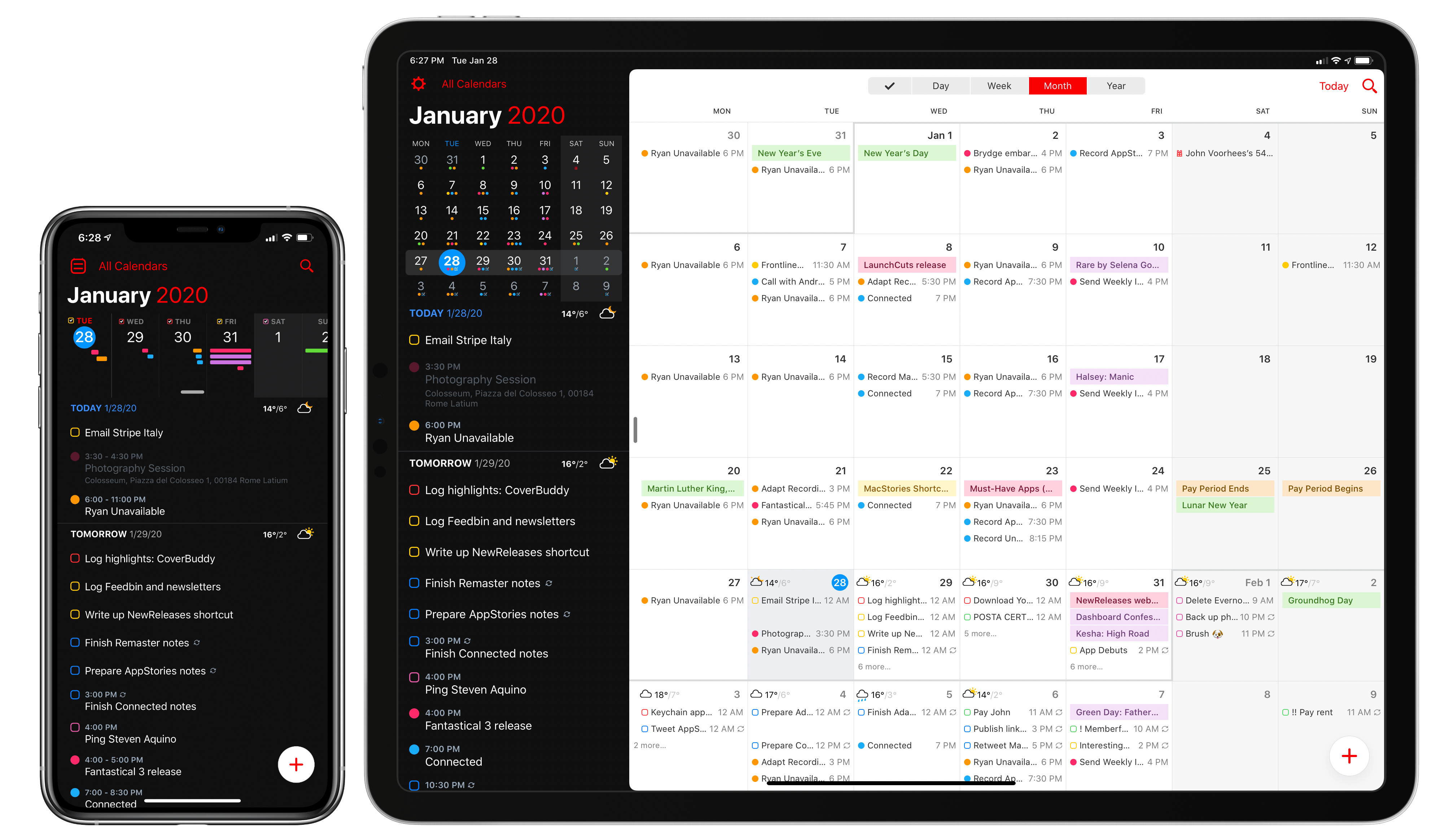
The New Fantastical Review

The new Fantastical.

The new Fantastical.

Over six years after the debut of the second major iteration of Fantastical – version 2.0 for iPhone, which I reviewed in October 2013 – Flexibits is introducing a new version of their popular hybrid calendar client/task manager today. The new Fantastical1, available today on the App Store, is a single app that runs on iPhone, iPad, Mac, and Apple Watch.

In many ways, the new Fantastical is a distillation of themes typically found in the modern productivity app scene: the app is free, and the developers have switched to a subscription model to unlock a variety of premium features. Fantastical Premium – the name of the new service – costs $4.99/month or $39.99/year and brings a collection of brand new functionalities, integrations, as well as enhancements to existing features. Users of Fantastical 2, regardless of the platform they were using, get to carry all existing features into the new app for free, and can try the Premium service at no cost for 14 days.

I’ll cut right to the chase: I’ve been using the new Fantastical for the past few months (hence the inclusion in my Must-Have Apps story), and it’s become the only calendar app I need, offering more power and flexibility than any alternative from Apple or the App Store. The free version of the new Fantastical – effectively, Fantastical 2 with a fresh coat of paint and some smaller bonuses – is a capable alternative to Apple’s Calendar app, but the Premium version is where Flexibits’ latest creation truly shines. At $40/year, Fantastical Premium may be a big ask for some users, but as a busy individual who deals with teammates all over the globe and likes Fantastical’s new features, I plan to subscribe.

In addition to the unification of the app across all platforms, design changes, and new premium features, which I will detail below, Flexibits has devised one of the most reasonable, generous upgrade flows from the old, paid-upfront app to the new, subscription-based one I’ve seen to date. There will be backlash from folks who are against subscriptions on principle – a discussion that is beyond the scope of this review – but I believe Flexibits has done a commendable job granting existing users access to all features they’ve already paid for, while replacing Fantastical 2 (the new app is an update over the old version) with something that is faster, visually more attractive, and potentially more useful.

With the new Fantastical, I’ve replaced a series of apps I was using for calendars, calendar sets, and time zones, and integrated everything into a single dashboard, kicking Apple’s Calendar app off my Home screen in the process. Even with a few shortcomings and system limitations, the new Fantastical is, at least for me, the non plus ultra of calendar apps at the moment.

Let’s dig in.

Read more