Nike Training Club Debuts on Apple Watch
Over the last year it’s become far too common to hear about a popular app dropping support for the Apple Watch – fortunately, today the opposite is happening: Nike Training Club has added an Apple Watch app for the first time.
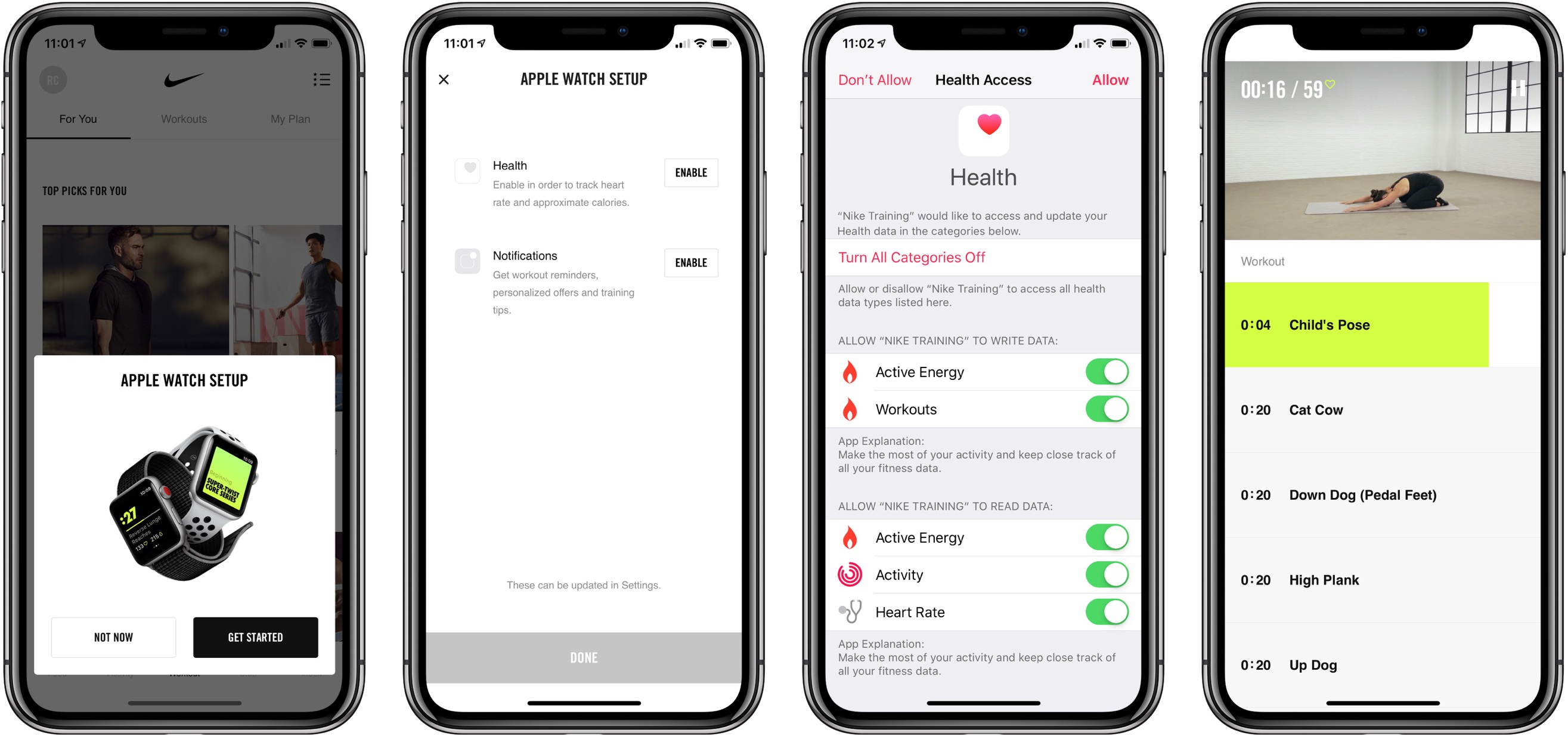
Nike Training Club is a workout app containing over 180 different training sessions to choose from. The app offers guided instructions to help you complete your workout, along with activity data to see your exercise track record. It’s a really solid, well designed app that gives you the tools needed to hit your workout goals.
The new Apple Watch app for Nike Training Club is merely a companion to the iOS app. You can’t start workouts directly from the Watch, so despite the Series 3 model’s cellular capabilities, you’ll need to have your phone nearby at all times.
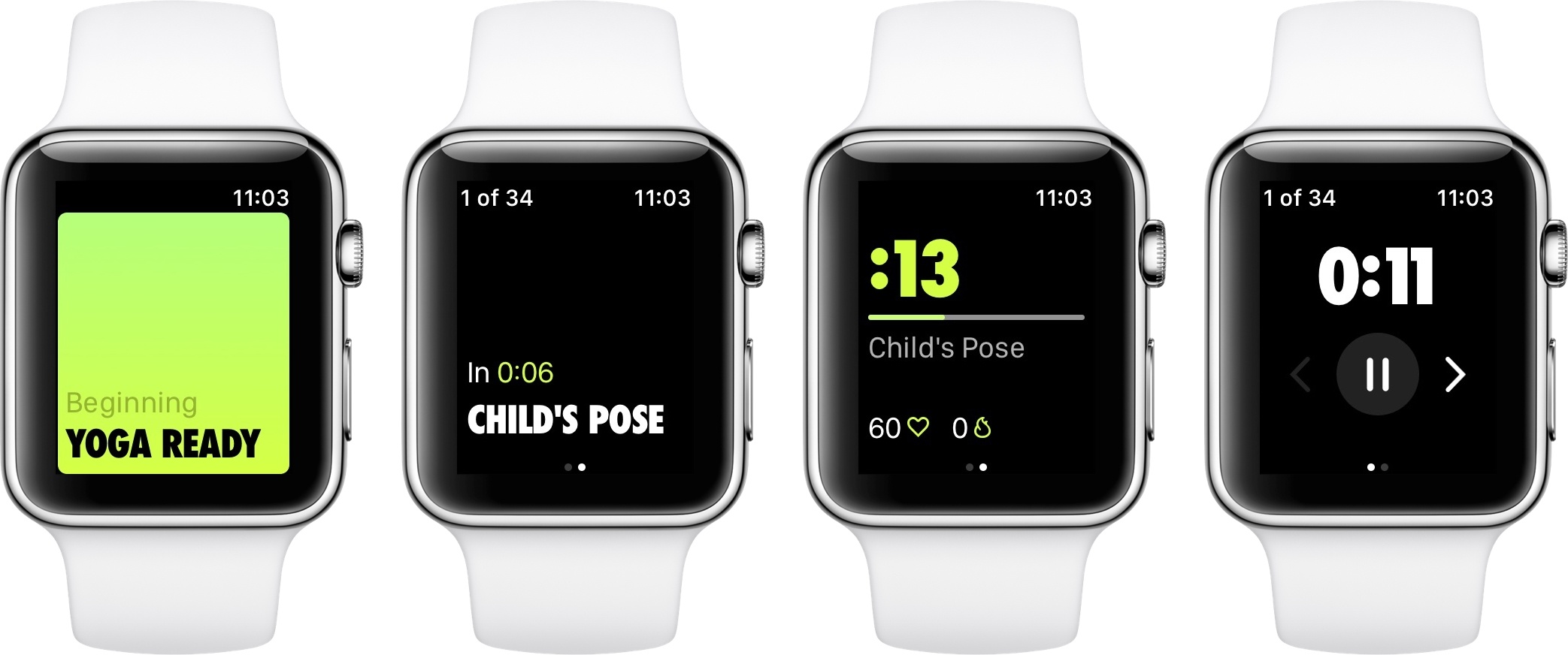
Despite its limitations, the Watch app can still be very useful during workouts. During a yoga session, for example, the Watch will show you which pose to take with a countdown for how long to hold it; you’ll also see your heart rate and calories burned. Swipe over in the app to see the total length of your workout and an option to pause or end the session.
If you’re a heavy Nike Training Club user, the new Watch app provides a much more convenient way to keep track of your workout’s progress. I really hope some day the app becomes completely independent of the iPhone, but this is a nice first step.
Nike Training Club is available on the App Store.
Apple Releases Software Fix to Address MacBook Pro Throttling→
Jason Snell, writing for Six Colors:
After a week of controversy following the posting of a video that claimed the new 15-inch MacBook Pro could experience massive slowdowns, Apple on Tuesday acknowledged that the slowdowns exist—and that they’re caused by a bug in the thermal management software of all the 2018 MacBook Pro models. That bug has been fixed in a software update that Apple says it’s pushing out to all 2018 MacBook Pro users as of Tuesday morning.
Here’s the official Apple statement, furnished to Six Colors by an Apple spokesperson:
Following extensive performance testing under numerous workloads, we’ve identified that there is a missing digital key in the firmware that impacts the thermal management system and could drive clock speeds down under heavy thermal loads on the new MacBook Pro. A bug fix is included in today’s macOS High Sierra 10.13.6 Supplemental Update and is recommended. We apologize to any customer who has experienced less than optimal performance on their new systems. Customers can expect the new 15-inch MacBook Pro to be up to 70% faster, and the 13-inch MacBook Pro with Touch Bar to be up to 2X faster, as shown in the performance results on our website.
The controversy caused this past week over throttling reports surely isn’t the kind of publicity Apple was hoping for with its latest updates to the MacBook Pro. There’s been all kinds of speculation as to the reasons for the excessive throttling that’s been reported, with one popular theory claiming it’s an issue with the MacBook Pro’s thin body – an error similar to that found with the current Mac Pro, whose enclosure can’t sufficiently handle the additional heat caused by powerful chips and heavy workflows.
While official tests will take some time to confirm Apple’s message, it’s great to see that the i9 MacBook Pro’s issues don’t appear to be hardware-related, and Apple moved swiftly to solve them.
App Debuts
Checking in with HomePod: Half a Year Later
Doppler Enables Pain-Free Importing of Music and Podcasts from Safari on iOS
I’ve been an iOS-first user for nearly three years now, and during that time there have been very few tasks that required me to pull out my old MacBook Air. One remaining holdout has been downloading music or podcast files from the web and saving them somewhere I can conveniently access them on iOS. The ideal scenario would enable importing those files into iTunes, where they get added to my iCloud Music Library – unfortunately, that remains impossible on iOS today. But the next-best option I’ve discovered can be found in an iPhone app called Doppler.
Doppler launched a few months ago as a music app aimed at the non-streaming market. Despite the increasing popularity of services like Apple Music and Spotify, there are still plenty of users who want greater ownership of their music library, and that’s where Doppler comes in. It specializes in offline playback and custom library curation. You can import your existing iTunes purchases, or import songs or podcasts saved in the Files app, and customize metadata so your library’s organized exactly as you like it.
Today in version 1.2, Doppler adds a feature I’ve long wanted on iOS: the ability to import files directly from Safari.
My main use cases for Doppler’s new feature include downloading MP3 tracks from an artist I support on Patreon, and downloading special members-only podcasts, like AppStories Unplugged from Club MacStories. In both cases, getting the audio files from Safari into a music player, or even just a cloud storage provider, has historically been way too difficult on iOS. Last year when iOS 11 introduced the Files app, I thought this problem would finally be taken care of; surely I’d be able to use Files’ share extension from Safari to save the audio tracks. Unfortunately, Safari only presents the Files extension when downloading certain file types, and audio files aren’t included. And that’s where Doppler comes in.
Doppler now offers an action extension that can be used in two contexts: either when an audio file is already loaded in Safari, or even just when long-pressing a link to an audio file and hitting the ‘Share…’ option. The action extension then pulls in the file, lets you modify track metadata, and saves it to your Doppler library. The app is billed as a music player, but this same process works well for podcasts too – just know that due to their increased track size, podcasts will take longer to import.
Doppler is still a young app, so it’s missing key features that will hopefully be added in the future, such as an iPad app and iCloud sync. Its design is solid though – I like how it evokes past versions of Apple’s Music app with backgrounds matching the color scheme of each album. Despite being feature-light, Doppler works well as a basic music player for your non-streaming service needs. And now, thanks to its Safari import feature, it’s become a crucial utility that’s staying installed on my device.
Doppler is available for iPhone on the App Store.
Apple Showcases New Emoji Arriving in iOS 12, macOS Mojave, and watchOS 5
In celebration of World Emoji Day, Apple has released a preview of the new emoji arriving later this year in updates to iOS, macOS, and watchOS. There will be 157 new emoji in total, but today’s preview only features a select few.
A centerpiece of the emoji additions this year will be improved diversity in hair options, including red hair, gray hair, curly hair, and bald.
Last year the new set of emoji was added with iOS 11.1 in October, while the year before that new emoji didn’t arrive until iOS 10.2 in December. One way or another, it’s only a matter of months until some version of iOS 12 puts the 157 new emoji in the hands of users.
After Two Years with Pinterest, Instapaper Regains Its Independence→
Today, we’re announcing that Pinterest has entered into an agreement to transfer ownership of Instapaper to Instant Paper, Inc., a new company owned and operated by the same people who’ve been working on Instapaper since it was sold to betaworks by Marco Arment in 2013. The ownership transfer will occur after a 21 day waiting period designed to give our users fair notice about the change of control with respect to their personal information.
We want to emphasize that not much is changing for the Instapaper product outside the new ownership. The product will continue to be built and maintained by the same people who’ve been working on Instapaper for the past five years. We plan to continue offering a robust service that focuses on readers and the reading experience for the foreseeable future.
Following Pinterest’s acquisition of Instapaper almost two years ago, there was a reasonable level of concern about what that change would mean for the popular read-it-later service. From an outside perspective, however, it seems like the transition has gone smoothly – which makes today’s announcement all the more surprising.
It will be interesting to see what changes this move brings in the short-term. In the immediate future, the company has already confirmed it’s working hard on making Instapaper available in Europe again. Looking further out, the service’s business model is a big question mark. Before Pinterest came along, Instapaper offered a premium subscription option that was later discontinued post-acquisition and its features made publicly available to all users. A new subscription plan may be in the works, likely with currently unannounced new features. Only time will tell what the future holds, but in any case, it’s always nice to see an app’s development team in full control of its product’s destiny.