Hosted by Tinderbox maker Eastgate, WinterFest 2018 is an amazing collection of carefully-crafted productivity apps and books available for a limited time for 20-25% off.
The 17 apps and books span the entire spectrum of the research and writing process. There are apps to plan your next big project, track your time, discover research materials, organize your research, add and tag images to your project, write, and more.
Each app is hand-crafted by some of the best Mac developers around. WinterFest includes:
- Tinderbox – Visualize and organize ideas and plans.
- Panorama X – Collect, organize, and understand your data.
- Nisus Writer Pro – The powerful word processor for the Mac.
- DEVONthink Pro Office - Your paperless Mac office.
- Aeon Timeline 2 – The timeline tool for creative thinking.
- TextExpander – Recall your best words. Instantly, repeatedly.
- Take Control Books – Essential books about Mac, iOS, and key apps.
- Storyspace – Serious hypertext narrative.
- Bookends –The reference manager you’ve been looking for.
- Scapple – Quickly capture and connect ideas.
- PDFpen – Powerful PDF editing.
- HoudahSpot – Powerful file search for Mac.
- HoudahGeo – Photo geotagging.
- DEVONagent Pro – Your smart (re)search assistant.
- BBEdit 12 – Power tool for text.
- ImageFramer Pro – Your art. Showcased.
- Timing – Automatic time tracking for Mac.
- Scrivener – Your complete writing studio.
Saving hundreds of dollars on these fine tools couldn’t be simpler. Visit the WinterFest website to learn more about each and purchase Eastgate’s Tinderbox and Storyspace. For everything else, just use the coupon code WINTERFEST2018 at checkout to take advantage of these fantastic deals.
Our thanks to WinterFest 2018 for sponsoring MacStories this week.
iOS devices and Macs sit at the center of our computing lives, often accompanied by a host of accessories. And each year brings a few standout new accessories that extend what our favorite devices can do in meaningful ways – 2018 was no exception. From dongles and hubs to cameras and headphones, the MacStories team tried a wide range of gadgets this year that made an impact on our daily lives. Below is our favorite, along with our runners-up.
Best New Accessory
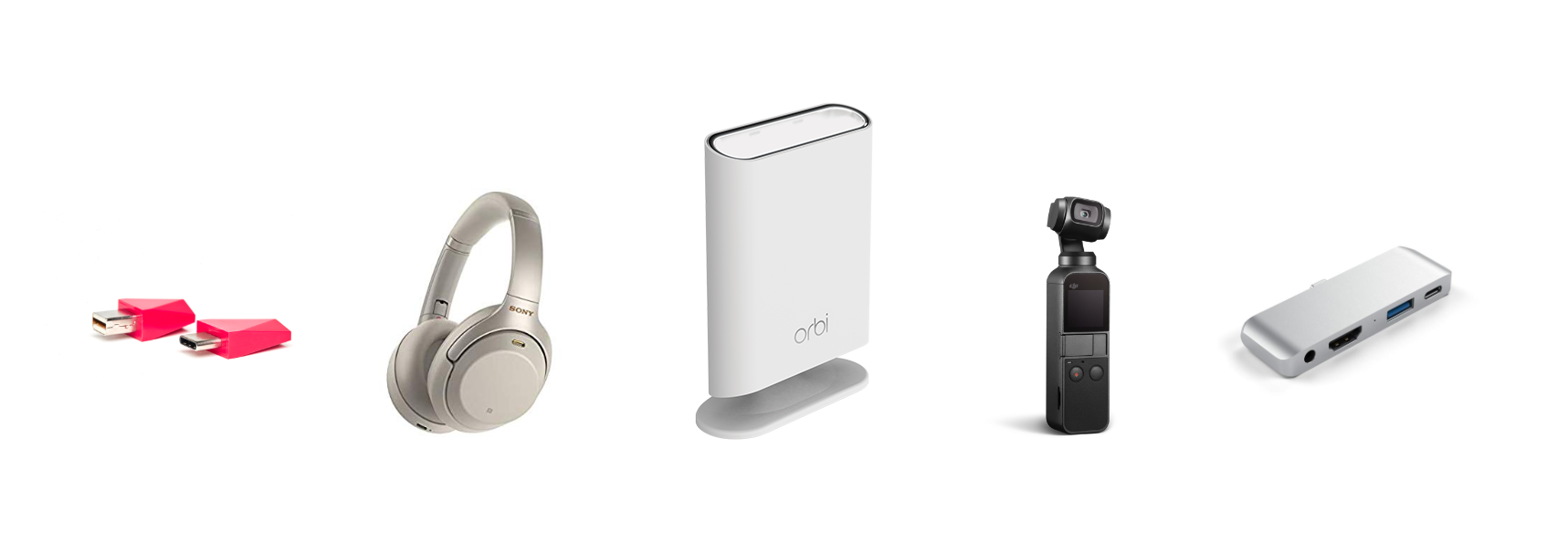
John: There are few aspects of my computing life more important than a reliable, fast connection to the Internet. There are several good options available when it comes to WiFi mesh networking systems, but it’s Netgear’s Orbi Outdoor WiFi Satellite that makes its system stand out and has added the kind of flexibility to my setup this year that wasn’t possible before.
Federico and I both use Netgear’s Orbi WiFi router and indoor satellite to blanket our homes in WiFi. I started with an Orbi router and one satellite. The router sits in my basement where our Comcast service enters the house, the satellite sits in the kitchen, and recently, I added an Orbi Wall-Plug on the second floor. That combination of Orbi devices alone has been enough to blanket the interior of my house in fast WiFi and handle around 40 connected devices when my entire family is home.
This past January at CES, Netgear announced it was adding to the Orbi lineup with the Orbi Outdoor Satellite, an extender for the Orbi router designed to withstand the elements. Admittedly, there’s probably no one more susceptible to the promise of outdoor WiFi than me sitting at home staring out at the snow while reading roundups of CES gear. Still, I waited until the device was released and reviewed before finally giving in early this past summer.
Read more
Hosted by Tinderbox maker Eastgate, WinterFest 2018 is an amazing collection of carefully-crafted productivity apps and books available for a limited time for 20-25% off.
The 17 apps and books span the entire spectrum of the research and writing process. There are apps to plan your next big project, track your time, discover research materials, organize your research, add and tag images to your project, write, and more.
Each app is hand-crafted by some of the best Mac developers around. WinterFest includes:
- Tinderbox – Visualize and organize ideas and plans.
- Panorama X – Collect, organize, and understand your data.
- Nisus Writer Pro – The powerful word processor for the Mac.
- DEVONthink Pro Office - Your paperless Mac office.
- Aeon Timeline 2 – The timeline tool for creative thinking.
- TextExpander – Recall your best words. Instantly, repeatedly.
- Take Control Books – Essential books about Mac, iOS, and key apps.
- Storyspace – Serious hypertext narrative.
- Bookends –The reference manager you’ve been looking for.
- Scapple – Quickly capture and connect ideas.
- PDFpen – Powerful PDF editing.
- HoudahSpot – Powerful file search for Mac.
- HoudahGeo – Photo geotagging.
- DEVONagent Pro – Your smart (re)search assistant.
- BBEdit 12 – Power tool for text.
- ImageFramer Pro – Your art. Showcased.
- Timing – Automatic time tracking for Mac.
- Scrivener – Your complete writing studio.
Saving hundreds of dollars on these fine tools couldn’t be simpler. Visit the WinterFest website to learn more about each and purchase Eastgate’s Tinderbox and Storyspace. For everything else, just use the coupon code WINTERFEST2018 at checkout to take advantage of these fantastic deals.
Our thanks to WinterFest 2018 for sponsoring MacStories this week.
A collection of MacStories Selects Honorable Mentions, a shortcut for saving tweets as rich text notes, an interview with photographer Austin Mann, John shares some wishes for the Apple Watch, an Outcast giveaway, lots of member questions answered, plus the usualLinks, App Debuts, a recap of MacStories articles, and a note about the AppStories publication...
Twitter: @austinmann. Travel photographer and co-founder of WELD. Where do iOS devices and apps fit in your photography workflow? This answer is always changing, but iOS is becoming more and more powerful and I find myself using iOS devices (iPhone + iPad) for things I wouldn’t have imagined. For instance, now with Lightroom CC, I...
TechCrunch reports that jailbreak site Cydia has shut down their jailbreak app store purchasing functionality. (Link) Ever wonder how much your personal data is worth? Gregory Barber at Wired set out to find out, trading his data for cryptocurrency. (Link) With calls in some quarters for Apple to manufacture iPhones in the US, The New...
Dear Club MacStories Members, This is a reminder that, as we announced last week, we will be taking two weeks off during the holidays to spend time with family and friends and relax a little after a busy 2018. This is our last MacStories Weekly issue of the year, but we will return with a...
Outcast Exclusively for Club MacStories members, we have 30 promo codes to give away for Outcast, a great standalone podcast player for the Apple Watch from Crunchy Bagel. Entries will remain open until 10:00 pm Eastern US time on Friday, December 28, 2018. Winners will be selected at random and notified by email by January...
Apple Music Is Now Available on the Amazon Echo Introducing MacStories Selects: The Best New Apps, App Updates, and iOS Games of 2018 Game Day: Tropico for iPad Darkroom 4.0: The MacStories Review Launch Center Pro 3.0 Review: Universal Version, New Business Model, NFC Triggers, and More AutoSleep 6: Effortless Sleep Tracking More Accessible Than...