

Twitter: @maxhasadhd. Creator of Television Time and Cinema Time. I love extremely colorful art, and on my phone I would usually have a really colorful wallpaper. However, that wallpaper can also detract from the art of the icons on my home screen. So I decided to start featuring the app icons themselves instead of having...
 In This Issue
iOS Travel Apps (Vol. 3), a shortcut for creating an offline file launcher for Safari, Ryan considers his personal app trends of 2018 and what’s in store for 2019, Maximilian Litteral’s home screen, plusWeekly Q&A follow-up, Links, App Debuts, a recap of MacStories articles, and a preview of next week’s episode of AppStories....
iPhone Backup Extractor: Helping Users Recover and Access Their iOS Data [Sponsor]
iPhone Backup Extractor is a powerful macOS app for working with iOS data. The app was launched a decade ago by Reincubate founder Aidan Fitzpatrick from his apartment out of frustration at having lost contacts he’d painstakingly entered into his iPhone. Now, not only can iPhone Backup Extractor recover contacts, it can retrieve deleted conversations from apps like Messages and WhatsApp, edit and browse iTunes backups, and export iPhone or iPad data into formats such as PDF, VCard, and iCal. The app also helps users find lost photos and extract data from individual apps.
iPhone Backup Extractor got a lot of love in 2018 with major updates throughout the year including support Mojave and iOS 12. The app’s UI was also overhauled, the restrictions passcode recovery feature was updated to support forgotten Screen Time passcodes, drag and drop support was added, and an all-new “Info” mode that provides a deep-dive into the various codes, serials, and IDs associated with an iOS device was launched.
iPhone Backup Extractor is available here. The free version of the app allows users to view their data and export four files at a time, which is a great way to give the app a test run. For a limited time, you can upgrade to the basic edition of iPhone Backup Extractor for just under $32 with this MacStories-exclusive 20%-off link. Help is always available too, whether you need assistance with your backups, recovering lost passcodes, or anything else.
Reincubate is always looking for ways to improve iPhone Backup Extractor too and would love to hear from MacStories readers about how it can do more to help people get deeper access to their own data. Feel free to get in touch with the Reincubate team at [email protected] or on Twitter at @reincubate or @afit.
Our thanks to iPhone Backup Extractor for sponsoring MacStories this week.
Interesting Links
If you’re looking for a more accurate (but slower and more involved) solution to see which music you’ve been listening to in any given year than Federico’s Apple Music Wrapped shortcut, Pat Murray’s Apple Music Analyzer web app is the best option around. The web app assembles a more precise and detailed report based on...
Previously, On MacStories
Apple Details iPad Pro Manufacturing Techniques and Flatness Standards Samsung Announces iTunes Movies and TV Shows App and AirPlay 2 Support for Its Smart TVs Apple Updates AirPlay 2 Page with Upcoming TV Features Including Siri Control Apple Music Wrapped: A Shortcut to Visualize Your Most Listened Songs, Artists, and Genres of the Year CES...
In This Issue
Fiery Feeds, more of our favorite Apple Watch apps, a tip on how to use the space barto engagetrackpad-mode for the keyboard of any iOS device, a shortcut for presenting a list of Agenda calendar events,plus the usual Weekly Q&A, Links, lots of App Debuts, a recap of MacStories articles, and a preview of next...
Up Next on MacStories’ Podcasts
Next week on AppStories, Federico and John interview Edwin Smith of Feral Interactive about the challenges of bringing deep, desktop game experiences to the iPad and iPhone....
LumaFusion: Professional Mobile Video Editing [Sponsor]
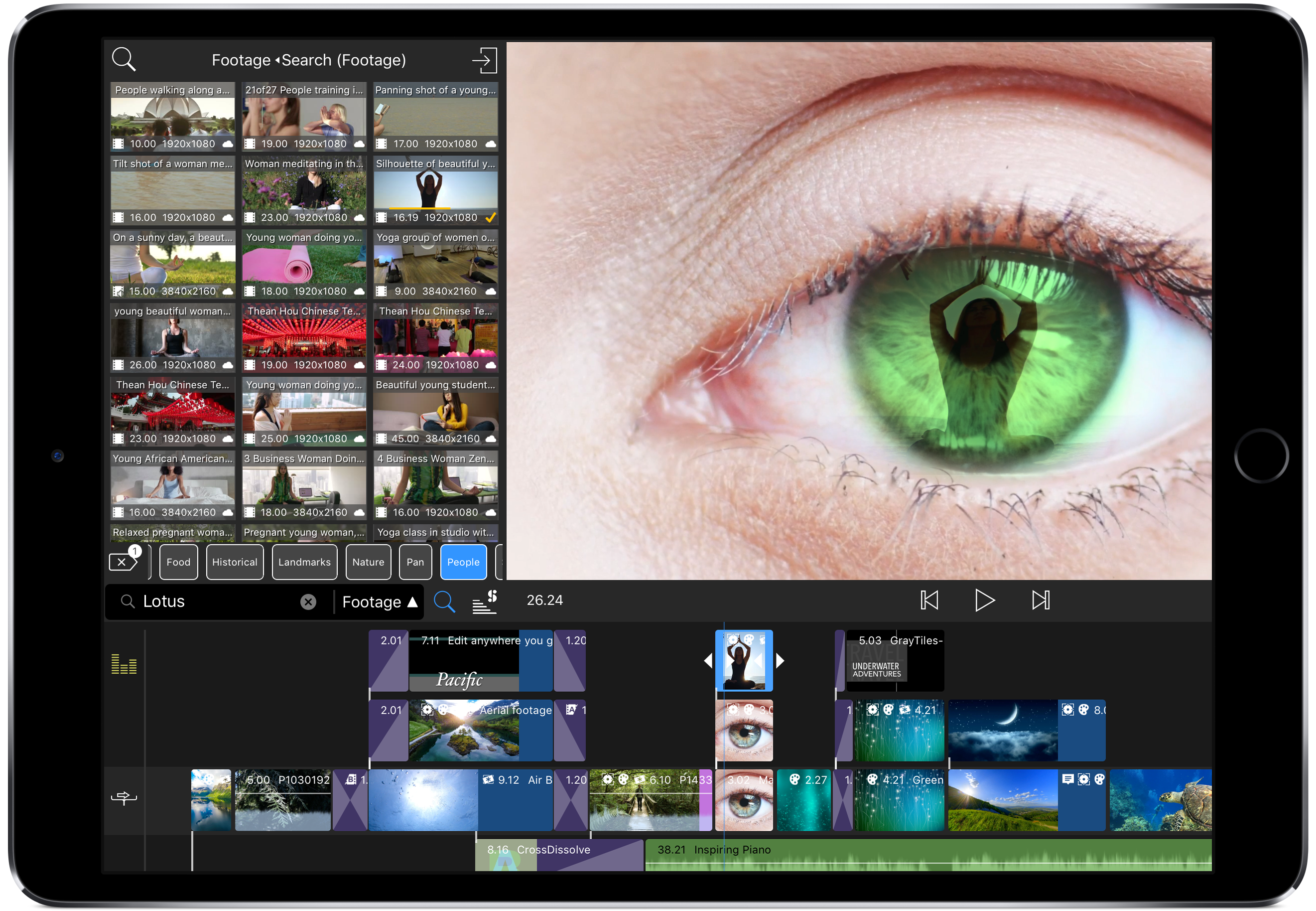
The future of video production is available today with LumaFusion, the powerful multi-track video editor for iOS. Used by mobile filmmakers, journalists, YouTube creators, and aspiring content producers looking to create better video using mobile devices and gear, LumaFusion delivers affordable power and flexibility in an intuitive interface.
Every aspect of LumaFusion is designed to allow users to edit and deliver professional-quality video from the field. Editing 4K video is demanding work for even the most powerful desktop computer, but LumaFusion handles tasks like adding titles, color correction, and effects gracefully in real-time. The app also supports multiple landscape and portrait aspect ratios, a long list of frame rates, and integrates with Storyblocks, a stock media service.
LumaFusion works with Western Digital My Passport Wireless Drives and GNARBOX SSD drives, which lets users import media into LumaFusion directly from the drives and back up their projects and assets without a laptop or Internet connection. It’s a fantastic feature that saves time and helps protect your creations.
LumaFusion brings the same class of sophisticated editing tools to multi-track audio editing too. The app can record voice-overs, mix tracks, and adjust levels on a per-track basis, all with simple gesture-based interactions.
As a video creator, you can count on LumaFusion to release regular updates with new functionality. Just this fall, Luma Touch, the maker of LumaFusion, introduced:
- Sort and Search to the Library and Import popup
- Multi-select and Select All functionality in the Library
- Edge softness and corner radius controls for cropping
- ‘Nudge’ buttons for sliders and rotation controls for super-precise adjustments
- Three new effects
- 20 new professional title templates
- Full EXIF, TIFF, IPTC, and PNG metadata for Photos
- ZIP file support
- New Cleanup functions to help you manage storage
All of that functionality is available for a small fraction of the price of comparable desktop apps making LumaFusion a fantastic choice for professionals and beginners alike. So download LumaFusion today and experience the freedom and flexibility of mobile video editing on iOS.
Our thanks to LumaFusion for sponsoring MacStories this week.
In This Issue
This month, John is optimistic about the looming Mac app ecosystem changes, Ryan shares his wishes for apps in 2019, and Stephen argues that the App Store should work better with the web....