

 Federico
Long Ago | Everyday Tracker This is an interesting take on a “tracker” app by indie developer Oscar Bazaldua. Long Ago wants to help you remember the last time you did something – whether that’s doing your laundry, going for a long walk, or calling a friend to check in with them. The app...
 The GameSir G8+ Is a Fantastic iPad mini Controller
I have a controller problem. There’s something about the built-in constraints of what a controller is designed to do, the ergonomics of something designed to be held with both hands, and the highly subjective, personal nature of what makes a controller good that draws me to try so many. When it comes to controllers that...
Interesting Links
I’m not sure, exactly, how putting a phone inside a MagSafe-enabled “case” with more comfortable grips makes it “like an e-reader” when it doesn’t have, you know, an e-Ink screen, but you can bet I preordered the latest accessory by the Astropad folks, called the Bookcase. If anything, I’m interested in the idea of...
The Latest from Comfort Zone, Magic Rays of Light, and MacStories Unwind

Enjoy the latest episodes from MacStories’ family of podcasts:
Comfort Zone






Chris has the brand new iPad mini, Matt made a big change to his RSS, and Niléane introduces a new segment: Our Tech Stories. Then the gang gets fun, weird, and thirsty in the game picks.
Magic Rays of Light
Sigmund and Devon predict Apple’s M4 Mac announcements and recap the second season of Pachinko.
MacStories Unwind
This week, Federico and I share how we use our iPad minis along with a couple of TV shows.
Mac Hacks: Everyday Tailscale Uses for People Who Aren’t Network Administrators
Editor’s Note: The Macintosh Desktop Experience column, exclusively for Club MacStories+ and Premier members, is now Mac Hacks. Why? Well, the old name was too long and amorphous. Mac Hacks feels more “MacStories.“ The simplest way to explain Tailscale is that it’s a modern mesh VPN that allows you to create a secure, peer-to-peer network...
Read moreThe Latest from AppStories and NPC: Next Portable Console

Enjoy the latest episodes from MacStories’ family of podcasts:
AppStories
Federico and John announce that AppStories is now on YouTube and discuss the Club MacStories Fall Membership Drive and listener follow-up before digging into Federico’s iPad mini review and the concept of “The Third Place.”
On AppStories+, Federico explains how he’s been revisiting and using the Apple Vision Pro.
NPC: Next Portable Console
This week, Federico and John carry on without Brendon and profess their love of all things OLED. Plus, Federico shares a shopping confession, Anbernic is back to its bi-weekly ways, we explore inventive controllers and answer a listener question about the Ayn Odin 2, before Federico tells the origin story of his Wii, which he modded to offload his game library to his collection of handhelds.
New Developer Betas Released for iOS, iPadOS, and macOS with Image Playground, ChatGPT Integration, and More Apple Intelligence Features
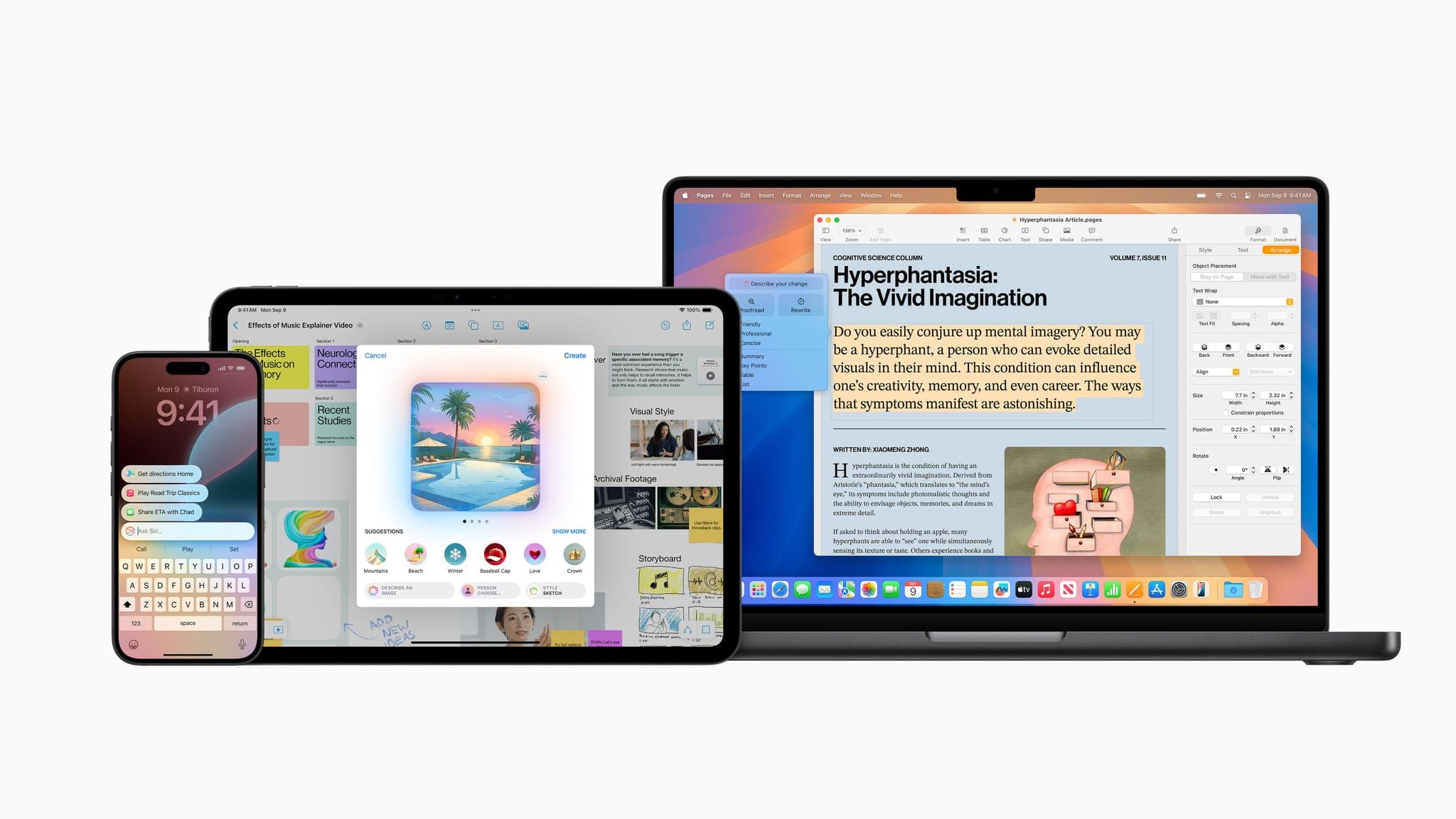
iOS 18.1, iPadOS 18.1, and macOS 15.1 aren’t quite out the door, but Apple has already updated its developer betas with the next round of upcoming Apple Intelligence features. Developer betas of iOS 18.2, iPadOS 18.2, and macOS 15.2 are now available for download and include the following:
- image generation in the form of Image Playground and Image Wand;
- Genmoji (iOS and iPadOS only)
- Visual Intelligence (iPhone 16 line only)
- ChatGPT integration with Siri; and
- new text manipulation features.
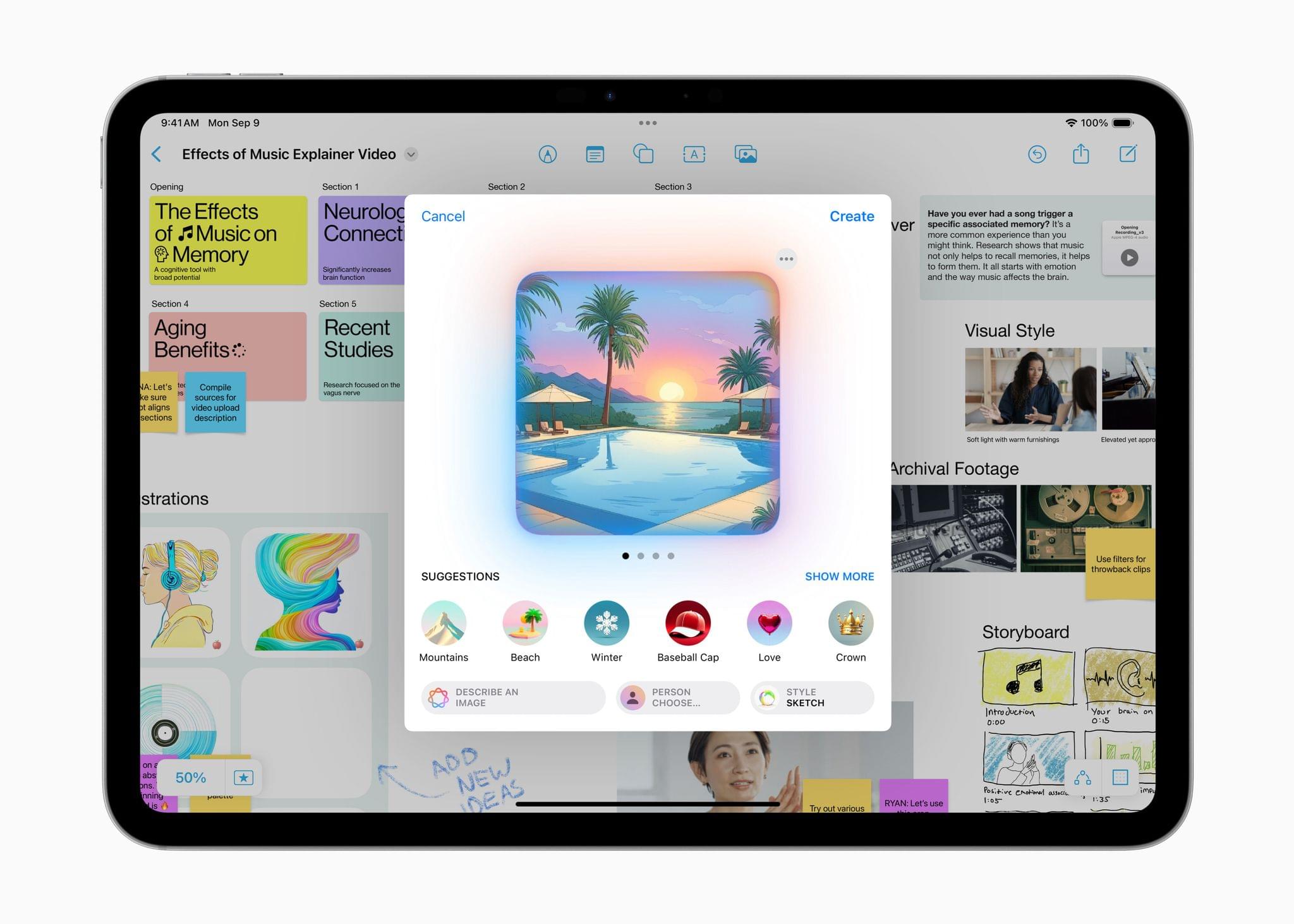
Image Playground is a feature that allows you to create images in two styles using in-app themes and other tools. Image Playground is available in apps like Messages, Freeform, Pages, and Keynote, but it’s also a standalone app. Regardless of where you use it, Image Playground looks like it’s designed to make it easy to create animated and sketch-style images using a variety of tools such as suggested concepts that pull from the context the image is created in, like a Messages thread. Creations can be previewed, there’s a history feature that allows you to undo changes made to images, and images are saved to an Image Playground Library that syncs across devices via iCloud.
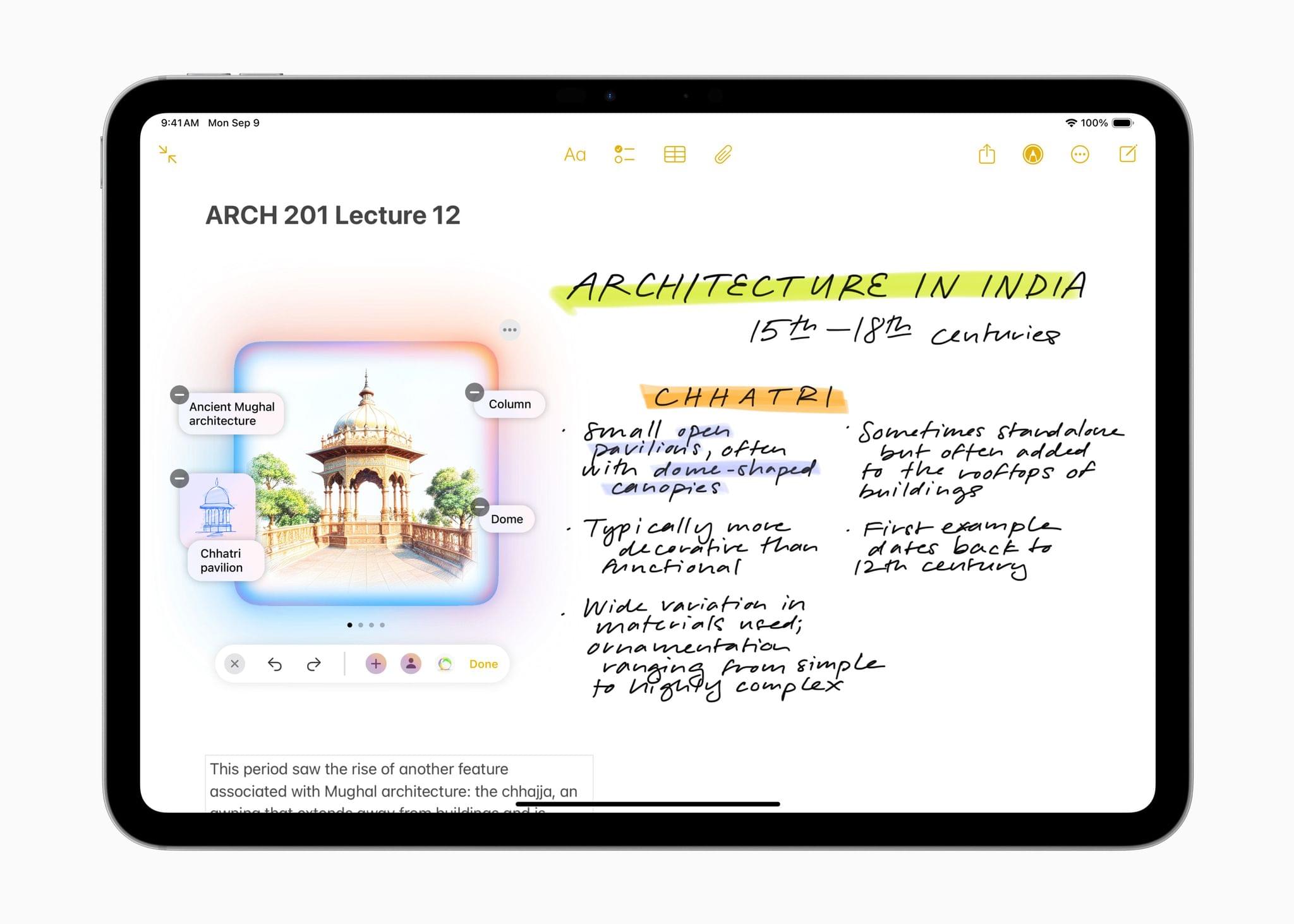
Image Wand, which appears in the Apple Pencil tool palette, takes a rough hand-drawn sketch, photo, or note and turns any of them into an image similar to one created by Image Playground. Image Wand can be further refined by adding text, and if you circle a blank space, it will use surrounding text to build an image.
Also, Genmoji – which is only in the iOS and iPadOS betas for now – allows you to create emoji-style images that can be used in Messages and other apps as decorative stickers. Inputs can include a text description, people in your contacts, friends and family recognized in Photos, and characters created from whole cloth.
Visual Intelligence has been added to the Camera Control on the iPhone 16 line too. The feature lets you look up details about a place and work with text, copying, reading, summarizing, and translating it.
The next betas also integrate ChatGPT into Siri. As demoed at WWDC, you can opt to pose queries to ChatGPT without disclosing you identity or IP address and without the prompts being used to train OpenAI’s large language models. The ChatGPT integration is free and does not require an account with OpenAI either.
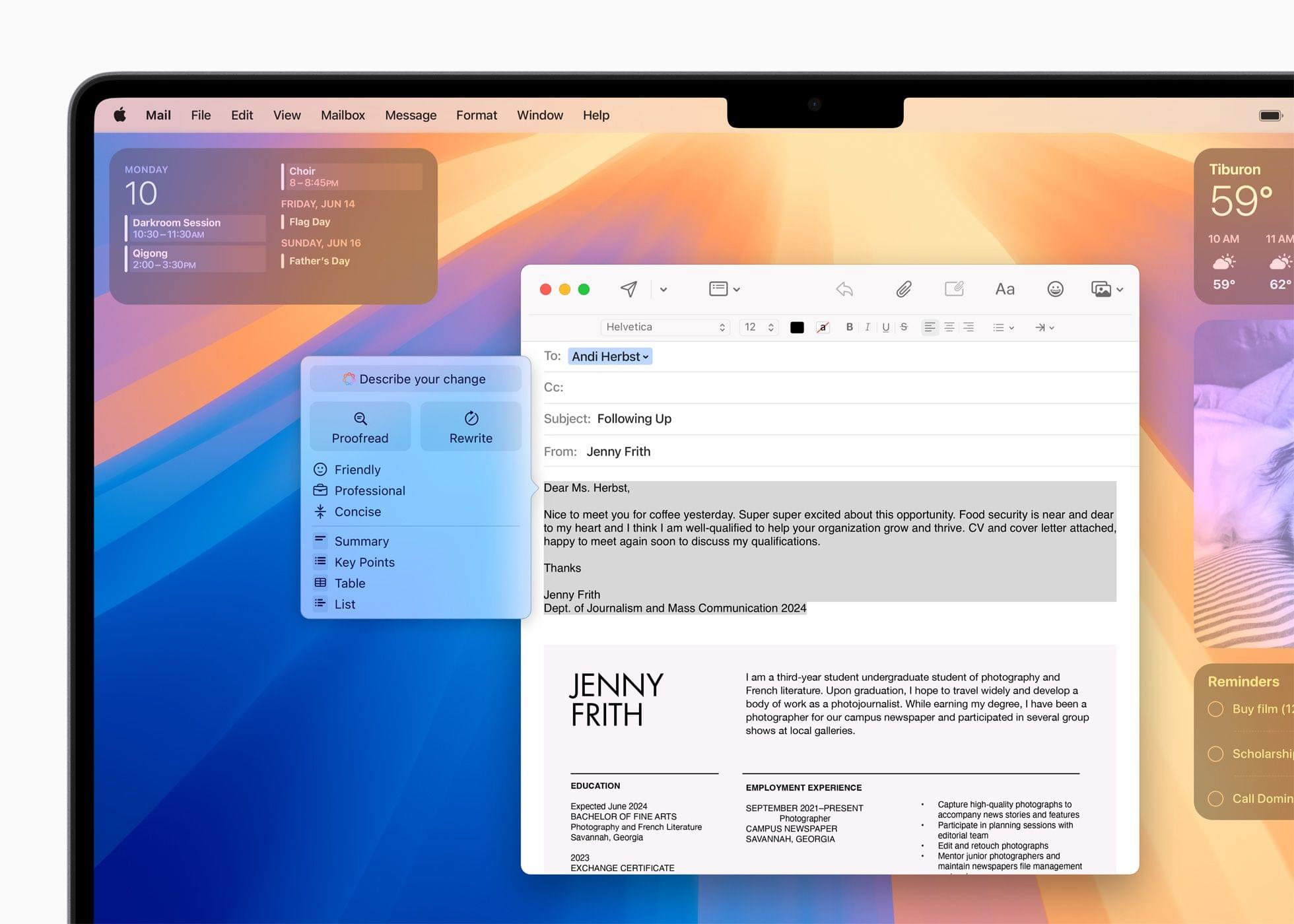
Finally, Apple has built a new Writing Tool that provides additional flexibility when manipulating text. From the Writing Tools UI, you’ll be able to submit a prompt to alter any text you’ve written. For instance, you could have Apple Intelligence make you sound more excited in your message or rewrite it in the form of a poem, neither of which is possible with the Writing Tools found in iOS and iPadOS 18.1 or macOS 15.1.
For developers, there are also new APIs for Writing Tools, Genmoji, and Image Playground.
As we’ve covered before, Apple’s AI models have been trained on a mix of licensed data and content from the web. If you’re a publisher or a creator who doesn’t want to be part of those models, you can opt out, but it doesn’t work retroactively. In other words, opting out won’t remove any data already ingested by Apple’s web crawlers, but it will work going forward.
I’m not a fan of generative AI tools, but I am looking forward to finally going beyond tightly controlled demos of these features. I want to see how well they work in practice and compare them to other AI tools. Apple appears to have put a lot of guardrails in place to avoid some of the disasters that have befallen other tech companies, but I’m pretty good at breaking software. It will be interesting to see how well these tools hold up under pressure.
 iPad mini Review: The Third Place

AppStories Episode 408 - iPad mini Review: The Third Place
0:00
47:58
47:58
This week, Federico and John announce that AppStories is now on YouTube and discuss the Club MacStories Fall Membership Drive and listener follow-up before digging into Federico’s iPad mini review and the concept of “The Third Place.”
A Video Version of AppStories Debuts Today on the MacStories YouTube Channel
Today, we’re expanding our podcast AppStories to include video on YouTube. AppStories debuted in 2017, and with over 400 episodes recorded, it’s long past due for a video version.
So beginning today, you can watch AppStories on the MacStories YouTube channel:
Today’s episode was a great place to start because Federico and I discussed his iPad mini review, and in the video version, he was able to show off the hardware in a way that isn’t possible in the audio-only version.
It’s safe to say that bringing AppStories to YouTube is a good sign that our YouTube channel has graduated from an experiment to a full-fledged component of MacStories. If you haven’t subscribed to the channel yet, you can check it out and subscribe here.
It’s not a conventional YouTube channel by any stretch, and as I recently discussed with Robb on Ruminate, it’s not meant to be. The purpose of the channel is to reach podcast listeners we wouldn’t have otherwise, enhance the experience for listeners of our shows, and add a new dimension to what we do on MacStories.net – and soon, Club MacStories – which it has accomplished more and more with each passing week.
If you’re curious about AppStories on YouTube, you can subscribe to just the show or the whole channel, which also includes
- the video versions of Comfort Zone and NPC: Next Portable Console;
- podcast bonus material for NPC;
- audio versions of Ruminate, Magic Rays of Light, and MacStories Unwind;
- playlists of classic AppStories episodes; and
- a growing collection of MacStories videos.
It should go without saying that the audio versions of our podcasts aren’t going anywhere, but I always hear concerns that the video version of a show will wreck the audio-only version. It won’t. AppStories in particular has been an audio-first podcast for seven years, so that’s not changing; but if you want to watch AppStories, now you can.
Thanks to everyone who has subscribed to the MacStories YouTube channel and tried our podcasts there. If you haven’t checked out the channel in a while, stop by sometime. It’s changed a lot since we launched it in June, and we’re not finished building it out yet. We have plenty of plans yet to come, including a little bonus for Club members later this week.