Federico
AppStories Episode 289 - Our ‘Recently Added’ Apps
0:00
41:19
41:19
This week, Federico and John dig into the Recently Added folders on their iPhones and the stories they tell about what they’ve been up to lately.

 Our ‘Recently Added’ Apps
 Matthew Cassinelli writing for iMore that Apple should be doing more to make it easier for new users to get started with Shortcuts:
In many ways, Shortcuts is “learning to code“ for the masses, and Shortcuts as a programming language should have the educational support, technical resources, and community development that Apple’s user base deserves. At least to match the quality and values the company imbues into all of its other products.
I agree. Although Apple has used Siri and will introduce App Intents this fall as simple entry points into the Shortcuts app, there’s a lot more that could be done. As Cassinelli argues, that includes better action descriptions, debugging tools, and more active curation of the Shortcuts Gallery. Shortcuts has made a lot of progress over the past few years, especially when it comes to meeting experienced users’ needs. Now would be a good time to focus on bringing new users into the fold.
 Stage Manager x 2
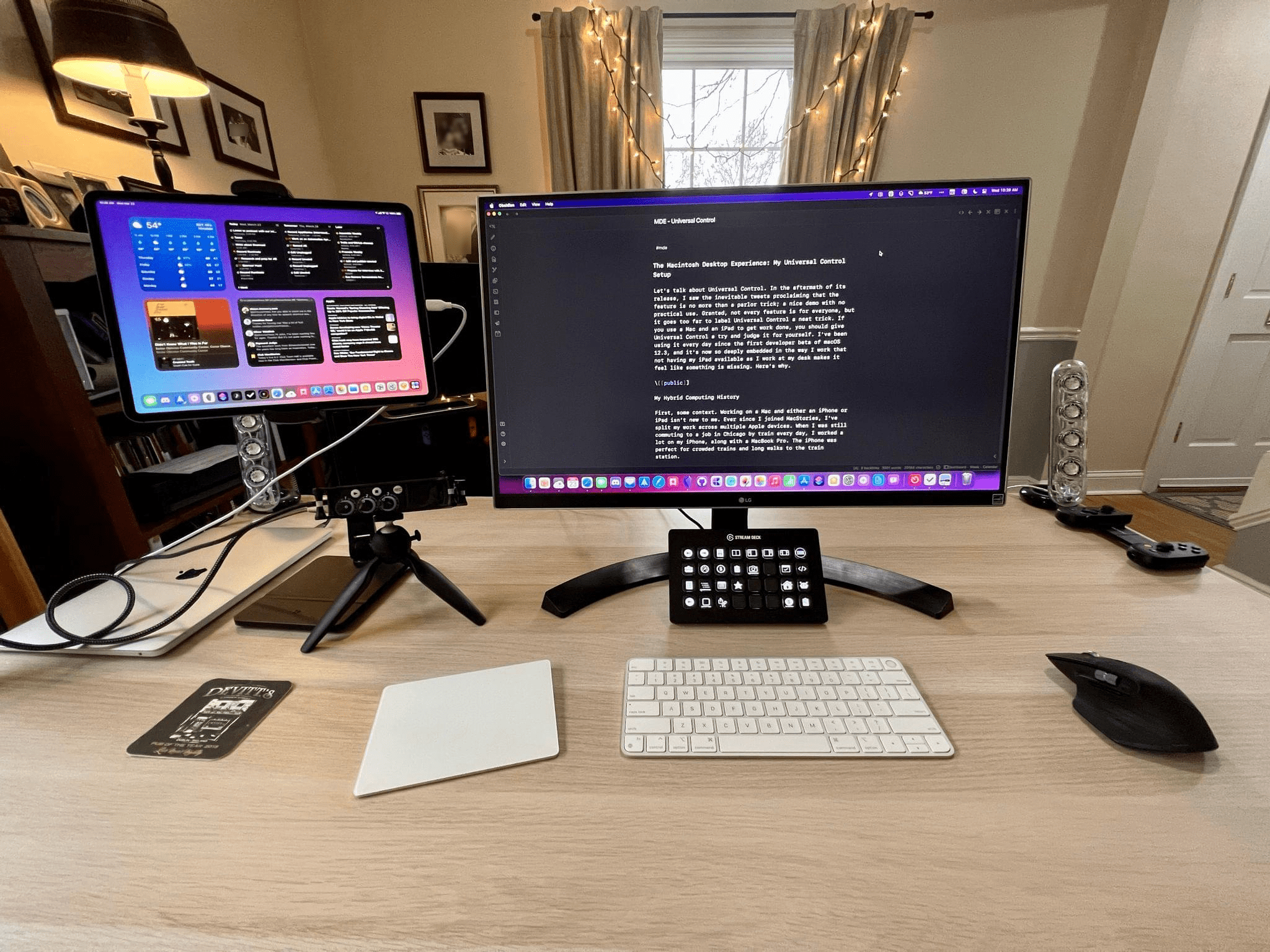
 Ever since Universal Control debuted, I’ve been using my iPad Pro next to my Mac with a dedicated set of Home Screen widgets that give me a quick look at things like the weather, tracked time, calendar events, and upcoming tasks. I like the setup a lot, which is sometimes referred to as an iPad...
MacStories Unplugged Fried Pickles and Buttermilk: A Tour of Southern Cooking [[unplugged_artwork]] This month, John helps Federico expand his knowledge of Southern US cooking with a tour of everything from fried pickles and hush puppies to okra and grits....
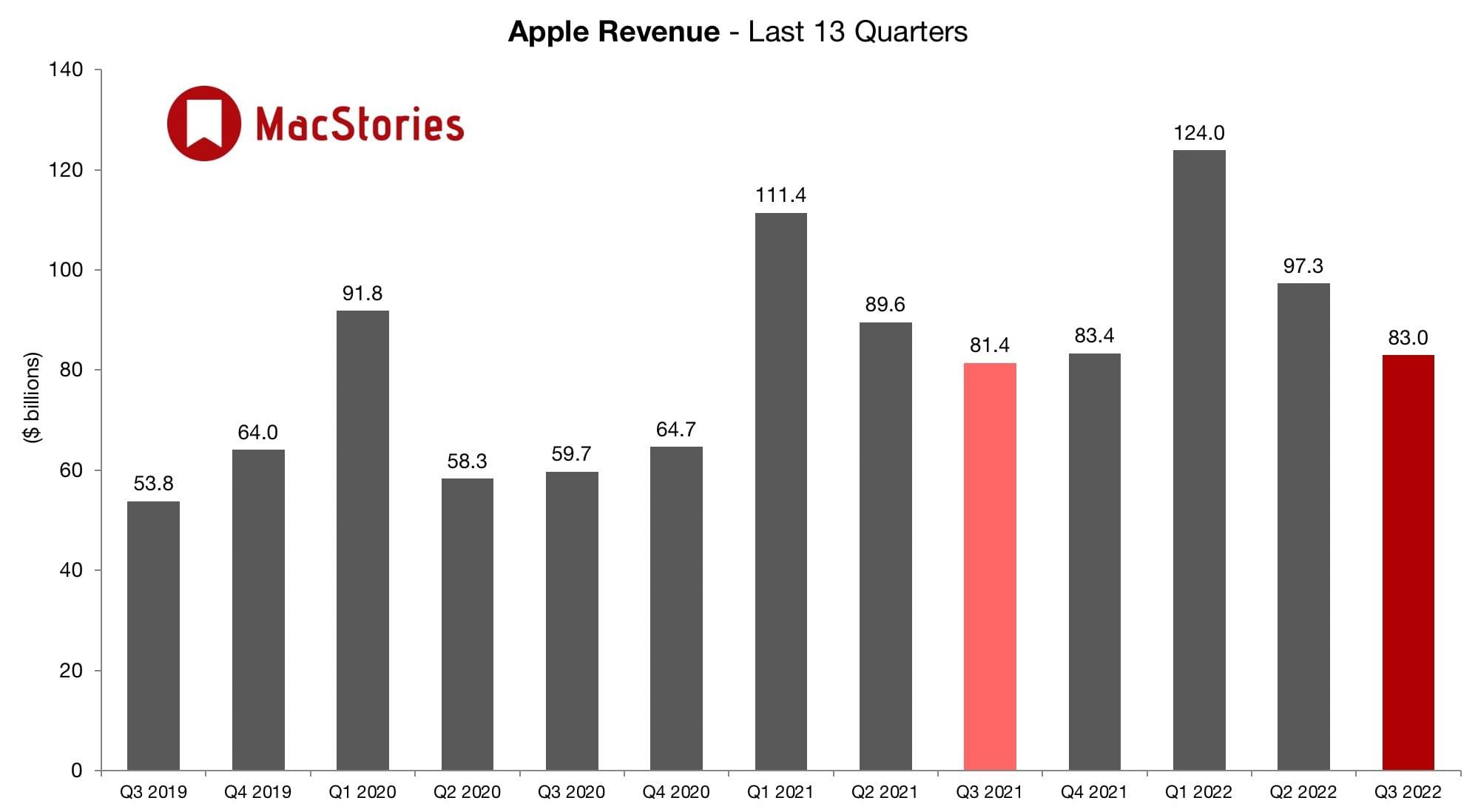
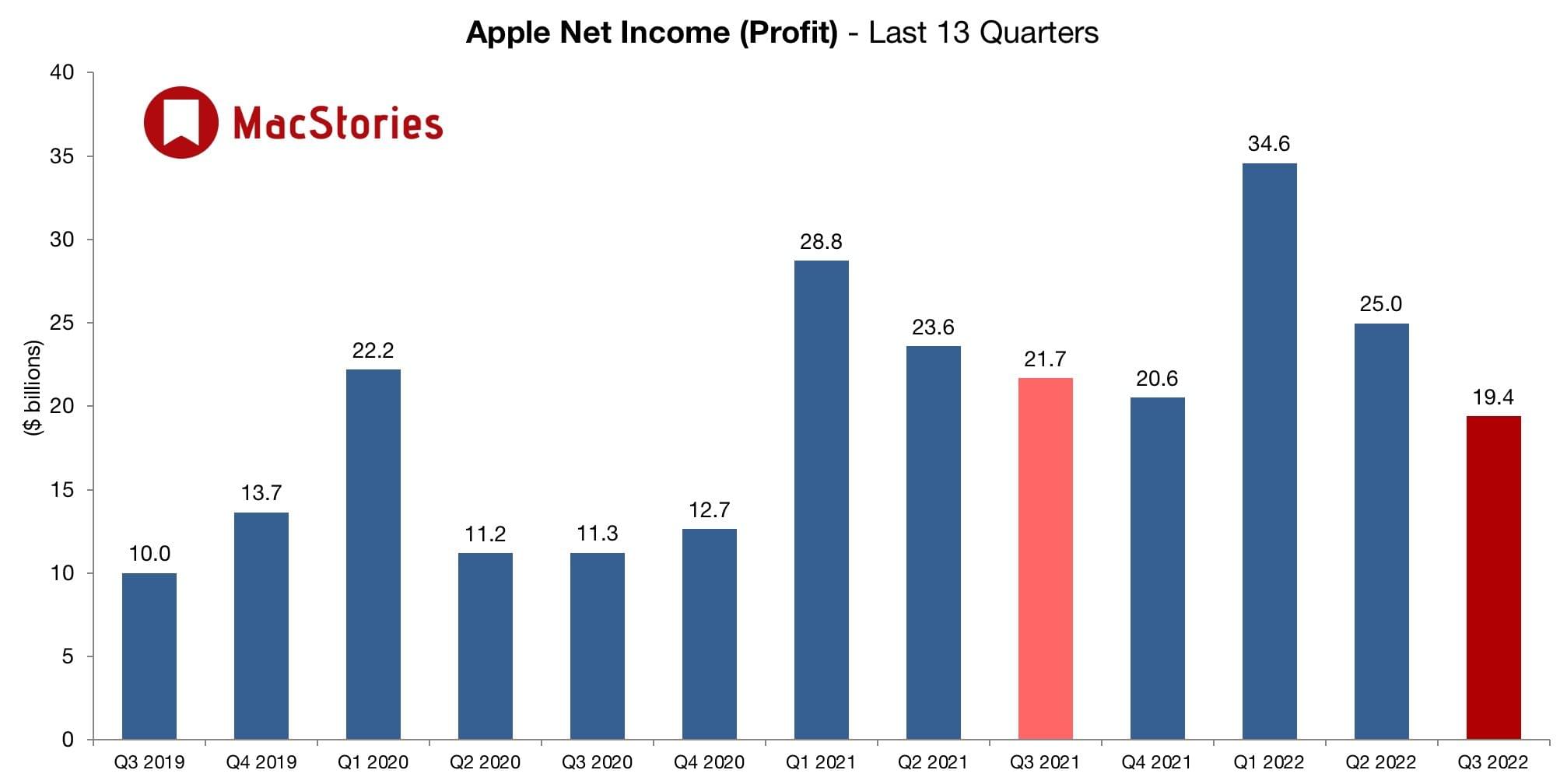
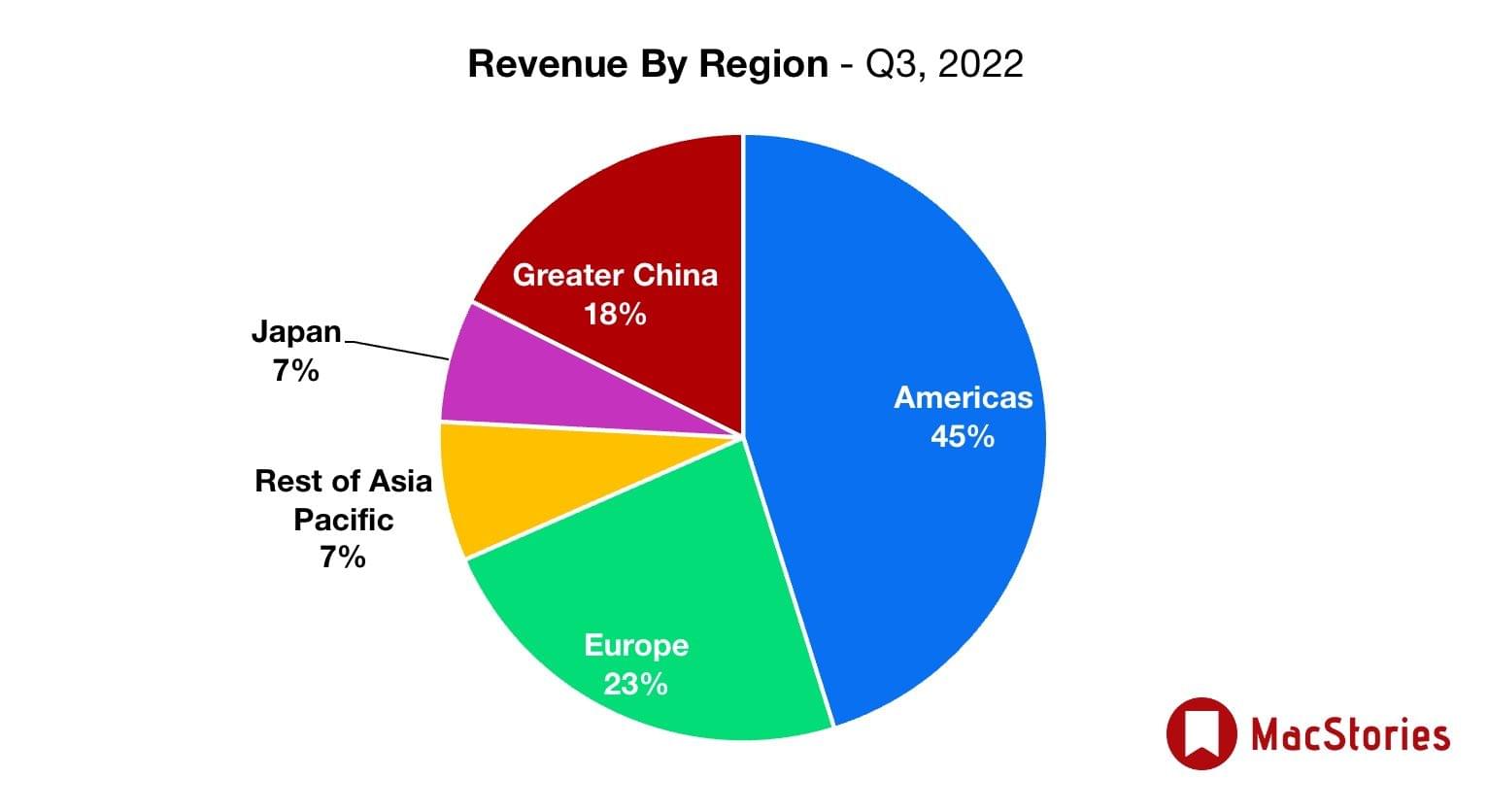
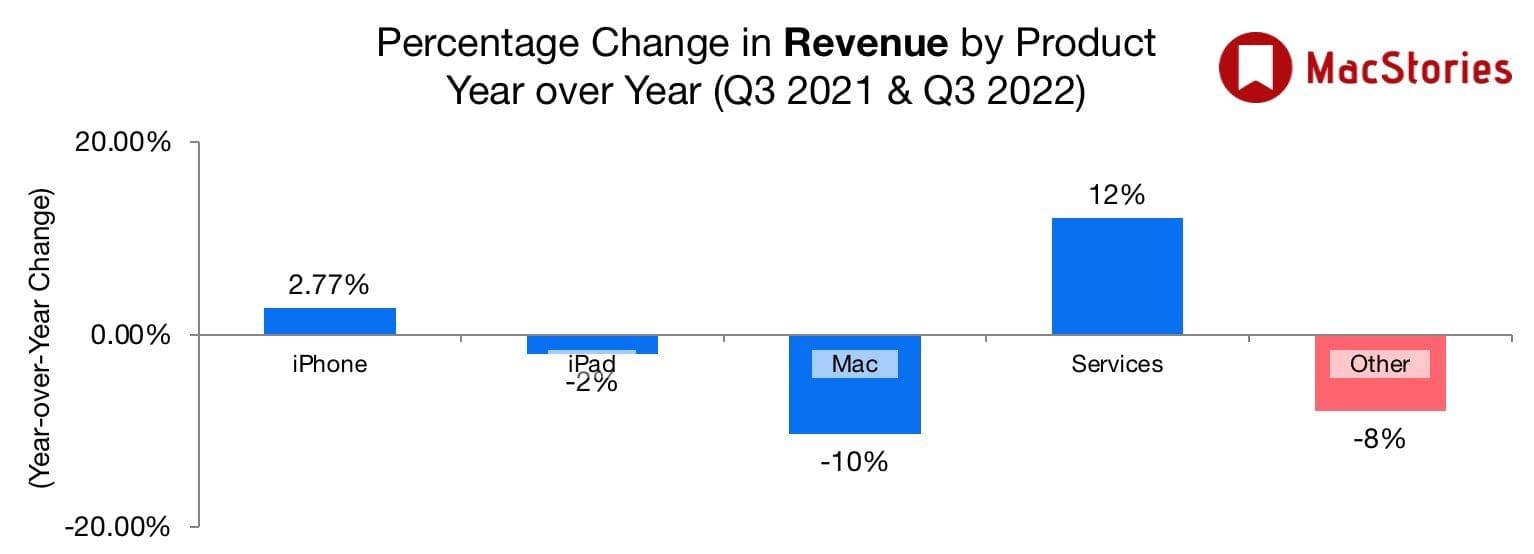
Yesterday, Apple announced its third quarter 2022 earnings, narrowly beating analysts’ consensus expectations. The company didn’t provide earnings guidance going into yesterday’s call and hasn’t since the start of the global pandemic. Coupled with ongoing supply chain disruption caused by COVID-19, inflationary pressure in the US and other countries, and the threat of a recession in many of its key markets, analysts’ revenue predictions varied widely, averaging just under $83 billion. So, when the company’s revenue came in at $83 billion, and CEO Tim Cook said he expects growth to accelerate ‘despite pockets of softness,’ Wall Street responded positively, lifting the stock’s price in after-hours trading.
According to Apple’s CFO Luca Maestri:
Our June quarter results continued to demonstrate our ability to manage our business effectively despite the challenging operating environment. We set a June quarter revenue record and our installed base of active devices reached an all-time high in every geographic segment and product category. During the quarter, we generated nearly $23 billion in operating cash flow, returned over $28 billion to our shareholders, and continued to invest in our long-term growth plans.
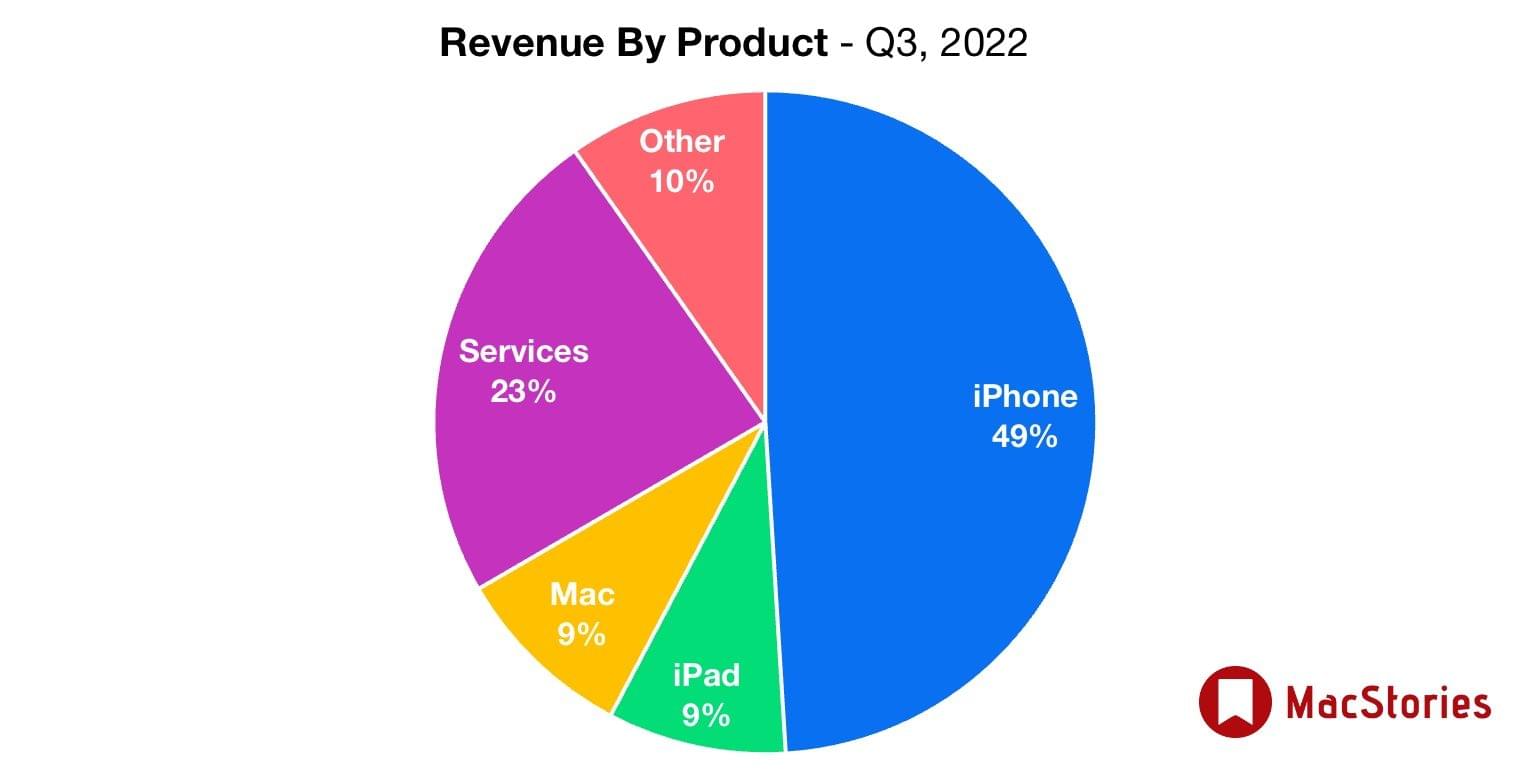
Despite the modest and unexpected growth from the same quarter in 2021, product sales slowed in some areas, with the Mac, iPad, and wearables all down year-over-year. That was made up by a strong increase in Apple’s services and a smaller increase in iPhone sales, but given delivery timelines for Macs and iPads in particular, supply chain issues appear to have taken a bite out of Apple’s earnings in those categories.
Still, the overall outlook of continued growth portrayed by Cook as the company prepares its fall iPhone lineup and for the release of other rumored products seems to have buoyed the stock with investors who undoubtedly appreciated the company’s optimistic message among the drumbeat of recent negative financial news.
Additional details regarding Apple’s third-quarter performance, including its consolidated financial statement are available on the company’s website. If you missed the earnings call, you can replay it on Apple’s Investors site or read the transcript prepared by Jason Snell at Six Colors, where you’ll also find additional charts.
I recently moved from Illinois to North Carolina, and I don’t know the area at all. As a result, I’ve been using Maps and CarPlay a lot since I got here. The new features coming this fall to each aren’t as extensive as they’ve been in past years, but there are several small changes that represent the kind of incremental, ‘quality of life’ improvements that I expect users will appreciate.
Because so much of Apple Maps relies on methodically mapping the world bit by bit, many users are stuck waiting for Maps’ underlying data to catch up with the app’s features. The more detailed maps and 3D models of landmarks introduced last year are good examples. Both came with asterisks because they were only available in certain cities or countries at launch.
This year is a little different. Apple announced new countries and cities where you’ll find the company’s more detailed maps, 3D landmarks, and other changes, but this year, multi-stop routes and tweaks to Maps’ routing UI will be available to everyone at the same time. It’s a nice mix of brand-new features and incremental improvements that includes something for everyone.
This week on AppStories, we conclude our in-depth look at changes coming to Apple’s system apps on the iPhone, iPad, and Mac, including Home, Notes, Reminders, and Shortcuts.






Sponsored by:
On AppStories+, I discover that I’m hooked on Stage Manager for Mac.
We deliver AppStories+ to subscribers with bonus content, ad-free, and at a high bitrate early every week.
To learn more about the benefits included with an AppStories+ subscription, visit our Plans page, or read the AppStories+ FAQ.
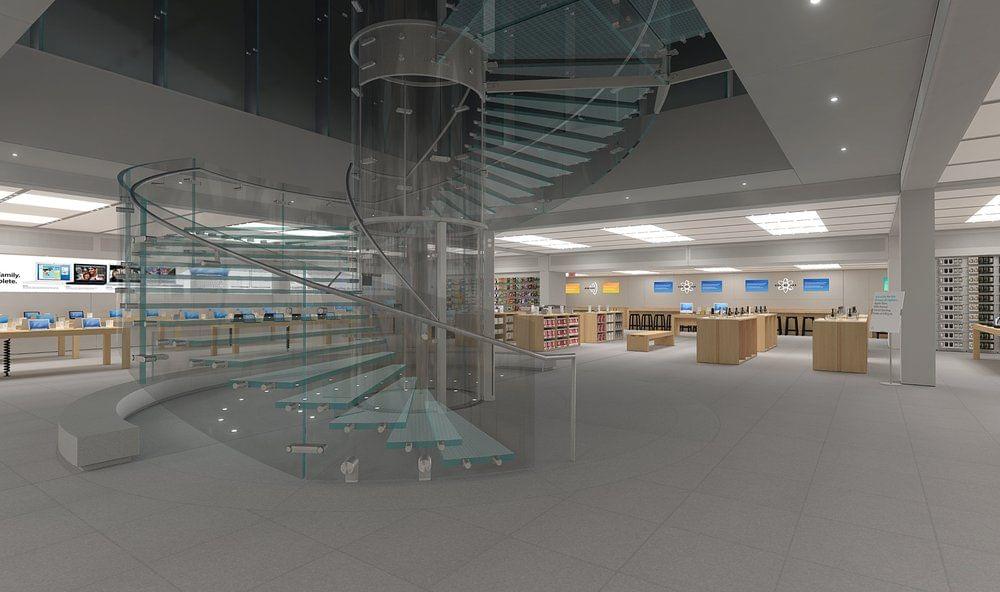
Yesterday, Michael Steeber released The Apple Store Time Machine, a Mac app built with the Unity game engine that recreates four historically significant Apple Stores:
As Steeber explains, the free app, which also accepts user donations:
…is a celebration of the places and products that have shaped our lives for more than twenty years. This interactive experience recreates memorable moments in Apple history with painstaking detail and historical accuracy.
The detail of each of the stores in the app is really quite remarkable. Clearly, a lot of work went into getting the details just right.
The Apple Store Time Machine is available to download on Steeber’s website.
Because Club MacStories now encompasses more than just newsletters, we’ve created a guide to the past week’s happenings:
](https://cdn.macstories.net/967466ed-d433-4313-8ccf-4500db12f669-1659092186095.jpeg)
](https://cdn.macstories.net/14b2f904-114f-48be-9424-b5bd63a7c76a-1659092186097.jpeg)
](https://cdn.macstories.net/image-1659119008915.jpeg)

](https://cdn.macstories.net/banneras-1629219199428.png)