John Voorhees

5790 posts on MacStories since November 2015

John is MacStories' Managing Editor, has been writing about Apple and apps since joining the team in 2015, and today, runs the site alongside Federico. John also co-hosts four MacStories podcasts: AppStories, which covers the world of apps, MacStories Unwind, which explores the fun differences between American and Italian culture and recommends media to listeners, Ruminate, a show about the weird web and unusual snacks, and NPC: Next Portable Console, a show about the games we take with us.

MacStories Unwind: Sheep and Cats

AppStories+ Deeper into the world of apps
0:00
24:08

AppStories+ Deeper into the world of apps


This week on MacStories Unwind, Federico and I recommend two of 2022’s hottest indie game sensations, Cult of the Lamb and Stray. As a bonus, Federico shares a 3DS game he’s thinking of playing, and I ask for advice on what to play next.

Federico’s Pick:

John’s Pick:


MacStories Unplugged

A Locksmith, a Mechanic, and a Cop [[unplugged_artwork]] This month on MacStories Unplugged: Splitting up the iOS and iPadOS 16 reviews, the state of Stage Manager on iPadOS and macOS Ventura, John’s Focus mode experiments at the DMV, and the complications of restarting bike commuting after a three-year hiatus....


App Debuts

MusicSmart Marcos Tanaka’s excellent utility to read credits and liner notes for albums and songs was updated earlier this week with a new Shortcuts action to get the attributes of any song. The action lets you retrieve any of the supported attributes (such as producers, release date, engineers, etc.) from any song you want;...


Interesting Links

Last week, CNBC reported that very few Netflix subscribers are playing the mobile games published by the streaming service, which likely has a lot to do with how little the company has done to publicize its offerings. (Link) We’ve had good experiences with the Eve Home smart devices that we’ve reviewed in the past,...


AppleScript: Shortcuts Bridge or Crutch?

At first, running AppleScript inside a Mac shortcut was fun. It opened up solutions to automation problems that weren’t possible with Shortcuts’ actions alone. That, in turn, has made Shortcuts for Mac more powerful and useful than the iOS and iPadOS versions in many ways, which is great, right? Right? Well, yes and no. Here’s...


Pixelmator Photo Switches to Subscription Pricing and Provides a Sneak Peek at the App’s Upcoming Mac Version

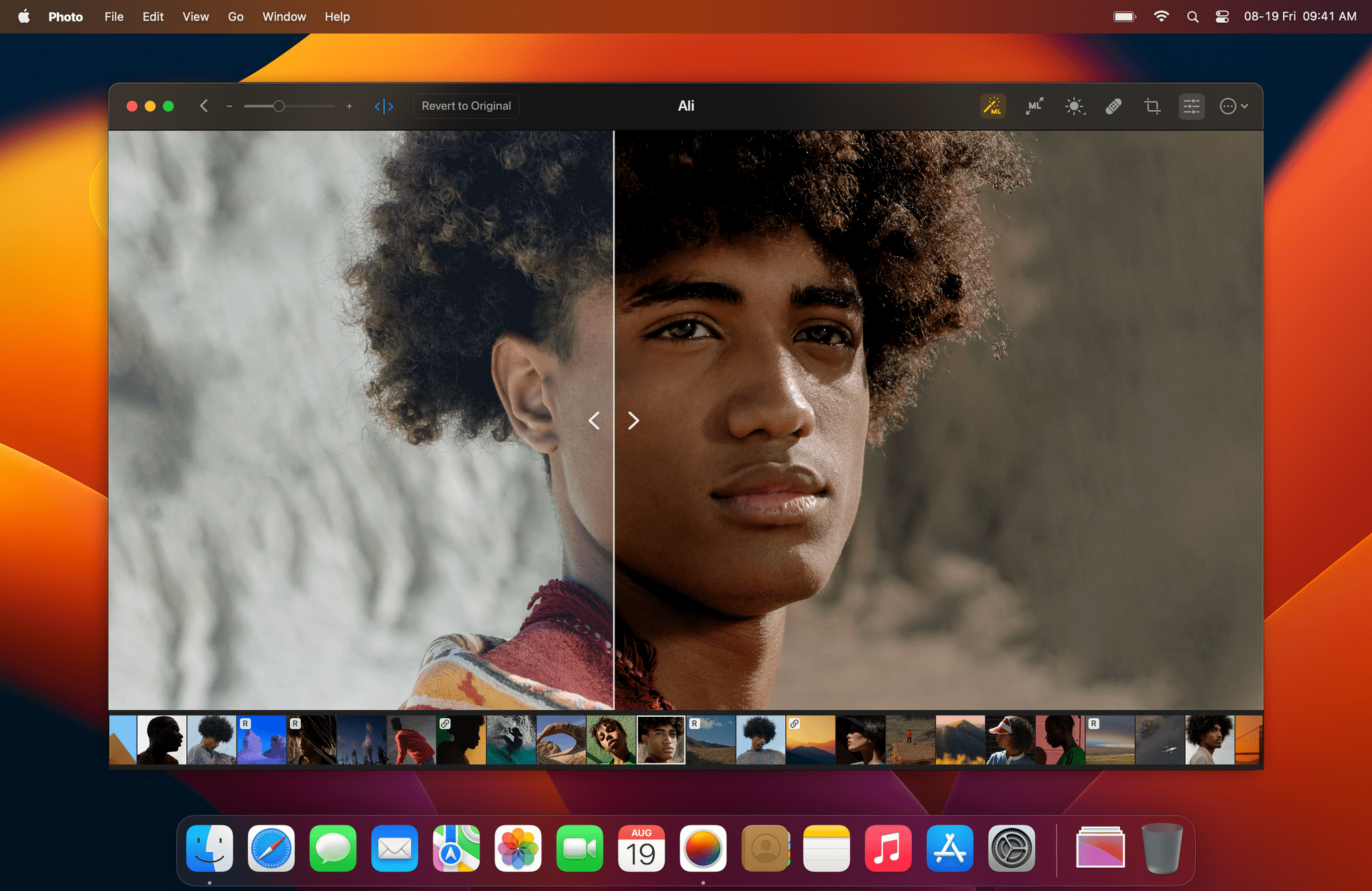
Source: Pixelmator.

Source: Pixelmator.

The Pixelmator team announced today that its iPhone and iPad photo editor, Pixelmator Photo, has moved to subscription pricing, and a Mac version of the app is on the way.

Existing Pixelmator Photo users won’t have to subscribe to continue using the app and should be able to add the Mac version at a discount when it’s released. New customers can subscribe for $4.99 per month or $23.99 per year after a 7-day free trial. There’s also a lifetime purchase option that costs $54.99. Pixelmator says that the subscription pricing will increase for new subscribers when the Mac app is released, so now is a good time to subscribe if you were hoping that the team would add a Mac version.

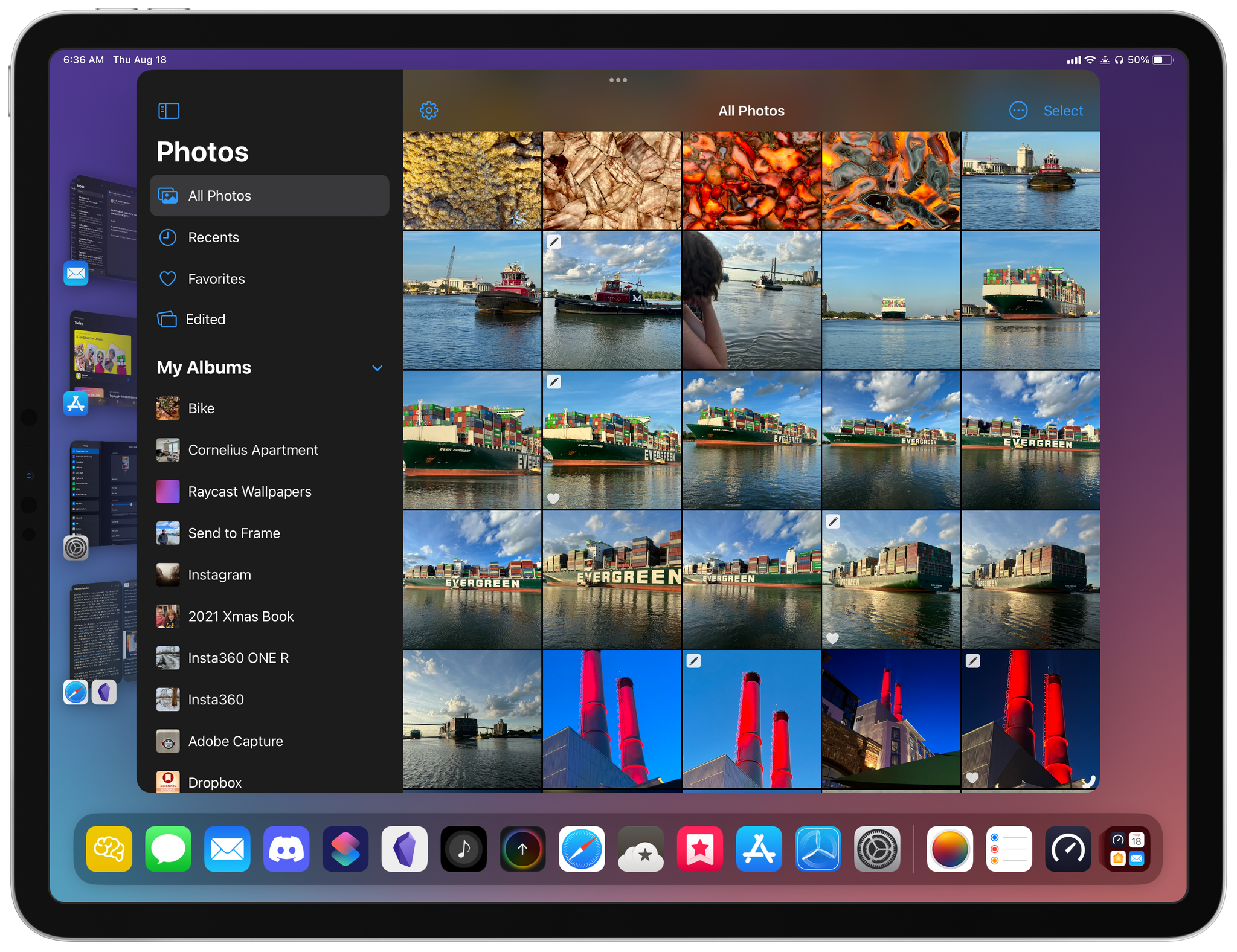
Pixelmator Photo for iPad.

Pixelmator Photo for iPad.

There are a lot of reasons for Pixelmator Photo’s move to a subscription model, which are explained in detail in the team’s blog post. As with any move from paid-up-front to a subscription, some users will be left behind, which is a shame, but I’m not surprised by Pixelmator’s move. I’m more surprised that the switch didn’t occur earlier. Pixelmator Photo is a top-notch, high-quality app that is continuously developed to keep up with advances in Apple’s photo editing frameworks and hardware updates. That’s not the sort of app that can be offered for a set price indefinitely, as demonstrated by the many other sophisticated apps, including other photo editing apps, that have made the leap to a subscription model. Hopefully, the switch to subscriptions will allow the Pixelmator team to continue to develop Photo for a long time to come.

There aren’t many details about the Mac version of Pixelmator Photo to share except for the image at the top of this story, but I like what I see. If you’ve used the iPad version of Pixelmator Photo, the Mac app will be immediately familiar with its spare UI and focus on the image being edited. There’s no word yet on when the Mac version might be released, but when it is, we’ll have a complete review.

The Pixelmator Photo update that adds its new subscription pricing model is available on the App Store now.



AppStories, Episode 291 – 2022 OS Preview: watchOS 9→

This week on AppStories, I’m joined by Alex Guyot to talk about Alex’s MacStories origin story and walk through all of the changes coming to watchOS this fall as part of the MacStories Summer OS Preview series.

Sponsored by:

  • Concepts - Infinite, Flexible Sketching.
  • Trade – Save Big, Support Small Roasters. Get $30 off your first order.
  • Memberful – Monetize your passion with membership.
  • Sourcegraph – Universal Code Search. Move fast, even in big codebases. Try it now.

On AppStories+, Alex and I discuss Apple’s home automation strategy, Matter, Thread, and more.

We deliver AppStories+ to subscribers with bonus content, ad-free, and at a high bitrate early every week.

To learn more about the benefits included with an AppStories+ subscription, visit our Plans page, or read the AppStories+ FAQ.

Permalink

The Magic of the M2 MacBook Air→

Stephen Hackett writing on 512 Pixels about the M2 MacBook Air:

There’s something about the design of this machine that I can’t escape. The footprint is pretty similar between the two notebooks, but in my backpack, there’s a huge difference. Don’t get me wrong: I am thrilled that the MacBook Pro has beefed up to be a better computer, but I’m drawn to the clean, simple look of the Air. I know the Pro is a better match for my workflows, but the Air can do everything I need — if just a little bit slower. And I don’t care about that speed difference any time I pick up the Air to take it with me. Something about it just clicks with me in a way I didn’t anticipate.

I completely understand where Stephen is coming from on this. On paper, the MacBook Pro’s advantages are undeniable, but they’re also expected. It’s a bigger, heavier ‘pro’ computer with fans, after all.

In contrast, the M2 Air feels like magic, despite the M1 version that preceded it. The performance boost from the M2 SoC and features like a bigger, brighter screen and a higher memory option are part of it, but so, too, is the fact that the new Air even looks like a MacBook Pro. Yet, the M2 MacBook Air is still the svelte, silent laptop that it replaces, which feels improbable if not impossible. Like Stephen, the MacBook Air has captured my heart, and I don’t see myself switching to a different Mac laptop anytime soon.

Permalink