

[[John]] Ivory Tapbots’ mastodon client added a new hashtag tab this week that allows you to follow hashtags, saving them for easy access. The new feature allows you to edit the tags associated with your profile too. Readwise Reader With AI rapidly improving text-to-speech engines, I expect we’ll see a lot of updates and new...
MacStories Unwind: The Best Music of 2023







This week on MacStories Unwind, kick off the first of our annual ‘best of’ Unwind recaps with the best music releases of 2023.
Sponsored By:
- Longplay – Rediscover, enjoy and organize your album collection.
- Kolide – It ensures that if a device isn’t secure it can’t access your apps. It’s Device Trust for Okta. Watch the demo today!
Links and Show Notes
Federico’s Top 5:
- the record by boygenius
- So Much for Stardust by Fallout Boy
- One More Time by Blink 182
- The Maine by The Maine
- Lobes by We are Scientists
Federico’s Album of the Year
- the record by boygenius
Federico’s Honorable Mentions:
- Guts by Olivia Rodrigo
- This is Why by Paramore
- Certified Depressant by Taylor Acorn
John’s Top 5:
- the record by boygenius
- Be Still My Heart by Babygirl
- One More Time by Blink 182
- Guts by Olivia Rodrigo
- First Two Pages of Frankenstein by The National
John’s Album of the Year
- First Two Pages of Frankenstein by The National
John’s Honorable Mentions:
- My Soft Machine by Arlo Parks
- Good Riddance by Gracie Abrams
- Memento Mori by Depeche Mode
- Knebworth 22 (Live) by Liam Gallagher
- Saviors by Green Day
MacStories Unwind+

We deliver MacStories Unwind+ to Club MacStories subscribers ad-free and early with high bitrate audio every week.
To learn more about the benefits of a Club MacStories subscription, visit our Plans page.
Screens 5: An Updated Design, Improved User Experience, and New Business Model
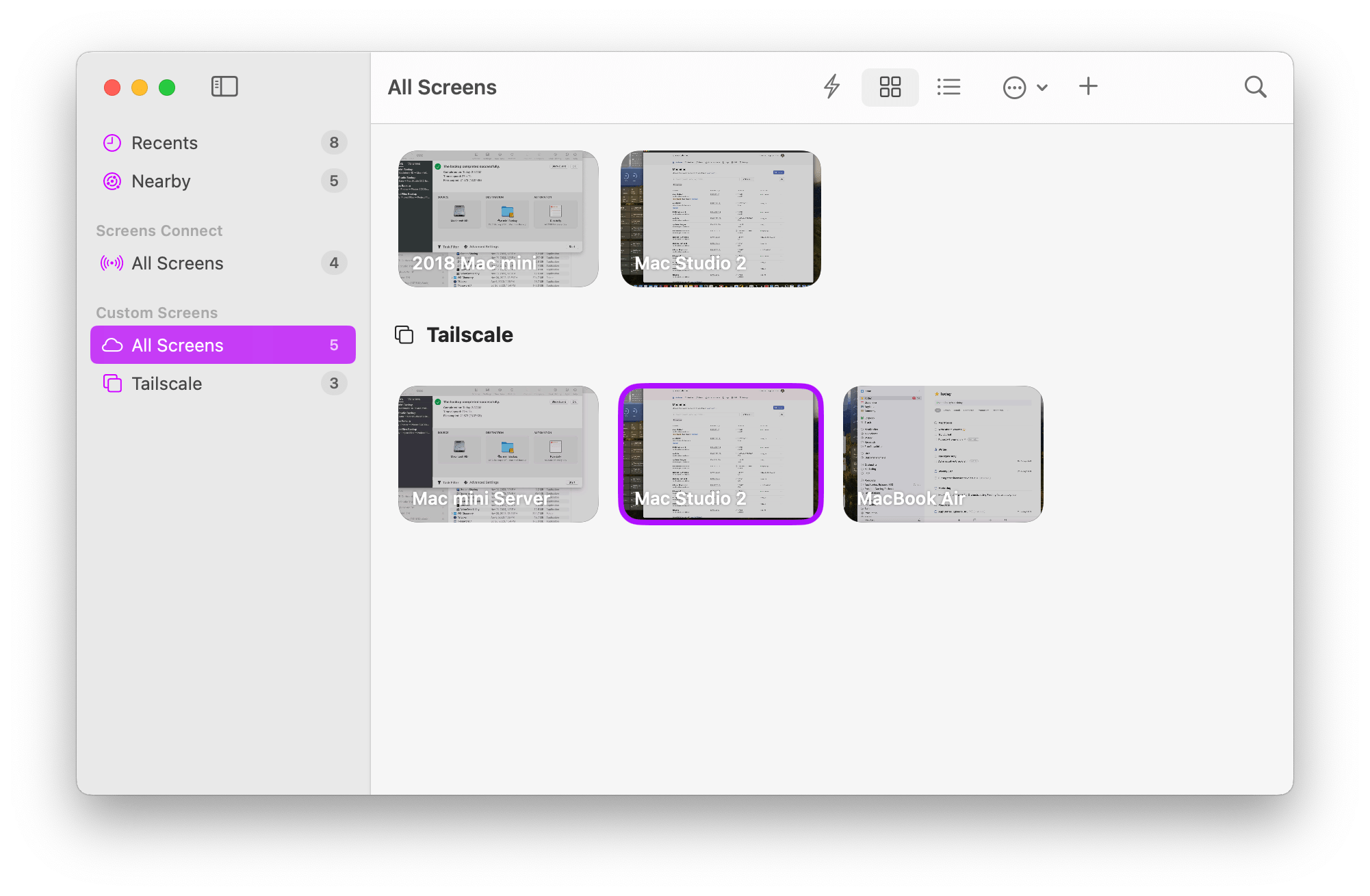
Screens, the remote screen-sharing app for the iPhone, iPad, and Mac by Luc Vandal of Edovia is one of those apps that I feel like I’ve always used. It’s installed on all of my devices, letting me lazily check on the Mac in my office from my couch or grab a file that I forgot to put on my laptop when I’m working remotely. It’s also the app that makes working with my headless Mac mini server that’s humming away in a closet feel like it was sitting right on my desk.
The last time I reviewed Screens was in 2017 when version 4 was released. In the years since, the app has received regular updates, refining the workflow of connecting to remote computers and keeping up with the latest changes to Apple’s OSes. However, as an app that’s designed to be a window to another system, the UI hasn’t seen a lot of change until today’s update to version 5, which adds a bunch of refinements to how connections are organized and makes significant improvements to the app’s toolbar.
First Look: Stray for Mac

Stray, a high-profile and well-regarded videogame that debuted in 2022, is now available on the Mac. Initially launched on PlayStation and Windows, followed by an Xbox version this past August, today’s Mac release is available on both the Mac App Store and Steam.
The game, created by BlueTwelve Studio and published by Annapurna Interactive, is set in a neon-lit, post-apocalyptic cityscape where you play as a cat. Thrown into an unfamiliar environment, your goal is to solve the mysteries of a dangerous rundown city aided by a flying robot named B-12.
Stray was generally well-received by reviewers, who appreciated how BlueTwelve imbued its cat protagonist with personality and captured life-like cat movement and behavior. As a result, it’s unsurprising that the number of systems on which you can enjoy Stray’s feline adventures has continued to expand.
I played Stray when it debuted on the PlayStation 5 and enjoyed it. The game’s controls are relatively simple, and the story isn’t terribly long, but the puzzles are challenging, and the cyberpunk visuals are stunning. It’s been a while since I last dipped into Stray, but the game was one of my favorites of 2022, so when I got the chance to play it a day before the launch, I jumped at the opportunity.
I’ve only had time to play Stray on the Mac for a few hours, navigating through the introductory scene and the early part of the game, so this isn’t a review. However, as someone familiar with the console version, I thought I’d share my early impressions playing on my M1 Max Mac Studio and my M1 MacBook Air.
AppStories, Episode 362 – What If?: Exploring Alternative Apple Timelines→
This week on AppStories, we explore alternative Apple timelines by asking the question: What if?
Sponsored by:
Dropzone 4 – The essential drag and drop productivity enhancer.
](https://cdn.macstories.net/banneras-1629219199428.png)
On AppStories+, I try to simplify and speed up my backup setup, and Federico has an update on his default apps.
We deliver AppStories+ to subscribers with bonus content, ad-free, and at a high bitrate early every week.
To learn more about the benefits included with an AppStories+ subscription, visit our Plans page, or read the AppStories+ FAQ.
 What If?: Exploring Alternative Apple Timelines
 Federico
 Interesting Links
[[John]] According to 9to5Mac, a display maker with a troubled past, announced a monitor with ProMotion support for less than $1,000 this week. That sounds too good to be true, and it may be, but we’ll be keeping an eye on the 27-inch, 4K Dough Spectrum One. (Link) The Cybertruck finally shipped this week, albeit...
App Debuts
[[John]] Matter Matter has added a ‘Rediscover’ feature to its You tab that resurfaces highlights you’ve added to articles. If you use Matter to learn a new topic, the new Rediscover feature can serve as a sort of flash card system to reinforce the material you’ve highlighted. The feature is also a useful reminder of...
Type
Type is a new note-taking app for the Mac in the style of app launchers like Raycast, Alfred, and macOS’s Spotlight Search. The premise is simple. Assign the app a hotkey, and when you invoke it, a text field will appear so you can capture a thought quickly. Hitting the Return key captures your text...