John Voorhees

5561 posts on MacStories since November 2015

John is MacStories' Managing Editor, has been writing about Apple and apps since joining the team in 2015, and today, runs the site alongside Federico. John also co-hosts four MacStories podcasts: AppStories, which covers the world of apps, MacStories Unwind, which explores the fun differences between American and Italian culture and recommends media to listeners, Ruminate, a show about the weird web and unusual snacks, and NPC: Next Portable Console, a show about the games we take with us.

Chris Lawley’s In-Depth Interview About Smart Script and Math Notes

Smart Script and Math Notes are two of the most notable features coming to iPadOS this fall. Both take advantage of the Apple Pencil and the iPad’s computer power to do a lot of complex work under the hood, which makes taking good-looking notes and working with numbers and equations feel natural.

Chris Lawley, co-host of Comfort Zone, sat down for an exclusive interview with Jenny Chen, an Apple engineering manager for input experiences, and Ty Jordan, an Apple system experiences product manager, to talk about both features in-depth for his YouTube channel. It’s an excellent interview full of little details you may have missed from the WWDC keynote:

When the new iPad Pros were released, I debated whether to buy an Apple Pencil Pro. I’ve never been a heavy user of the Apple Pencil, but I’m glad I bought one in the end. With features like Smart Script and Math Notes added to Quick Notes and the other Pencil features, my use has slowly crept up to the point where I’m now looking to find places where I can do even more with it.

Permalink

The Latest from AppStories and NPC: Next Portable Console

Enjoy the latest episodes from MacStories’ family of podcasts:

This week, Federico and John run down the highlights of the iOS and iPadOS 18 public betas that were released today.

On AppStories+, Federico and John compare earbud notes, covering recent models from Sennheiser, Technics, and Beats.

This episode is sponsored by:

  • CleanMyMac X: Your Mac. As good as new. Get 15% off today with code APPSTORIES15.
  • Setapp – the place to get apps. Use the code appstories20 at checkout for 20% off.

It was a busy news week in the world of portable gaming hardware, plus Federico’s quest for cable perfection continues, a return of the Steam Deck, and a look at mobile phone gaming, controllers, and more.

Read more


Federico’s Updated Setup Is Designed for Modular Simplicity

Federico has been on quite a journey with his gear setup over the past few months. If you’ve been following along on NPC: Next Portable Console, MacStories Unwind, and AppStories, you know that he’s been assembling a modular system that lets him switch effortlessly from work to play. He’s working on a story that pulls the threads of his experience together for readers, but in the meantime, Federico has updated our dedicated Setups page with what’s changed.

If you start with Federico’s latest entry in our Setups changelog, you’ll notice right away that the updates he’s made to his setup are all about simplifying his tech life. But, while many things have been taken away, several have been strategically added too. Let’s take a look.

The additions to Federico’ desk include:

Like me, Federico has also been experimenting with video and has added the Elgato FaceCam Pro and Elgato Key Light with Mini Mount to his setup.

As for gaming, Federico is still using the Lenovo Legion Go, but he upgraded to a new Steam Deck OLED with an etched glass display and added a bunch of Legion Go accessories, along with a custom-built eGPU:

On the home automation front, Federico has added Aqara E1 cameras and an Aqara Camera Hub G3 to his setup along with a variety of Philips Hue lights, a smart plug, and more.

For the complete list of gear in Federico’s setup, along with mine, be sure to check out our dedicated Setups page.

Permalink

New Projects, New Setup

The past few months have been busy at MacStories. The release of new iPads was followed by our launch of new podcasts and then WWDC. Along the way, my gear setup has changed a little, too.

Portable Setup Changes

11” iPad Pro and Accessories

Leading up to Apple’s spring event and knowing that it would feature new iPads, I was on the fence about buying one. The Pencil Pro and the Tandem OLED display tipped the balance, though, and I ended up getting the 11” Wi-Fi-only model with a Magic Keyboard Case, a Smart Folio cover, and Apple Pencil Pro.

I was tempted by the nano-texture display but ultimately passed on it as well as cellular connectivity. I expect there’s a nano-texture device of some sort in my future, but even without it, the iPad Pro’s Tandem OLED display works better in sunlight than previous displays. I don’t use an Apple Pencil often, but with the new Pro model, I plan to play around with it more to see if I can find a place for it in my day-to-day computing. The lack of meaningful iPadOS 18 updates coming this fall is a letdown, but I’m still pleased with my purchase because the smaller form factor and fantastic display have led me to use my iPad Pro more.

Desk Setup Changes

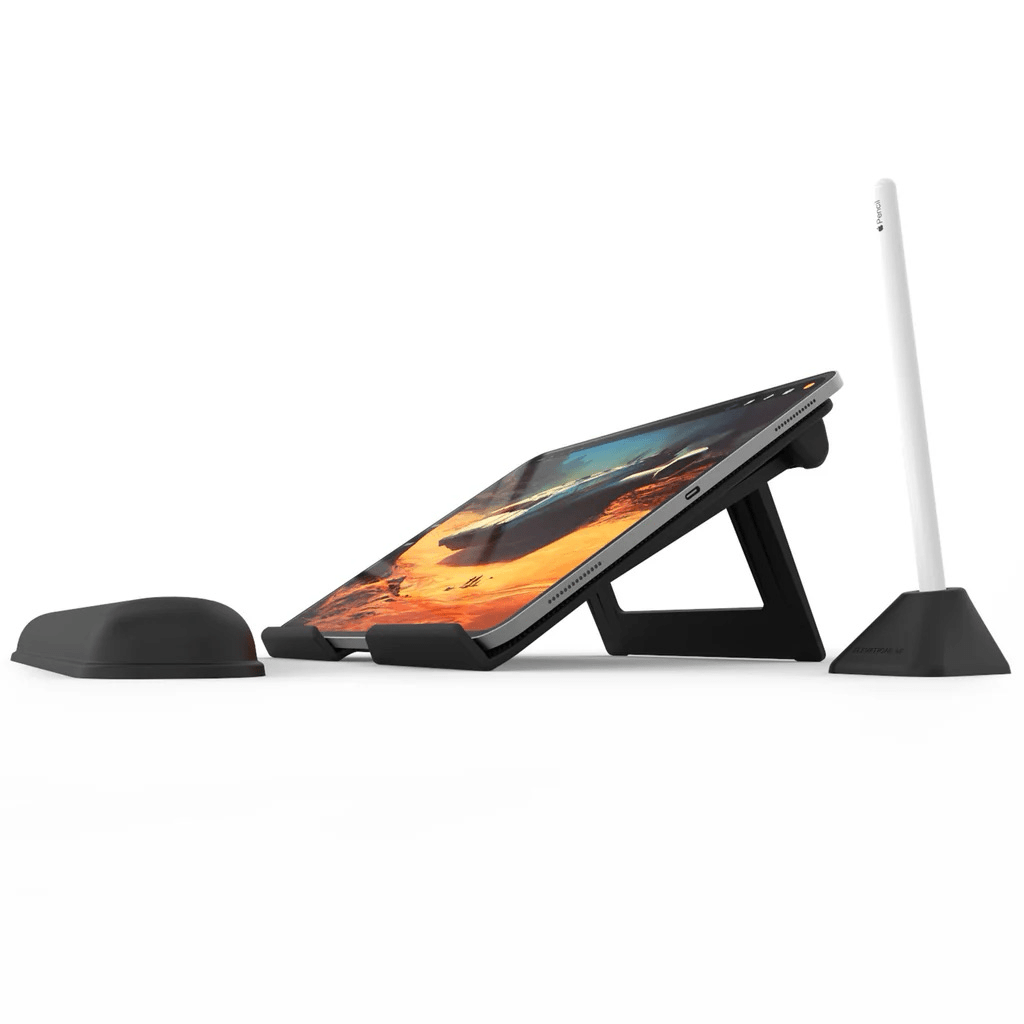
Balolo's tablet holder accessory.

Balolo’s tablet holder accessory.

With the change in iPad sizes, the articulating arm I used for the 12.9” iPad Pro no longer worked for me. Instead, I’ve transitioned to another Balolo accessory, the Tablet Holder. It sits neatly in the center of my Desk Cockpit shelf, where I can set my iPad for use with Sidecar or Universal Control. If you’re a Club member and interested in Balolo’s Desk Cockpit setup, which I covered in detail this past February, there’s a coupon code for 10% off on the Club Discounts page.

My new video gear from Elgato.

My new video gear from Elgato.

I have been experimenting more with video in recent weeks, too. That led to the addition of an Elgato Facecam Pro and Key Light to my desk, along with an Elgato Mini Mount stand for the camera.

Read more


My Top Amazon Prime Day Picks

There are thousands of things on sale during Amazon Prime Day, including a lot of my favorite gadgets, so I thought I’d highlight the deals I’ve found for the gear I’ve used, tested, and love. Here are my top picks.

Apple Hardware and Accessory Deals

Apple Studio Display with Adjustable Stand (15% off)

Source: Apple.

Source: Apple.

I’ve had an Apple Studio Display for two years now and love it. Colors are bright, text is crisp, and having a set of additional Thunderbolt ports available on its rear panel comes in surprisingly handy.

Apple iPad mini (6th Gen), 256GB Storage, Wi-Fi (15% off)

Source: Apple.

Source: Apple.

It may be getting a little long in the tooth, but I still love my mighty iPad mini. My new 11” iPad Pro has absorbed some of the reading and video-watching I used to do almost exclusively on the mini, but the mini’s size is perfect for reading, which is what I still use it for almost every day.

Beats Fit Pro (25% off)

Source: Beats.

Source: Beats.

I haven’t gotten around to writing about the Beats Fit Pro yet, but I picked up a pair a couple of months ago, and I love them. They’re smaller than the Powerbeats Pro that wrap around your ears, which I like, and because they use Apple’s H1 chip, they include features like fast pairing with the Apple Watch and transparency mode. They don’t have every feature of the latest AirPods Pro, but they have the most important ones that I want when I go out for a run on a hot day.

Read more


iOS and iPadOS 18 Preview

AppStories+ Deeper into the world of apps

AppStories Episode 395 - iOS and iPadOS 18 Preview

0:00
40:35

AppStories+ Deeper into the world of apps

This week, Federico and John run down the highlights of the iOS and iPadOS 18 public betas that were released today.

Read more


macOS Sequoia: The MacStories Public Beta Preview

Sequoia is not your typical macOS release. In recent years, new features of all Apple OSes have been increasingly meted out over time instead of dropping all at once in the fall. That’s been true of macOS, too, but this year, the magnitude of the staged release will be more pronounced, which has trickled through to the public beta released today.

macOS Sequoia will be a phased release. That means you won’t find everything announced at WWDC in the public beta. Some features, notably large parts of Apple Intelligence, won’t be available until 2025. That’s something worth keeping in mind if you’re thinking about installing the Sequoia public beta today. The beta is generally stable, but you’re likely to run into bugs, and with many features still to come in the months ahead, the upside of running it is more limited than in past years.

Apple Intelligence promises to round out Sequoia over time, but neither I nor anyone else outside of Apple has had a chance to try those features yet. So, for now, let’s focus on what you can expect if you install the macOS Sequoia public beta today.

Read more


Automating Text Transformations with Text Workflow

There are a lot of text transformation apps out there, and many of them are good. However, my current favorite is Text Workflow by Giorgos Trigonakis. The app comes in separate Mac and iPhone/iPad versions and incorporates a long list of text actions and automation options, which I’ve found myself needing more and more lately....


Interesting Links

Samuel Stolton and Jennifer Surane of Bloomberg reported this week that Apple has avoided EU fines by opening up tap to pay on the iPhone to other companies. (Link) On 512 Pixels, Stephen Hackett has first impressions of a brand-new smart lock from Aqara called the U200, which integrates with existing door lock hardware...